> ## Documentation Index
> Fetch the complete documentation index at: https://www.courier.com/docs/llms.txt
> Use this file to discover all available pages before exploring further.
# MailerSend
> Send emails via MailerSend using Courier by verifying your domain, providing the recipient's email, and optionally overriding fields like API key, sender address, or subject.
## Setup
You will need a [MailerSend](https://www.mailersend.com/) account with a verified sending domain.
In MailerSend, add your domain and complete DNS verification.
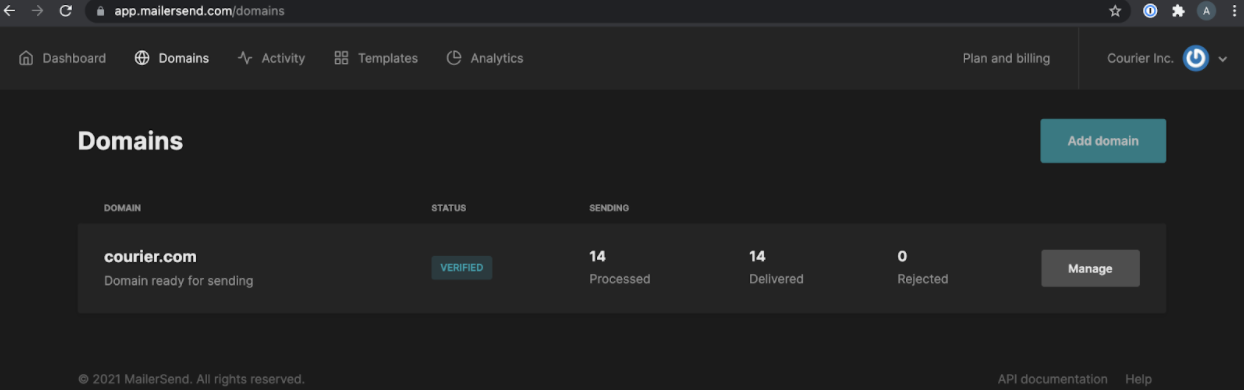 Click "Manage" on your domain and generate an API token.
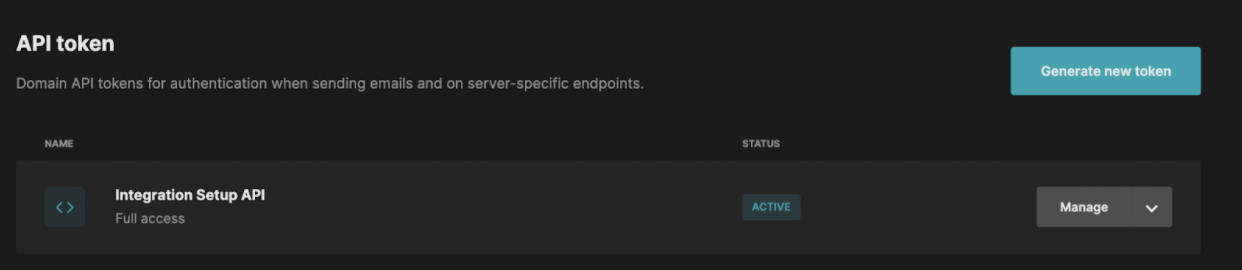 In Courier, navigate to the [MailerSend Integration](https://app.courier.com/integrations/catalog/mailersend) page. Enter your API token and From Address, then click "Save."
## Profile Requirements
To deliver a message to a recipient over MailerSend, Courier must be provided the recipient's email address. This value should be included in the recipient profile as `email`.
```json theme={null}
{
"message": {
"to": {
"email": "alice@acme.com"
}
// ... rest of message definition
}
}
```
## Overrides
You can override any of the fields supported by MailerSend's [/v1/email endpoint](https://developers.mailersend.com/api/v1/email.html#send-an-email). Overrides are useful when a field is not yet supported by Courier or you want to replace a value that Courier generates.
**Config override example:**
```json theme={null}
{
"message": {
"template": "NOTIFICATION_TEMPLATE_ID",
"to": {
"email": "alice@acme.com"
},
"providers": {
"mailersend": {
"override": {
"config": {
"apiKey": "",
"fromAddress": "alternate-sender@yourdomain.com"
}
}
}
}
}
}
```
### Attachments
To include an attachment, add an `attachments` array in the override. File content must be base64-encoded.
```json theme={null}
{
"message": {
"template": "NOTIFICATION_TEMPLATE_ID",
"to": {
"email": "alice@acme.com"
},
"providers": {
"mailersend": {
"override": {
"attachments": [
{
"filename": "billing.pdf",
"contentType": "application/pdf",
"data": "Q29uZ3JhdHVsYXRpb25zLCB5b3UgY2FuIGJhc2U2NCBkZWNvZGUh"
}
]
}
}
}
}
}
```
## Troubleshooting
A [422 error](https://www.mailersend.com/help/how-to-start-sending-emails#rest-api) from MailerSend can have several causes:
| Error | Cause |
| ------------------------------------- | ------------------------------------------------------------------------------------------------------------------------ |
| From email must be verified | The domain of the from email address must match the domain that the API token is from. |
| Must provide HTML/text or template ID | The API request is missing content; provide either an HTML/text body or a template ID. |
| File type not supported | The attachment is not a [supported file type](https://developers.mailersend.com/api/v1/email.html#supported-file-types). |
| Reply-to must be a valid email | The `reply_to` parameter is not a valid email address. |
| Email quota reached | The account's quota has been reached. Ensure your account is approved for production sending. |
The most common cause is an unverified sending domain. Make sure your domain is [verified with MailerSend](https://www.mailersend.com/help/how-to-verify-and-authenticate-a-sending-domain) before using it with Courier.
In Courier, navigate to the [MailerSend Integration](https://app.courier.com/integrations/catalog/mailersend) page. Enter your API token and From Address, then click "Save."
## Profile Requirements
To deliver a message to a recipient over MailerSend, Courier must be provided the recipient's email address. This value should be included in the recipient profile as `email`.
```json theme={null}
{
"message": {
"to": {
"email": "alice@acme.com"
}
// ... rest of message definition
}
}
```
## Overrides
You can override any of the fields supported by MailerSend's [/v1/email endpoint](https://developers.mailersend.com/api/v1/email.html#send-an-email). Overrides are useful when a field is not yet supported by Courier or you want to replace a value that Courier generates.
**Config override example:**
```json theme={null}
{
"message": {
"template": "NOTIFICATION_TEMPLATE_ID",
"to": {
"email": "alice@acme.com"
},
"providers": {
"mailersend": {
"override": {
"config": {
"apiKey": "",
"fromAddress": "alternate-sender@yourdomain.com"
}
}
}
}
}
}
```
### Attachments
To include an attachment, add an `attachments` array in the override. File content must be base64-encoded.
```json theme={null}
{
"message": {
"template": "NOTIFICATION_TEMPLATE_ID",
"to": {
"email": "alice@acme.com"
},
"providers": {
"mailersend": {
"override": {
"attachments": [
{
"filename": "billing.pdf",
"contentType": "application/pdf",
"data": "Q29uZ3JhdHVsYXRpb25zLCB5b3UgY2FuIGJhc2U2NCBkZWNvZGUh"
}
]
}
}
}
}
}
```
## Troubleshooting
A [422 error](https://www.mailersend.com/help/how-to-start-sending-emails#rest-api) from MailerSend can have several causes:
| Error | Cause |
| ------------------------------------- | ------------------------------------------------------------------------------------------------------------------------ |
| From email must be verified | The domain of the from email address must match the domain that the API token is from. |
| Must provide HTML/text or template ID | The API request is missing content; provide either an HTML/text body or a template ID. |
| File type not supported | The attachment is not a [supported file type](https://developers.mailersend.com/api/v1/email.html#supported-file-types). |
| Reply-to must be a valid email | The `reply_to` parameter is not a valid email address. |
| Email quota reached | The account's quota has been reached. Ensure your account is approved for production sending. |
The most common cause is an unverified sending domain. Make sure your domain is [verified with MailerSend](https://www.mailersend.com/help/how-to-verify-and-authenticate-a-sending-domain) before using it with Courier.