> ## Documentation Index
> Fetch the complete documentation index at: https://www.courier.com/docs/llms.txt
> Use this file to discover all available pages before exploring further.
# Mandrill
> Integrate Mandrill with Courier to send emails, override messages with custom payloads, import templates, and resolve common issues like merge vars, click tracking, and recipient visibility.
## Setup
You will need a [Mailchimp Transactional (Mandrill)](https://mandrillapp.com/) account. In Mandrill, navigate to Settings and create an API key. In Courier, navigate to the [Mandrill Integration](https://app.courier.com/integrations/catalog/mandrill) page, enter your API key, From Address, and From Name, then click "Save."
## Profile Requirements
To deliver a message to a recipient over Mandrill, Courier must be provided the recipient's email address. This value should be included in the recipient profile as `email`.
```json theme={null}
{
"message": {
// Recipient Profile
"to": {
"email": "alice@acme.com"
}
// ... rest of message definition
}
}
```
## Overrides
You can use a provider override to replace what we send to Mandrill's Messages API. For example, you can add an attachment to your request:
```json theme={null}
{
"message": {
"template": "NOTIFICATION_TEMPLATE_ID",
"to": {
"email": "alice@acme.com"
},
"providers": {
"mandrill": {
"override": {
"body": {
"message": {
"from_email": "me@courier.com",
"subject": "Hi there",
"from_name": "Rod",
"attachments": [
{
"type": "text/plain",
"name": "myfile.txt",
"content": "ZXhhbXBsZSBmaWxl"
}
]
}
}
}
}
}
}
}
```
Everything inside of `messageproviders.mandrill.override` will replace what we send to Mandrill's Messages API. You can see all the available options by visiting [Mandrill API docs](https://mandrillapp.com/api/docs/messages.JSON.html).
## Template Import
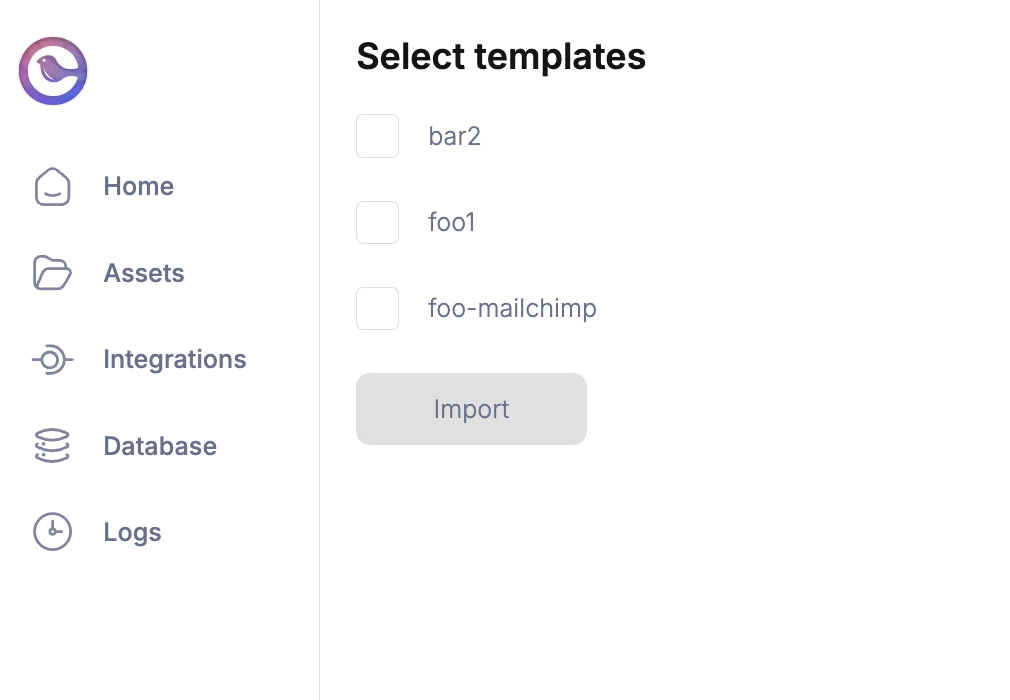
You can import your Mandrill templates to use with Courier from the [Mandrill configuration page](https://app.courier.com/channels/mandrill).
You will need to provide your Mandrill credentials in the configuration page to retrieve your saved templates from Mandrill.
Templates ready for import will appear as selectable checkboxes that you can choose to import.
 ## Troubleshooting
> Dealing with Mandrill requests can result in some errors. You can find them below to help you troubleshoot. You can also check the [Courier Logs](/platform/analytics/message-logs) to help debug any provider errors you may encounter. For anything else, you may contact [Courier Support](mailto:support@courier.com).
### Mandrill Click Tracking Not Working
The three most possible causes are that you have not enabled click tracking, the URL is too long, so Mandrill has disabled click-tracking, or the clicks are recorded but not updated in real-time.
**Solution**
* Verify whether click tracking is enabled.
1. Login to the Mandrill account.
2. Settings -> Sending defaults.
3. Make sure your choice from the "Track Clicks" dropdown is something other than the "No click tracking" option.
Even though the opens and clicks get tracked in real-time, the status updates may delay from a few minutes to a more extended period. For instance, this may happen due to the load on their system. [Courier provides its own link tracking](/platform/workspaces/workspaces-overview) which you can use to track clicks on your notification templates.
### Mandrill BCC Not Working
Most possibly, Mandrill is ignoring the BCC headers and hence this error occurs.
**Solution**
1. Try using the `to` field rather than the `bcc` field and set `X-MC-PreserveRecipients` to `false`.
2. Or, specify the `bcc` address in the `to` field but declare their `type` as `bcc`. Add `preserve_recipients: true` under the message section. The code given below is an example of implementing this solution.
```json theme={null}
{
"to":[
{
"email":"to1.email@example.com",
"name":"To Recipient Name",
"type":"to"
},
{
"email":"bcc1.email.@example.com",
"name":"BCC1 Recipient Name",
"type":"bcc"
},
{
"email":"bcc2.email@example.com",
"name":"BCC2 Recipient Name",
"type":"bcc"
}
]
}
```
You can read more about X-MC-PreserveRecipients [here](https://mailchimp.com/developer/transactional/docs/smtp-integration/#customize-messages-with-smtp-headers)
### Mandrill CC Emails Not Present
CC email fields passed to Mandrill's API can be done [through the designer](/platform/content/template-settings/email-fields), or through an API override definition.
Similar to BCC emails not being respected, `preserve_recipients` needs to be set to `true` in the override schema request so that CC emails can be passed to Mandrill's API. If this field isn't set to `true`, **CC emails will not be sent**.
**Solution**
```json theme={null}
{
// ... rest of message definition
"providers":{
"mandrill":{
"override":{
"body":{
"message":{
"preserve_recipients":true, //This setting must be set to true when passing CC recipients.
"attachments":[
{
"name":"Top Secret",
"content":"ZXhhbXBsZSBmaWxl",
"type":"application/pdf"
}
]
}
}
}
}
}
}
```
### Mandrill Merge Vars Not Working
The cause for the Mandrill merge variables not working is possible because of an issue with the nesting.
**Solution**
You have to make sure the variables are nested in the `message` struct for it to work. Given below is an example of how it is done.
```javascript theme={null}
var message = {
to: "sample@gmail.com",
mandrillOptions: {
template_name: 'template1',
template_content: [
],
message: {
"merge": true,
"merge_language": "handlebars",
"global_merge_vars": [{
"name": "fname",
"content": "Sample"
},
{
"name": "email",
"content": "sample@gmail.com"
}
]
}
}
};
```
## Troubleshooting
> Dealing with Mandrill requests can result in some errors. You can find them below to help you troubleshoot. You can also check the [Courier Logs](/platform/analytics/message-logs) to help debug any provider errors you may encounter. For anything else, you may contact [Courier Support](mailto:support@courier.com).
### Mandrill Click Tracking Not Working
The three most possible causes are that you have not enabled click tracking, the URL is too long, so Mandrill has disabled click-tracking, or the clicks are recorded but not updated in real-time.
**Solution**
* Verify whether click tracking is enabled.
1. Login to the Mandrill account.
2. Settings -> Sending defaults.
3. Make sure your choice from the "Track Clicks" dropdown is something other than the "No click tracking" option.
Even though the opens and clicks get tracked in real-time, the status updates may delay from a few minutes to a more extended period. For instance, this may happen due to the load on their system. [Courier provides its own link tracking](/platform/workspaces/workspaces-overview) which you can use to track clicks on your notification templates.
### Mandrill BCC Not Working
Most possibly, Mandrill is ignoring the BCC headers and hence this error occurs.
**Solution**
1. Try using the `to` field rather than the `bcc` field and set `X-MC-PreserveRecipients` to `false`.
2. Or, specify the `bcc` address in the `to` field but declare their `type` as `bcc`. Add `preserve_recipients: true` under the message section. The code given below is an example of implementing this solution.
```json theme={null}
{
"to":[
{
"email":"to1.email@example.com",
"name":"To Recipient Name",
"type":"to"
},
{
"email":"bcc1.email.@example.com",
"name":"BCC1 Recipient Name",
"type":"bcc"
},
{
"email":"bcc2.email@example.com",
"name":"BCC2 Recipient Name",
"type":"bcc"
}
]
}
```
You can read more about X-MC-PreserveRecipients [here](https://mailchimp.com/developer/transactional/docs/smtp-integration/#customize-messages-with-smtp-headers)
### Mandrill CC Emails Not Present
CC email fields passed to Mandrill's API can be done [through the designer](/platform/content/template-settings/email-fields), or through an API override definition.
Similar to BCC emails not being respected, `preserve_recipients` needs to be set to `true` in the override schema request so that CC emails can be passed to Mandrill's API. If this field isn't set to `true`, **CC emails will not be sent**.
**Solution**
```json theme={null}
{
// ... rest of message definition
"providers":{
"mandrill":{
"override":{
"body":{
"message":{
"preserve_recipients":true, //This setting must be set to true when passing CC recipients.
"attachments":[
{
"name":"Top Secret",
"content":"ZXhhbXBsZSBmaWxl",
"type":"application/pdf"
}
]
}
}
}
}
}
}
```
### Mandrill Merge Vars Not Working
The cause for the Mandrill merge variables not working is possible because of an issue with the nesting.
**Solution**
You have to make sure the variables are nested in the `message` struct for it to work. Given below is an example of how it is done.
```javascript theme={null}
var message = {
to: "sample@gmail.com",
mandrillOptions: {
template_name: 'template1',
template_content: [
],
message: {
"merge": true,
"merge_language": "handlebars",
"global_merge_vars": [{
"name": "fname",
"content": "Sample"
},
{
"name": "email",
"content": "sample@gmail.com"
}
]
}
}
};
```