> ## Documentation Index
> Fetch the complete documentation index at: https://www.courier.com/docs/llms.txt
> Use this file to discover all available pages before exploring further.
# Datadog
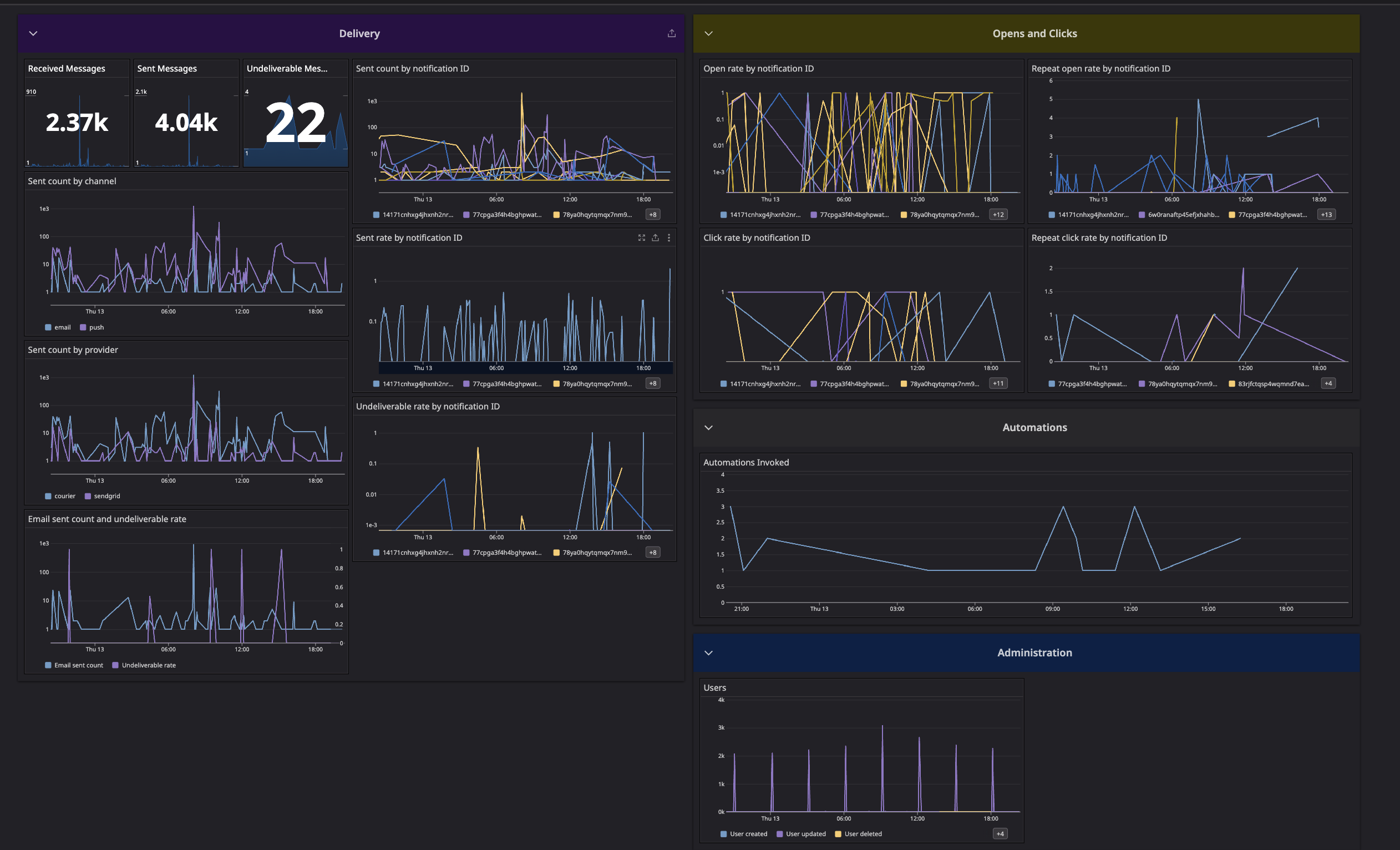
> Courier’s observability integration with Datadog enables Business-tier users to monitor real-time metrics and logs across message delivery, automations, user activity, and channel performance by environment.
## Setup
1. Create a Datadog account if you don't have one.
2. Generate a Datadog [API key](https://app.datadoghq.com/organization-settings/api-keys).
3. Navigate to the [Datadog integration page](https://app.courier.com/integrations/catalog/datadog) in Courier and enter the API key you generated in step 2.
4. Verify that the [Datadog site parameter](https://docs.datadoghq.com/getting_started/site/#access-the-datadog-site) corresponds to the URL of your Datadog instance.
The Datadog integration is **forward-only**. Courier begins emitting metrics from the moment you activate the integration; it does not backfill historical data.
## Dashboard
Download the Courier Datadog Dashboard using the link below to easily monitor Courier within Datadog.
[Download Dashboard JSON](https://github.com/trycourier/shareable/blob/main/courier-datadog-dashboard.json)
 ## Available Datadog Metrics
Courier sends various metrics to Datadog to help you monitor and track the performance of your notifications. Here are the available metrics:
DataDog's Metrics Without Limits lets users [configure a blocklist](https://docs.datadoghq.com/metrics/metrics-without-limits/#blocklist-of-tags) of tags to reduce cardinality as well as costs. Please note that you will still be [billed](https://docs.datadoghq.com/account_management/billing/custom_metrics/?tab=countrate) for ingestion, but at a lower rate.
### Account Metrics
* `courier.account.created`
* `courier.account.deleted`
* `courier.account.updated`
### Account User Relationship Metrics
* `courier.account.user.added`
* `courier.account.user.removed`
* `courier.account.user.updated`
### Audience Metrics
* `courier.audience.matched`
* `courier.audience.unmatched`
### Automation Metrics
* `courier.automation.invoked`
* `courier.automation.throttled`
* `courier.automation.digest.triggered`
* `courier.automation.batch.triggered`
* `courier.automation.fetch-data-step.errored`
### Channel Metrics
* `courier.email.delivered`
* `courier.email.error`
* `courier.email.sent`
* `courier.email.undeliverable`
* `courier.sms.delivered`
* `courier.sms.error`
* `courier.sms.sent`
* `courier.sms.undeliverable`
* `courier.push.delivered`
* `courier.push.error`
* `courier.push.sent`
* `courier.push.undeliverable`
* `courier.direct_message.delivered`
* `courier.direct_message.error`
* `courier.direct_message.sent`
* `courier.direct_message.undeliverable`
### Debug Metric
* `courier.debug`
### Inbox Metrics
* `courier.inbox.connection_attempt`
* `courier.inbox.connection_error`
* `courier.inbox.reconnection_attempt`
* `courier.inbox.notification_attempt`
### List Metrics
* `courier.list.subscribed`
* `courier.list.unsubscribed`
* `courier.list.subscribe.failed`
### Message Metrics
* `courier.message.canceled`
* `courier.message.delivered`
* `courier.message.filtered`
* `courier.message.received`
* `courier.message.sent`
* `courier.message.throttled`
* `courier.message.total.clicked`
* `courier.message.total.opened`
* `courier.message.undeliverable`
* `courier.message.unique.clicked`
* `courier.message.unique.opened`
* `courier.message.unique.sent`
* `courier.message.unmapped`
* `courier.message.unroutable`
### User Metrics
* `courier.user.created`
* `courier.user.deleted`
* `courier.user.unsubscribed`
* `courier.user.updated`
* `courier.user.update.failed`
You can use these metrics to create custom dashboards and alerts in Datadog to monitor the health and performance of your Courier notifications.
## Troubleshooting
| Symptom | Cause | Fix |
| --------------------------------------------------------- | ---------------------------------------------------------- | --------------------------------------------------------------------------------------------------------------------------------------------- |
| No metrics appearing in Datadog | API key incorrect, or Datadog site parameter mismatch | Verify the API key and [site parameter](https://docs.datadoghq.com/getting_started/site/#access-the-datadog-site) match your Datadog instance |
| Metrics start from integration date, not historical | The integration is forward-only | Expected behavior — Courier does not backfill. Enable the integration before you need the data |
| Metrics appear in test but not production (or vice versa) | The integration is configured per environment | Install the Datadog integration in each Courier environment (test and production) separately |
| `courier.message.*` counts don't match message logs | Metrics are emitted per status transition, not per message | A single message may trigger multiple `message.updated` metrics as it progresses through statuses |
## Available Datadog Metrics
Courier sends various metrics to Datadog to help you monitor and track the performance of your notifications. Here are the available metrics:
DataDog's Metrics Without Limits lets users [configure a blocklist](https://docs.datadoghq.com/metrics/metrics-without-limits/#blocklist-of-tags) of tags to reduce cardinality as well as costs. Please note that you will still be [billed](https://docs.datadoghq.com/account_management/billing/custom_metrics/?tab=countrate) for ingestion, but at a lower rate.
### Account Metrics
* `courier.account.created`
* `courier.account.deleted`
* `courier.account.updated`
### Account User Relationship Metrics
* `courier.account.user.added`
* `courier.account.user.removed`
* `courier.account.user.updated`
### Audience Metrics
* `courier.audience.matched`
* `courier.audience.unmatched`
### Automation Metrics
* `courier.automation.invoked`
* `courier.automation.throttled`
* `courier.automation.digest.triggered`
* `courier.automation.batch.triggered`
* `courier.automation.fetch-data-step.errored`
### Channel Metrics
* `courier.email.delivered`
* `courier.email.error`
* `courier.email.sent`
* `courier.email.undeliverable`
* `courier.sms.delivered`
* `courier.sms.error`
* `courier.sms.sent`
* `courier.sms.undeliverable`
* `courier.push.delivered`
* `courier.push.error`
* `courier.push.sent`
* `courier.push.undeliverable`
* `courier.direct_message.delivered`
* `courier.direct_message.error`
* `courier.direct_message.sent`
* `courier.direct_message.undeliverable`
### Debug Metric
* `courier.debug`
### Inbox Metrics
* `courier.inbox.connection_attempt`
* `courier.inbox.connection_error`
* `courier.inbox.reconnection_attempt`
* `courier.inbox.notification_attempt`
### List Metrics
* `courier.list.subscribed`
* `courier.list.unsubscribed`
* `courier.list.subscribe.failed`
### Message Metrics
* `courier.message.canceled`
* `courier.message.delivered`
* `courier.message.filtered`
* `courier.message.received`
* `courier.message.sent`
* `courier.message.throttled`
* `courier.message.total.clicked`
* `courier.message.total.opened`
* `courier.message.undeliverable`
* `courier.message.unique.clicked`
* `courier.message.unique.opened`
* `courier.message.unique.sent`
* `courier.message.unmapped`
* `courier.message.unroutable`
### User Metrics
* `courier.user.created`
* `courier.user.deleted`
* `courier.user.unsubscribed`
* `courier.user.updated`
* `courier.user.update.failed`
You can use these metrics to create custom dashboards and alerts in Datadog to monitor the health and performance of your Courier notifications.
## Troubleshooting
| Symptom | Cause | Fix |
| --------------------------------------------------------- | ---------------------------------------------------------- | --------------------------------------------------------------------------------------------------------------------------------------------- |
| No metrics appearing in Datadog | API key incorrect, or Datadog site parameter mismatch | Verify the API key and [site parameter](https://docs.datadoghq.com/getting_started/site/#access-the-datadog-site) match your Datadog instance |
| Metrics start from integration date, not historical | The integration is forward-only | Expected behavior — Courier does not backfill. Enable the integration before you need the data |
| Metrics appear in test but not production (or vice versa) | The integration is configured per environment | Install the Datadog integration in each Courier environment (test and production) separately |
| `courier.message.*` counts don't match message logs | Metrics are emitted per status transition, not per message | A single message may trigger multiple `message.updated` metrics as it progresses through statuses |