> ## Documentation Index
> Fetch the complete documentation index at: https://www.courier.com/docs/llms.txt
> Use this file to discover all available pages before exploring further.
# Firebase Cloud Messaging (FCM)
> Step-by-step guide for integrating Firebase Cloud Messaging (FCM) with Courier, including setup instructions, token management with or without SDKs, sending messages, using overrides, and enabling automatic formatting.
Before you begin, ensure that you have created a Firebase project. If you haven't done so already, create a new project [here](https://firebase.google.com/).
## Setup
To set up Courier with Firebase FCM integration, follow these steps:
### Configure FCM Provider
1. In your [Firebase Project](https://console.firebase.google.com/), go to "Project Settings" > "Service Accounts" and generate a new private key.
2. Copy the contents of the downloaded private key JSON file and paste it into the designated field in the [Courier FCM Provider Configuration](https://app.courier.com/channels/firebase-fcm).
3. Click "Install Provider" or "Save" to complete the configuration.
### Enable iOS Support (if required)
1. Integrate Firebase into your [iOS project](https://firebase.google.com/docs/ios/setup).
2. In your Firebase project settings, go to "Cloud Messaging" and select your iOS project under "Apple app configuration".
3. Create a new key in your [Apple Developer Account](https://developer.apple.com/account) with "Apple Push Notifications Service (APNs)" enabled.
4. Download the generated `.p8` file and upload it to your Firebase project settings under "Apple apps" > your app > "APNs Authentication Key".
## Getting FCM Tokens
### Using a Courier Mobile SDK
The recommended approach to set up Firebase Cloud Messaging (FCM) with Courier is to use a Courier Mobile SDK. All Courier Mobile SDKs automatically sync FCM tokens to Courier and manage them for you. This allows you to send push notifications directly to a `user_id` instead of managing FCM tokens manually.
| Mobile SDK | FCM Token Management | Tracking Analytics |
| :---------------------------------------------------------------------------------------------------- | :---------------------------------------------------------: | :----------------: |
| [ Android
](/sdk-libraries/android) | [Setup](/sdk-libraries/android#automatic-token-syncing-fcm) | Automatic |
| [ iOS
](/sdk-libraries/ios) | [Setup](/sdk-libraries/ios#manual-token-syncing) | Automatic |
| [ React Native
](/sdk-libraries/react-native) | [Setup](/sdk-libraries/react-native#push-notifications) | Automatic |
| [ Flutter
](/sdk-libraries/flutter) | [Setup](/sdk-libraries/flutter#push-notifications) | Automatic |
### Without a Courier Mobile SDK
If you choose not to use a Courier Mobile SDK, follow the [Firebase Cloud Messaging Setup](https://firebase.google.com/docs/cloud-messaging) guide for your desired platform.
Example FCM token:
```bash theme={null}
dYeufxa20kwFnykCny-gIN:APA91bEJxheJmH_zDvoHfPsCDZstJcuYfWuQrhztywoejlAK5HmDBEYNm7R8fNzk3bjQ3lPmkVi8uaoIX94SMV4ZXRPxG_IhfT_OkfmVHCAN6GtdAvELOXSjp6z1UHVVmMnAFTOa7YxW
```
When implementing FCM without a Courier Mobile SDK, you will need to:
* Sync, store, and manage your users' FCM tokens. This may require creating entries in your database, deploying separate endpoints, and adding extra development time that can be avoided by using a [Courier Mobile SDK](#using-a-courier-mobile-sdk).
* Manually make a request to the `trackingUrl` if you want Courier delivery and click tracking.
## Sending Messages
Here's a common example request you can make to the [`send`](/api-reference/send/send-a-message) API, demonstrating:
1. `providers.firebase-fcm.override.body.data.YOUR_CUSTOM_KEY` for adding custom data to your payload. This is typically used for opening a specific screen in your app when the user interacts with a push notification. Firebase requires the `data` key to be flat. More details about FCM custom data can be found [here](https://firebase.google.com/docs/reference/fcm/rest/v1/projects.messages#Message.FIELDS.data).
2. `providers.firebase-fcm.override.body.apns` for applying iOS-specific values. You can learn more about these [here](https://developer.apple.com/documentation/usernotifications/setting_up_a_remote_notification_server/generating_a_remote_notification).
When combining FCM with other channels like Inbox in a single send, place personalization variables and click actions in `message.data`, not inside the `to` recipient object. Fields nested inside `to` are treated as profile data and won't populate template variables or trigger push data mapping.
### ClickAction and Data Mapping
To pass a click action link into your push notification, enable the data mapping toggle in the Push [channel settings](/platform/content/template-designer/template-designer-overview).
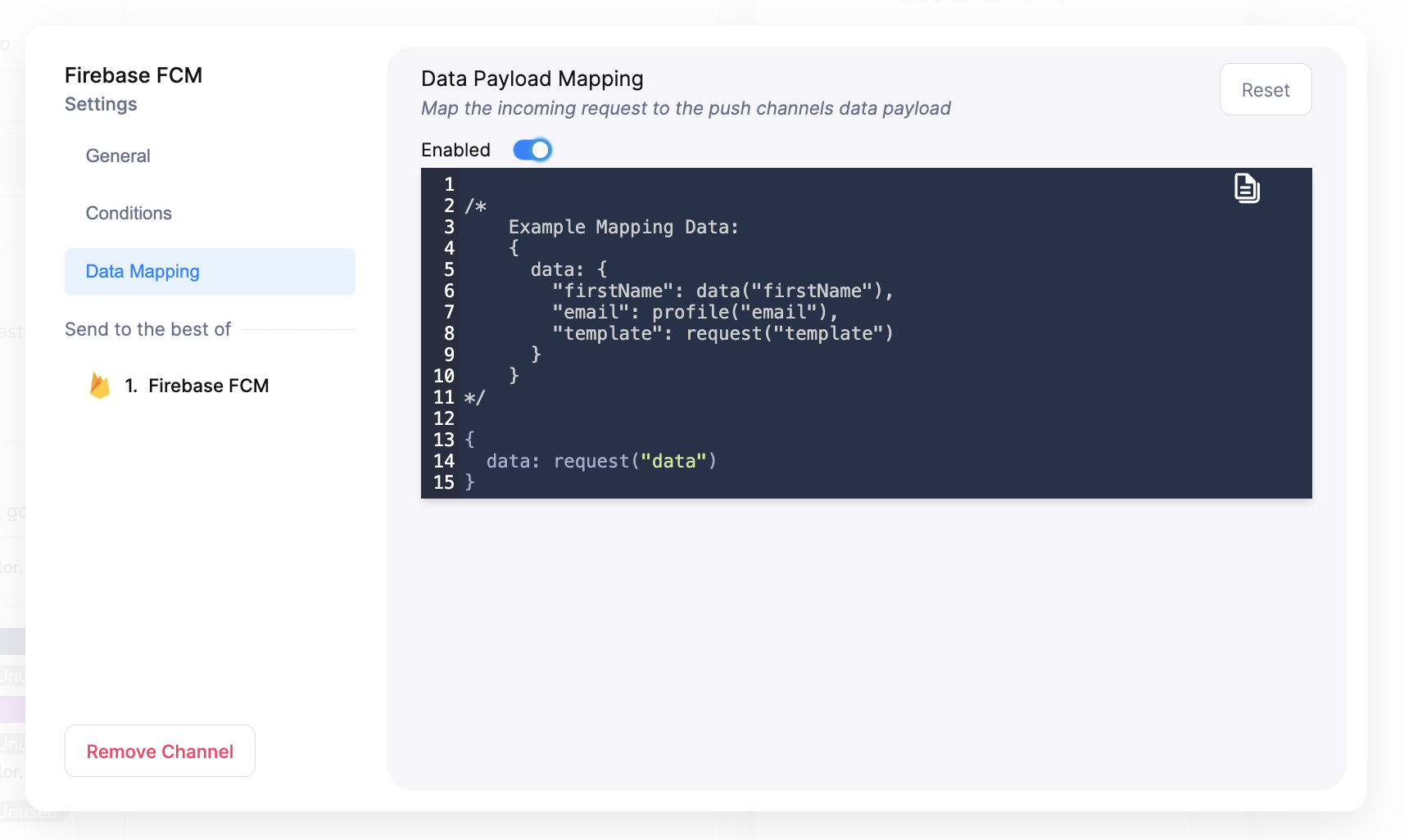 You can then perform a send request that looks similar to this, passing the clickAction in the data payload.
```json theme={null}
{
"message": {
"to": {
"user_id": "mike_mill_made_it"
},
"template": "HY59FFJQTR4JGEGT25HQD2D201GK",
"data": {
"click_action": "https://courier.com"
}
}
}
```
Sounds and badges can only be configured in the override schema of a send request at this time, and are not compatible with a `template` field attached. If your push notifications require sounds and badges, shape your push request with `sound` and `badge` in the override as shown below.
### Sending to a `user_id` (Recommended)
```bash theme={null}
curl --request POST \
--url https://api.courier.com/send \
--header 'Authorization: Bearer YOUR_AUTH_KEY' \
--header 'Content-Type: application/json' \
--data '{
"message": {
"to": {
"user_id": "YOUR_USER_ID"
},
"content": {
"title": "Hey there 👋",
"body": "Have a great day 😁"
},
"routing": {
"method": "all",
"channels": [
"firebase-fcm"
]
},
"providers": {
"firebase-fcm": {
"override": {
"body": {
"data": {
"YOUR_CUSTOM_KEY": "YOUR_CUSTOM_VALUE"
},
"apns": {
"payload": {
"aps": {
"sound": "ping.aiff",
"badge": 99
}
}
}
}
}
}
}
}
}'
```
### Sending to a `firebaseToken`
```bash theme={null}
curl --request POST \
--url https://api.courier.com/send \
--header 'Authorization: Bearer YOUR_AUTH_KEY' \
--header 'Content-Type: application/json' \
--data '{
"message": {
"to": {
"firebaseToken": "YOUR_FCM_TOKEN"
},
"content": {
"title": "Hey there 👋",
"body": "Have a great day 😁"
},
"routing": {
"method": "all",
"channels": [
"firebase-fcm"
]
},
"providers": {
"firebase-fcm": {
"override": {
"body": {
"data": {
"YOUR_CUSTOM_KEY": "YOUR_CUSTOM_VALUE"
},
"apns": {
"payload": {
"aps": {
"sound": "ping.aiff",
"badge": 99
}
}
}
}
}
}
}
}
}'
```
### Sending to multiple `firebaseTokens`
```bash theme={null}
curl --request POST \
--url https://api.courier.com/send \
--header 'Authorization: Bearer YOUR_AUTH_KEY' \
--header 'Content-Type: application/json' \
--data '{
"message": {
"to": {
"firebaseToken": ["FCM_TOKEN_ONE", "FCM_TOKEN_TWO"]
},
"content": {
"title": "Hey there 👋",
"body": "Have a great day 😁"
},
"routing": {
"method": "all",
"channels": [
"firebase-fcm"
]
},
"providers": {
"firebase-fcm": {
"override": {
"body": {
"data": {
"YOUR_CUSTOM_KEY": "YOUR_CUSTOM_VALUE"
},
"apns": {
"payload": {
"aps": {
"sound": "ping.aiff",
"badge": 99
}
}
}
}
}
}
}
}
}'
```
To send to specific devices when a user has multiple FCM tokens, see [Targeting Specific Devices](/external-integrations/push/intro-to-push#targeting-specific-devices).
## Automatic Courier Mobile SDK Formatting
When working with a [Courier Mobile SDK](#using-a-courier-mobile-sdk), Courier can automatically format the FCM payload to provide a better developer experience. You can toggle this feature in the [Courier FCM Provider Configuration](https://app.courier.com/channels/firebase-fcm).
You can then perform a send request that looks similar to this, passing the clickAction in the data payload.
```json theme={null}
{
"message": {
"to": {
"user_id": "mike_mill_made_it"
},
"template": "HY59FFJQTR4JGEGT25HQD2D201GK",
"data": {
"click_action": "https://courier.com"
}
}
}
```
Sounds and badges can only be configured in the override schema of a send request at this time, and are not compatible with a `template` field attached. If your push notifications require sounds and badges, shape your push request with `sound` and `badge` in the override as shown below.
### Sending to a `user_id` (Recommended)
```bash theme={null}
curl --request POST \
--url https://api.courier.com/send \
--header 'Authorization: Bearer YOUR_AUTH_KEY' \
--header 'Content-Type: application/json' \
--data '{
"message": {
"to": {
"user_id": "YOUR_USER_ID"
},
"content": {
"title": "Hey there 👋",
"body": "Have a great day 😁"
},
"routing": {
"method": "all",
"channels": [
"firebase-fcm"
]
},
"providers": {
"firebase-fcm": {
"override": {
"body": {
"data": {
"YOUR_CUSTOM_KEY": "YOUR_CUSTOM_VALUE"
},
"apns": {
"payload": {
"aps": {
"sound": "ping.aiff",
"badge": 99
}
}
}
}
}
}
}
}
}'
```
### Sending to a `firebaseToken`
```bash theme={null}
curl --request POST \
--url https://api.courier.com/send \
--header 'Authorization: Bearer YOUR_AUTH_KEY' \
--header 'Content-Type: application/json' \
--data '{
"message": {
"to": {
"firebaseToken": "YOUR_FCM_TOKEN"
},
"content": {
"title": "Hey there 👋",
"body": "Have a great day 😁"
},
"routing": {
"method": "all",
"channels": [
"firebase-fcm"
]
},
"providers": {
"firebase-fcm": {
"override": {
"body": {
"data": {
"YOUR_CUSTOM_KEY": "YOUR_CUSTOM_VALUE"
},
"apns": {
"payload": {
"aps": {
"sound": "ping.aiff",
"badge": 99
}
}
}
}
}
}
}
}
}'
```
### Sending to multiple `firebaseTokens`
```bash theme={null}
curl --request POST \
--url https://api.courier.com/send \
--header 'Authorization: Bearer YOUR_AUTH_KEY' \
--header 'Content-Type: application/json' \
--data '{
"message": {
"to": {
"firebaseToken": ["FCM_TOKEN_ONE", "FCM_TOKEN_TWO"]
},
"content": {
"title": "Hey there 👋",
"body": "Have a great day 😁"
},
"routing": {
"method": "all",
"channels": [
"firebase-fcm"
]
},
"providers": {
"firebase-fcm": {
"override": {
"body": {
"data": {
"YOUR_CUSTOM_KEY": "YOUR_CUSTOM_VALUE"
},
"apns": {
"payload": {
"aps": {
"sound": "ping.aiff",
"badge": 99
}
}
}
}
}
}
}
}
}'
```
To send to specific devices when a user has multiple FCM tokens, see [Targeting Specific Devices](/external-integrations/push/intro-to-push#targeting-specific-devices).
## Automatic Courier Mobile SDK Formatting
When working with a [Courier Mobile SDK](#using-a-courier-mobile-sdk), Courier can automatically format the FCM payload to provide a better developer experience. You can toggle this feature in the [Courier FCM Provider Configuration](https://app.courier.com/channels/firebase-fcm).
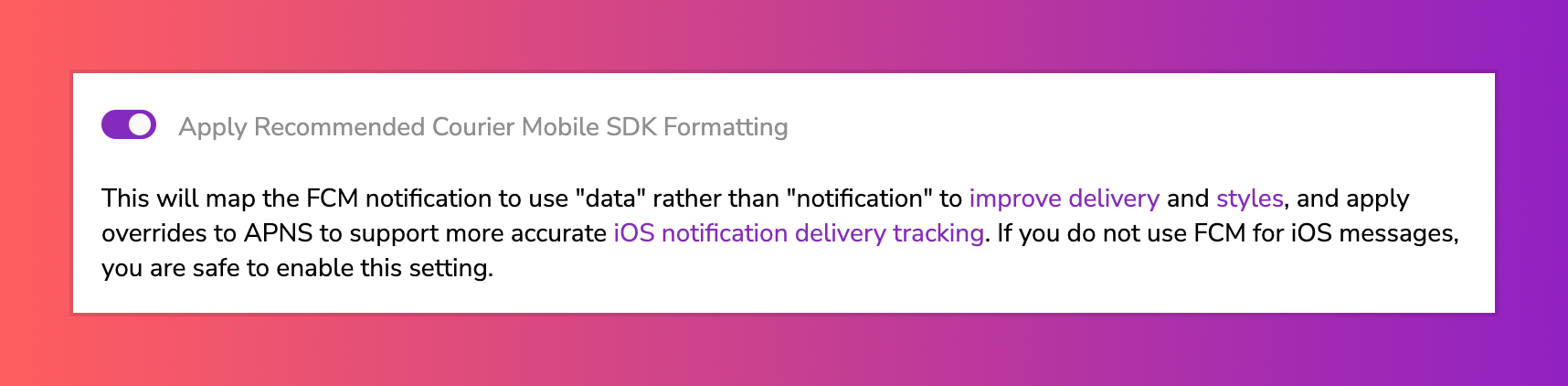 When enabled, this feature:
1. Automatically delivers Android push notifications in the background. This allows for more accurate push notification delivery tracking and the ability to use your own [custom Android notification style](https://github.com/trycourier/courier-android#2-setup) consistently.
2. Supports Courier's [iOS Notification Service Extension](https://github.com/trycourier/courier-ios/blob/master/Docs/PushNotifications.md#4-add-the-notification-service-extension-optional-but-recommended) for improved push notification delivery tracking.
Here is an example of what the formatted [`send`](/api-reference/send/send-a-message) request looks like when this setting is enabled:
```bash theme={null}
curl --request POST \
--url https://api.courier.com/send \
--header 'Authorization: Bearer YOUR_AUTH_KEY' \
--header 'Content-Type: application/json' \
--data '{
"message": {
"to": {
"user_id": "YOUR_USER_ID"
},
"content": {
"title": "Hey there 👋",
"body": "Have a great day 😁"
},
"routing": {
"method": "all",
"channels": [
"firebase-fcm"
]
},
"providers": {
"firebase-fcm": {
"override": {
"body": {
"notification": null,
"data": {
"title": "Hey there 👋",
"body": "Have a great day 😁"
},
"apns": {
"payload": {
"aps": {
"mutable-content": 1,
"sound": "ping.aiff",
"alert": {
"title": "Hey there 👋",
"body": "Have a great day 😁"
}
}
}
}
}
}
}
}
}
}'
```
When enabled, this feature:
1. Automatically delivers Android push notifications in the background. This allows for more accurate push notification delivery tracking and the ability to use your own [custom Android notification style](https://github.com/trycourier/courier-android#2-setup) consistently.
2. Supports Courier's [iOS Notification Service Extension](https://github.com/trycourier/courier-ios/blob/master/Docs/PushNotifications.md#4-add-the-notification-service-extension-optional-but-recommended) for improved push notification delivery tracking.
Here is an example of what the formatted [`send`](/api-reference/send/send-a-message) request looks like when this setting is enabled:
```bash theme={null}
curl --request POST \
--url https://api.courier.com/send \
--header 'Authorization: Bearer YOUR_AUTH_KEY' \
--header 'Content-Type: application/json' \
--data '{
"message": {
"to": {
"user_id": "YOUR_USER_ID"
},
"content": {
"title": "Hey there 👋",
"body": "Have a great day 😁"
},
"routing": {
"method": "all",
"channels": [
"firebase-fcm"
]
},
"providers": {
"firebase-fcm": {
"override": {
"body": {
"notification": null,
"data": {
"title": "Hey there 👋",
"body": "Have a great day 😁"
},
"apns": {
"payload": {
"aps": {
"mutable-content": 1,
"sound": "ping.aiff",
"alert": {
"title": "Hey there 👋",
"body": "Have a great day 😁"
}
}
}
}
}
}
}
}
}
}'
```