> ## Documentation Index
> Fetch the complete documentation index at: https://www.courier.com/docs/llms.txt
> Use this file to discover all available pages before exploring further.
# If / Switch
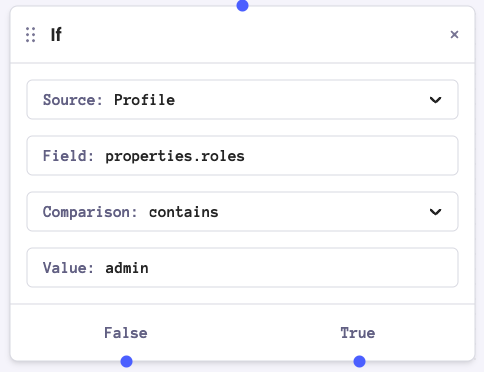
> Courier Automations support conditional logic using “If” nodes. Conditions evaluate data, profile, step results, or custom JavaScript to determine which branch of the workflow to execute next.
 ## Types of Control Flow
### If
The `If` node routes workflow execution based on a single condition. When the condition evaluates to true, the workflow follows the True branch; otherwise, it follows the False branch.
### Switch
The `Switch` node allows routing based on multiple conditions.
It evaluates conditions in order and routes to the first matching branch.
If no conditions match, the workflow follows the default branch.
## Comparison Operators
The following operators are available for Data, Profile, and Step Ref conditions:
| Operator | Description |
| ------------------------------- | -------------------------------------------------- |
| **is** (eq) | Exact match |
| **is not** (neq) | Does not match |
| **is one of** (one\_of) | Matches any value in a comma-separated list |
| **contains** | String contains substring, or array contains value |
| **does not contain** | String/array does not contain value |
| **greater than** (gt) | Numeric greater than |
| **greater than or equal** (gte) | Numeric greater than or equal |
| **less than** (lt) | Numeric less than |
| **less than or equal** (lte) | Numeric less than or equal |
| **starts with** | String starts with prefix |
| **ends with** | String ends with suffix |
## Condition Sources
The `If` and `Switch` nodes can evaluate boolean expressions from four different sources:
| Source | Description |
| ---------------- | ----------------------------------------------------------- |
| **Data** | Compare values from the automation context's data object |
| **Profile** | Compare values from the automation context's profile object |
| **Step Ref** | Monitor status of previous Send steps |
| **JS Condition** | Write custom JavaScript for complex logic |
### Data
*Compare a field within the `data` key of the automation context with a value.*
| Property | Description | Example |
| ------------ | ------------------------------ | ----------- |
| `Field` | The data object to evaluate | `data.foo` |
| `Comparison` | The comparison operator to use | `is one of` |
| `Value` | The value to compare against | `bar, baz` |
### Profile
*Compare a field within the `profile` key of the automation context with a value.*
| Property | Description | Example |
| ------------ | ------------------------------ | ----------------- |
| `Field` | The profile object to evaluate | `address.country` |
| `Comparison` | The comparison operator to use | `is` |
| `Value` | The value to compare against | `Canada` |
Profile conditions require profile data to be present in the automation context. Automations started by an [audience trigger](/platform/automations/audience-trigger) or a schedule do not automatically load stored profile fields. Add a [GET Profile](/platform/automations/get-profile) step before your If or Switch node so the user's profile is available for comparison.
### Step Ref
*Check the current status of an upstream Send node, using it's reference ID (Ref). The Ref value is defined in the Send node's configuration.*
| Property | Description | Example |
| ------------ | ------------------------------ | ---------------------- |
| `Ref` | The send node's status object | `welcome_email.status` |
| `Comparison` | The comparison operator to use | `is not` |
| `Value` | The value to compare against | `CLICKED` |
Possible [status](/platform/analytics/message-logs#send-status-key-and-definitions) values are: `CLICKED`, `DELIVERED`, `ENQUEUED`, `FILTERED`, `OPENED`, `SENT`, `SIMULATED`, `UNDELIVERABLE`, `UNMAPPED`, `UNROUTABLE`
### JS Condition
*Use JavaScript expressions when standard comparisons aren't sufficient.*
| Property | Description | Example |
| ------------ | ------------------------------------- | -------------------------------------- |
| `Expression` | The javascript expression to evaluate | `data.expiry < (new Date()).getTime()` |
```javascript JS Condition examples theme={null}
// Transform and compare values
data.email.toLowerCase().includes('@company.com')
// Check for key existence or null values
'preferences' in data && data.preferences !== null
// Compare date diffs as ISO strings
Date.parse(data.lastLogin) < Date.now() - (30 * 24 * 60 * 60 * 1000)
// Manipulate nested arrays and objects
data.orders.filter(order => order.total > 100).length > 0
```
#### Javascript Expressions in Value Fields
Javascript expressions can also be used in the `Value` field of Data, Profile, and Step Ref sources.
```javascript Examples theme={null}
// Dynamic timestamps
${(new Date()).getTime()}
// Concatenate values
${data.firstName + ' ' + data.lastName}
// Default values
${profile.language || 'en'}
```
## Types of Control Flow
### If
The `If` node routes workflow execution based on a single condition. When the condition evaluates to true, the workflow follows the True branch; otherwise, it follows the False branch.
### Switch
The `Switch` node allows routing based on multiple conditions.
It evaluates conditions in order and routes to the first matching branch.
If no conditions match, the workflow follows the default branch.
## Comparison Operators
The following operators are available for Data, Profile, and Step Ref conditions:
| Operator | Description |
| ------------------------------- | -------------------------------------------------- |
| **is** (eq) | Exact match |
| **is not** (neq) | Does not match |
| **is one of** (one\_of) | Matches any value in a comma-separated list |
| **contains** | String contains substring, or array contains value |
| **does not contain** | String/array does not contain value |
| **greater than** (gt) | Numeric greater than |
| **greater than or equal** (gte) | Numeric greater than or equal |
| **less than** (lt) | Numeric less than |
| **less than or equal** (lte) | Numeric less than or equal |
| **starts with** | String starts with prefix |
| **ends with** | String ends with suffix |
## Condition Sources
The `If` and `Switch` nodes can evaluate boolean expressions from four different sources:
| Source | Description |
| ---------------- | ----------------------------------------------------------- |
| **Data** | Compare values from the automation context's data object |
| **Profile** | Compare values from the automation context's profile object |
| **Step Ref** | Monitor status of previous Send steps |
| **JS Condition** | Write custom JavaScript for complex logic |
### Data
*Compare a field within the `data` key of the automation context with a value.*
| Property | Description | Example |
| ------------ | ------------------------------ | ----------- |
| `Field` | The data object to evaluate | `data.foo` |
| `Comparison` | The comparison operator to use | `is one of` |
| `Value` | The value to compare against | `bar, baz` |
### Profile
*Compare a field within the `profile` key of the automation context with a value.*
| Property | Description | Example |
| ------------ | ------------------------------ | ----------------- |
| `Field` | The profile object to evaluate | `address.country` |
| `Comparison` | The comparison operator to use | `is` |
| `Value` | The value to compare against | `Canada` |
Profile conditions require profile data to be present in the automation context. Automations started by an [audience trigger](/platform/automations/audience-trigger) or a schedule do not automatically load stored profile fields. Add a [GET Profile](/platform/automations/get-profile) step before your If or Switch node so the user's profile is available for comparison.
### Step Ref
*Check the current status of an upstream Send node, using it's reference ID (Ref). The Ref value is defined in the Send node's configuration.*
| Property | Description | Example |
| ------------ | ------------------------------ | ---------------------- |
| `Ref` | The send node's status object | `welcome_email.status` |
| `Comparison` | The comparison operator to use | `is not` |
| `Value` | The value to compare against | `CLICKED` |
Possible [status](/platform/analytics/message-logs#send-status-key-and-definitions) values are: `CLICKED`, `DELIVERED`, `ENQUEUED`, `FILTERED`, `OPENED`, `SENT`, `SIMULATED`, `UNDELIVERABLE`, `UNMAPPED`, `UNROUTABLE`
### JS Condition
*Use JavaScript expressions when standard comparisons aren't sufficient.*
| Property | Description | Example |
| ------------ | ------------------------------------- | -------------------------------------- |
| `Expression` | The javascript expression to evaluate | `data.expiry < (new Date()).getTime()` |
```javascript JS Condition examples theme={null}
// Transform and compare values
data.email.toLowerCase().includes('@company.com')
// Check for key existence or null values
'preferences' in data && data.preferences !== null
// Compare date diffs as ISO strings
Date.parse(data.lastLogin) < Date.now() - (30 * 24 * 60 * 60 * 1000)
// Manipulate nested arrays and objects
data.orders.filter(order => order.total > 100).length > 0
```
#### Javascript Expressions in Value Fields
Javascript expressions can also be used in the `Value` field of Data, Profile, and Step Ref sources.
```javascript Examples theme={null}
// Dynamic timestamps
${(new Date()).getTime()}
// Concatenate values
${data.firstName + ' ' + data.lastName}
// Default values
${profile.language || 'en'}
```