> ## Documentation Index
> Fetch the complete documentation index at: https://www.courier.com/docs/llms.txt
> Use this file to discover all available pages before exploring further.
# Broadcasts Overview
> Send a one-off message to a list or audience, now or on a schedule, and track delivery, opens, clicks, and errors.
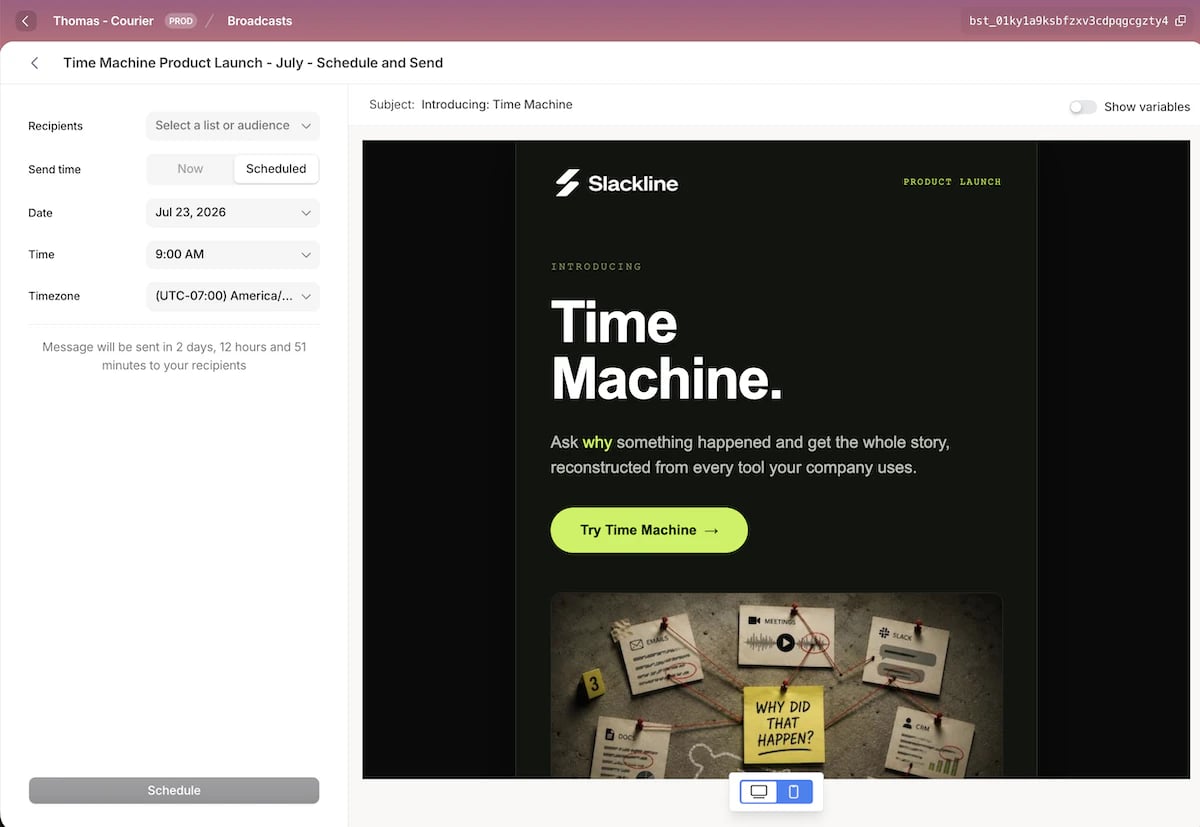
A **broadcast** is a single send to a list or an audience of users. You design the content once, choose who receives it, and send it now or schedule it for later. After it goes out, you get delivery, open, click, and error metrics along with a per-recipient log.
Broadcasts are built for one-off sends: newsletters, product launches, promotions, and policy updates like a change to your terms of service. When you need to tell a whole group one thing, once, this is the tool.
 ## How a broadcast works
* Build the content in the editor.
* Choose a list or an audience to receive it.
* Send it right away, or schedule it to go out later.
For the full walkthrough, see [creating a broadcast](/docs/platform/broadcasts/creating-a-broadcast).
## Broadcasts vs Journeys
Both send customer messages, but they solve different problems.
| | Broadcasts | Journeys |
| -------------- | -------------------------------------- | -------------------------------------------- |
| **Shape** | One message to a group | Per-user flow, single or multi-step |
| **Trigger** | You send it, now or scheduled | A user event or API call |
| **Recipients** | A list or an audience | Users entering the flow |
| **Best for** | Newsletters, promotions, announcements | Onboarding, receipts, digests, re-engagement |
Rule of thumb: sending the same message to a group at a chosen moment is a broadcast. A user's action that should send a transactional message or start a sequence is a [journey](/docs/platform/journeys/journeys-overview).
## Before you send
Two things need to be in place before you send:
* **An integration for the channel.** Broadcasts send through the same providers as the rest of Courier, so once you have connected a provider for a channel, you can broadcast on it.
* **A [list](/docs/platform/users/audiences#static-lists) or an [audience](/docs/platform/users/audiences#dynamic-audiences) to send to.** Either one works as a broadcast's recipients.
## FAQ
A broadcast is a single message sent to a list or an audience of users, either right away or on a schedule. It is built for one-off sends like newsletters, product launches, promotions, and policy updates.
Use a broadcast to send the same message to a group at a moment you choose. Use a [journey](/docs/platform/journeys/journeys-overview) when a user's action should trigger a per-user message or flow, like a receipt, an onboarding sequence, or re-engagement.
Any channel you have an integration connected for, including email, SMS, and push. Each broadcast sends on a single channel.
No. Each broadcast uses one channel. To reach the same group on another channel, create a separate broadcast for it.
Yes. Choose **Scheduled** and set a date, time, and timezone. You can reschedule or cancel the broadcast any time before it sends.
Cancel the scheduled send, edit the content, then schedule it again. Content is locked while a broadcast is scheduled.
Delivery, open, click, and error rates for the whole send, plus a per-recipient log showing the status of each message. See [performance and logs](/docs/platform/broadcasts/performance).
No. You can create, design, schedule, and measure a broadcast entirely in the Courier UI. An API is also available for teams that want to send programmatically.
## Next steps
Design your message, pick recipients, and send now or on a schedule
Read delivery, open, and click rates and inspect per-recipient sends
## How a broadcast works
* Build the content in the editor.
* Choose a list or an audience to receive it.
* Send it right away, or schedule it to go out later.
For the full walkthrough, see [creating a broadcast](/docs/platform/broadcasts/creating-a-broadcast).
## Broadcasts vs Journeys
Both send customer messages, but they solve different problems.
| | Broadcasts | Journeys |
| -------------- | -------------------------------------- | -------------------------------------------- |
| **Shape** | One message to a group | Per-user flow, single or multi-step |
| **Trigger** | You send it, now or scheduled | A user event or API call |
| **Recipients** | A list or an audience | Users entering the flow |
| **Best for** | Newsletters, promotions, announcements | Onboarding, receipts, digests, re-engagement |
Rule of thumb: sending the same message to a group at a chosen moment is a broadcast. A user's action that should send a transactional message or start a sequence is a [journey](/docs/platform/journeys/journeys-overview).
## Before you send
Two things need to be in place before you send:
* **An integration for the channel.** Broadcasts send through the same providers as the rest of Courier, so once you have connected a provider for a channel, you can broadcast on it.
* **A [list](/docs/platform/users/audiences#static-lists) or an [audience](/docs/platform/users/audiences#dynamic-audiences) to send to.** Either one works as a broadcast's recipients.
## FAQ
A broadcast is a single message sent to a list or an audience of users, either right away or on a schedule. It is built for one-off sends like newsletters, product launches, promotions, and policy updates.
Use a broadcast to send the same message to a group at a moment you choose. Use a [journey](/docs/platform/journeys/journeys-overview) when a user's action should trigger a per-user message or flow, like a receipt, an onboarding sequence, or re-engagement.
Any channel you have an integration connected for, including email, SMS, and push. Each broadcast sends on a single channel.
No. Each broadcast uses one channel. To reach the same group on another channel, create a separate broadcast for it.
Yes. Choose **Scheduled** and set a date, time, and timezone. You can reschedule or cancel the broadcast any time before it sends.
Cancel the scheduled send, edit the content, then schedule it again. Content is locked while a broadcast is scheduled.
Delivery, open, click, and error rates for the whole send, plus a per-recipient log showing the status of each message. See [performance and logs](/docs/platform/broadcasts/performance).
No. You can create, design, schedule, and measure a broadcast entirely in the Courier UI. An API is also available for teams that want to send programmatically.
## Next steps
Design your message, pick recipients, and send now or on a schedule
Read delivery, open, and click rates and inspect per-recipient sends