> ## Documentation Index
> Fetch the complete documentation index at: https://www.courier.com/docs/llms.txt
> Use this file to discover all available pages before exploring further.
# Performance & Logs
> See delivery, open, click, and error rates for a broadcast, and inspect every send in the per-recipient log.
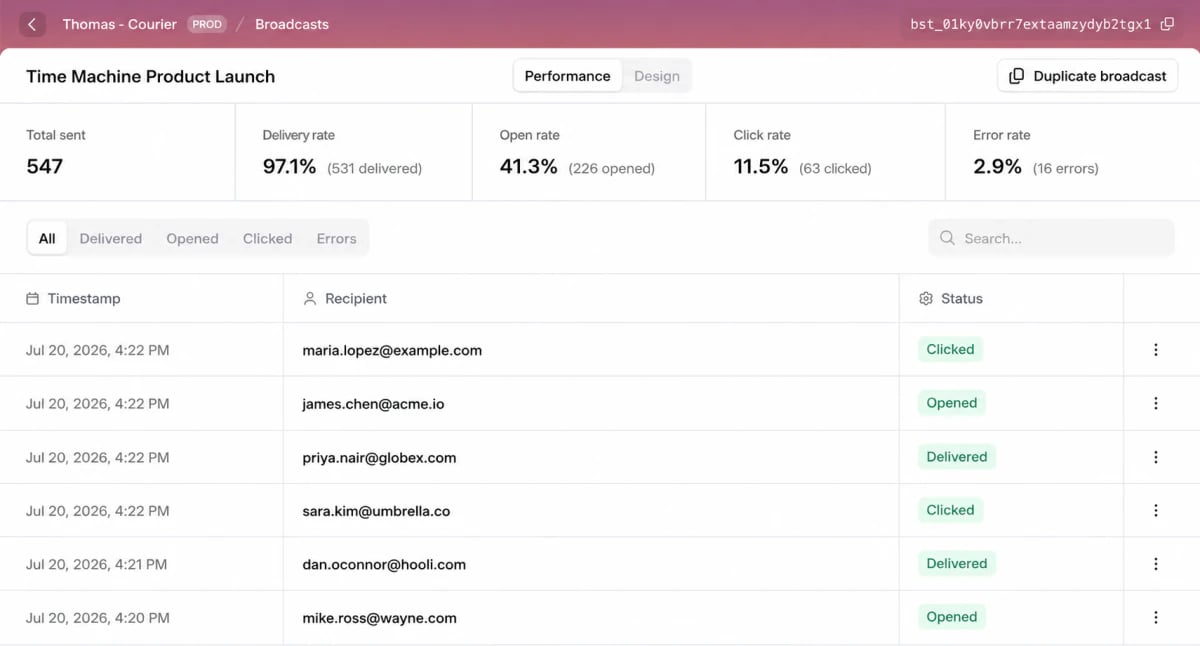
Every broadcast you send has a **Performance** tab. Open the broadcast and select it to see how the send did, from the top-line rates down to what happened for each recipient.
 ## Aggregate metrics
The top of the Performance view summarizes the whole send:
| Metric | What it shows |
| ----------------- | -------------------------------------------- |
| **Total sent** | The total number of messages sent. |
| **Delivery rate** | The percentage of sends that were delivered. |
| **Open rate** | The percentage that were opened. |
| **Click rate** | The percentage that were clicked. |
| **Error rate** | The percentage that errored. |
The metrics you see depend on the channel. Open and click tracking only applies to channels that support it, like email.
## Per-recipient log
Below the summary, the log lists every recipient in the send with a timestamp, the recipient, and the status of their message. Filter by status (**All**, **Delivered**, **Opened**, **Clicked**, or **Errors**) or search for a specific recipient.
When something looks off for one person, this is where you find them. Open the row's **View in logs** action to jump straight to the full delivery detail in your [message logs](/docs/platform/analytics/message-logs).
## Duplicating a broadcast
To send something similar again, open a past broadcast and click **Duplicate broadcast**. Courier copies its content and setup into a new draft that you can adjust and send, which makes recurring announcements quick to repeat.
## Next steps
Build a message, pick recipients, and send now or on a schedule
How broadcasts fit alongside Journeys
## Aggregate metrics
The top of the Performance view summarizes the whole send:
| Metric | What it shows |
| ----------------- | -------------------------------------------- |
| **Total sent** | The total number of messages sent. |
| **Delivery rate** | The percentage of sends that were delivered. |
| **Open rate** | The percentage that were opened. |
| **Click rate** | The percentage that were clicked. |
| **Error rate** | The percentage that errored. |
The metrics you see depend on the channel. Open and click tracking only applies to channels that support it, like email.
## Per-recipient log
Below the summary, the log lists every recipient in the send with a timestamp, the recipient, and the status of their message. Filter by status (**All**, **Delivered**, **Opened**, **Clicked**, or **Errors**) or search for a specific recipient.
When something looks off for one person, this is where you find them. Open the row's **View in logs** action to jump straight to the full delivery detail in your [message logs](/docs/platform/analytics/message-logs).
## Duplicating a broadcast
To send something similar again, open a past broadcast and click **Duplicate broadcast**. Courier copies its content and setup into a new draft that you can adjust and send, which makes recurring announcements quick to repeat.
## Next steps
Build a message, pick recipients, and send now or on a schedule
How broadcasts fit alongside Journeys