> ## Documentation Index
> Fetch the complete documentation index at: https://www.courier.com/docs/llms.txt
> Use this file to discover all available pages before exploring further.
# Jsonnet
> Courier Jsonnet Blocks let you build dynamic Slack and Teams notifications using Jsonnet. Support includes data-driven templates, conditional logic, and reusable components for Block Kit and Adaptive Cards.
**Availability:** [Slack](/external-integrations/direct-message/slack), [Microsoft Teams](/external-integrations/direct-message/microsoft-teams)
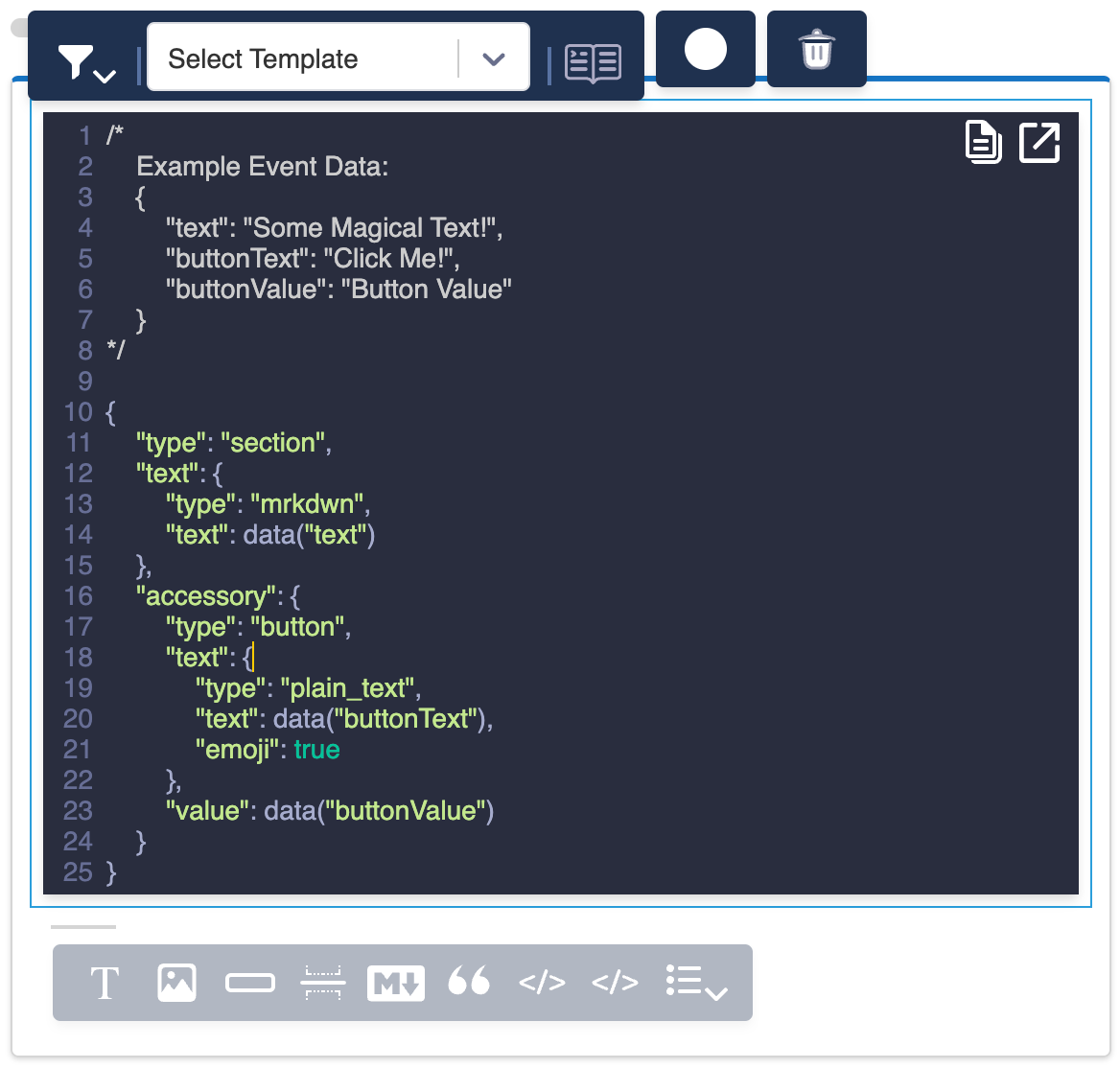
Jsonnet Blocks enable you to create dynamic, customized content for Slack and Microsoft Teams notifications using the Jsonnet templating language.
[Jsonnet](https://learnxinyminutes.com/docs/jsonnet/) is a JSON to JSON templating language, which means that combining Jsonnet with your user data allows you to build and send dynamic, custom Slack blocks and MS Teams Adaptive Cards in your notifications.
 ## Key Features
### Data Integration
* Access data using the `data("variable")` syntax
* Access profile data using the `profile("variable")` syntax
* Dynamically populate message content based on profile attributes or event data.
Referencing Data Payload:
```json theme={null}
[
{
"type": "context",
"elements": [
{
"type": "plain_text",
"text": ":wave: There's a new comment from " + data("commenter"), //commenter would be the variable that can be found in the data payload
"emoji": true
}
]
}
]
```
Referencing Profile Data:
```json theme={null}
[
{
"type": "context",
"elements": [
{
"type": "plain_text",
"text": ":wave: There's a new comment on the investigation from " + profile("name"),
"emoji": true
}
]
}
]
```
### Templating
* Use Jsonnet's templating features to create reusable components
* Apply conditional logic to show or hide parts of your message
### Platform-Specific Elements
* Create Slack [Block Kit](https://api.slack.com/block-kit) elements
* Design Microsoft Teams [Adaptive Cards](https://adaptivecards.io/)
## Courier-Provided Templates
Courier offers several pre-built Jsonnet template blocks for common Block Kit actions:
* Buttons
* Dropdowns
* Images
* Text sections
* And more...
These templates can serve as starting points for your custom designs.
## Custom Block Kit Elements
You can also build your own [Block Kit](https://api.slack.com/block-kit) elements from scratch. The Jsonnet Block expects either a single Block Kit element or an array of elements.
### Preventing Unwanted Mentions with `verbatim`
Slack automatically parses `mrkdwn` text for `@name` patterns and converts them into mentions. If your message includes text that looks like a mention but shouldn't trigger one, set `verbatim: true` on the text object to disable this behavior:
```json theme={null}
{
"type": "section",
"text": {
"type": "mrkdwn",
"text": ">>> " + data("quote_text"),
"verbatim": true
}
}
```
This is useful when rendering user-generated content, quotes, or any text that may contain `@` characters. Standard Courier blocks (text, quote) don't expose this property; Jsonnet blocks give you full control over [Block Kit text object](https://docs.slack.dev/reference/block-kit/composition-objects/text-object/) fields like `verbatim`.
## Key Features
### Data Integration
* Access data using the `data("variable")` syntax
* Access profile data using the `profile("variable")` syntax
* Dynamically populate message content based on profile attributes or event data.
Referencing Data Payload:
```json theme={null}
[
{
"type": "context",
"elements": [
{
"type": "plain_text",
"text": ":wave: There's a new comment from " + data("commenter"), //commenter would be the variable that can be found in the data payload
"emoji": true
}
]
}
]
```
Referencing Profile Data:
```json theme={null}
[
{
"type": "context",
"elements": [
{
"type": "plain_text",
"text": ":wave: There's a new comment on the investigation from " + profile("name"),
"emoji": true
}
]
}
]
```
### Templating
* Use Jsonnet's templating features to create reusable components
* Apply conditional logic to show or hide parts of your message
### Platform-Specific Elements
* Create Slack [Block Kit](https://api.slack.com/block-kit) elements
* Design Microsoft Teams [Adaptive Cards](https://adaptivecards.io/)
## Courier-Provided Templates
Courier offers several pre-built Jsonnet template blocks for common Block Kit actions:
* Buttons
* Dropdowns
* Images
* Text sections
* And more...
These templates can serve as starting points for your custom designs.
## Custom Block Kit Elements
You can also build your own [Block Kit](https://api.slack.com/block-kit) elements from scratch. The Jsonnet Block expects either a single Block Kit element or an array of elements.
### Preventing Unwanted Mentions with `verbatim`
Slack automatically parses `mrkdwn` text for `@name` patterns and converts them into mentions. If your message includes text that looks like a mention but shouldn't trigger one, set `verbatim: true` on the text object to disable this behavior:
```json theme={null}
{
"type": "section",
"text": {
"type": "mrkdwn",
"text": ">>> " + data("quote_text"),
"verbatim": true
}
}
```
This is useful when rendering user-generated content, quotes, or any text that may contain `@` characters. Standard Courier blocks (text, quote) don't expose this property; Jsonnet blocks give you full control over [Block Kit text object](https://docs.slack.dev/reference/block-kit/composition-objects/text-object/) fields like `verbatim`.