> ## Documentation Index
> Fetch the complete documentation index at: https://www.courier.com/docs/llms.txt
> Use this file to discover all available pages before exploring further.
# What are Templates?
> Templates define the content and structure of your notifications across all channels.
## Overview
Courier notifications are powered by flexible templates that allow you to define what your message says, how it looks, and how it behaves across channels.
Create a template once and send it across email, SMS, push, chat, and in-app channels. With Courier templates, you can design modular content blocks, configure routing and failover logic, and apply customized branding and variables across the appropriate channels.
## Two ways to build templates
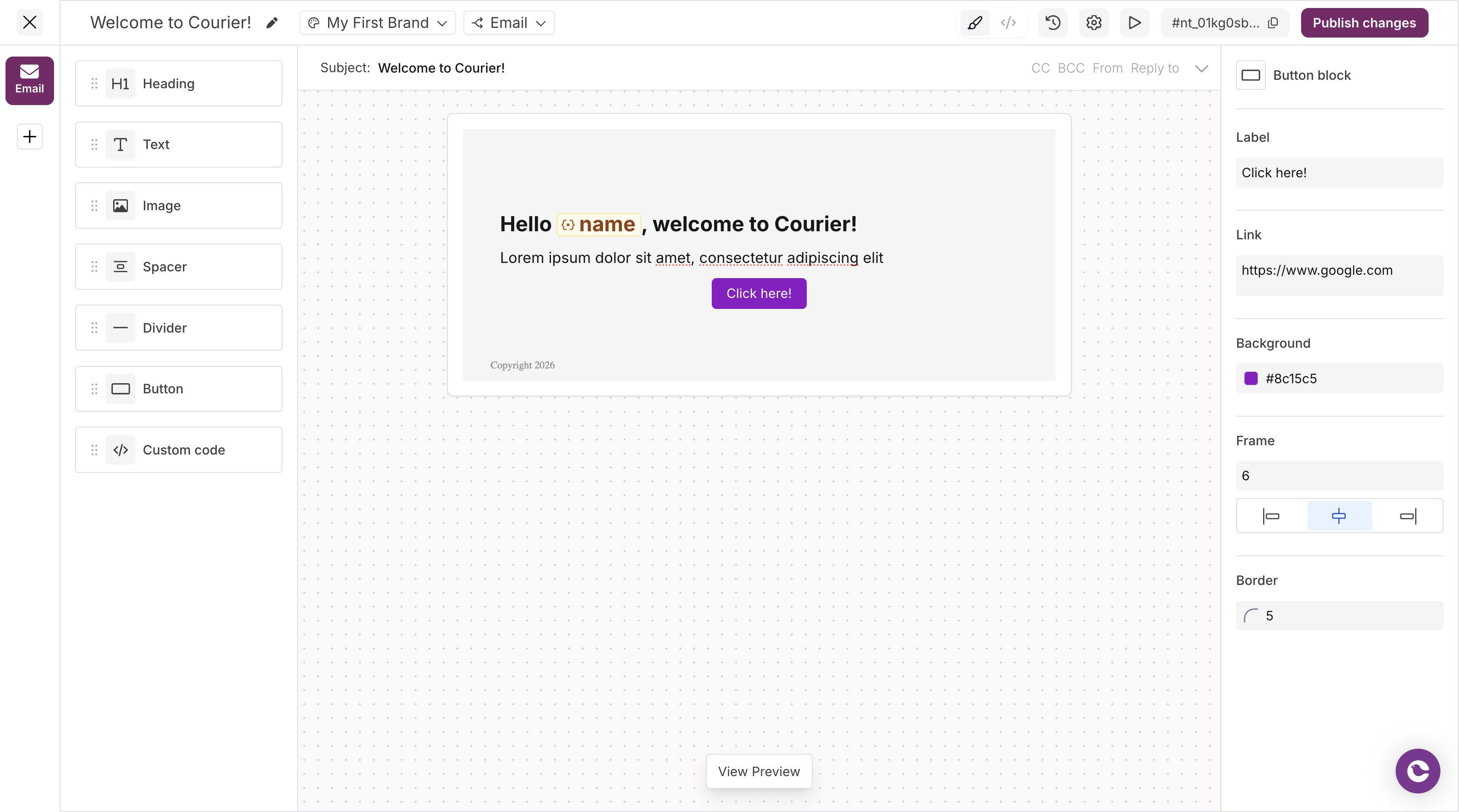
Courier offers two main ways to create templates: a UI-based Designer for visual editing, and an API-based Elemental format for programmatic control. Most teams start with the UI Template Designer, which is accessible to both technical and non-technical users:
### **[Template Designer](/platform/content/template-designer/template-designer-overview)**
A powerful visual editor for building notifications with drag-and-drop blocks. Best for teams that want to create and iterate on templates without writing code. The designer provides real-time previews, test data injection, version history, and side-by-side channel editing.
 ### **[Elemental](/platform/content/elemental/elemental-overview)**
A JSON format for creating and editing templates programmatically. Best for templates that live in your codebase, require complex logic, or need version control through Git. Elemental templates can be generated dynamically, tested in CI pipelines, and managed alongside your application code.
***
## What you can do with templates
### [Dynamic content](/platform/content/variables/inserting-variables)
Personalize notifications with variables from multiple data sources. Pull in user profile data, event payloads, tenant information, and brand settings to create contextual, relevant messages for each recipient.
### [Branding](/platform/content/brands/brands-overview)
Maintain visual consistency across all notifications. Configure logos, colors, fonts, and layouts that automatically apply to templates. Support white-labeling for multi-tenant applications where you send on behalf of customers.
### [Reusable Routing Strategies](/platform/content/routing)
Define routing logic once and apply it across multiple templates. Create primary and fallback channels, set provider priorities, and manage routing configurations independently from template content.
### [Conditional logic](/platform/content/template-settings/send-conditions)
Control what content appears based on user data, preferences, or custom business rules. Show premium features to paid users, hide irrelevant sections, or adapt messaging based on account status or location.
### [Preview and testing](/platform/content/template-designer/how-to-preview-notification)
Validate templates before they go live. Inject test data to see exactly how notifications will render, preview across different brands, and send test emails to verify delivery and formatting.
### [Version control](/platform/content/template-designer/history-compare-mode)
Track every change to your templates with full version history. Compare versions side-by-side, see who made changes and when, and roll back to previous iterations if needed.
## Key Concepts
Apply consistent styles to notifications; assign brands per template as needed
Configure send conditions, channels, and approval workflows
Use Handlebars helpers for logic, formatting, and dynamic content
Serve content in multiple languages based on user locale
Add text, images, buttons, and other content components
Add and configure building blocks in JSON; Elements map to the same content types as blocks
### **[Elemental](/platform/content/elemental/elemental-overview)**
A JSON format for creating and editing templates programmatically. Best for templates that live in your codebase, require complex logic, or need version control through Git. Elemental templates can be generated dynamically, tested in CI pipelines, and managed alongside your application code.
***
## What you can do with templates
### [Dynamic content](/platform/content/variables/inserting-variables)
Personalize notifications with variables from multiple data sources. Pull in user profile data, event payloads, tenant information, and brand settings to create contextual, relevant messages for each recipient.
### [Branding](/platform/content/brands/brands-overview)
Maintain visual consistency across all notifications. Configure logos, colors, fonts, and layouts that automatically apply to templates. Support white-labeling for multi-tenant applications where you send on behalf of customers.
### [Reusable Routing Strategies](/platform/content/routing)
Define routing logic once and apply it across multiple templates. Create primary and fallback channels, set provider priorities, and manage routing configurations independently from template content.
### [Conditional logic](/platform/content/template-settings/send-conditions)
Control what content appears based on user data, preferences, or custom business rules. Show premium features to paid users, hide irrelevant sections, or adapt messaging based on account status or location.
### [Preview and testing](/platform/content/template-designer/how-to-preview-notification)
Validate templates before they go live. Inject test data to see exactly how notifications will render, preview across different brands, and send test emails to verify delivery and formatting.
### [Version control](/platform/content/template-designer/history-compare-mode)
Track every change to your templates with full version history. Compare versions side-by-side, see who made changes and when, and roll back to previous iterations if needed.
## Key Concepts
Apply consistent styles to notifications; assign brands per template as needed
Configure send conditions, channels, and approval workflows
Use Handlebars helpers for logic, formatting, and dynamic content
Serve content in multiple languages based on user locale
Add text, images, buttons, and other content components
Add and configure building blocks in JSON; Elements map to the same content types as blocks