> ## Documentation Index
> Fetch the complete documentation index at: https://www.courier.com/docs/llms.txt
> Use this file to discover all available pages before exploring further.
# Localization
> Send notifications in multiple languages using locale-based content, the localization API, or TMS integrations.
Courier supports sending notifications in multiple languages. You can localize content using:
* **Manual approaches**: Create language-specific channels or templates in the designer
* **Variable-based**: Pass translated content in your send request
* **API-driven**: Use the localization API directly or integrate with a translation management system (TMS)
For a step-by-step walkthrough, see [How to Internationalize Notifications](/tutorials/content/internationalizing-notifications).
## Setting a User's Locale
Include a `locale` property in the user's profile or in the send request:
```json theme={null}
{
"message": {
"to": {
"email": "user@example.com",
"locale": "fr_FR"
},
"template": "TEMPLATE_ID",
"data": {
"name": "Jane"
}
}
}
```
The locale value should follow [ISO 639-1](https://www.andiamo.co.uk/resources/iso-language-codes/) format (e.g., `en`, `en_US`, `fr`, `fr_FR`, `de_DE`).
## Previewing Localized Content
Include a locale in your test event's profile to preview the localized version:
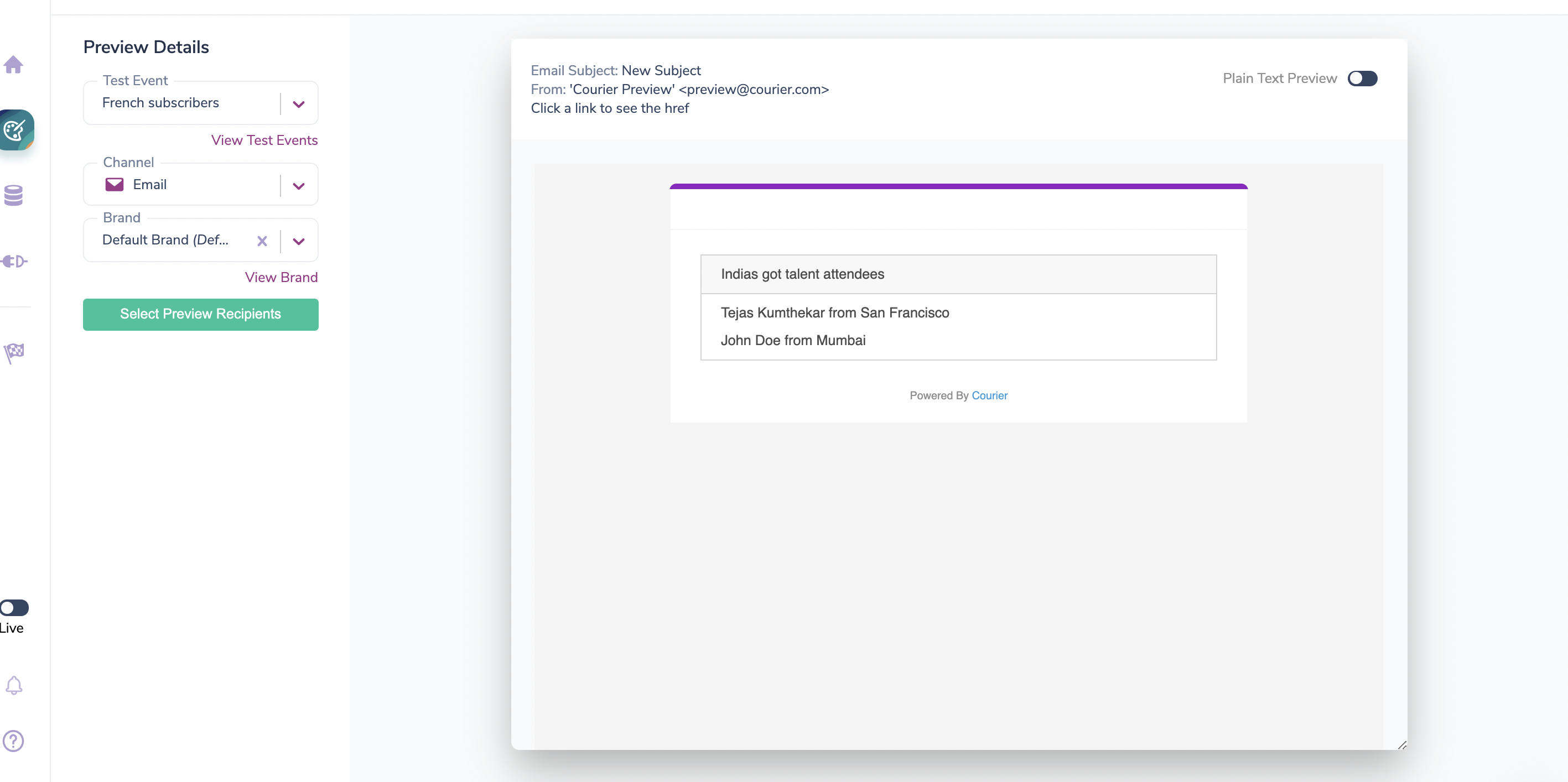 Without a locale in the test event, the preview shows the default (source) language.
## API-Driven Localization
API-driven localization is available on Business and Enterprise plans.
Courier provides APIs to programmatically manage translations, either for direct scripting or integration with a translation management system (TMS).
### Key Concepts
| Concept | Description |
| ------------ | ------------------------------------------------------------------------------------------- |
| **Blocks** | Individual content pieces (text, action, list, etc.) that can have locale-specific versions |
| **Channels** | Channel-specific content (email subject, push title) that can be localized |
| **Checksum** | MD5 hash to track content changes and manage translation workflows |
| **Locales** | Language/region codes (e.g., `fr_FR`, `de_DE`) used to store translations |
### Supported Block Types
| Block Type | Content Structure |
| ---------- | ------------------------------------------- |
| Text | Plain string with variables and highlights |
| Quote | Plain string with variables and highlights |
| Markdown | Markdown string with variables |
| Action | Button text string |
| List | Object with `parent` and `children` strings |
| Template | HTML string |
### Draft vs Published Paths
Every localization endpoint is available at two paths:
| Path style | Behavior |
| ------------------------------- | ----------------------------------------------------------------------------------------------------------- |
| `/notifications/{id}/...` | Updates the **published** template directly. Changes are live immediately. |
| `/notifications/{id}/draft/...` | Updates the **draft** version. Requires a [publish step](#publishing-draft-changes) before changes go live. |
For programmatic locale updates (scripts, CI/CD, bulk imports), the non-draft paths are simpler since they skip the publish step entirely. Use the draft paths when you need a review or approval step before translations go live, or when integrating with a TMS.
### API Endpoints
| Method | Published Path | Draft Path | Description |
| ------ | -------------------------------------------------- | -------------------------------------------------------- | --------------------------------------------------------------- |
| `GET` | `/notifications/{id}/content` | `/notifications/{id}/draft/content` | Fetch translatable content (blocks, channels, existing locales) |
| `PUT` | `/notifications/{id}/locales` | `/notifications/{id}/draft/locales` | Bulk-update locales for all blocks and channels |
| `PUT` | `/notifications/{id}/locales/{locale}` | `/notifications/{id}/draft/locales/{locale}` | Update all blocks/channels for a single locale |
| `POST` | `/notifications/{id}/blocks/{blockId}/locales` | `/notifications/{id}/draft/blocks/{blockId}/locales` | Update locales for a specific block |
| `POST` | `/notifications/{id}/channels/{channelId}/locales` | `/notifications/{id}/draft/channels/{channelId}/locales` | Update locales for a specific channel |
All endpoints require an `Authorization: Bearer {api_key}` header.
### Step 1: Fetch Translatable Content
Start by fetching your template's content to get the block and channel IDs you'll need for the update endpoints.
```bash cURL theme={null}
curl -X GET https://api.courier.com/notifications/{notification_id}/content \
-H "Authorization: Bearer $COURIER_API_KEY"
```
```javascript Node.js theme={null}
const response = await fetch(
`https://api.courier.com/notifications/${notificationId}/content`,
{ headers: { Authorization: `Bearer ${apiKey}` } }
);
const { blocks, channels } = await response.json();
```
```python Python theme={null}
import requests
response = requests.get(
f"https://api.courier.com/notifications/{notification_id}/content",
headers={"Authorization": f"Bearer {api_key}"},
)
data = response.json()
blocks = data["blocks"]
channels = data["channels"]
```
**Response:**
```json theme={null}
{
"blocks": [
{
"id": "block_43c114d9-9cfd-4340-808f-17e2fc7a4c87",
"type": "text",
"content": "Hello {name}, Welcome to Courier!",
"checksum": "fb60f2098fa407a4ff8d48e3e908d889",
"locales": {
"fr_FR": "Bonjour {name}, bienvenu à Courier!"
}
}
],
"channels": [
{
"id": "channel_456",
"type": "email",
"content": { "subject": "Welcome!" },
"checksum": "a1b2c3d4...",
"locales": {
"fr_FR": { "subject": "Bienvenue !" }
}
}
]
}
```
When updating translations, preserve the `` and `` tags with their original IDs. These are required for proper variable substitution.
### Step 2: Update Translations
Choose the approach that fits your workflow.
#### Option A: Update locales for a specific block
Use the block ID from the content response to update translations for a single block.
```bash cURL theme={null}
curl -X POST https://api.courier.com/notifications/{notification_id}/blocks/{block_id}/locales \
-H "Authorization: Bearer $COURIER_API_KEY" \
-H "Content-Type: application/json" \
-d '{
"fr_FR": "Bonjour {name}, bienvenu à Courier!",
"de_DE": "Hallo {name}, willkommen bei Courier!"
}'
```
```javascript Node.js theme={null}
await fetch(
`https://api.courier.com/notifications/${notificationId}/blocks/${blockId}/locales`,
{
method: "POST",
headers: {
Authorization: `Bearer ${apiKey}`,
"Content-Type": "application/json",
},
body: JSON.stringify({
fr_FR: 'Bonjour {name}, bienvenu à Courier!',
de_DE: 'Hallo {name}, willkommen bei Courier!',
}),
}
);
```
```python Python theme={null}
requests.post(
f"https://api.courier.com/notifications/{notification_id}/blocks/{block_id}/locales",
headers={
"Authorization": f"Bearer {api_key}",
"Content-Type": "application/json",
},
json={
"fr_FR": 'Bonjour {name}, bienvenu à Courier!',
"de_DE": 'Hallo {name}, willkommen bei Courier!',
},
)
```
Returns `204 No Content` on success.
For **list** blocks, the body uses an object with `parent` and `children` keys instead of a plain string:
```json theme={null}
{
"fr_FR": { "parent": "Éléments de la commande", "children": "{item} × {qty}" },
"de_DE": { "parent": "Bestellpositionen", "children": "{item} × {qty}" }
}
```
#### Option B: Update locales for a specific channel
Use the channel ID from the content response to update channel-level translations (e.g., email subject, push title). The body is a plain string per locale; the backend automatically maps the value to `subject` for email channels or `title` for push channels based on the channel type.
```bash cURL theme={null}
curl -X POST https://api.courier.com/notifications/{notification_id}/channels/{channel_id}/locales \
-H "Authorization: Bearer $COURIER_API_KEY" \
-H "Content-Type: application/json" \
-d '{
"fr_FR": "Bienvenue !",
"de_DE": "Willkommen!"
}'
```
```javascript Node.js theme={null}
await fetch(
`https://api.courier.com/notifications/${notificationId}/channels/${channelId}/locales`,
{
method: "POST",
headers: {
Authorization: `Bearer ${apiKey}`,
"Content-Type": "application/json",
},
body: JSON.stringify({
fr_FR: "Bienvenue !",
de_DE: "Willkommen!",
}),
}
);
```
```python Python theme={null}
requests.post(
f"https://api.courier.com/notifications/{notification_id}/channels/{channel_id}/locales",
headers={
"Authorization": f"Bearer {api_key}",
"Content-Type": "application/json",
},
json={
"fr_FR": "Bienvenue !",
"de_DE": "Willkommen!",
},
)
```
Returns `204 No Content` on success.
The per-channel endpoint takes a plain string per locale. For email channels, this sets the subject line. For push channels, it sets the title. The [bulk update endpoint](#option-c-bulk-update-all-locales-at-once) uses a different format where you specify `{ "subject": "..." }` or `{ "title": "..." }` explicitly.
#### Option C: Bulk-update all locales at once
Update translations for all blocks and channels in a single request.
```bash cURL theme={null}
curl -X PUT https://api.courier.com/notifications/{notification_id}/locales \
-H "Authorization: Bearer $COURIER_API_KEY" \
-H "Content-Type: application/json" \
-d '{
"blocks": [
{
"id": "block_43c114d9-9cfd-4340-808f-17e2fc7a4c87",
"type": "text",
"locales": {
"fr_FR": "Bonjour {name}, bienvenu à Courier!",
"de_DE": "Hallo {name}, willkommen bei Courier!"
}
}
],
"channels": [
{
"id": "channel_456",
"locales": {
"fr_FR": { "subject": "Bienvenue !" },
"de_DE": { "subject": "Willkommen!" }
}
}
]
}'
```
```javascript Node.js theme={null}
await fetch(
`https://api.courier.com/notifications/${notificationId}/locales`,
{
method: "PUT",
headers: {
Authorization: `Bearer ${apiKey}`,
"Content-Type": "application/json",
},
body: JSON.stringify({
blocks: [
{
id: "block_43c114d9-9cfd-4340-808f-17e2fc7a4c87",
type: "text",
locales: {
fr_FR: 'Bonjour {name}, bienvenu à Courier!',
de_DE: 'Hallo {name}, willkommen bei Courier!',
},
},
],
channels: [
{
id: "channel_456",
locales: {
fr_FR: { subject: "Bienvenue !" },
de_DE: { subject: "Willkommen!" },
},
},
],
}),
}
);
```
```python Python theme={null}
requests.put(
f"https://api.courier.com/notifications/{notification_id}/locales",
headers={
"Authorization": f"Bearer {api_key}",
"Content-Type": "application/json",
},
json={
"blocks": [
{
"id": "block_43c114d9-9cfd-4340-808f-17e2fc7a4c87",
"type": "text",
"locales": {
"fr_FR": 'Bonjour {name}, bienvenu à Courier!',
"de_DE": 'Hallo {name}, willkommen bei Courier!',
},
}
],
"channels": [
{
"id": "channel_456",
"locales": {
"fr_FR": {"subject": "Bienvenue !"},
"de_DE": {"subject": "Willkommen!"},
},
}
],
},
)
```
Returns `204 No Content` on success.
### Publishing Draft Changes
If you use the `/draft/` endpoints, your translations are saved to the draft version and need to be published before they take effect. Two options:
**Option 1: Direct publish** (simplest)
```bash theme={null}
curl -X POST https://api.courier.com/notifications/{notification_id}/publish \
-H "Authorization: Bearer $COURIER_API_KEY"
```
**Option 2: TMS checks workflow**
If your template was submitted for translation via the Studio UI, you can complete the submission by resolving all checks. This auto-publishes the draft when every check is resolved.
```bash theme={null}
curl -X PUT https://api.courier.com/notifications/{notification_id}/{submission_id}/checks \
-H "Authorization: Bearer $COURIER_API_KEY" \
-H "Content-Type: application/json" \
-d '{
"checks": [{ "id": "custom", "status": "RESOLVED", "type": "custom" }]
}'
```
If you don't need a review step, skip the draft paths entirely. The non-draft endpoints update the published template directly with no publish step required.
### TMS Integration Workflow
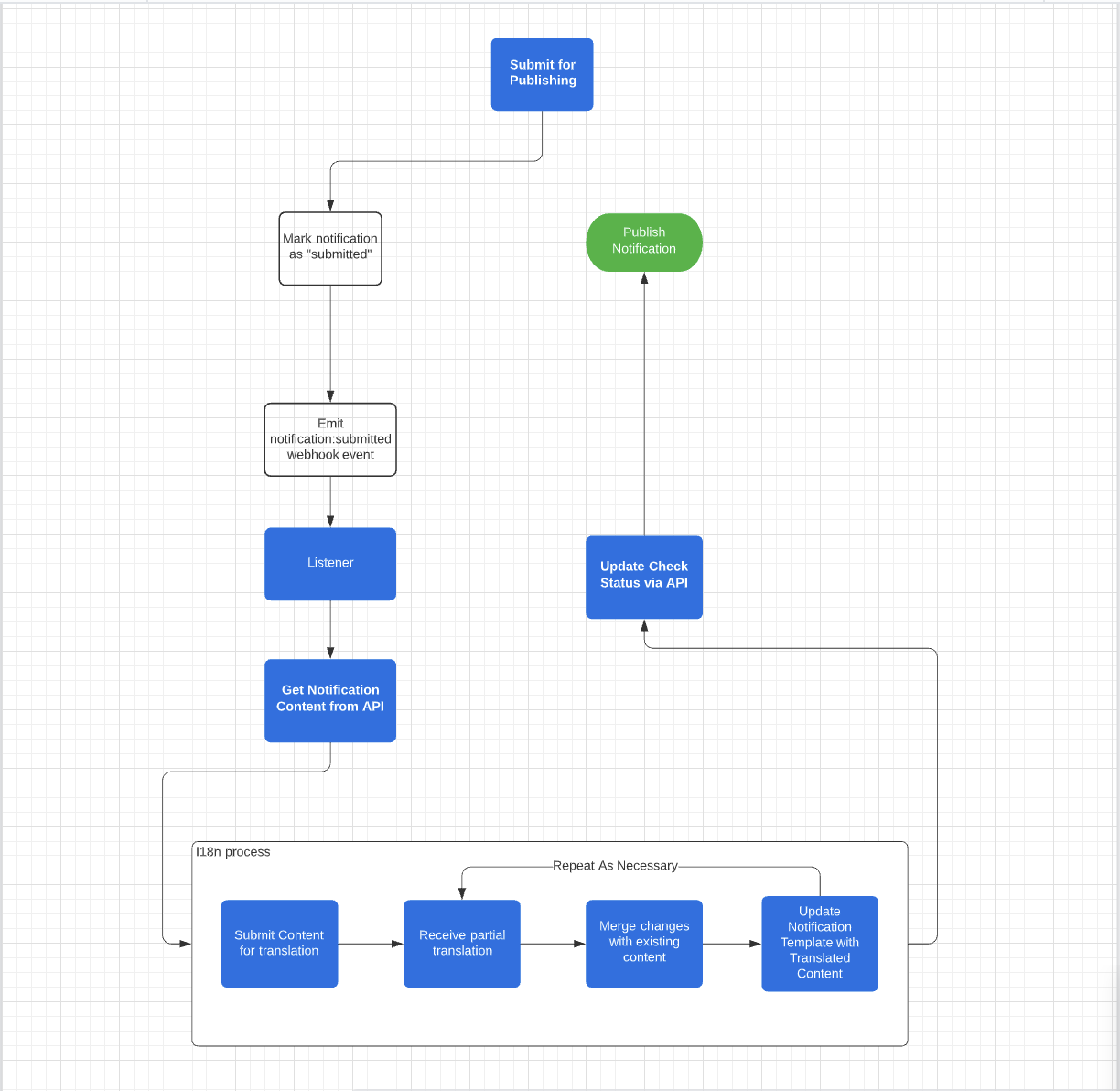
For teams using a translation management system, Courier supports a webhook-driven workflow:
1. **Submit for translation**: When a template is submitted in Studio, Courier sends a `notification:submitted` webhook
2. **Fetch content**: Your TMS fetches translatable content via `GET /notifications/{id}/draft/content`
3. **Update translations**: Push translated content back via the `/draft/` locale endpoints
4. **Complete the process**: Resolve checks via `PUT /notifications/{id}/{submissionId}/checks` to auto-publish
Without a locale in the test event, the preview shows the default (source) language.
## API-Driven Localization
API-driven localization is available on Business and Enterprise plans.
Courier provides APIs to programmatically manage translations, either for direct scripting or integration with a translation management system (TMS).
### Key Concepts
| Concept | Description |
| ------------ | ------------------------------------------------------------------------------------------- |
| **Blocks** | Individual content pieces (text, action, list, etc.) that can have locale-specific versions |
| **Channels** | Channel-specific content (email subject, push title) that can be localized |
| **Checksum** | MD5 hash to track content changes and manage translation workflows |
| **Locales** | Language/region codes (e.g., `fr_FR`, `de_DE`) used to store translations |
### Supported Block Types
| Block Type | Content Structure |
| ---------- | ------------------------------------------- |
| Text | Plain string with variables and highlights |
| Quote | Plain string with variables and highlights |
| Markdown | Markdown string with variables |
| Action | Button text string |
| List | Object with `parent` and `children` strings |
| Template | HTML string |
### Draft vs Published Paths
Every localization endpoint is available at two paths:
| Path style | Behavior |
| ------------------------------- | ----------------------------------------------------------------------------------------------------------- |
| `/notifications/{id}/...` | Updates the **published** template directly. Changes are live immediately. |
| `/notifications/{id}/draft/...` | Updates the **draft** version. Requires a [publish step](#publishing-draft-changes) before changes go live. |
For programmatic locale updates (scripts, CI/CD, bulk imports), the non-draft paths are simpler since they skip the publish step entirely. Use the draft paths when you need a review or approval step before translations go live, or when integrating with a TMS.
### API Endpoints
| Method | Published Path | Draft Path | Description |
| ------ | -------------------------------------------------- | -------------------------------------------------------- | --------------------------------------------------------------- |
| `GET` | `/notifications/{id}/content` | `/notifications/{id}/draft/content` | Fetch translatable content (blocks, channels, existing locales) |
| `PUT` | `/notifications/{id}/locales` | `/notifications/{id}/draft/locales` | Bulk-update locales for all blocks and channels |
| `PUT` | `/notifications/{id}/locales/{locale}` | `/notifications/{id}/draft/locales/{locale}` | Update all blocks/channels for a single locale |
| `POST` | `/notifications/{id}/blocks/{blockId}/locales` | `/notifications/{id}/draft/blocks/{blockId}/locales` | Update locales for a specific block |
| `POST` | `/notifications/{id}/channels/{channelId}/locales` | `/notifications/{id}/draft/channels/{channelId}/locales` | Update locales for a specific channel |
All endpoints require an `Authorization: Bearer {api_key}` header.
### Step 1: Fetch Translatable Content
Start by fetching your template's content to get the block and channel IDs you'll need for the update endpoints.
```bash cURL theme={null}
curl -X GET https://api.courier.com/notifications/{notification_id}/content \
-H "Authorization: Bearer $COURIER_API_KEY"
```
```javascript Node.js theme={null}
const response = await fetch(
`https://api.courier.com/notifications/${notificationId}/content`,
{ headers: { Authorization: `Bearer ${apiKey}` } }
);
const { blocks, channels } = await response.json();
```
```python Python theme={null}
import requests
response = requests.get(
f"https://api.courier.com/notifications/{notification_id}/content",
headers={"Authorization": f"Bearer {api_key}"},
)
data = response.json()
blocks = data["blocks"]
channels = data["channels"]
```
**Response:**
```json theme={null}
{
"blocks": [
{
"id": "block_43c114d9-9cfd-4340-808f-17e2fc7a4c87",
"type": "text",
"content": "Hello {name}, Welcome to Courier!",
"checksum": "fb60f2098fa407a4ff8d48e3e908d889",
"locales": {
"fr_FR": "Bonjour {name}, bienvenu à Courier!"
}
}
],
"channels": [
{
"id": "channel_456",
"type": "email",
"content": { "subject": "Welcome!" },
"checksum": "a1b2c3d4...",
"locales": {
"fr_FR": { "subject": "Bienvenue !" }
}
}
]
}
```
When updating translations, preserve the `` and `` tags with their original IDs. These are required for proper variable substitution.
### Step 2: Update Translations
Choose the approach that fits your workflow.
#### Option A: Update locales for a specific block
Use the block ID from the content response to update translations for a single block.
```bash cURL theme={null}
curl -X POST https://api.courier.com/notifications/{notification_id}/blocks/{block_id}/locales \
-H "Authorization: Bearer $COURIER_API_KEY" \
-H "Content-Type: application/json" \
-d '{
"fr_FR": "Bonjour {name}, bienvenu à Courier!",
"de_DE": "Hallo {name}, willkommen bei Courier!"
}'
```
```javascript Node.js theme={null}
await fetch(
`https://api.courier.com/notifications/${notificationId}/blocks/${blockId}/locales`,
{
method: "POST",
headers: {
Authorization: `Bearer ${apiKey}`,
"Content-Type": "application/json",
},
body: JSON.stringify({
fr_FR: 'Bonjour {name}, bienvenu à Courier!',
de_DE: 'Hallo {name}, willkommen bei Courier!',
}),
}
);
```
```python Python theme={null}
requests.post(
f"https://api.courier.com/notifications/{notification_id}/blocks/{block_id}/locales",
headers={
"Authorization": f"Bearer {api_key}",
"Content-Type": "application/json",
},
json={
"fr_FR": 'Bonjour {name}, bienvenu à Courier!',
"de_DE": 'Hallo {name}, willkommen bei Courier!',
},
)
```
Returns `204 No Content` on success.
For **list** blocks, the body uses an object with `parent` and `children` keys instead of a plain string:
```json theme={null}
{
"fr_FR": { "parent": "Éléments de la commande", "children": "{item} × {qty}" },
"de_DE": { "parent": "Bestellpositionen", "children": "{item} × {qty}" }
}
```
#### Option B: Update locales for a specific channel
Use the channel ID from the content response to update channel-level translations (e.g., email subject, push title). The body is a plain string per locale; the backend automatically maps the value to `subject` for email channels or `title` for push channels based on the channel type.
```bash cURL theme={null}
curl -X POST https://api.courier.com/notifications/{notification_id}/channels/{channel_id}/locales \
-H "Authorization: Bearer $COURIER_API_KEY" \
-H "Content-Type: application/json" \
-d '{
"fr_FR": "Bienvenue !",
"de_DE": "Willkommen!"
}'
```
```javascript Node.js theme={null}
await fetch(
`https://api.courier.com/notifications/${notificationId}/channels/${channelId}/locales`,
{
method: "POST",
headers: {
Authorization: `Bearer ${apiKey}`,
"Content-Type": "application/json",
},
body: JSON.stringify({
fr_FR: "Bienvenue !",
de_DE: "Willkommen!",
}),
}
);
```
```python Python theme={null}
requests.post(
f"https://api.courier.com/notifications/{notification_id}/channels/{channel_id}/locales",
headers={
"Authorization": f"Bearer {api_key}",
"Content-Type": "application/json",
},
json={
"fr_FR": "Bienvenue !",
"de_DE": "Willkommen!",
},
)
```
Returns `204 No Content` on success.
The per-channel endpoint takes a plain string per locale. For email channels, this sets the subject line. For push channels, it sets the title. The [bulk update endpoint](#option-c-bulk-update-all-locales-at-once) uses a different format where you specify `{ "subject": "..." }` or `{ "title": "..." }` explicitly.
#### Option C: Bulk-update all locales at once
Update translations for all blocks and channels in a single request.
```bash cURL theme={null}
curl -X PUT https://api.courier.com/notifications/{notification_id}/locales \
-H "Authorization: Bearer $COURIER_API_KEY" \
-H "Content-Type: application/json" \
-d '{
"blocks": [
{
"id": "block_43c114d9-9cfd-4340-808f-17e2fc7a4c87",
"type": "text",
"locales": {
"fr_FR": "Bonjour {name}, bienvenu à Courier!",
"de_DE": "Hallo {name}, willkommen bei Courier!"
}
}
],
"channels": [
{
"id": "channel_456",
"locales": {
"fr_FR": { "subject": "Bienvenue !" },
"de_DE": { "subject": "Willkommen!" }
}
}
]
}'
```
```javascript Node.js theme={null}
await fetch(
`https://api.courier.com/notifications/${notificationId}/locales`,
{
method: "PUT",
headers: {
Authorization: `Bearer ${apiKey}`,
"Content-Type": "application/json",
},
body: JSON.stringify({
blocks: [
{
id: "block_43c114d9-9cfd-4340-808f-17e2fc7a4c87",
type: "text",
locales: {
fr_FR: 'Bonjour {name}, bienvenu à Courier!',
de_DE: 'Hallo {name}, willkommen bei Courier!',
},
},
],
channels: [
{
id: "channel_456",
locales: {
fr_FR: { subject: "Bienvenue !" },
de_DE: { subject: "Willkommen!" },
},
},
],
}),
}
);
```
```python Python theme={null}
requests.put(
f"https://api.courier.com/notifications/{notification_id}/locales",
headers={
"Authorization": f"Bearer {api_key}",
"Content-Type": "application/json",
},
json={
"blocks": [
{
"id": "block_43c114d9-9cfd-4340-808f-17e2fc7a4c87",
"type": "text",
"locales": {
"fr_FR": 'Bonjour {name}, bienvenu à Courier!',
"de_DE": 'Hallo {name}, willkommen bei Courier!',
},
}
],
"channels": [
{
"id": "channel_456",
"locales": {
"fr_FR": {"subject": "Bienvenue !"},
"de_DE": {"subject": "Willkommen!"},
},
}
],
},
)
```
Returns `204 No Content` on success.
### Publishing Draft Changes
If you use the `/draft/` endpoints, your translations are saved to the draft version and need to be published before they take effect. Two options:
**Option 1: Direct publish** (simplest)
```bash theme={null}
curl -X POST https://api.courier.com/notifications/{notification_id}/publish \
-H "Authorization: Bearer $COURIER_API_KEY"
```
**Option 2: TMS checks workflow**
If your template was submitted for translation via the Studio UI, you can complete the submission by resolving all checks. This auto-publishes the draft when every check is resolved.
```bash theme={null}
curl -X PUT https://api.courier.com/notifications/{notification_id}/{submission_id}/checks \
-H "Authorization: Bearer $COURIER_API_KEY" \
-H "Content-Type: application/json" \
-d '{
"checks": [{ "id": "custom", "status": "RESOLVED", "type": "custom" }]
}'
```
If you don't need a review step, skip the draft paths entirely. The non-draft endpoints update the published template directly with no publish step required.
### TMS Integration Workflow
For teams using a translation management system, Courier supports a webhook-driven workflow:
1. **Submit for translation**: When a template is submitted in Studio, Courier sends a `notification:submitted` webhook
2. **Fetch content**: Your TMS fetches translatable content via `GET /notifications/{id}/draft/content`
3. **Update translations**: Push translated content back via the `/draft/` locale endpoints
4. **Complete the process**: Resolve checks via `PUT /notifications/{id}/{submissionId}/checks` to auto-publish
 ### Webhooks
Configure webhooks in **Settings → Webhooks** to receive events for the TMS workflow:
* `notification:submitted` — Template submitted for translation
* `notification:published` — Template published
* `notification:canceled` — Submission canceled
## Right-to-Left (RTL) Language Support
Courier automatically detects RTL content in email templates and applies `direction: rtl` CSS styling at the block level. When a text block contains content in an RTL language like Arabic or Hebrew, Courier switches alignment from left to right and sets the text direction. This is content-driven; you don't need to set a `dir` attribute or add custom CSS.
RTL detection applies to text, quote, markdown, and list blocks. Text blocks get full treatment (direction and alignment), while other block types receive the `direction: rtl` style. Action buttons do not include RTL detection.
If you use a [custom brand template override](/platform/content/brands/brand-designer#custom-mjml%2Fhandlebars-template), you may need to add `.text-rtl { direction: rtl; }` to your brand's custom head styles. The built-in email templates (line, none, inbox) include this by default.
## What's Next
Step-by-step tutorial for sending multi-language notifications.
Localize Elemental templates programmatically.
Route to channels based on locale.
Format dates and numbers for locales.
### Webhooks
Configure webhooks in **Settings → Webhooks** to receive events for the TMS workflow:
* `notification:submitted` — Template submitted for translation
* `notification:published` — Template published
* `notification:canceled` — Submission canceled
## Right-to-Left (RTL) Language Support
Courier automatically detects RTL content in email templates and applies `direction: rtl` CSS styling at the block level. When a text block contains content in an RTL language like Arabic or Hebrew, Courier switches alignment from left to right and sets the text direction. This is content-driven; you don't need to set a `dir` attribute or add custom CSS.
RTL detection applies to text, quote, markdown, and list blocks. Text blocks get full treatment (direction and alignment), while other block types receive the `direction: rtl` style. Action buttons do not include RTL detection.
If you use a [custom brand template override](/platform/content/brands/brand-designer#custom-mjml%2Fhandlebars-template), you may need to add `.text-rtl { direction: rtl; }` to your brand's custom head styles. The built-in email templates (line, none, inbox) include this by default.
## What's Next
Step-by-step tutorial for sending multi-language notifications.
Localize Elemental templates programmatically.
Route to channels based on locale.
Format dates and numbers for locales.