> ## Documentation Index
> Fetch the complete documentation index at: https://www.courier.com/docs/llms.txt
> Use this file to discover all available pages before exploring further.
# Jsonnet Webhook Designer
> Configure custom webhook payloads using Jsonnet with access to send data, profile, and request metadata.
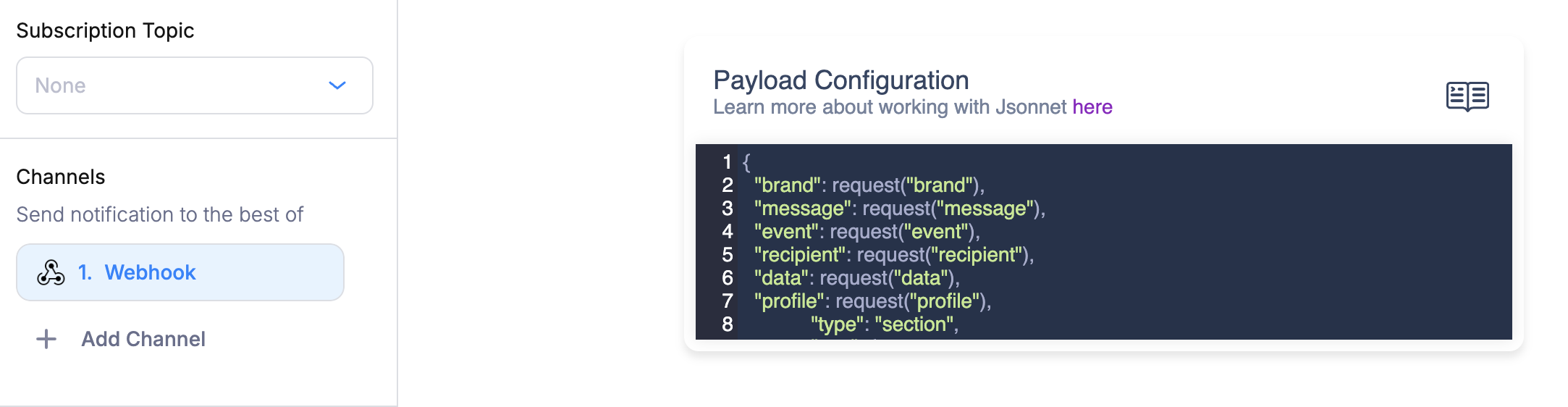
The Webhook Designer lets you define the JSON payload Courier sends to your [Webhook integration](/external-integrations/other/webhook-integration) using a [Jsonnet](https://jsonnet.org/) code editor. You can build dynamic payloads that pull from your send data, recipient profile, and request metadata.
 ## Setting Up Your Webhook Destination
Courier needs a destination URL to deliver webhook requests. You have two options:
* **Static destination**: Go to [Settings](https://app.courier.com/settings), scroll to **Outbound Webhooks**, and add a webhook with the URL and auth type.
* **Dynamic destination**: Pass the URL per recipient via the `webhook` profile property. See the [Webhook integration docs](/external-integrations/other/webhook-integration) for details.
## Default Payload
If you don't define a custom Jsonnet template, Courier sends this default payload:
```jsonnet theme={null}
{
"brand": request("brand"),
"message": request("message"),
"event": request("event"),
"recipient": request("recipient"),
"data": request("data"),
"profile": request("profile"),
}
```
This includes the full data and profile objects from your send request, plus metadata like message ID and template name.
## Available Functions and Variables
The Jsonnet editor provides these built-in functions for accessing your notification context:
| Function | Description | Example |
| --------------------------- | ----------------------------------------------------------------------------------- | ------------------------ |
| `data("path")` | Access a value from the send request's `data` object | `data("order.total")` |
| `profile("path")` | Access a value from the recipient's profile | `profile("email")` |
| `request("path")` | Access request metadata (brand, message, event, recipient, data, profile, template) | `request("message")` |
| `t("key", default, locale)` | Resolve a translation from the data object | `t("greeting", "Hello")` |
| `chunk(str, size)` | Split a string into chunks of a given size | `chunk(longText, 40)` |
These scalar variables are also available directly:
| Variable | Description |
| ----------- | ------------------------------------------ |
| `brand` | The brand ID |
| `message` | The message ID |
| `recipient` | The recipient ID |
| `event` | The event associated with the notification |
| `template` | The template name |
All standard [Jsonnet `std` library functions](https://jsonnet.org/ref/stdlib.html) are also available (e.g., `std.length()`, `std.join()`, `std.format()`).
## Writing a Custom Payload
Your Jsonnet template must evaluate to a JSON object. Use `data()` and `profile()` to pull values from the send request.
Here's an example that builds a custom payload for an order confirmation webhook:
```jsonnet theme={null}
{
"event_type": "order.confirmed",
"customer": {
"id": data("customer.id"),
"email": profile("email"),
"name": profile("name"),
},
"order": {
"id": data("order.id"),
"total": data("order.total"),
"currency": data("order.currency"),
"items": data("order.items"),
},
"metadata": {
"courier_message_id": message,
"template": template,
},
}
```
Given this send request:
```json theme={null}
{
"message": {
"template": "ORDER_CONFIRMED",
"to": { "user_id": "user_123" },
"data": {
"customer": { "id": "cust_456" },
"order": {
"id": "ord_789",
"total": 99.99,
"currency": "USD",
"items": [{ "name": "Widget", "qty": 2 }]
}
}
}
}
```
Courier would deliver this payload to your webhook URL:
```json theme={null}
{
"event_type": "order.confirmed",
"customer": {
"id": "cust_456",
"email": "jane@example.com",
"name": "Jane Doe"
},
"order": {
"id": "ord_789",
"total": 99.99,
"currency": "USD",
"items": [{ "name": "Widget", "qty": 2 }]
},
"metadata": {
"courier_message_id": "1-abc123...",
"template": "ORDER_CONFIRMED"
}
}
```
## Conditional Logic
Jsonnet supports conditionals, which let you vary the payload based on your data:
```jsonnet theme={null}
{
"event_type": "user.action",
"priority": if data("is_urgent") then "high" else "normal",
"channel": data("channel"),
} + if data("include_debug") then {
"debug": {
"message_id": message,
"recipient": recipient,
},
} else {}
```
## Nested Path Access
The `data()` and `profile()` functions support dot-separated paths to access nested values:
```jsonnet theme={null}
{
"city": profile("address.city"),
"plan": data("customer.plan.name"),
"first_item": data("order.items.0.name"),
}
```
If a path doesn't exist, the function returns `null` by default. You can provide a fallback as the second argument:
```jsonnet theme={null}
{
"name": profile("name", "Unknown User"),
"locale": profile("locale", "en_US"),
}
```
Set up static or dynamic webhook destinations and authentication.
Use Jsonnet for Slack Block Kit and Teams Adaptive Cards.
## Setting Up Your Webhook Destination
Courier needs a destination URL to deliver webhook requests. You have two options:
* **Static destination**: Go to [Settings](https://app.courier.com/settings), scroll to **Outbound Webhooks**, and add a webhook with the URL and auth type.
* **Dynamic destination**: Pass the URL per recipient via the `webhook` profile property. See the [Webhook integration docs](/external-integrations/other/webhook-integration) for details.
## Default Payload
If you don't define a custom Jsonnet template, Courier sends this default payload:
```jsonnet theme={null}
{
"brand": request("brand"),
"message": request("message"),
"event": request("event"),
"recipient": request("recipient"),
"data": request("data"),
"profile": request("profile"),
}
```
This includes the full data and profile objects from your send request, plus metadata like message ID and template name.
## Available Functions and Variables
The Jsonnet editor provides these built-in functions for accessing your notification context:
| Function | Description | Example |
| --------------------------- | ----------------------------------------------------------------------------------- | ------------------------ |
| `data("path")` | Access a value from the send request's `data` object | `data("order.total")` |
| `profile("path")` | Access a value from the recipient's profile | `profile("email")` |
| `request("path")` | Access request metadata (brand, message, event, recipient, data, profile, template) | `request("message")` |
| `t("key", default, locale)` | Resolve a translation from the data object | `t("greeting", "Hello")` |
| `chunk(str, size)` | Split a string into chunks of a given size | `chunk(longText, 40)` |
These scalar variables are also available directly:
| Variable | Description |
| ----------- | ------------------------------------------ |
| `brand` | The brand ID |
| `message` | The message ID |
| `recipient` | The recipient ID |
| `event` | The event associated with the notification |
| `template` | The template name |
All standard [Jsonnet `std` library functions](https://jsonnet.org/ref/stdlib.html) are also available (e.g., `std.length()`, `std.join()`, `std.format()`).
## Writing a Custom Payload
Your Jsonnet template must evaluate to a JSON object. Use `data()` and `profile()` to pull values from the send request.
Here's an example that builds a custom payload for an order confirmation webhook:
```jsonnet theme={null}
{
"event_type": "order.confirmed",
"customer": {
"id": data("customer.id"),
"email": profile("email"),
"name": profile("name"),
},
"order": {
"id": data("order.id"),
"total": data("order.total"),
"currency": data("order.currency"),
"items": data("order.items"),
},
"metadata": {
"courier_message_id": message,
"template": template,
},
}
```
Given this send request:
```json theme={null}
{
"message": {
"template": "ORDER_CONFIRMED",
"to": { "user_id": "user_123" },
"data": {
"customer": { "id": "cust_456" },
"order": {
"id": "ord_789",
"total": 99.99,
"currency": "USD",
"items": [{ "name": "Widget", "qty": 2 }]
}
}
}
}
```
Courier would deliver this payload to your webhook URL:
```json theme={null}
{
"event_type": "order.confirmed",
"customer": {
"id": "cust_456",
"email": "jane@example.com",
"name": "Jane Doe"
},
"order": {
"id": "ord_789",
"total": 99.99,
"currency": "USD",
"items": [{ "name": "Widget", "qty": 2 }]
},
"metadata": {
"courier_message_id": "1-abc123...",
"template": "ORDER_CONFIRMED"
}
}
```
## Conditional Logic
Jsonnet supports conditionals, which let you vary the payload based on your data:
```jsonnet theme={null}
{
"event_type": "user.action",
"priority": if data("is_urgent") then "high" else "normal",
"channel": data("channel"),
} + if data("include_debug") then {
"debug": {
"message_id": message,
"recipient": recipient,
},
} else {}
```
## Nested Path Access
The `data()` and `profile()` functions support dot-separated paths to access nested values:
```jsonnet theme={null}
{
"city": profile("address.city"),
"plan": data("customer.plan.name"),
"first_item": data("order.items.0.name"),
}
```
If a path doesn't exist, the function returns `null` by default. You can provide a fallback as the second argument:
```jsonnet theme={null}
{
"name": profile("name", "Unknown User"),
"locale": profile("locale", "en_US"),
}
```
Set up static or dynamic webhook destinations and authentication.
Use Jsonnet for Slack Block Kit and Teams Adaptive Cards.