> ## Documentation Index
> Fetch the complete documentation index at: https://www.courier.com/docs/llms.txt
> Use this file to discover all available pages before exploring further.
# Customizing Email Address Fields
> Set `From`, `Reply-To`, `CC`, and `BCC` addresses per notification or through provider defaults.
You can set email address fields globally in provider integration settings or per notification in email channel settings.
`Reply-To`, `CC`, and `BCC` are configured per notification in channel settings.
If you're sending with [inline content](/platform/content/elemental/elemental-overview) or need to set these fields programmatically at send time, you can use `message.channels.email.override` in the Send request instead. See [Email Channel Overrides](/external-integrations/email/intro-to-email#available-channel-override-fields) for the full field reference.
## Setting the 'From' Name and Email Address
You can set the 'From' name and email address for email notifications in two ways:
1. The default provider integration settings
2. On a per-channel basis using the email channel settings.
Channel settings always override provider defaults for the notification and channel where they are set.
## Setting Default Address Fields in the Integration Settings
By default, email notifications use the `from` name and `email` address set in your provider integration settings.
Some providers expose both `From Email Address` and `From Name` fields.
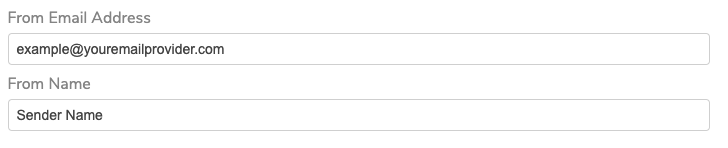 If your provider integration settings do not include a Sender Name field, use `Sender Name ` in the `from` value.
 ### Overriding the Default From Name and Email Via Channel Settings
To override provider defaults for one notification, open [channel settings](/platform/sending/channel-settings) and set a channel-level `from` value.
### Overriding the Default From Name and Email Via Channel Settings
To override provider defaults for one notification, open [channel settings](/platform/sending/channel-settings) and set a channel-level `from` value.
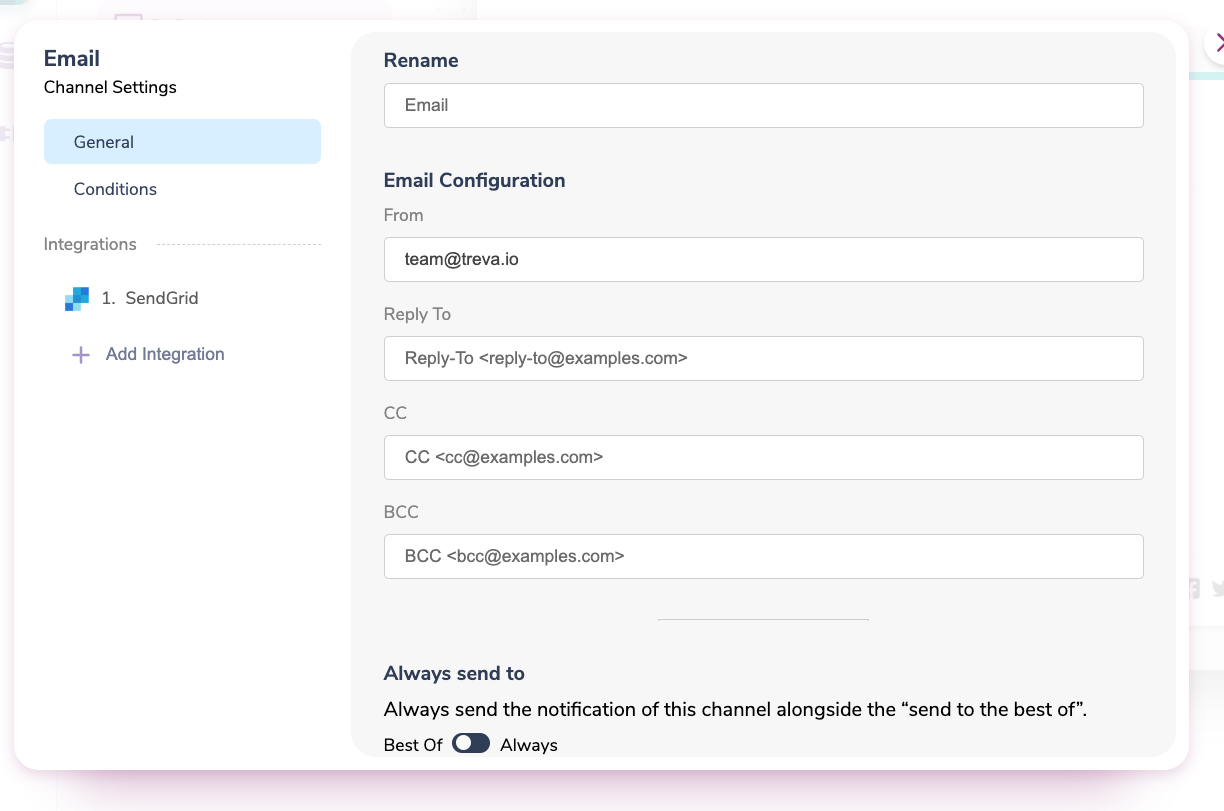
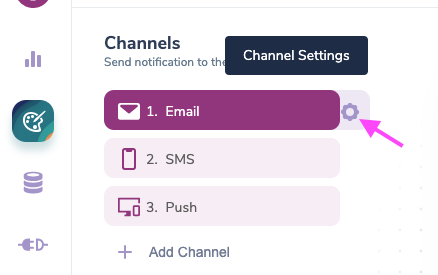 In channel settings, use the email configuration fields to set the `From` address.
Use the `Sender Name ` format to define a name.
## Setting the 'Reply To', 'CC' and 'BCC' Addresses
To set the `Reply To`, `CC` and `BCC` addresses, open the email channel settings and add your email addresses into the corresponding fields.
You can use [variables](/platform/content/variables/inserting-variables) to dynamically set any of these email addresses.
In channel settings, use the email configuration fields to set the `From` address.
Use the `Sender Name ` format to define a name.
## Setting the 'Reply To', 'CC' and 'BCC' Addresses
To set the `Reply To`, `CC` and `BCC` addresses, open the email channel settings and add your email addresses into the corresponding fields.
You can use [variables](/platform/content/variables/inserting-variables) to dynamically set any of these email addresses.
 ## What's Next
Configure channel-level send rules, conditions, and integrations.
Control when notifications, channels, and blocks are disabled.
Manage template identity, mapping, tags, and publishing.
Stop channel sends when required variables are unresolved.
## What's Next
Configure channel-level send rules, conditions, and integrations.
Control when notifications, channels, and blocks are disabled.
Manage template identity, mapping, tags, and publishing.
Stop channel sends when required variables are unresolved.