> ## Documentation Index
> Fetch the complete documentation index at: https://www.courier.com/docs/llms.txt
> Use this file to discover all available pages before exploring further.
# Authenticate Courier Inbox SDKs
> Courier Inbox and toasts use JWTs to authenticate. This guide details the JWT flow and how to test it for your app.
[Courier Inbox](/platform/inbox/inbox-overview) and [Toasts](/platform/inbox/notify-with-toasts) use the same JWT-based authentication and scopes, since both connect to the same message feed. If you've already set up authentication for either, you can skip this step.
## JSON Web Tokens (JWT) Authentication
[JWTs](https://www.jwt.io/introduction) are short-lived, signed tokens used to securely authenticate and authorize connections from Courier SDKs to the Courier backend. They are the recommended authentication method in all cases.
JWT generation requires a private key which is unique to your Courier workspace, and should only be accessed in secure environments such as your backend server. A typical production JWT generation flow might look like this:
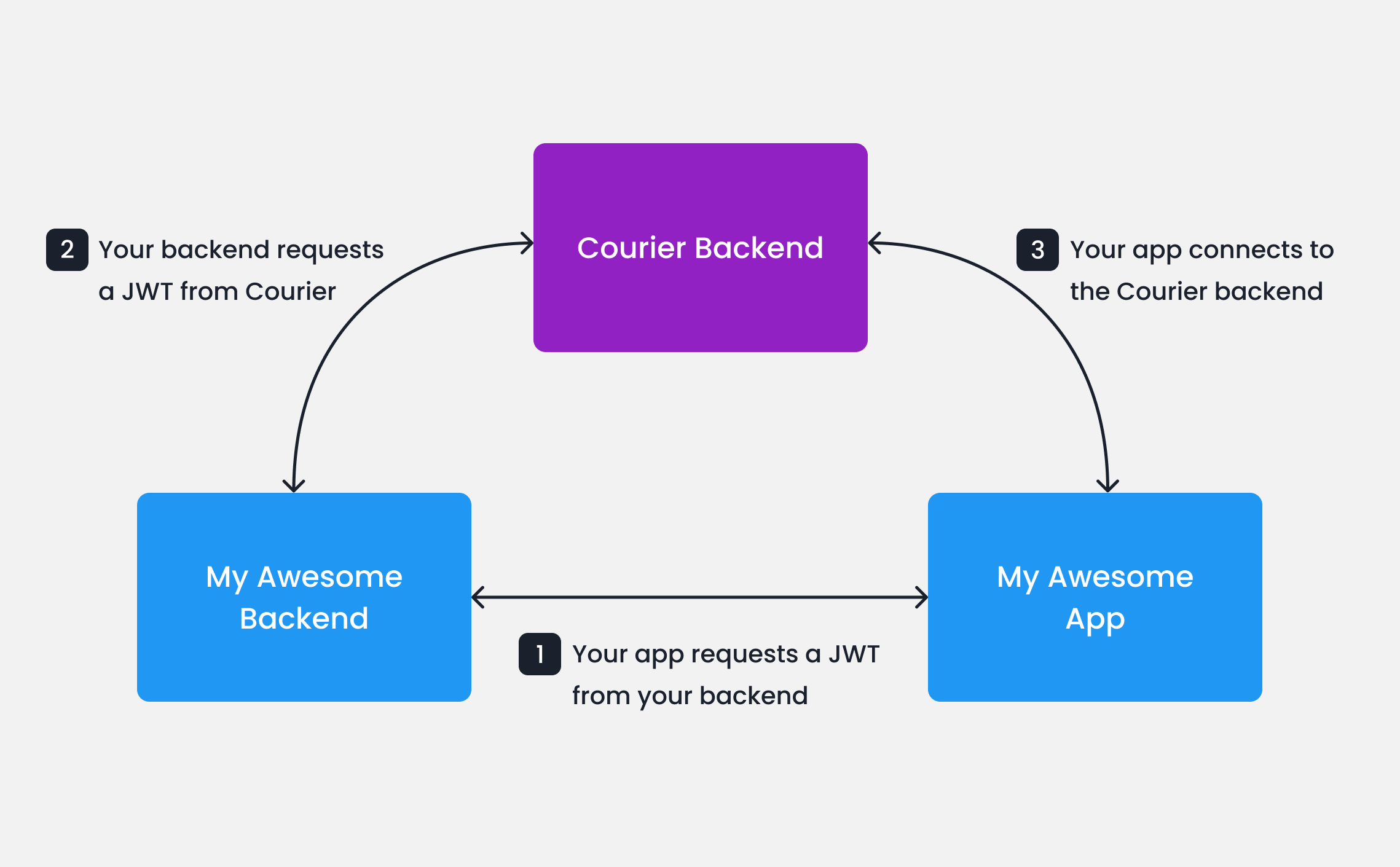 When your app needs to authenticate a user, your app
should make a request to your own backend (ex. `GET https://my-awesome-app.com/api/generate-courier-jwt`).
In your backend, use your [Courier API Key](/platform/workspaces/environments-api-keys/) to call the [Courier Issue Token Endpoint](/api-reference/authentication/create-a-jwt) and generate a JWT for the user.
Having received the JWT from Courier, your backend should return it to your app and pass it to the Courier SDK.
The JWT can be supplied to the Courier client at initialization time. See the docs for each SDK for detailed instructions and examples:
* [React](/sdk-libraries/courier-react-web)
* [Web Components](/sdk-libraries/courier-ui-inbox-web)
* [iOS](/sdk-libraries/ios#authentication)
* [Android](/sdk-libraries/android#authentication)
* [Flutter](/sdk-libraries/flutter#authentication)
* [React Native](/sdk-libraries/react-native#authentication)
#### Testing JWTs in Development
To quickly get up and running with JWTs in development, you can use cURL to call the [Courier Issue Token Endpoint](/api-reference/authentication/create-a-jwt) directly.
```bash wrap theme={null}
curl --request POST \
--url https://api.courier.com/auth/issue-token \
--header 'Accept: application/json' \
--header 'Authorization: Bearer $YOUR_API_KEY' \
--header 'Content-Type: application/json' \
--data \
'{
"scope": "user_id:$YOUR_USER_ID write:user-tokens inbox:read:messages inbox:write:events read:preferences write:preferences read:brands",
"expires_in": "$YOUR_NUMBER days"
}'
```
Looking for backend code examples for generating JWTs? Check out the [courier-samples](https://github.com/trycourier/courier-samples) repository for straightforward SDK implementations in popular languages and frameworks, such as [Node.js](https://github.com/trycourier/courier-samples/tree/main/server/node#generate-jwt), [Python](https://github.com/trycourier/courier-samples/tree/main/server/python#generate-jwt), [Ruby](https://github.com/trycourier/courier-samples/tree/main/server/ruby#generate-jwt), and more.
## Client Key and HMAC Authentication (Deprecated)
Earlier versions of the Courier web SDKs support client key authentication with or without an HMAC signature.
The latest versions (`@trycourier/courier-react` v8+ and `@trycourier/courier-ui-inbox` v1+) remove this support.
We recommend upgrading to the latest SDKs and updating existing integrations
to use JWT authentication.
HMAC authentication adds a hash-based code to the request to verify its authenticity.
For requests to the Courier backend, the HMAC is a hash of the `userId` and your Courier API Key.
```ts hmac.ts theme={null}
import crypto from "crypto";
const userSignature =
crypto
.createHmac("sha256", courierApiKey)
.update(userId)
.digest("hex");
```
Always keep your Courier API keys private. Do not generate HMAC signatures in client-side code.
## Troubleshooting
### JWT errors
**Messages not loading (401 or empty Inbox)**
The most common cause is an expired token or missing scopes. Decode your JWT at [jwt.io](https://jwt.io) and check:
* **`exp`** -- is the expiration in the future? Tokens with short `expires_in` values can silently expire between page loads. If your users keep sessions open for long periods, add a refresh mechanism that requests a new token before the current one expires.
* **`scope`** -- does it include `inbox:read:messages` and `inbox:write:events`? Without these, the SDK connects successfully but returns no messages. A minimal working scope string looks like:
```
user_id: inbox:read:messages inbox:write:events
```
Add `read:preferences write:preferences` if you use the embedded [Preferences editor](/platform/preferences/preferences-overview), and `write:user-tokens` if you sync push tokens from the client.
### Cross-channel read sync
When cross-channel sync is enabled, reading a message in one channel (for example, opening an email) marks the corresponding Inbox message as read. This relies on a tracking pixel embedded in the email body.
If your users' email clients block tracking pixels (common in corporate environments with strict privacy policies), the read event never fires and the Inbox message stays unread. There is no workaround on the email side; you can call the [Messages API](/api-reference/sent-messages/archive-message) to mark messages read programmatically if needed.
To disable cross-channel sync entirely, enable `optOutOfInboxSync` in your Courier Inbox provider settings. This keeps Inbox message state independent of other channels.
## Next Steps
Courier SDKs are available for React, Web Components, React Native, Flutter, iOS, and Android.
Start sending notifications
When your app needs to authenticate a user, your app
should make a request to your own backend (ex. `GET https://my-awesome-app.com/api/generate-courier-jwt`).
In your backend, use your [Courier API Key](/platform/workspaces/environments-api-keys/) to call the [Courier Issue Token Endpoint](/api-reference/authentication/create-a-jwt) and generate a JWT for the user.
Having received the JWT from Courier, your backend should return it to your app and pass it to the Courier SDK.
The JWT can be supplied to the Courier client at initialization time. See the docs for each SDK for detailed instructions and examples:
* [React](/sdk-libraries/courier-react-web)
* [Web Components](/sdk-libraries/courier-ui-inbox-web)
* [iOS](/sdk-libraries/ios#authentication)
* [Android](/sdk-libraries/android#authentication)
* [Flutter](/sdk-libraries/flutter#authentication)
* [React Native](/sdk-libraries/react-native#authentication)
#### Testing JWTs in Development
To quickly get up and running with JWTs in development, you can use cURL to call the [Courier Issue Token Endpoint](/api-reference/authentication/create-a-jwt) directly.
```bash wrap theme={null}
curl --request POST \
--url https://api.courier.com/auth/issue-token \
--header 'Accept: application/json' \
--header 'Authorization: Bearer $YOUR_API_KEY' \
--header 'Content-Type: application/json' \
--data \
'{
"scope": "user_id:$YOUR_USER_ID write:user-tokens inbox:read:messages inbox:write:events read:preferences write:preferences read:brands",
"expires_in": "$YOUR_NUMBER days"
}'
```
Looking for backend code examples for generating JWTs? Check out the [courier-samples](https://github.com/trycourier/courier-samples) repository for straightforward SDK implementations in popular languages and frameworks, such as [Node.js](https://github.com/trycourier/courier-samples/tree/main/server/node#generate-jwt), [Python](https://github.com/trycourier/courier-samples/tree/main/server/python#generate-jwt), [Ruby](https://github.com/trycourier/courier-samples/tree/main/server/ruby#generate-jwt), and more.
## Client Key and HMAC Authentication (Deprecated)
Earlier versions of the Courier web SDKs support client key authentication with or without an HMAC signature.
The latest versions (`@trycourier/courier-react` v8+ and `@trycourier/courier-ui-inbox` v1+) remove this support.
We recommend upgrading to the latest SDKs and updating existing integrations
to use JWT authentication.
HMAC authentication adds a hash-based code to the request to verify its authenticity.
For requests to the Courier backend, the HMAC is a hash of the `userId` and your Courier API Key.
```ts hmac.ts theme={null}
import crypto from "crypto";
const userSignature =
crypto
.createHmac("sha256", courierApiKey)
.update(userId)
.digest("hex");
```
Always keep your Courier API keys private. Do not generate HMAC signatures in client-side code.
## Troubleshooting
### JWT errors
**Messages not loading (401 or empty Inbox)**
The most common cause is an expired token or missing scopes. Decode your JWT at [jwt.io](https://jwt.io) and check:
* **`exp`** -- is the expiration in the future? Tokens with short `expires_in` values can silently expire between page loads. If your users keep sessions open for long periods, add a refresh mechanism that requests a new token before the current one expires.
* **`scope`** -- does it include `inbox:read:messages` and `inbox:write:events`? Without these, the SDK connects successfully but returns no messages. A minimal working scope string looks like:
```
user_id: inbox:read:messages inbox:write:events
```
Add `read:preferences write:preferences` if you use the embedded [Preferences editor](/platform/preferences/preferences-overview), and `write:user-tokens` if you sync push tokens from the client.
### Cross-channel read sync
When cross-channel sync is enabled, reading a message in one channel (for example, opening an email) marks the corresponding Inbox message as read. This relies on a tracking pixel embedded in the email body.
If your users' email clients block tracking pixels (common in corporate environments with strict privacy policies), the read event never fires and the Inbox message stays unread. There is no workaround on the email side; you can call the [Messages API](/api-reference/sent-messages/archive-message) to mark messages read programmatically if needed.
To disable cross-channel sync entirely, enable `optOutOfInboxSync` in your Courier Inbox provider settings. This keeps Inbox message state independent of other channels.
## Next Steps
Courier SDKs are available for React, Web Components, React Native, Flutter, iOS, and Android.
Start sending notifications