> ## Documentation Index
> Fetch the complete documentation index at: https://www.courier.com/docs/llms.txt
> Use this file to discover all available pages before exploring further.
# Build Journeys via UI
> Compose journeys from triggers, send nodes, and function nodes: branch, delay, fetch data, throttle, and AI.
Beyond [send nodes](/platform/journeys/channels) and [triggers](/platform/journeys/invocation), journeys support five function nodes that add logic and orchestration to your workflows.
## Canvas Basics
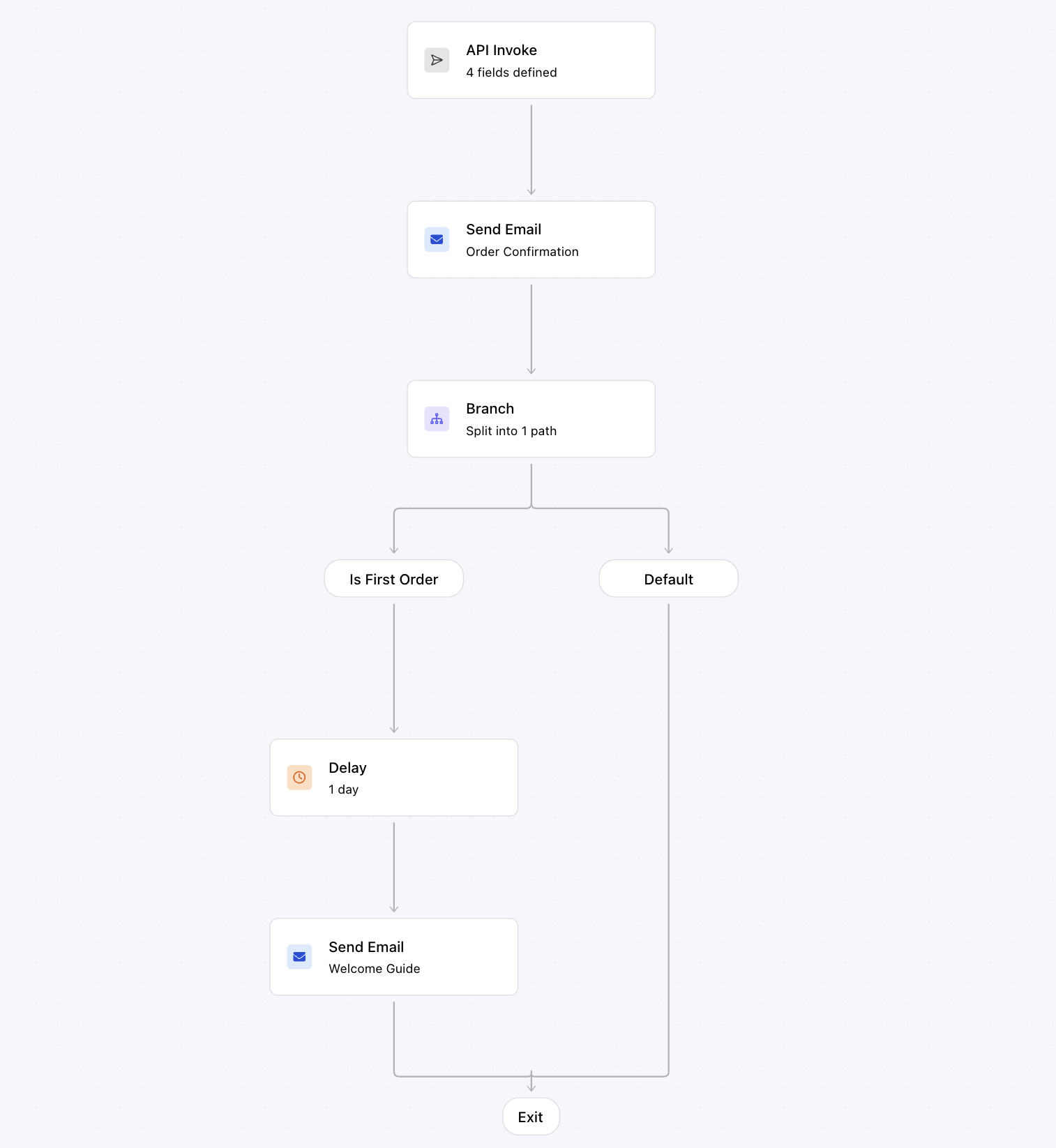
The journey editor is a visual canvas. Nodes are connected by edges that define execution order. You build a journey by dragging nodes from the palette, dropping them onto edges, and configuring each node in its side panel.
Execution flows top-to-bottom. When the trigger fires, the journey evaluates each node in sequence. Branch nodes can split execution into multiple paths; all other nodes have a single output.
 ## Node Types
The palette offers two categories of nodes: **channels** (send nodes for each configured provider) and **functions** (logic and orchestration).
### Channel Nodes
Channel nodes deliver messages. Each one targets a specific channel and is linked to a [journey template](/platform/journeys/journey-templates). See [Channels & Send](/platform/journeys/channels) for configuration details.
### Function Nodes
| Node | What it does | Reference |
| ----------------------------------------------------- | -------------------------------------------------------------------------------------------------------------------------------------------------- | ----------------------------------------------------------- |
| [**Branch**](/platform/journeys/nodes/branch) | Split the journey into multiple conditional paths. The first path whose conditions are met executes; unmatched runs take the Default path. | [Branch reference](/platform/journeys/nodes/branch) |
| [**Delay**](/platform/journeys/nodes/delay) | Pause execution for a fixed duration or until a specific time. Use it to space out messages or wait for user action. | [Delay reference](/platform/journeys/nodes/delay) |
| [**Fetch Data**](/platform/journeys/nodes/fetch-data) | Make HTTP requests to external services. The response becomes available as variables in downstream nodes. | [Fetch Data reference](/platform/journeys/nodes/fetch-data) |
| [**Throttle**](/platform/journeys/nodes/throttle) | Limit how many times a user (or globally) can pass through a point in the journey within a time period. | [Throttle reference](/platform/journeys/nodes/throttle) |
| [**AI**](/platform/journeys/nodes/ai) | Run an LLM prompt to classify, extract, or generate structured data from journey context. The output merges into the context for downstream nodes. | [AI reference](/platform/journeys/nodes/ai) |
## Data Flow
Understanding how data flows through a journey helps you build reliable workflows:
1. **Trigger data** — Schema fields from the API invocation or Segment event properties. Available everywhere.
2. **Profile data** — Loaded from the user's [stored profile](/platform/users/users) and any `profile` overrides in the invocation. Available everywhere.
3. **Fetch responses** — Merged into the journey context using the configured [merge strategy](/platform/journeys/nodes/fetch-data#merge-strategy). Available in all downstream nodes.
4. **AI output** — Structured JSON returned by [AI nodes](/platform/journeys/nodes/ai), merged into the journey context. Available in all downstream nodes.
Each node can reference data from any upstream source. The journey editor shows available fields in dropdowns and autocomplete, so you can see exactly what data is accessible at each point.
## What's Next
Conditional routing and multi-path logic
Enrich journeys with external data
Configure send nodes, recipients, and delivery
Debug journey runs node by node
## Node Types
The palette offers two categories of nodes: **channels** (send nodes for each configured provider) and **functions** (logic and orchestration).
### Channel Nodes
Channel nodes deliver messages. Each one targets a specific channel and is linked to a [journey template](/platform/journeys/journey-templates). See [Channels & Send](/platform/journeys/channels) for configuration details.
### Function Nodes
| Node | What it does | Reference |
| ----------------------------------------------------- | -------------------------------------------------------------------------------------------------------------------------------------------------- | ----------------------------------------------------------- |
| [**Branch**](/platform/journeys/nodes/branch) | Split the journey into multiple conditional paths. The first path whose conditions are met executes; unmatched runs take the Default path. | [Branch reference](/platform/journeys/nodes/branch) |
| [**Delay**](/platform/journeys/nodes/delay) | Pause execution for a fixed duration or until a specific time. Use it to space out messages or wait for user action. | [Delay reference](/platform/journeys/nodes/delay) |
| [**Fetch Data**](/platform/journeys/nodes/fetch-data) | Make HTTP requests to external services. The response becomes available as variables in downstream nodes. | [Fetch Data reference](/platform/journeys/nodes/fetch-data) |
| [**Throttle**](/platform/journeys/nodes/throttle) | Limit how many times a user (or globally) can pass through a point in the journey within a time period. | [Throttle reference](/platform/journeys/nodes/throttle) |
| [**AI**](/platform/journeys/nodes/ai) | Run an LLM prompt to classify, extract, or generate structured data from journey context. The output merges into the context for downstream nodes. | [AI reference](/platform/journeys/nodes/ai) |
## Data Flow
Understanding how data flows through a journey helps you build reliable workflows:
1. **Trigger data** — Schema fields from the API invocation or Segment event properties. Available everywhere.
2. **Profile data** — Loaded from the user's [stored profile](/platform/users/users) and any `profile` overrides in the invocation. Available everywhere.
3. **Fetch responses** — Merged into the journey context using the configured [merge strategy](/platform/journeys/nodes/fetch-data#merge-strategy). Available in all downstream nodes.
4. **AI output** — Structured JSON returned by [AI nodes](/platform/journeys/nodes/ai), merged into the journey context. Available in all downstream nodes.
Each node can reference data from any upstream source. The journey editor shows available fields in dropdowns and autocomplete, so you can see exactly what data is accessible at each point.
## What's Next
Conditional routing and multi-path logic
Enrich journeys with external data
Configure send nodes, recipients, and delivery
Debug journey runs node by node