> ## Documentation Index
> Fetch the complete documentation index at: https://www.courier.com/docs/llms.txt
> Use this file to discover all available pages before exploring further.
# Starting a Journey
> Invoke a journey via the Courier API or trigger one automatically from a Segment event stream.
Every journey starts with a trigger. You choose the trigger type when you create a journey, and it determines how people enter the workflow. Journeys support two trigger types: **API** and **Segment**.
 | | API | Segment |
| ---------------------- | --------------------------------------------------------------------------------- | ------------------------------------------------------------------------------------------------- |
| **How it works** | Your code sends a POST request to invoke a specific journey | Courier listens to your Segment event stream and starts the journey when a matching event arrives |
| **Engineering effort** | Requires a code change to call the API | No new integration code; uses events you already send to Segment |
| **Data contract** | You define a typed schema; Courier uses it for editor autofill and variable hints | No schema; Courier receives whatever Segment sends |
| **Best for** | App-triggered flows where you control the payload (signups, purchases, actions) | Behavioral flows driven by events you already track (page views, feature usage, lifecycle events) |
## API Invoke
The API trigger introduces a contract between your application and Courier. You define a schema on the trigger (field names and types), and Courier uses it to power autofill and variable hints throughout the journey editor. Any field you declare becomes available as a variable in every downstream node.
Courier does not reject invocations that omit schema fields. If your payload is missing a field that a node references, the journey will proceed until it reaches that node and then fail there. Defining an accurate schema keeps things predictable and makes building in the editor much faster.
### Define a Schema
When you configure an API trigger, you add schema fields. Each field has a name and a type.
| Type | Description | Example value |
| -------- | ---------------------------------- | ------------------------ |
| String | Text value | `"ORD-9042"` |
| Number | Numeric value (integer or decimal) | `49.99` |
| Boolean | True or false | `true` |
| Datetime | ISO 8601 timestamp | `"2026-02-10T14:30:00Z"` |
Schema fields propagate as available variables throughout the journey. Any downstream node (send, branch, fetch, throttle) can reference them by name.
| | API | Segment |
| ---------------------- | --------------------------------------------------------------------------------- | ------------------------------------------------------------------------------------------------- |
| **How it works** | Your code sends a POST request to invoke a specific journey | Courier listens to your Segment event stream and starts the journey when a matching event arrives |
| **Engineering effort** | Requires a code change to call the API | No new integration code; uses events you already send to Segment |
| **Data contract** | You define a typed schema; Courier uses it for editor autofill and variable hints | No schema; Courier receives whatever Segment sends |
| **Best for** | App-triggered flows where you control the payload (signups, purchases, actions) | Behavioral flows driven by events you already track (page views, feature usage, lifecycle events) |
## API Invoke
The API trigger introduces a contract between your application and Courier. You define a schema on the trigger (field names and types), and Courier uses it to power autofill and variable hints throughout the journey editor. Any field you declare becomes available as a variable in every downstream node.
Courier does not reject invocations that omit schema fields. If your payload is missing a field that a node references, the journey will proceed until it reaches that node and then fail there. Defining an accurate schema keeps things predictable and makes building in the editor much faster.
### Define a Schema
When you configure an API trigger, you add schema fields. Each field has a name and a type.
| Type | Description | Example value |
| -------- | ---------------------------------- | ------------------------ |
| String | Text value | `"ORD-9042"` |
| Number | Numeric value (integer or decimal) | `49.99` |
| Boolean | True or false | `true` |
| Datetime | ISO 8601 timestamp | `"2026-02-10T14:30:00Z"` |
Schema fields propagate as available variables throughout the journey. Any downstream node (send, branch, fetch, throttle) can reference them by name.
 ### Invoke via API
Send a POST request to start the journey for a user.
**Endpoint**: `POST /journeys/{journeyId}/invoke`
The request body accepts three optional fields. At minimum, you must provide either `user_id` or a `profile` with contact information (like an email address).
| Field | Type | Required | Description |
| --------- | ------ | ----------- | ------------------------------------------------------------------------------------------------------ |
| `user_id` | string | conditional | The recipient's Courier user ID. Required unless `profile` contains a user identifier or contact info. |
| `profile` | object | conditional | Profile data for the recipient. Merged with any stored profile data for the user. |
| `data` | object | no | Payload data matching your schema. Available as variables throughout the journey. |
```bash cURL icon="terminal" wrap theme={null}
curl -X POST https://api.courier.com/journeys/JOURNEY_ID/invoke \
-H "Authorization: Bearer $COURIER_API_KEY" \
-H "Content-Type: application/json" \
-d '{
"user_id": "user_123",
"data": {
"order_id": "ORD-9042",
"order_total": 49.99,
"is_first_order": true,
"order_date": "2026-02-10T14:30:00Z"
}
}'
```
```javascript Node.js icon="node-js" theme={null}
import Courier from "@trycourier/courier";
const client = new Courier({ apiKey: "your_api_key" });
const { runId } = await client.journeys.invoke("JOURNEY_ID", {
userId: "user_123",
data: {
order_id: "ORD-9042",
order_total: 49.99,
is_first_order: true,
order_date: "2026-02-10T14:30:00Z",
},
});
console.log("Run ID:", runId);
```
```python Python icon="python" theme={null}
from courier import Courier
client = Courier(api_key="your_api_key")
response = client.journeys.invoke(
"JOURNEY_ID",
user_id="user_123",
data={
"order_id": "ORD-9042",
"order_total": 49.99,
"is_first_order": True,
"order_date": "2026-02-10T14:30:00Z",
},
)
print("Run ID:", response.run_id)
```
The response returns a `runId` you can use to track the journey execution in [Run Inspection](/platform/journeys/run-inspection).
```json theme={null}
{
"runId": "1-67ab1234-a1b2c3d4e5f6"
}
```
### Invoke with Profile Only
If you don't have a stored Courier user, you can invoke with just a `profile` containing contact information. Courier will use the profile data to deliver messages without requiring a user ID.
```bash cURL icon="terminal" wrap theme={null}
curl -X POST https://api.courier.com/journeys/JOURNEY_ID/invoke \
-H "Authorization: Bearer $COURIER_API_KEY" \
-H "Content-Type: application/json" \
-d '{
"profile": {
"email": "jane@example.com"
},
"data": {
"signup_source": "landing_page"
}
}'
```
```javascript Node.js icon="node-js" theme={null}
const { runId } = await client.journeys.invoke("JOURNEY_ID", {
profile: {
email: "jane@example.com",
},
data: {
signup_source: "landing_page",
},
});
```
```python Python icon="python" theme={null}
response = client.journeys.invoke(
"JOURNEY_ID",
profile={"email": "jane@example.com"},
data={"signup_source": "landing_page"},
)
```
### Profile Enrichment
When you invoke a journey with a `user_id`, Courier loads the user's [stored profile](/platform/users/users) and merges it with any `profile` data you include in the request. Request fields override stored fields with the same key; stored fields not present in the request are preserved.
```
stored profile: { "email": "stored@example.com", "first_name": "Jane" }
request profile: { "email": "new@example.com" }
result: { "email": "new@example.com", "first_name": "Jane" }
```
### Tenant-Scoped Profiles
If your application uses [tenants](/platform/tenants/tenants-overview), include the tenant ID in the profile context. Courier will load the user's tenant-scoped profile data.
```json theme={null}
{
"user_id": "user_123",
"profile": {
"context": {
"tenant_id": "hospital-a"
}
},
"data": {
"appointment_time": "2026-02-15T09:00:00Z"
}
}
```
### cURL Preview
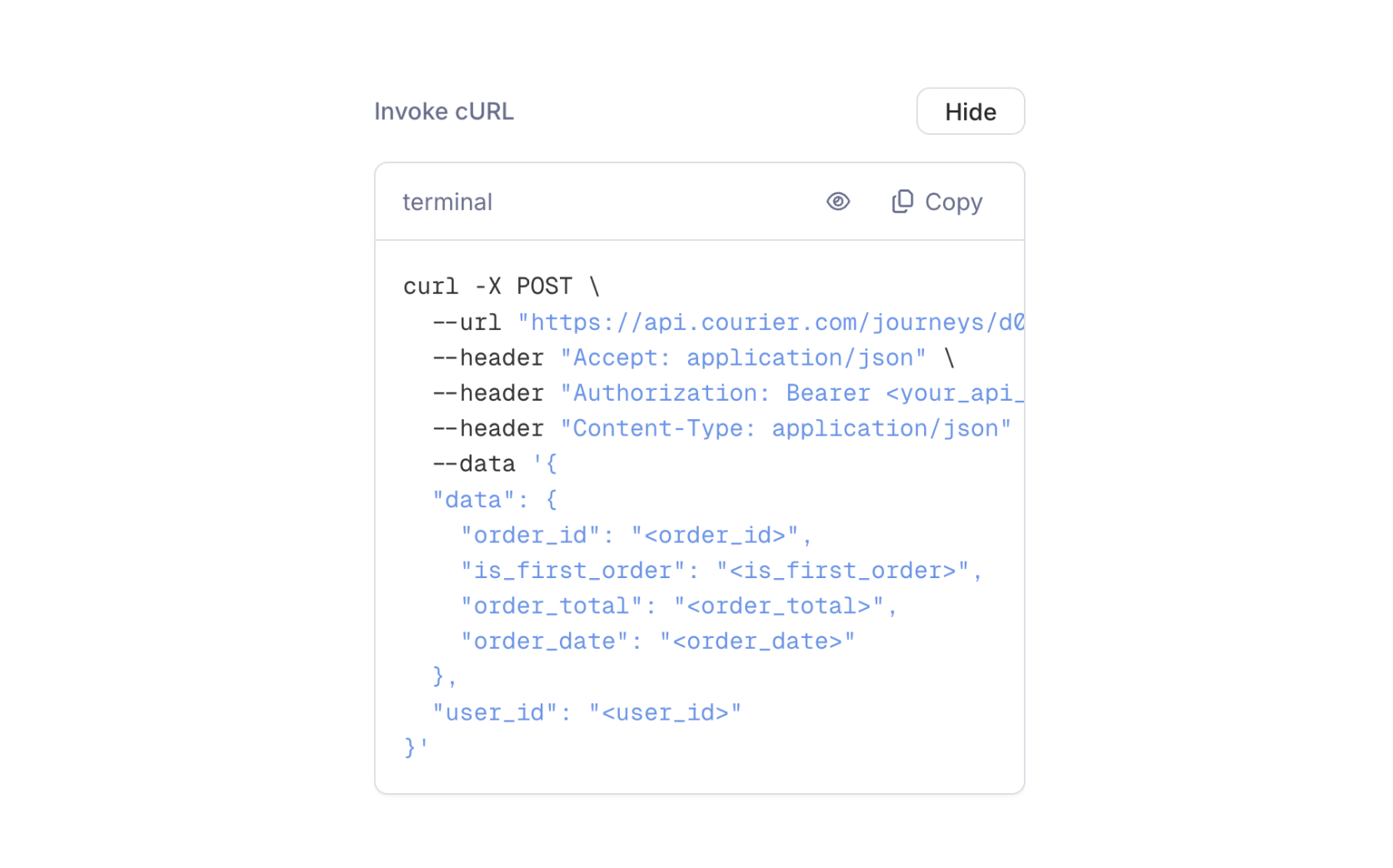
The journey editor generates a ready-to-use cURL command for every API-triggered journey. Click **Show** next to "Invoke cURL" in the trigger configuration panel to see the command with your journey ID and schema fields pre-filled.
### Invoke via API
Send a POST request to start the journey for a user.
**Endpoint**: `POST /journeys/{journeyId}/invoke`
The request body accepts three optional fields. At minimum, you must provide either `user_id` or a `profile` with contact information (like an email address).
| Field | Type | Required | Description |
| --------- | ------ | ----------- | ------------------------------------------------------------------------------------------------------ |
| `user_id` | string | conditional | The recipient's Courier user ID. Required unless `profile` contains a user identifier or contact info. |
| `profile` | object | conditional | Profile data for the recipient. Merged with any stored profile data for the user. |
| `data` | object | no | Payload data matching your schema. Available as variables throughout the journey. |
```bash cURL icon="terminal" wrap theme={null}
curl -X POST https://api.courier.com/journeys/JOURNEY_ID/invoke \
-H "Authorization: Bearer $COURIER_API_KEY" \
-H "Content-Type: application/json" \
-d '{
"user_id": "user_123",
"data": {
"order_id": "ORD-9042",
"order_total": 49.99,
"is_first_order": true,
"order_date": "2026-02-10T14:30:00Z"
}
}'
```
```javascript Node.js icon="node-js" theme={null}
import Courier from "@trycourier/courier";
const client = new Courier({ apiKey: "your_api_key" });
const { runId } = await client.journeys.invoke("JOURNEY_ID", {
userId: "user_123",
data: {
order_id: "ORD-9042",
order_total: 49.99,
is_first_order: true,
order_date: "2026-02-10T14:30:00Z",
},
});
console.log("Run ID:", runId);
```
```python Python icon="python" theme={null}
from courier import Courier
client = Courier(api_key="your_api_key")
response = client.journeys.invoke(
"JOURNEY_ID",
user_id="user_123",
data={
"order_id": "ORD-9042",
"order_total": 49.99,
"is_first_order": True,
"order_date": "2026-02-10T14:30:00Z",
},
)
print("Run ID:", response.run_id)
```
The response returns a `runId` you can use to track the journey execution in [Run Inspection](/platform/journeys/run-inspection).
```json theme={null}
{
"runId": "1-67ab1234-a1b2c3d4e5f6"
}
```
### Invoke with Profile Only
If you don't have a stored Courier user, you can invoke with just a `profile` containing contact information. Courier will use the profile data to deliver messages without requiring a user ID.
```bash cURL icon="terminal" wrap theme={null}
curl -X POST https://api.courier.com/journeys/JOURNEY_ID/invoke \
-H "Authorization: Bearer $COURIER_API_KEY" \
-H "Content-Type: application/json" \
-d '{
"profile": {
"email": "jane@example.com"
},
"data": {
"signup_source": "landing_page"
}
}'
```
```javascript Node.js icon="node-js" theme={null}
const { runId } = await client.journeys.invoke("JOURNEY_ID", {
profile: {
email: "jane@example.com",
},
data: {
signup_source: "landing_page",
},
});
```
```python Python icon="python" theme={null}
response = client.journeys.invoke(
"JOURNEY_ID",
profile={"email": "jane@example.com"},
data={"signup_source": "landing_page"},
)
```
### Profile Enrichment
When you invoke a journey with a `user_id`, Courier loads the user's [stored profile](/platform/users/users) and merges it with any `profile` data you include in the request. Request fields override stored fields with the same key; stored fields not present in the request are preserved.
```
stored profile: { "email": "stored@example.com", "first_name": "Jane" }
request profile: { "email": "new@example.com" }
result: { "email": "new@example.com", "first_name": "Jane" }
```
### Tenant-Scoped Profiles
If your application uses [tenants](/platform/tenants/tenants-overview), include the tenant ID in the profile context. Courier will load the user's tenant-scoped profile data.
```json theme={null}
{
"user_id": "user_123",
"profile": {
"context": {
"tenant_id": "hospital-a"
}
},
"data": {
"appointment_time": "2026-02-15T09:00:00Z"
}
}
```
### cURL Preview
The journey editor generates a ready-to-use cURL command for every API-triggered journey. Click **Show** next to "Invoke cURL" in the trigger configuration panel to see the command with your journey ID and schema fields pre-filled.
 ### Error Handling
| Status | Error | Meaning |
| ------ | -------------------- | ------------------------------------------------------------------------------------------------------------------------------------ |
| `400` | Bad Request | Missing required fields, invalid types, or missing user identifier. Check your schema and ensure `user_id` or `profile` is provided. |
| `404` | Not Found | The journey ID doesn't exist or hasn't been published. |
| `422` | Unprocessable Entity | The journey exists but can't run. Common causes: trigger conditions not met, or the journey is archived. |
## Segment
The Segment trigger connects a journey to your existing [Segment](https://segment.com/) event stream. When Courier receives an event that matches your trigger configuration, the journey starts automatically. No API integration is required; if you already send events to Segment, those same events can trigger journeys in Courier.
This makes Segment triggers useful for behavioral flows driven by events you already track: feature adoption, lifecycle milestones, or engagement signals. Segment acts as a centralized event bus; the same events that push to your analytics tools, CRM, and marketing platforms can now drive notification workflows in Courier.
### Error Handling
| Status | Error | Meaning |
| ------ | -------------------- | ------------------------------------------------------------------------------------------------------------------------------------ |
| `400` | Bad Request | Missing required fields, invalid types, or missing user identifier. Check your schema and ensure `user_id` or `profile` is provided. |
| `404` | Not Found | The journey ID doesn't exist or hasn't been published. |
| `422` | Unprocessable Entity | The journey exists but can't run. Common causes: trigger conditions not met, or the journey is archived. |
## Segment
The Segment trigger connects a journey to your existing [Segment](https://segment.com/) event stream. When Courier receives an event that matches your trigger configuration, the journey starts automatically. No API integration is required; if you already send events to Segment, those same events can trigger journeys in Courier.
This makes Segment triggers useful for behavioral flows driven by events you already track: feature adoption, lifecycle milestones, or engagement signals. Segment acts as a centralized event bus; the same events that push to your analytics tools, CRM, and marketing platforms can now drive notification workflows in Courier.
 ### Supported Event Types
| Event Type | Description |
| ------------ | ----------------------------------------------------------------------------------------- |
| **Track** | Fires when a user performs an action (`Order Completed`, `Feature Used`, `Plan Upgraded`) |
| **Identify** | Fires when a user's traits are updated (new email, name change, plan change) |
| **Group** | Fires when a user is added to or updated within a group |
### Event Filtering
You can narrow which events trigger the journey by adding conditions. Conditions evaluate fields from the Segment event payload (event name, properties, traits) and only start the journey when all conditions are met.
For example, a journey triggered by `Track` events could filter for `event = "Order Completed"` and `properties.total > 100` to only run for high-value orders.
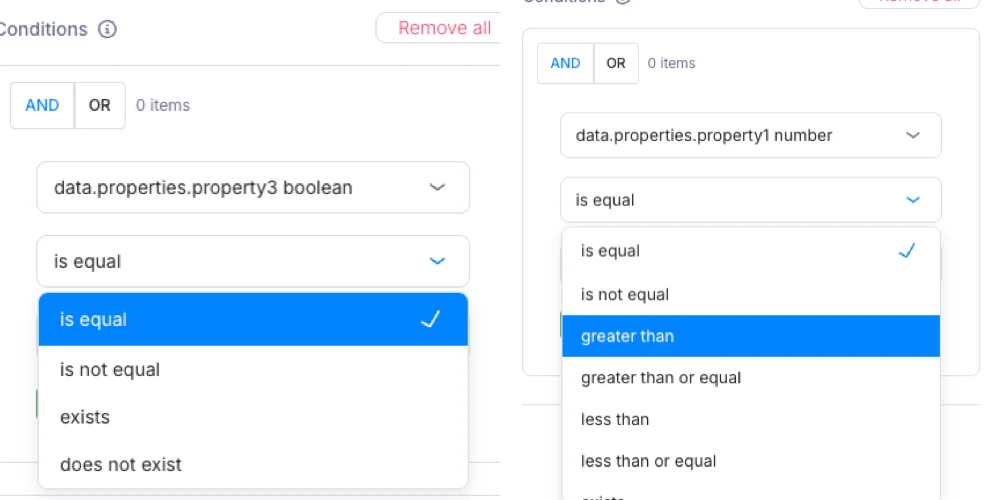
Journeys' knowledge base will automatically detect the data type for each value that can be used for conditional logic. For example, if your incoming data payload contains `numbers`, `booleans`, `strings`, the conditions dropdown will label your data type accordingly. The comparison operator will automatically change depending on your datatype.
### Supported Event Types
| Event Type | Description |
| ------------ | ----------------------------------------------------------------------------------------- |
| **Track** | Fires when a user performs an action (`Order Completed`, `Feature Used`, `Plan Upgraded`) |
| **Identify** | Fires when a user's traits are updated (new email, name change, plan change) |
| **Group** | Fires when a user is added to or updated within a group |
### Event Filtering
You can narrow which events trigger the journey by adding conditions. Conditions evaluate fields from the Segment event payload (event name, properties, traits) and only start the journey when all conditions are met.
For example, a journey triggered by `Track` events could filter for `event = "Order Completed"` and `properties.total > 100` to only run for high-value orders.
Journeys' knowledge base will automatically detect the data type for each value that can be used for conditional logic. For example, if your incoming data payload contains `numbers`, `booleans`, `strings`, the conditions dropdown will label your data type accordingly. The comparison operator will automatically change depending on your datatype.
 ## Trigger Conditions
Both API and Segment triggers support optional conditions. Conditions are evaluated before the journey starts; if any condition fails, the invocation is rejected (API returns `422`) or the event is ignored (Segment).
When sending Segment `track` events, the `userId` in the event has to be a valid [Courier Profile ID](/platform/users/users-overview) otherwise the Journey will not be invoked.
Conditions use the same operators available in [branch nodes](/platform/journeys/nodes/branch): equals, not equals, greater than, less than, contains, and more. You can reference any field available in the trigger's data context.
## What's Next
Configure which channels your journey sends to
Create and edit notification content
Add branching, delays, enrichment, and more
Step through individual runs to debug issues
## Trigger Conditions
Both API and Segment triggers support optional conditions. Conditions are evaluated before the journey starts; if any condition fails, the invocation is rejected (API returns `422`) or the event is ignored (Segment).
When sending Segment `track` events, the `userId` in the event has to be a valid [Courier Profile ID](/platform/users/users-overview) otherwise the Journey will not be invoked.
Conditions use the same operators available in [branch nodes](/platform/journeys/nodes/branch): equals, not equals, greater than, less than, contains, and more. You can reference any field available in the trigger's data context.
## What's Next
Configure which channels your journey sends to
Create and edit notification content
Add branching, delays, enrichment, and more
Step through individual runs to debug issues