> ## Documentation Index
> Fetch the complete documentation index at: https://www.courier.com/docs/llms.txt
> Use this file to discover all available pages before exploring further.
# Fetch Data
> Make HTTP requests to external services during journey execution and use the response data in downstream nodes.
Fetch data nodes make HTTP requests to external services during journey execution. The response is merged into the journey context and becomes available as variables in downstream nodes.
This is useful for enriching the journey with real-time data from your application: checking whether a user completed an action, loading order details, or calling an internal API.
## Configuration
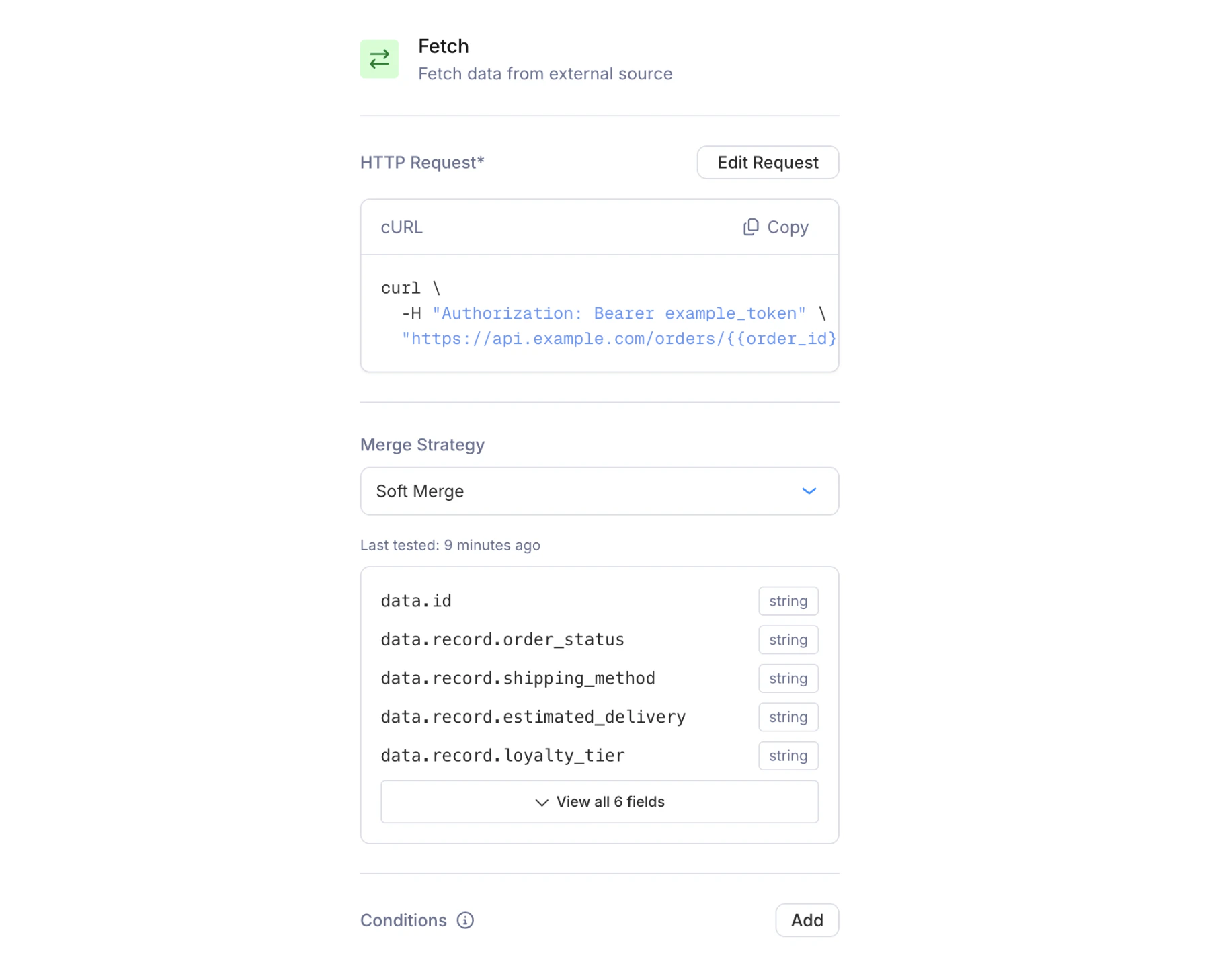
The fetch node has two panels: a summary panel (visible when clicking the node on the canvas) and a full HTTP request editor (opened by clicking **Setup Request**).
 ### HTTP Request Editor
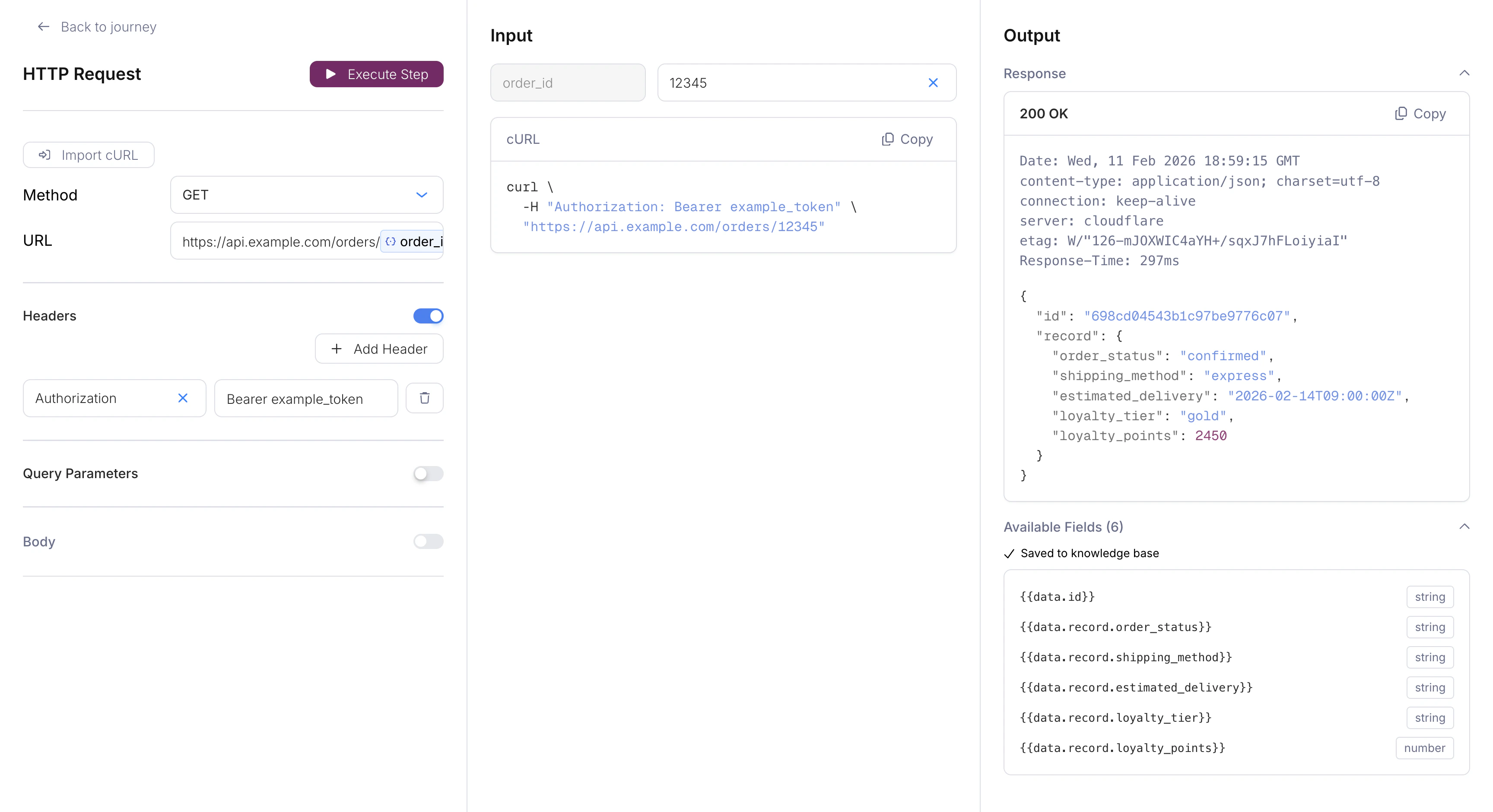
Click **Setup Request** to open the full-screen HTTP request editor. The editor has three columns: setup, input, and output.
### HTTP Request Editor
Click **Setup Request** to open the full-screen HTTP request editor. The editor has three columns: setup, input, and output.
 **Setup (left column):**
* **Import cURL** — Paste an existing cURL command to auto-populate the request configuration.
* **Method** — GET, POST, PUT, or DELETE.
* **URL** — The endpoint to call. Supports variable interpolation with `{{field_name}}` syntax (e.g., `https://api.example.com/users/{{user_id}}`). Only HTTPS URLs are allowed.
* **Headers** — Toggle on to add key-value header pairs. Common use: `Authorization: Bearer {{api_token}}`.
* **Query Parameters** — Toggle on to add key-value query parameters appended to the URL.
* **Body** — Toggle on to add a JSON request body (available for POST and PUT only; disabled for GET and DELETE).
**Input (center column):**
If your URL or body contains variables (like `{{user_id}}`), the input column shows fields where you can provide test values. A live cURL preview updates as you fill them in.
**Output (right column):**
Click **Execute Step** to run the request and see the response. On a successful 2xx response, Courier automatically extracts the response schema and saves the available fields. These fields are then displayed back on the summary panel (with their names and types) so you can confirm what data is available downstream. A "Last tested" timestamp shows when the schema was last captured.
### Merge Strategy
The merge strategy controls how the fetch response is combined with the existing journey context. Choose from the dropdown on the summary panel:
| Strategy | Behavior |
| ------------------------ | ------------------------------------------------------------------------------------------------------------- |
| **Soft Merge** (default) | Adds new fields from the response without overwriting existing values. Existing context fields are preserved. |
| **Overwrite** | Deep-merges the response into the context. Response values overwrite existing fields with the same key. |
| **Replace** | Replaces the entire context with the response. Existing fields not in the response are removed. |
| **None** | Does not merge. If context already exists, it's left untouched. If empty, uses the response. |
**Soft Merge** is the safest default. It ensures trigger schema fields and profile data are never accidentally overwritten by a fetch response.
### Conditions
Like other nodes, fetch nodes support optional [conditions](/platform/journeys/nodes/branch). If the conditions are not met, the node is skipped and the journey continues without making the HTTP request.
## Response Handling
The response body is parsed as JSON and merged into the journey context using the selected merge strategy. If the fetch returns:
```json theme={null}
{
"onboarding_complete": true,
"last_login": "2026-02-09T10:30:00Z"
}
```
These fields become part of the journey's data context. Downstream nodes reference them the same way they reference trigger schema fields:
* In [branch conditions](/platform/journeys/nodes/branch): select `data.onboarding_complete` as the field
* In [journey templates](/platform/journeys/journey-templates): use `{{onboarding_complete}}` or `{{last_login}}`
* In [send node](/platform/journeys/channels) recipient overrides: select the field from the dropdown
If the fetch request fails (network error, non-2xx response), the journey continues but no data is merged. Use branch conditions to handle cases where expected fields may be missing.
## Chaining Fetch Nodes
You can add multiple fetch nodes in sequence. Each one merges its response into the journey context, and all fields are available downstream. For example:
1. **Fetch order details** — merges `order_id`, `total`, `status` into context
2. **Fetch user preferences** — merges `email_frequency`, `locale` into context
3. **Branch** — check `email_frequency` to decide whether to send
## What's Next
Route based on fetch response data
Rate-limit downstream sends
Tutorial: fetch data, branch, and send in a real workflow
Debug fetch responses and downstream data flow
**Setup (left column):**
* **Import cURL** — Paste an existing cURL command to auto-populate the request configuration.
* **Method** — GET, POST, PUT, or DELETE.
* **URL** — The endpoint to call. Supports variable interpolation with `{{field_name}}` syntax (e.g., `https://api.example.com/users/{{user_id}}`). Only HTTPS URLs are allowed.
* **Headers** — Toggle on to add key-value header pairs. Common use: `Authorization: Bearer {{api_token}}`.
* **Query Parameters** — Toggle on to add key-value query parameters appended to the URL.
* **Body** — Toggle on to add a JSON request body (available for POST and PUT only; disabled for GET and DELETE).
**Input (center column):**
If your URL or body contains variables (like `{{user_id}}`), the input column shows fields where you can provide test values. A live cURL preview updates as you fill them in.
**Output (right column):**
Click **Execute Step** to run the request and see the response. On a successful 2xx response, Courier automatically extracts the response schema and saves the available fields. These fields are then displayed back on the summary panel (with their names and types) so you can confirm what data is available downstream. A "Last tested" timestamp shows when the schema was last captured.
### Merge Strategy
The merge strategy controls how the fetch response is combined with the existing journey context. Choose from the dropdown on the summary panel:
| Strategy | Behavior |
| ------------------------ | ------------------------------------------------------------------------------------------------------------- |
| **Soft Merge** (default) | Adds new fields from the response without overwriting existing values. Existing context fields are preserved. |
| **Overwrite** | Deep-merges the response into the context. Response values overwrite existing fields with the same key. |
| **Replace** | Replaces the entire context with the response. Existing fields not in the response are removed. |
| **None** | Does not merge. If context already exists, it's left untouched. If empty, uses the response. |
**Soft Merge** is the safest default. It ensures trigger schema fields and profile data are never accidentally overwritten by a fetch response.
### Conditions
Like other nodes, fetch nodes support optional [conditions](/platform/journeys/nodes/branch). If the conditions are not met, the node is skipped and the journey continues without making the HTTP request.
## Response Handling
The response body is parsed as JSON and merged into the journey context using the selected merge strategy. If the fetch returns:
```json theme={null}
{
"onboarding_complete": true,
"last_login": "2026-02-09T10:30:00Z"
}
```
These fields become part of the journey's data context. Downstream nodes reference them the same way they reference trigger schema fields:
* In [branch conditions](/platform/journeys/nodes/branch): select `data.onboarding_complete` as the field
* In [journey templates](/platform/journeys/journey-templates): use `{{onboarding_complete}}` or `{{last_login}}`
* In [send node](/platform/journeys/channels) recipient overrides: select the field from the dropdown
If the fetch request fails (network error, non-2xx response), the journey continues but no data is merged. Use branch conditions to handle cases where expected fields may be missing.
## Chaining Fetch Nodes
You can add multiple fetch nodes in sequence. Each one merges its response into the journey context, and all fields are available downstream. For example:
1. **Fetch order details** — merges `order_id`, `total`, `status` into context
2. **Fetch user preferences** — merges `email_frequency`, `locale` into context
3. **Branch** — check `email_frequency` to decide whether to send
## What's Next
Route based on fetch response data
Rate-limit downstream sends
Tutorial: fetch data, branch, and send in a real workflow
Debug fetch responses and downstream data flow