> ## Documentation Index
> Fetch the complete documentation index at: https://www.courier.com/docs/llms.txt
> Use this file to discover all available pages before exploring further.
# Preferences Overview
> Let users control which notifications they receive and how. Configure subscription topics, channel choices, and preference centers that Courier enforces automatically at send time.
## Overview
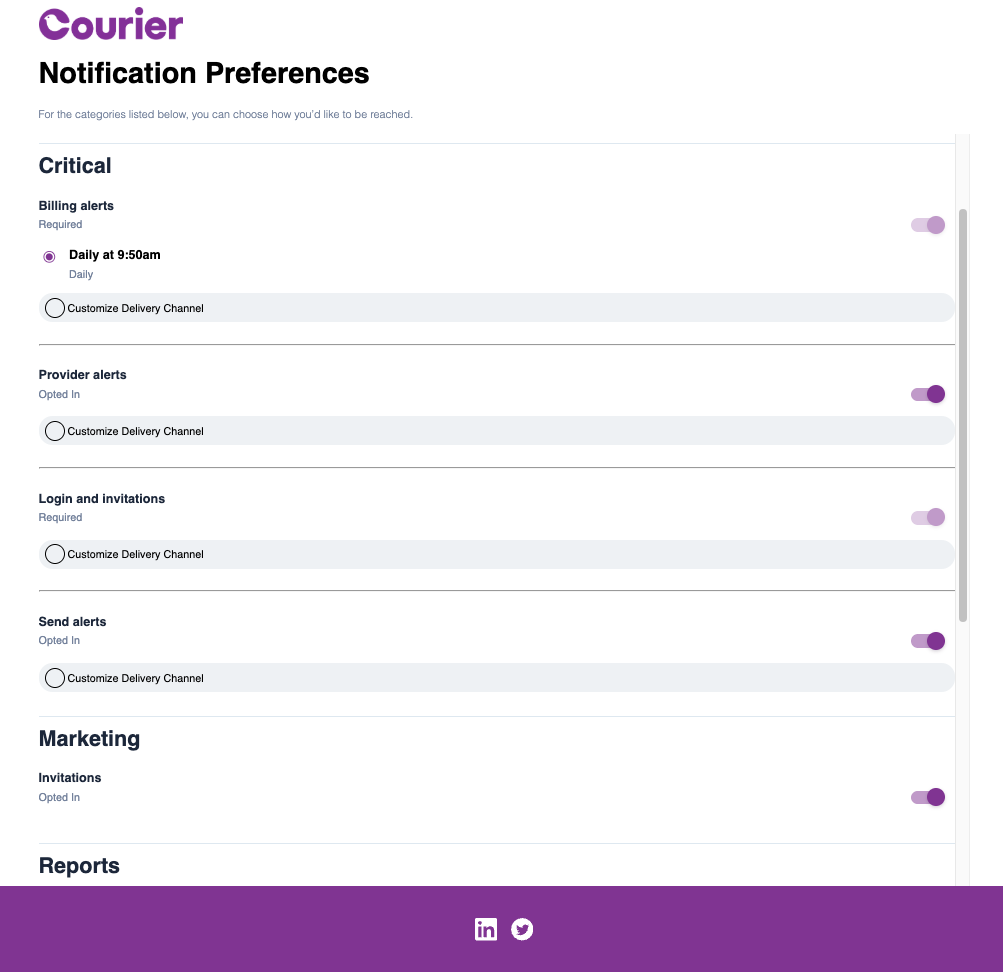
Courier's preference management lets users control which notifications they receive and how they receive them. Users opt in or out of categories (e.g. marketing, product updates, security alerts), choose delivery channels per category where you enable it, and can subscribe to digests. Courier checks these preferences at send time and skips delivery for opted-out topics and channels automatically.
Opted out users resulting in `unsubscribed` events will still count towards Courier usage.
## When to use preferences
Use preference management when you need:
* **User-controlled subscriptions** – Let recipients choose which notification categories they receive.
* **Unsubscribe handling** – One-click opt-out and preference centers that satisfy unsubscribe requirements.
* **Channel and frequency control** – Let users pick delivery channels (email, SMS, push, etc.) and digest schedules where your plan supports it.
## Two ways to offer preference management
### [Hosted Preference Center](/platform/preferences/hosted-page)
Courier-hosted pages where users manage their notification preferences. Best when you want zero in-app development: add a link in your notifications or brand footer and users get a branded, responsive preference page. Includes unsubscribe handling and optional channel selection (Enterprise).
 ### [Embedded Preferences](/platform/preferences/embedding-preferences)
Preference UI embedded in your app via React components or web components. Best when you want preferences to live inside your product (e.g. account or settings). Full control over layout and styling; uses GraphQL under the hood.
## What you can do with preferences
### [Configure topics and sections](/platform/preferences/preferences-editor)
Define subscription topics, group them into sections, set default opt-in/opt-out (or required), and map notification templates to topics so sends respect user choices.
### [Offer channel and digest choices](/platform/preferences/preferences-editor)
Let users choose delivery channels per topic and subscribe to digests where enabled. Configure channel labels and digest schedules in the editor and [Automations > Digest](/platform/automations/digest).
### [Track and query preferences](/platform/preferences/user-preferences-logs)
View preference change history in the dashboard and query current preferences via the [User Preferences API](/api-reference/user-preferences/get-users-preferences) for analytics or downstream systems.
## FAQ
When you send a notification mapped to a subscription topic, Courier checks the recipient's preferences before delivering. If the user has opted out of that topic (or opted out of the channel being used), Courier skips the send for that channel. No extra logic is needed in your code; mapping a template to a topic is enough.
When a user is opted out of a notification, Courier will do a check on a `user_id`'s preferences and route the notification accordingly. This process will still count towards your usage even if the event returns with `unsubscribed`. If you would like to filter out a channel or a notification before any routing is done, you can check out [send conditions](/platform/content/template-settings/send-conditions#using-send-conditions).
Yes. In the [Preferences Editor](/platform/preferences/preferences-editor), each topic has a default status: `OPTED_IN`, `OPTED_OUT`, or `REQUIRED`. New users inherit these defaults until they make their own choices. You can also set tenant-level default preferences that override workspace defaults for users within that tenant.
The [hosted preference center](/platform/preferences/hosted-page) is a Courier-hosted page you link to from emails or your app; zero frontend code required. [Embedded preferences](/platform/preferences/embedding-preferences) use React components or web components you drop into your own UI for full control over layout and styling. Both read and write the same underlying preference data.
Yes, if you enable channel routing on a topic in the Preferences Editor. Users can then select which channels (email, SMS, push, etc.) they want for that topic. This is available on Enterprise plans with custom routing enabled.
Use the [User Preferences API](/api-reference/user-preferences/get-users-preferences). You can read a user's current preferences and update topic-level opt-in/out status, channel choices, and custom routing. See the [API tutorial](/tutorials/preferences/how-to-configure-user-preferences) for curl, Node, and Python examples.
## What's next
Configure subscription topics, sections, and channel options
Deploy turnkey hosted preference pages with branding and unsubscribe
Integrate preference components into your application
Audit preference changes and query preferences via API
### [Embedded Preferences](/platform/preferences/embedding-preferences)
Preference UI embedded in your app via React components or web components. Best when you want preferences to live inside your product (e.g. account or settings). Full control over layout and styling; uses GraphQL under the hood.
## What you can do with preferences
### [Configure topics and sections](/platform/preferences/preferences-editor)
Define subscription topics, group them into sections, set default opt-in/opt-out (or required), and map notification templates to topics so sends respect user choices.
### [Offer channel and digest choices](/platform/preferences/preferences-editor)
Let users choose delivery channels per topic and subscribe to digests where enabled. Configure channel labels and digest schedules in the editor and [Automations > Digest](/platform/automations/digest).
### [Track and query preferences](/platform/preferences/user-preferences-logs)
View preference change history in the dashboard and query current preferences via the [User Preferences API](/api-reference/user-preferences/get-users-preferences) for analytics or downstream systems.
## FAQ
When you send a notification mapped to a subscription topic, Courier checks the recipient's preferences before delivering. If the user has opted out of that topic (or opted out of the channel being used), Courier skips the send for that channel. No extra logic is needed in your code; mapping a template to a topic is enough.
When a user is opted out of a notification, Courier will do a check on a `user_id`'s preferences and route the notification accordingly. This process will still count towards your usage even if the event returns with `unsubscribed`. If you would like to filter out a channel or a notification before any routing is done, you can check out [send conditions](/platform/content/template-settings/send-conditions#using-send-conditions).
Yes. In the [Preferences Editor](/platform/preferences/preferences-editor), each topic has a default status: `OPTED_IN`, `OPTED_OUT`, or `REQUIRED`. New users inherit these defaults until they make their own choices. You can also set tenant-level default preferences that override workspace defaults for users within that tenant.
The [hosted preference center](/platform/preferences/hosted-page) is a Courier-hosted page you link to from emails or your app; zero frontend code required. [Embedded preferences](/platform/preferences/embedding-preferences) use React components or web components you drop into your own UI for full control over layout and styling. Both read and write the same underlying preference data.
Yes, if you enable channel routing on a topic in the Preferences Editor. Users can then select which channels (email, SMS, push, etc.) they want for that topic. This is available on Enterprise plans with custom routing enabled.
Use the [User Preferences API](/api-reference/user-preferences/get-users-preferences). You can read a user's current preferences and update topic-level opt-in/out status, channel choices, and custom routing. See the [API tutorial](/tutorials/preferences/how-to-configure-user-preferences) for curl, Node, and Python examples.
## What's next
Configure subscription topics, sections, and channel options
Deploy turnkey hosted preference pages with branding and unsubscribe
Integrate preference components into your application
Audit preference changes and query preferences via API