> ## Documentation Index
> Fetch the complete documentation index at: https://www.courier.com/docs/llms.txt
> Use this file to discover all available pages before exploring further.
# User Preference Logs & Data
> Access user preference audit trails through the dashboard and query current notification preferences through the API.
## Overview
Access user notification preference data and audit trails to understand subscription settings, channel preferences, and preference change history. Courier provides both dashboard audit logs and API access to user preference information, enabling you to track user consent changes and integrate preference data with your systems.
The dashboard provides a complete audit trail of preference changes over time, while the API returns current user preference state across all configured subscription topics and delivery channels.
## Key Features
Courier's user preference system provides comprehensive access to user settings and change history:
* **Dashboard Audit Trail** - Complete history of user preference changes with timestamps
* **Real-Time API Data** - Query current preference state without caching delays
* **Complete Topic Coverage** - Access all configured subscription topics and their status
* **Channel Preferences** - View custom routing settings for Enterprise customers
* **Section Organization** - Preferences grouped by configured sections
## Accessing User Preferences
### Dashboard Interface
View user preferences and audit trail through Courier's web interface:
1. Navigate to the [Users section](https://app.courier.com/users) in your Courier workspace
2. Search for and select the user whose preferences you want to review
3. View their current notification preferences and subscription status
4. Access the preference change audit trail in the user's profile
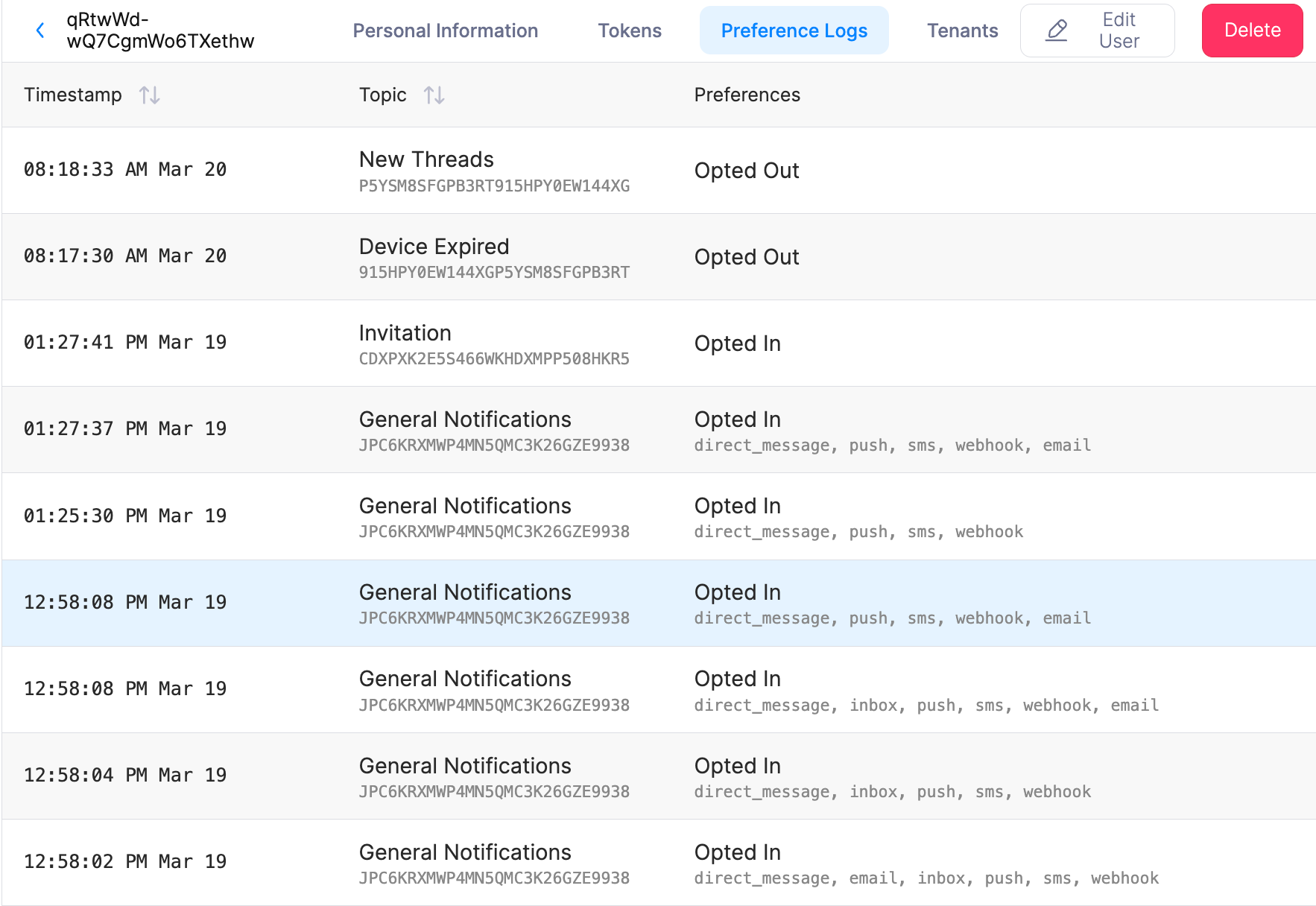 The dashboard provides a complete audit trail of user preference changes, showing when users opted in or out of subscription topics and modified their notification settings.
### API Access
Query user preferences programmatically using the [User Preferences API](/api-reference/user-preferences/get-users-preferences). The API provides endpoints to list all preferences for a user and to get or update preferences for a specific subscription topic. For multi-tenant workspaces, use the optional `tenant_id` query parameter. See the API reference for exact paths, parameters, and request/response formats.
**Example: List all preferences for a user**
```bash theme={null}
curl -X GET "https://api.courier.com/users/USER_ID/preferences" \
-H "Authorization: Bearer YOUR_API_KEY"
```
## Data Structure
The API returns current user preference data with the following structure:
```json theme={null}
{
"paging": {
"more": false
},
"items": [
{
"custom_routing": ["inbox", "email", "sms"],
"has_custom_routing": true,
"default_status": "OPTED_IN",
"status": "OPTED_IN",
"section_name": "Notifications",
"section_id": "pHdYzLqMu12XNxih5EoDJ",
"topic_id": "D9BX66Y1EM4N6QQ1E1D9VVFFQB0N",
"topic_name": "Critical Messages"
}
]
}
```
### Field Descriptions
* **`status`** - Current user preference (`OPTED_IN` or `OPTED_OUT`)
* **`default_status`** - Default subscription setting for new users
* **`topic_id`** - Unique identifier for the subscription topic
* **`topic_name`** - Human-readable topic name
* **`section_id`** - Parent section identifier
* **`section_name`** - Section grouping name
* **`custom_routing`** - Array of preferred delivery channels (Enterprise feature)
* **`has_custom_routing`** - Boolean indicating if user has channel preferences set
**API vs Dashboard**: The User Preferences API provides current preference settings only. For historical change tracking and compliance auditing, use the audit trail feature in the Courier dashboard or implement logging in your application.
## Next Steps
Programmatically manage and retrieve user preference data and logs
Configure subscription topics and preference sections that generate logs
Deploy preference interfaces that automatically generate audit trails
Integrate preference logs with broader notification analytics and reporting
The dashboard provides a complete audit trail of user preference changes, showing when users opted in or out of subscription topics and modified their notification settings.
### API Access
Query user preferences programmatically using the [User Preferences API](/api-reference/user-preferences/get-users-preferences). The API provides endpoints to list all preferences for a user and to get or update preferences for a specific subscription topic. For multi-tenant workspaces, use the optional `tenant_id` query parameter. See the API reference for exact paths, parameters, and request/response formats.
**Example: List all preferences for a user**
```bash theme={null}
curl -X GET "https://api.courier.com/users/USER_ID/preferences" \
-H "Authorization: Bearer YOUR_API_KEY"
```
## Data Structure
The API returns current user preference data with the following structure:
```json theme={null}
{
"paging": {
"more": false
},
"items": [
{
"custom_routing": ["inbox", "email", "sms"],
"has_custom_routing": true,
"default_status": "OPTED_IN",
"status": "OPTED_IN",
"section_name": "Notifications",
"section_id": "pHdYzLqMu12XNxih5EoDJ",
"topic_id": "D9BX66Y1EM4N6QQ1E1D9VVFFQB0N",
"topic_name": "Critical Messages"
}
]
}
```
### Field Descriptions
* **`status`** - Current user preference (`OPTED_IN` or `OPTED_OUT`)
* **`default_status`** - Default subscription setting for new users
* **`topic_id`** - Unique identifier for the subscription topic
* **`topic_name`** - Human-readable topic name
* **`section_id`** - Parent section identifier
* **`section_name`** - Section grouping name
* **`custom_routing`** - Array of preferred delivery channels (Enterprise feature)
* **`has_custom_routing`** - Boolean indicating if user has channel preferences set
**API vs Dashboard**: The User Preferences API provides current preference settings only. For historical change tracking and compliance auditing, use the audit trail feature in the Courier dashboard or implement logging in your application.
## Next Steps
Programmatically manage and retrieve user preference data and logs
Configure subscription topics and preference sections that generate logs
Deploy preference interfaces that automatically generate audit trails
Integrate preference logs with broader notification analytics and reporting