> ## Documentation Index
> Fetch the complete documentation index at: https://www.courier.com/docs/llms.txt
> Use this file to discover all available pages before exploring further.
# Automated Failover
> Courier ensures message delivery with automated retries, provider/channel failover, and customizable timeouts—automatically switching routes if an error or delay occurs, maintaining resilience across providers and channels.
## Overview
Automated failover handles message delivery by automatically switching to backup providers or channels when primary delivery methods fail. When a provider experiences outages, rate limiting, or timeouts, Courier automatically routes messages through alternative paths without manual intervention.
## Key Concepts
### Failover Triggers
Courier initiates failover when downstream providers return specific error conditions:
* **`408` Request Timeout**: Provider response takes too long
* **`429` Too Many Requests**: Rate limiting or throttling detected
* **`>=500` Server Errors**: Internal server errors, service unavailable
### Failover Types
* **Provider Failover**: Switch between different providers within the same channel (e.g., SendGrid → AWS SES for email)
* **Channel Failover**: Switch between different communication channels (e.g., email → SMS → push)
* **Timeout-Based Failover**: Automatically trigger failover based on response time thresholds
## Configuration
### Provider Failover
Set up multiple providers within a single channel to create redundancy at the provider level:
Configure SendGrid as backup for AWS SES. If SES experiences an outage or rate limiting, Courier automatically switches to SendGrid for email delivery.
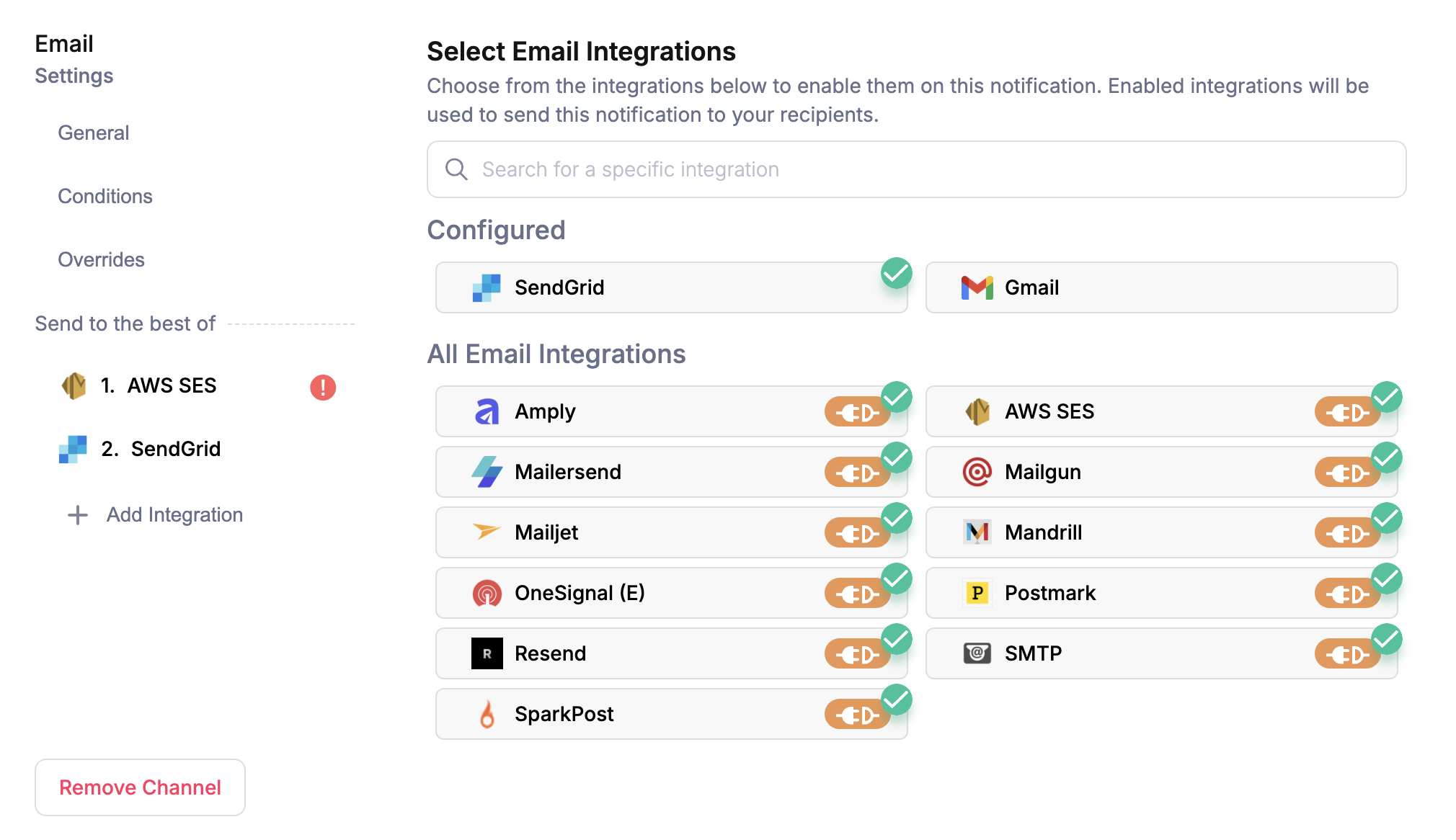 **Configuration Options:**
* **Template channel settings**: Configure provider priority in the template designer
* **Send API**: Use `message.channels.[channel_name].routing_method` property
**Common Use Cases:**
* Email redundancy: SendGrid + AWS SES + Mailgun
* SMS backup: Twilio + MessageBird + Plivo
* Push notifications: Firebase FCM + Apple Push + OneSignal
### Channel Failover
Set up multiple communication channels to ensure message delivery when specific channels fail or users lack contact information:
Configure **Best Of: Email → Push → SMS** routing. Courier tries email first, then push if email fails, and finally SMS if both previous channels fail.
**Configuration Options:**
* **Template routing**: Use "Best Of" channel configuration in template settings
* **Send API**: Configure via `message.routing` property in your [Send API](/api-reference/send/send-a-message) requests
**Strategic Benefits:**
* **Contact coverage**: Reach users even when primary contact info is missing
* **Delivery assurance**: Multiple paths increase successful delivery rates
* **User preferences**: Respect user channel preferences while maintaining backup options
## Advanced Configuration
### Timeout Management
Control when failover occurs by configuring timeout thresholds at different levels:
**Default Timeouts:**
* **Provider timeout**: 5 minutes (300000ms) - Time to wait for individual provider responses
* **Channel timeout**: 30 minutes (1800000ms) - Time to attempt all providers in a channel
* **Message timeout**: 72 hours (259200000ms) - Overall delivery attempt window
**Timeout Hierarchy:**
1. **Global timeouts**: Apply to all providers/channels unless overridden
2. **Channel-specific timeouts**: Override global settings for specific channels
3. **Provider-specific timeouts**: Override global settings for specific providers
**Precedence Rule**: More specific timeouts take precedence. For example, `message.providers.slack.timeout` overrides `message.timeout.provider` for Slack delivery attempts.
**Configuration Levels:**
1. **Global Configuration**:
```json theme={null}
"message.timeout": {
"provider": 10000, // 10 seconds per provider
"channel": 60000, // 1 minute per channel
"message": 120000 // 2 minutes total
}
```
2. **Channel-Specific Overrides**:
```json theme={null}
"message.channels.direct_message.timeout": 50000 // 50 seconds for DM channel
```
3. **Provider-Specific Overrides**:
```json theme={null}
"message.providers.slack.timeout": 20000 // 20 seconds for Slack
```
### Complete Configuration Example
```json theme={null}
{
"message": {
"to": { "user_id": "user_123" },
"template": "urgent-alert",
"timeout": {
"provider": 10000, // 10 seconds per provider attempt
"channel": 60000, // 1 minute per channel attempt
"message": 120000 // 2 minutes total delivery window
},
"channels": {
"direct_message": {
"timeout": 50000 // Override: 50 seconds for direct message channel
}
},
"providers": {
"slack": {
"timeout": 20000 // Override: 20 seconds for Slack specifically
}
},
"routing": {
"method": "all",
"channels": ["email", "direct_message", "sms"]
}
}
}
```
This configuration creates a complete failover strategy with custom timeouts for time-sensitive notifications.
## Related Resources
Learn how to configure intelligent channel routing and fallback logic
Understand automatic retry strategies and delivery reliability
Monitor failover behavior and delivery success rates
Complete API documentation for timeout and routing configuration
**Configuration Options:**
* **Template channel settings**: Configure provider priority in the template designer
* **Send API**: Use `message.channels.[channel_name].routing_method` property
**Common Use Cases:**
* Email redundancy: SendGrid + AWS SES + Mailgun
* SMS backup: Twilio + MessageBird + Plivo
* Push notifications: Firebase FCM + Apple Push + OneSignal
### Channel Failover
Set up multiple communication channels to ensure message delivery when specific channels fail or users lack contact information:
Configure **Best Of: Email → Push → SMS** routing. Courier tries email first, then push if email fails, and finally SMS if both previous channels fail.
**Configuration Options:**
* **Template routing**: Use "Best Of" channel configuration in template settings
* **Send API**: Configure via `message.routing` property in your [Send API](/api-reference/send/send-a-message) requests
**Strategic Benefits:**
* **Contact coverage**: Reach users even when primary contact info is missing
* **Delivery assurance**: Multiple paths increase successful delivery rates
* **User preferences**: Respect user channel preferences while maintaining backup options
## Advanced Configuration
### Timeout Management
Control when failover occurs by configuring timeout thresholds at different levels:
**Default Timeouts:**
* **Provider timeout**: 5 minutes (300000ms) - Time to wait for individual provider responses
* **Channel timeout**: 30 minutes (1800000ms) - Time to attempt all providers in a channel
* **Message timeout**: 72 hours (259200000ms) - Overall delivery attempt window
**Timeout Hierarchy:**
1. **Global timeouts**: Apply to all providers/channels unless overridden
2. **Channel-specific timeouts**: Override global settings for specific channels
3. **Provider-specific timeouts**: Override global settings for specific providers
**Precedence Rule**: More specific timeouts take precedence. For example, `message.providers.slack.timeout` overrides `message.timeout.provider` for Slack delivery attempts.
**Configuration Levels:**
1. **Global Configuration**:
```json theme={null}
"message.timeout": {
"provider": 10000, // 10 seconds per provider
"channel": 60000, // 1 minute per channel
"message": 120000 // 2 minutes total
}
```
2. **Channel-Specific Overrides**:
```json theme={null}
"message.channels.direct_message.timeout": 50000 // 50 seconds for DM channel
```
3. **Provider-Specific Overrides**:
```json theme={null}
"message.providers.slack.timeout": 20000 // 20 seconds for Slack
```
### Complete Configuration Example
```json theme={null}
{
"message": {
"to": { "user_id": "user_123" },
"template": "urgent-alert",
"timeout": {
"provider": 10000, // 10 seconds per provider attempt
"channel": 60000, // 1 minute per channel attempt
"message": 120000 // 2 minutes total delivery window
},
"channels": {
"direct_message": {
"timeout": 50000 // Override: 50 seconds for direct message channel
}
},
"providers": {
"slack": {
"timeout": 20000 // Override: 20 seconds for Slack specifically
}
},
"routing": {
"method": "all",
"channels": ["email", "direct_message", "sms"]
}
}
}
```
This configuration creates a complete failover strategy with custom timeouts for time-sensitive notifications.
## Related Resources
Learn how to configure intelligent channel routing and fallback logic
Understand automatic retry strategies and delivery reliability
Monitor failover behavior and delivery success rates
Complete API documentation for timeout and routing configuration