> ## Documentation Index
> Fetch the complete documentation index at: https://www.courier.com/docs/llms.txt
> Use this file to discover all available pages before exploring further.
# How to Cancel an Automation
> Stop in-flight automation runs using cancellation tokens. Learn how to set a token, cancel from your backend, and build compound tokens with JavaScript interpolation.
Automations that include delays or long-running steps can be cancelled before they finish. This is useful when a user takes an action that makes the rest of the automation irrelevant; for example, completing onboarding before a reminder fires, or upgrading their plan before a trial-expiry sequence reaches the next send.
Cancellation works in two parts: you set a **cancellation token** on the automation template, and later invoke a separate **cancel step** with the resolved token value.
## Prerequisites
* A published automation with at least one Delay or long-running step (see [Build and Send Your First Automation](/tutorials/automations/how-to-automate-message-sequences) if you need one)
* Your Courier API key (found in [Settings > API Keys](https://app.courier.com/settings/api-keys))
## Set a Cancellation Token
In the Automations Designer, click the gear icon in the top-right corner, then select **Automation configuration**.
The **Cancellation Token** field is a freeform text input. Whatever you enter gets evaluated against the automation's run context at invoke time.
For a simple per-user token, enter:
```text theme={null}
refs.data.user_id
```
When the automation is invoked with `"data": {"user_id": "user_123"}`, the token resolves to the literal string `user_123` for that run.
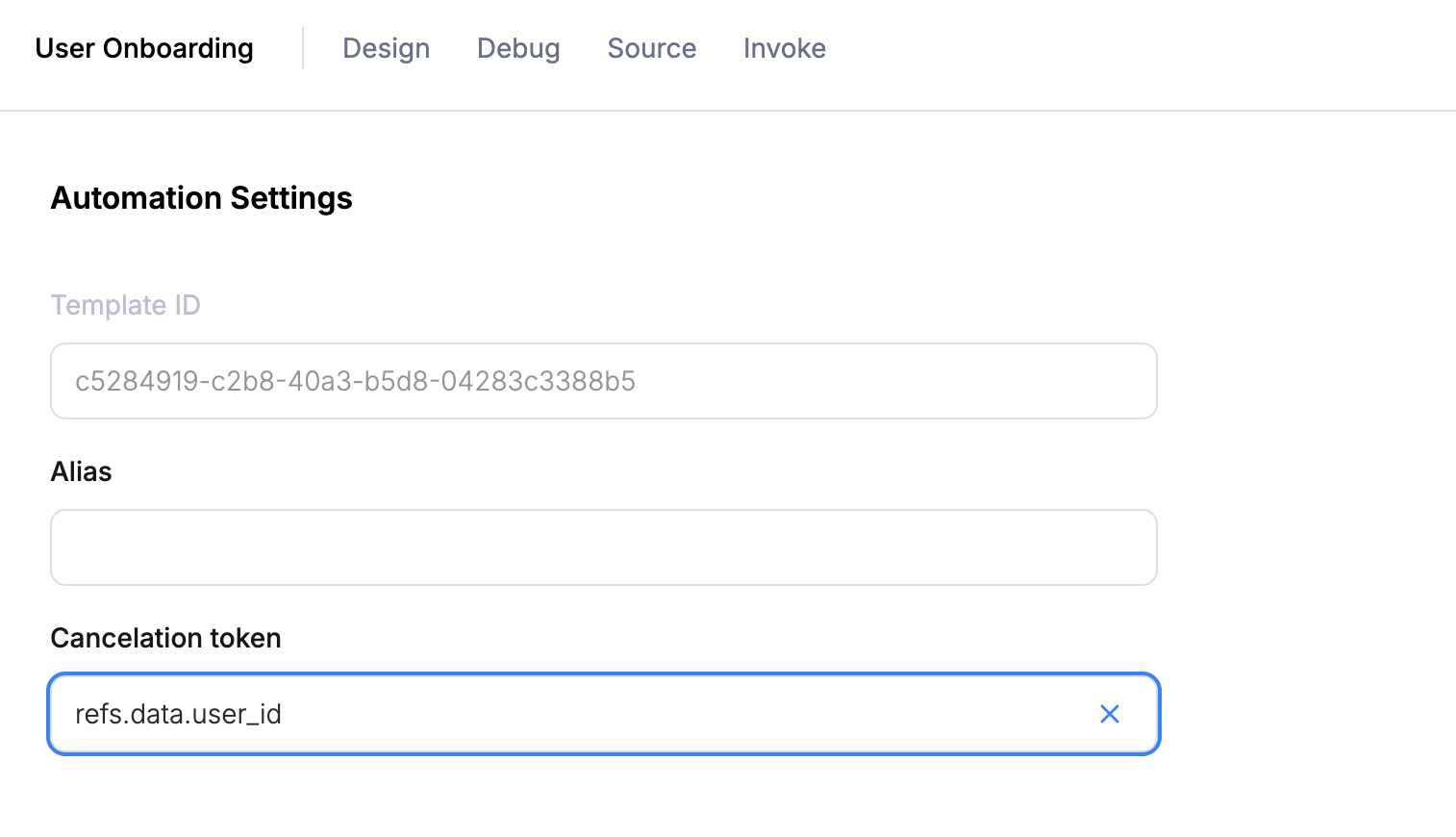 Publish the automation. The token is now active for all future invocations.
## Cancel from Your Backend
When your app detects that the automation should stop (e.g. the user completed onboarding), send an ad-hoc automation with a `cancel` step. The `cancelation_token` value must be the *resolved* string; your backend constructs it the same way.
```bash cURL icon="terminal" wrap theme={null}
curl -X POST https://api.courier.com/automations/invoke \
-H "Authorization: Bearer $COURIER_AUTH_TOKEN" \
-H "Content-Type: application/json" \
-d '{
"automation": {
"steps": [
{
"action": "cancel",
"cancelation_token": "user_123"
}
]
}
}'
```
```javascript Node.js icon="node-js" theme={null}
await client.automations.invoke.invokeAdHoc({
automation: {
steps: [
{ action: "cancel", cancelation_token: "user_123" },
],
},
});
```
```python Python icon="python" theme={null}
client.automations.invoke.invoke_ad_hoc(
automation={
"steps": [
{"action": "cancel", "cancelation_token": "user_123"},
],
},
)
```
All running automations whose resolved token matches `user_123` are cancelled. Any steps that haven't executed yet (pending delays, queued sends) are skipped. If the automation already finished, the cancel is a no-op.
You can also cancel from the Courier UI; see [Canceling From the UI](/platform/automations/cancel#canceling-from-the-ui).
## Token Syntax Reference
The cancellation token field supports two resolution modes. The backend checks them in order:
### 1. Refs accessor
If the entire string starts with `refs.`, Courier navigates into the run context and returns the raw value.
| You type | Run data | Resolves to |
| -------------------- | ------------------------------------ | --------------- |
| `refs.data.user_id` | `{"user_id": "user_123"}` | `user_123` |
| `refs.data.plan` | `{"plan": "pro"}` | `pro` |
| `refs.profile.email` | profile has `email: "j@example.com"` | `j@example.com` |
This only works when the **entire string** starts with `refs.`. Prefixing it with anything else (e.g. `onboarding-refs.data.user_id`) breaks the pattern and the whole string is treated as a literal.
### 2. JavaScript interpolation
If the string is wrapped in the interpolation delimiters (a dollar sign followed by an opening brace at the start, and a closing brace at the end), Courier strips the wrapper and evaluates the inner content as JavaScript in a sandboxed VM. The sandbox exposes the following variables from the run context:
| Variable | Source |
| -------------- | ------------------------------------------ |
| `data` | The `data` object passed at invoke time |
| `profile` | The `profile` object passed at invoke time |
| `refs.data` | Same as `data` (alias for convenience) |
| `refs.profile` | Same as `profile` (alias for convenience) |
The inner content is real JavaScript, so you can use template literals, string concatenation, and simple expressions. See the examples below. In each case, the outer wrapper is Courier's interpolation marker, and everything inside is evaluated as JS.
**Prefixed token** (most common for compound keys) - resolves to `onboarding-user_123`:
Publish the automation. The token is now active for all future invocations.
## Cancel from Your Backend
When your app detects that the automation should stop (e.g. the user completed onboarding), send an ad-hoc automation with a `cancel` step. The `cancelation_token` value must be the *resolved* string; your backend constructs it the same way.
```bash cURL icon="terminal" wrap theme={null}
curl -X POST https://api.courier.com/automations/invoke \
-H "Authorization: Bearer $COURIER_AUTH_TOKEN" \
-H "Content-Type: application/json" \
-d '{
"automation": {
"steps": [
{
"action": "cancel",
"cancelation_token": "user_123"
}
]
}
}'
```
```javascript Node.js icon="node-js" theme={null}
await client.automations.invoke.invokeAdHoc({
automation: {
steps: [
{ action: "cancel", cancelation_token: "user_123" },
],
},
});
```
```python Python icon="python" theme={null}
client.automations.invoke.invoke_ad_hoc(
automation={
"steps": [
{"action": "cancel", "cancelation_token": "user_123"},
],
},
)
```
All running automations whose resolved token matches `user_123` are cancelled. Any steps that haven't executed yet (pending delays, queued sends) are skipped. If the automation already finished, the cancel is a no-op.
You can also cancel from the Courier UI; see [Canceling From the UI](/platform/automations/cancel#canceling-from-the-ui).
## Token Syntax Reference
The cancellation token field supports two resolution modes. The backend checks them in order:
### 1. Refs accessor
If the entire string starts with `refs.`, Courier navigates into the run context and returns the raw value.
| You type | Run data | Resolves to |
| -------------------- | ------------------------------------ | --------------- |
| `refs.data.user_id` | `{"user_id": "user_123"}` | `user_123` |
| `refs.data.plan` | `{"plan": "pro"}` | `pro` |
| `refs.profile.email` | profile has `email: "j@example.com"` | `j@example.com` |
This only works when the **entire string** starts with `refs.`. Prefixing it with anything else (e.g. `onboarding-refs.data.user_id`) breaks the pattern and the whole string is treated as a literal.
### 2. JavaScript interpolation
If the string is wrapped in the interpolation delimiters (a dollar sign followed by an opening brace at the start, and a closing brace at the end), Courier strips the wrapper and evaluates the inner content as JavaScript in a sandboxed VM. The sandbox exposes the following variables from the run context:
| Variable | Source |
| -------------- | ------------------------------------------ |
| `data` | The `data` object passed at invoke time |
| `profile` | The `profile` object passed at invoke time |
| `refs.data` | Same as `data` (alias for convenience) |
| `refs.profile` | Same as `profile` (alias for convenience) |
The inner content is real JavaScript, so you can use template literals, string concatenation, and simple expressions. See the examples below. In each case, the outer wrapper is Courier's interpolation marker, and everything inside is evaluated as JS.
**Prefixed token** (most common for compound keys) - resolves to `onboarding-user_123`:
{'${`onboarding-${data.user_id}`}'}
**Combining multiple fields** - resolves to e.g. `trial-expiry-user_456`:
{'${`${data.flow_name}-${data.user_id}`}'}
**String concatenation** - resolves to e.g. `user_123-tenant_abc`:
{"${data.user_id + '-' + data.tenant_id}"}
The VM has a 300ms timeout, no async support, and no access to `eval` or WebAssembly. Keep expressions simple.
## Scoping Tokens
With a simple token like `refs.data.user_id`, a cancel targets *every* running automation for that user across all templates. If you have multiple automations that could share the same user ID (onboarding, trial expiry, feature adoption), use a compound token to scope cancellation to a specific automation.
A good pattern is to include the automation name as a static prefix combined with the user ID. For example:
* **Onboarding reminder** - use a prefix like `onboarding-` combined with `data.user_id`, resolving to `onboarding-user_123`
* **Trial expiry** - use a prefix like `trial-expiry-` combined with `data.user_id`, resolving to `trial-expiry-user_123`
* **Feature adoption** - combine `data.feature` and `data.user_id`, resolving to something like `feature-dashboards-user_123`
Now cancelling `onboarding-user_123` only stops the onboarding automation, not the trial expiry one.
If you run into issues formatting a compound cancellation token, reach out to [Courier support](https://courier.com/support) for help.
## What's Next
Create a multi-step workflow in the visual Automations Designer
Invoke ad-hoc and template-based automations programmatically
Full reference for cancellation tokens and UI-based cancellation
Full reference for all node types and capabilities