> ## Documentation Index
> Fetch the complete documentation index at: https://www.courier.com/docs/llms.txt
> Use this file to discover all available pages before exploring further.
# How To Send Notifications With Segment
> Integrate Segment with Courier to trigger automated notifications from tracked user events in your app.
Courier's destination for Segment provides an easy way to send data from web or mobile applications into Courier to automate notification delivery and management. Event data can flow from your application through Segment's integration into Courier.
## Overview
How Courier API calls work with Segment:
1. In your application, Segment identifies a user action and creates a track/identify API call.
2. The Segment event API call sends the event to Courier
* Segment `properties` JSON data is passed into the Courier Send API as elements of the `data` JSON object
* Segment's `userId` is used to locate the recipient in Courier with the same ID or create a new one when none are found
3. Courier receives the event from Segment
4. The event within Courier triggers any [automations linked](/platform/automations/segment) to it
5. The linked automations run send any notifications that are linked to them
Sample Segment data payload:
```json theme={null}
{
"brand": null,
"data": {
"channel": "server",
"email": "test@example.org",
"event": "Rod-Test",
"messageId": "segment-test-message-7cn29",
"projectId": "dvH4TNFwoeMr729ExtJ8aQ",
"properties": { //Segment properties object nested inside the Courier data object
"email": "rodrigo@courier.com",
"property2": "test",
"property3": true
},
"replay": true,
"timestamp": "2024-10-02T16:23:03.956Z",
"type": "track",
"userId": "test-user-hke8ei"
},
"profile": null,
"recipient": "test-user-hke8ei"
}
```
### Before Starting
Prior to sending notifications with Segment you will need the following:
* A Segment account
* A notification template configured with a downstream provider within Courier
* Segment [integrated](/external-integrations/cdp/segment) to Courier.
[Learn more about Courier Automation concepts >](/tutorials/automations/how-to-automate-message-sequences)
### Linking Automations
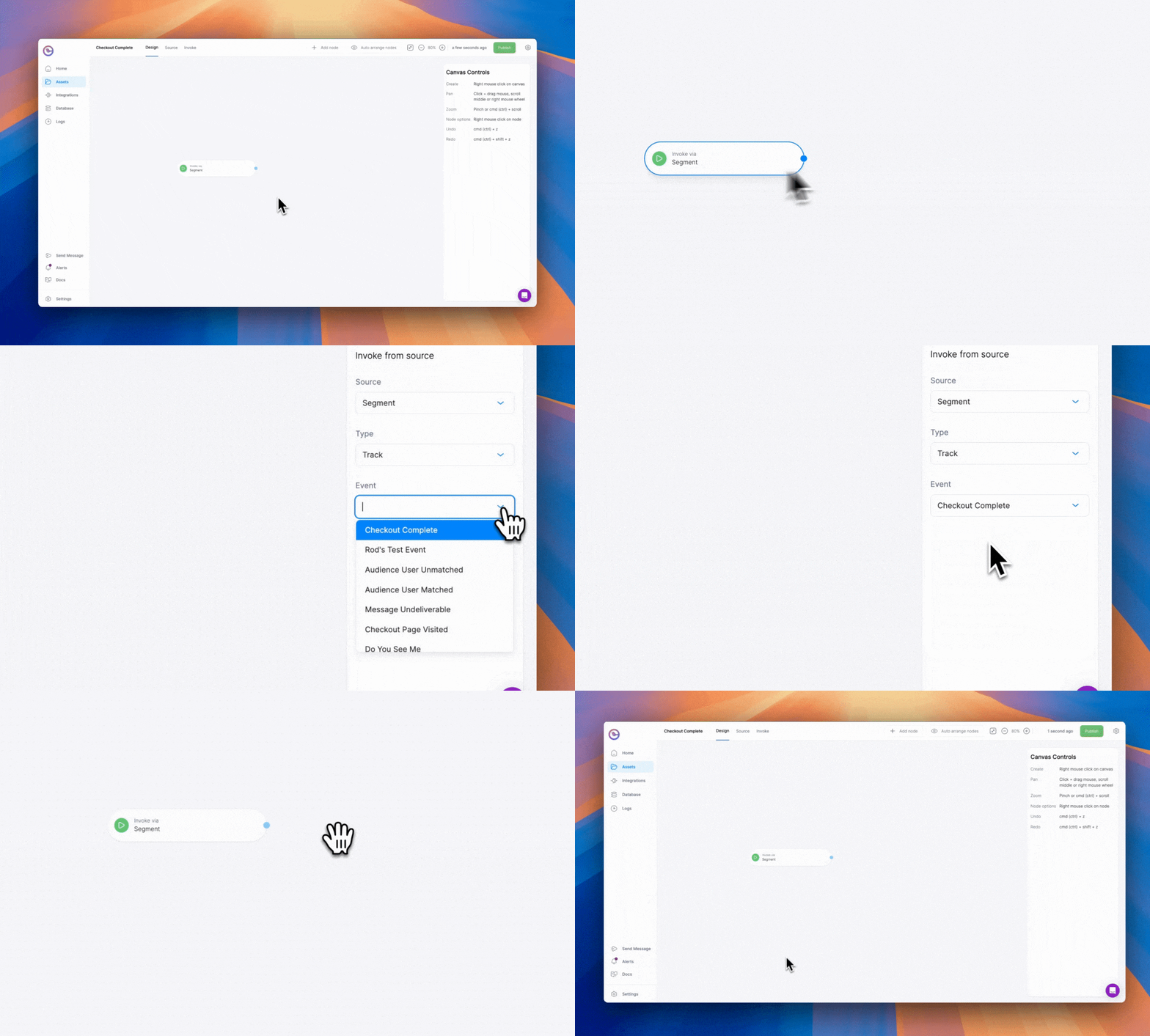
Linking automations to Segment events allows you to create a flow of actions that will be triggered by specific events. This means that whenever an event occurs in your application and is sent through Segment, any linked Courier automations will trigger a workflow to send a notification with the data passed from the event.
* In the [Segment integration page](https://app.courier.com/integrations/catalog/segment), locate the event you want to link, click the + sign on the second column, and select the automation of your choice.
* From an automation template, you can link an automation to a segment event from the dropdown menu.
 ## What's Next
Learn about automation steps, triggers, and sequences
Batch notifications into periodic digest messages
Full reference for the Segment integration
Full reference for automation steps and triggers
## What's Next
Learn about automation steps, triggers, and sequences
Batch notifications into periodic digest messages
Full reference for the Segment integration
Full reference for automation steps and triggers