

Setup
You will need a MailerSend account with a verified sending domain.1
Verify Your Domain
In MailerSend, add your domain and complete DNS verification.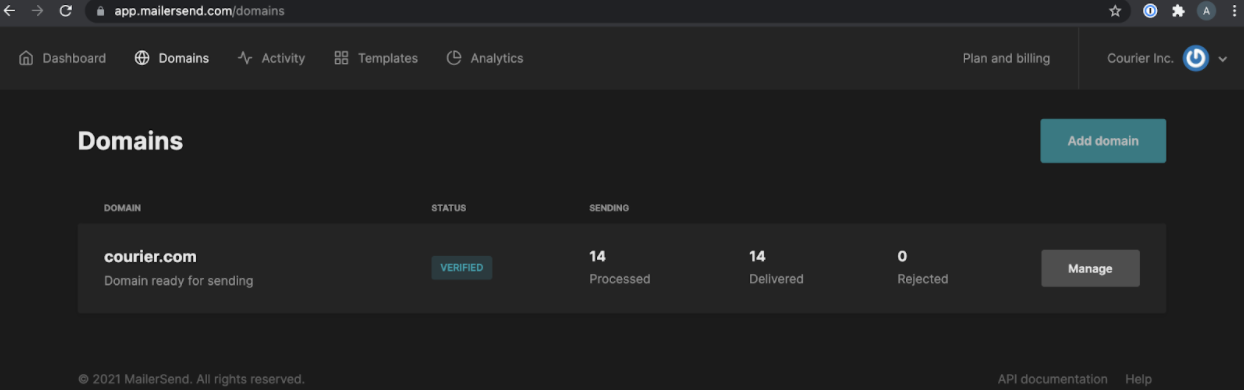
2
Generate an API Token
Click “Manage” on your domain and generate an API token.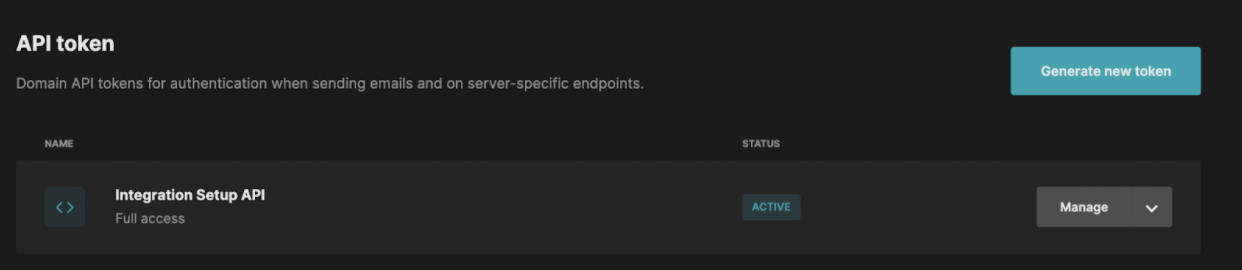
3
Configure in Courier
In Courier, navigate to the MailerSend Integration page. Enter your API token and From Address, then click “Save.”
Profile Requirements
To deliver a message to a recipient over MailerSend, Courier must be provided the recipient’s email address. This value should be included in the recipient profile asemail.
Overrides
You can override any of the fields supported by MailerSend’s /v1/email endpoint. Overrides are useful when a field is not yet supported by Courier or you want to replace a value that Courier generates. Config override example:Attachments
To include an attachment, add anattachments array in the override. File content must be base64-encoded.
Troubleshooting
MailerSend 422 Response Code
MailerSend 422 Response Code
A 422 error from MailerSend can have several causes:
The most common cause is an unverified sending domain. Make sure your domain is verified with MailerSend before using it with Courier.