

Prerequisites
- A Twilio account with WhatsApp enabled
- Your Twilio Account SID and Auth Token
- A WhatsApp-enabled “From” number in Twilio
Setup
1
Get your Twilio credentials
In Twilio, open the console and copy your Account SID and Auth Token. Your WhatsApp sender is the “From” number.
2
Configure in Courier
Open the in Courier, enter your Twilio Account SID, Auth Token, and “From” number, then save.
Profile requirements
WhatsApp addresses the recipient by phone number, so the profile you send to needs aphone_number. Store it once with , which merges into the profile and creates it if it doesn’t exist:
user_id and Courier resolves the address.
For a one-off with no stored profile, pass it inline instead: "to": { "phone_number": "+15551234567" }.
Send by user id
The call in every language, and the rest of the profile object.
Send to a recipient
- Send to user id
- Send to a phone number
Courier reads
phone_number off the saved profile, so preferences apply and the value can change without touching this code.Notification categories
WhatsApp allows these notification categories:- Marketing
- Authentication
- Utility
- Account Update
- Alert Update
- Appointment Update
- Auto-Reply
- Issue Resolution
- Payment Update
- Personal Finance Update
- Reservation Update
- Shipping Update
- Ticket Update
- Transportation Update
WhatsApp template verification
WhatsApp reviews every template against its guidelines before you can send it.Create the template
Structure: WhatsApp message templates are predefined messages with placeholders for dynamic content. A template can be text, media (images, documents), or interactive (buttons, list messages). Categories: Each template is categorized by use case, such as transactional updates, customer service, or alerts.Submit the template for approval
Open the console: In the Twilio Console, go to the Messaging section. Create the template: In the WhatsApp Templates section, create a template. Provide the template name, category, language, and message content. Leave out promotional material, which WhatsApp disallows in templates. Submit for review: Submit the template for WhatsApp’s review.WhatsApp approval process
WhatsApp checks the template against its policies. Review takes a few minutes to 24 hours. Two outcomes:- Approved: The template meets WhatsApp’s guidelines. You can now send it through the Twilio API.
- Rejected: The template is rejected for promotional content, inappropriate language, or other policy violations. Fix the template and resubmit it.
Approved templates with Courier
Copy the approved template’s Twilio Content SID, which starts withHX. Paste it into the WhatsApp channel settings of your Courier template. Sends then reference that approved template through the .
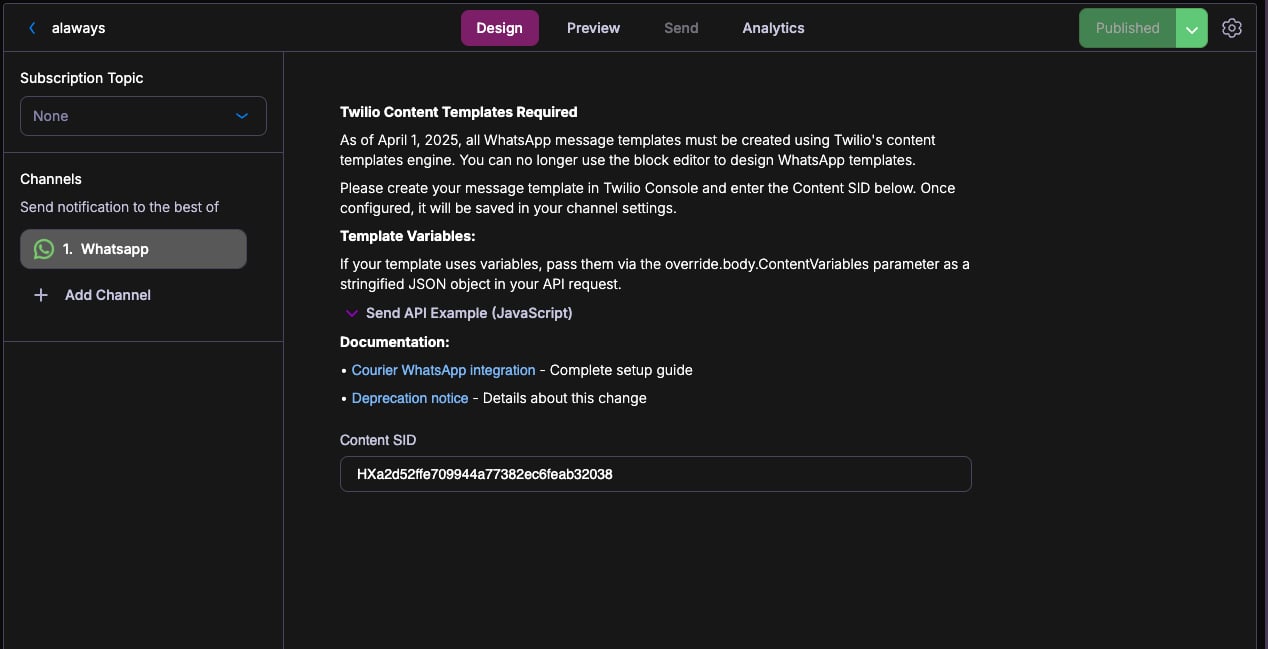
WhatsApp Template
Twilio renders the approved template, filled with your Courier variables.
Courier sends the Content SID and its variables, and Twilio renders the approved template. Your Courier template still drives routing, variables, and every other channel.
Courier sends the Content SID and its variables, and Twilio renders the approved template. Your Courier template still drives routing, variables, and every other channel.
Key considerations
Content: Keep template content clear and non-promotional. Include every placeholder and give sample values so reviewers have context. Localization: Create and get approval for each language version of the template. Monitoring: Watch template performance. Frequent spam reports can cost you the ability to send. Update templates as WhatsApp guidelines change.Overrides
covers the two levels and which one wins. A provider override changes the request body Courier sends to Twilio, or swaps the Twilio credentials and the From number.Body overrides
A Content SID is required on every WhatsApp send. Set it on the template’s WhatsApp channel settings, or pass it per send asoverride.body.ContentSid. Without one the send fails with No Content SID specified. before reaching Twilio.
Override body keys are capitalized before they are sent, so contentSid and ContentSid are equivalent. Use an override to select an approved template at send time:
Config overrides
Swap Twilio credentials or the “From” number at send time:Provider details
routing.channels instead is supported, and sends through just this provider.
Send to a specific provider
When that is worth doing, and what you give up: failover, channel priority, and providers you add later.