

Prerequisites
- An Opsgenie account
- Your Opsgenie API key
Setup
1
Create an Opsgenie API integration
In Opsgenie, create an API integration and copy its API key.
2
Configure in Courier
Install the in Courier and enter your API key.
Set a value in the
Message field in the channel configuration. Use a static message, or add the data property to the API call payload.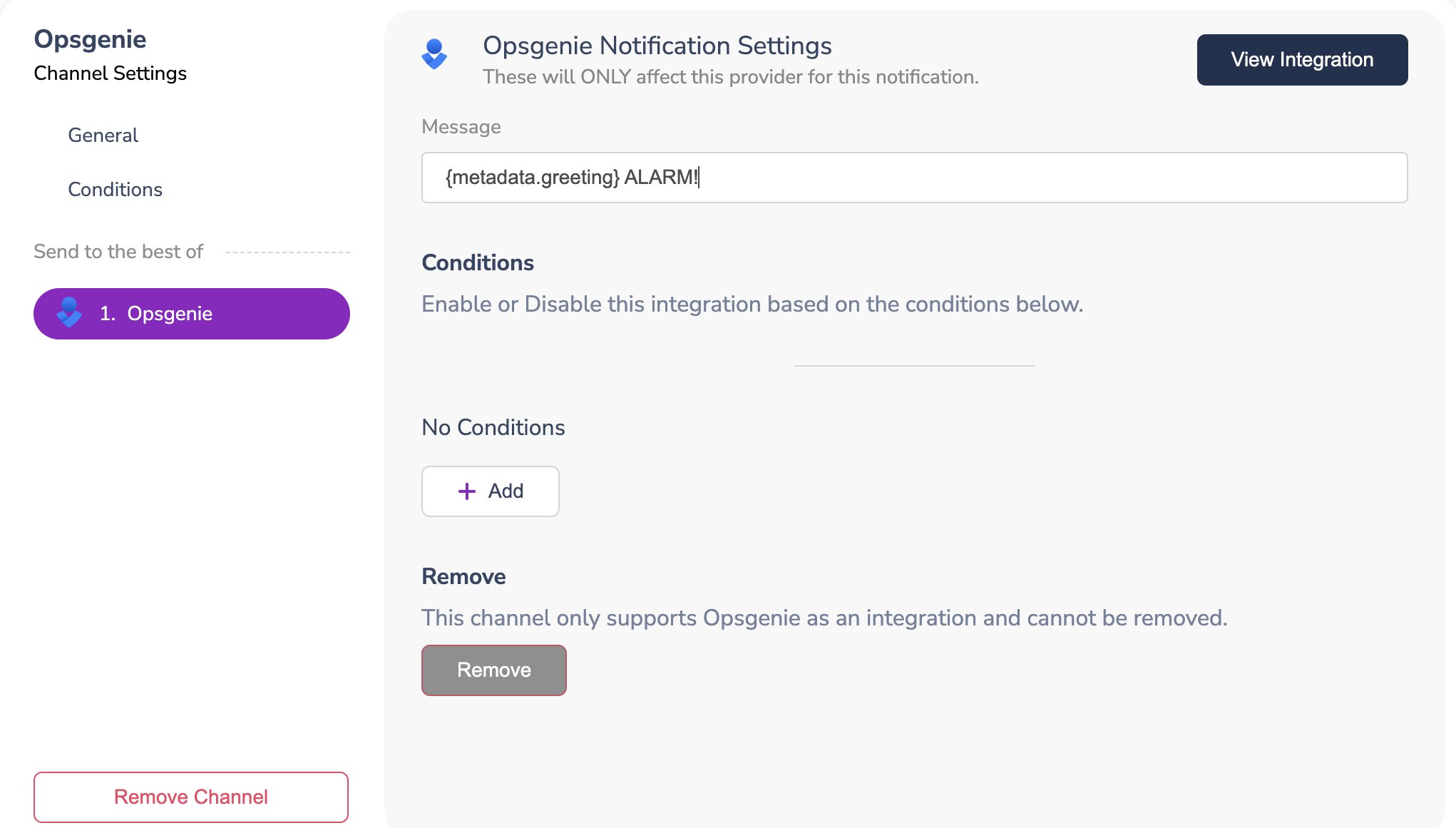
Profile requirements
Opsgenie needs no profile data. Include the Opsgenie channel in your template, and Courier routes the notification to Opsgenie.const { requestId } = await courier.send.message({
message: {
to: {},
template: "nt_01kx4h2jdafq8bk9aftxak4b40",
},
});
response = client.send.message(
    message={
        "to": {},
        "template": "nt_01kx4h2jdafq8bk9aftxak4b40",
    },
)
curl -X POST https://api.courier.com/send \
  -H "Authorization: Bearer $COURIER_API_KEY" \
  -H "Content-Type: application/json" \
  -d '{
    "message": {
      "to": {},
      "template": "nt_01kx4h2jdafq8bk9aftxak4b40"
    }
  }'
response = courier.send_.message(
  message: {
    to: {},
    template: "nt_01kx4h2jdafq8bk9aftxak4b40"
  }
)
response, err := client.Send.Message(context.TODO(), courier.SendMessageParams{
	Message: courier.SendMessageParamsMessage{
		To: courier.SendMessageParamsMessageToUnion{
			OfUserRecipient: &shared.UserRecipientParam{
			},
		},
		Template: courier.String("nt_01kx4h2jdafq8bk9aftxak4b40"),
	},
})
SendMessageParams params = SendMessageParams.builder()
    .message(SendMessageParams.Message.builder()
        .to(UserRecipient.builder().build())
        .template("nt_01kx4h2jdafq8bk9aftxak4b40")
        .build())
    .build();
SendMessageResponse response = client.send().message(params);
$response = $client->send->message(
  message: [
    'to' => [],
    'template' => 'nt_01kx4h2jdafq8bk9aftxak4b40',
  ],
);
SendMessageParams parameters = new()
{
    Message = new()
    {
        To = new UserRecipient {  },
        Template = "nt_01kx4h2jdafq8bk9aftxak4b40",
    },
};

var response = await client.Send.Message(parameters);
courier send message \
  --api-key "$COURIER_API_KEY" \
  --message.to '{}' \
  --message.template nt_01kx4h2jdafq8bk9aftxak4b40
With Courier MCP, send my Opsgenie template with no recipient profile data.
data property in the API call payload:
const { requestId } = await courier.send.message({
  message: {
    data: {
      metadata: {
        greeting: "Hey... DO NOT PANIC...",
      },
    },
    providers: {
      opsgenie: {
        override: {
          config: {
            apiKey: "YOUR_OPSGENIE_API_KEY",
          },
        },
      },
    },
    template: "nt_01kx4h2jdafq8bk9aftxak4b40",
    to: {},
  },
});
response = client.send.message(
    message={
        "data": {
            "metadata": {
                "greeting": "Hey... DO NOT PANIC...",
            },
        },
        "providers": {
            "opsgenie": {
                "override": {
                    "config": {
                        "apiKey": "YOUR_OPSGENIE_API_KEY",
                    },
                },
            },
        },
        "template": "nt_01kx4h2jdafq8bk9aftxak4b40",
        "to": {},
    },
)
curl -X POST https://api.courier.com/send \
  -H "Authorization: Bearer $COURIER_API_KEY" \
  -H "Content-Type: application/json" \
  -d '{
    "message": {
      "data": {
        "metadata": {
          "greeting": "Hey... DO NOT PANIC..."
        }
      },
      "providers": {
        "opsgenie": {
          "override": {
            "config": {
              "apiKey": "YOUR_OPSGENIE_API_KEY"
            }
          }
        }
      },
      "template": "nt_01kx4h2jdafq8bk9aftxak4b40",
      "to": {}
    }
  }'
response = courier.send_.message(
  message: {
    data: {
      metadata: {
        greeting: "Hey... DO NOT PANIC..."
      }
    },
    providers: {
      opsgenie: {
        override: {
          config: {
            apiKey: "YOUR_OPSGENIE_API_KEY"
          }
        }
      }
    },
    template: "nt_01kx4h2jdafq8bk9aftxak4b40",
    to: {}
  }
)
response, err := client.Send.Message(context.TODO(), courier.SendMessageParams{
	Message: courier.SendMessageParamsMessage{
		To: courier.SendMessageParamsMessageToUnion{
			OfUserRecipient: &shared.UserRecipientParam{
			},
		},
		Template: courier.String("nt_01kx4h2jdafq8bk9aftxak4b40"),
		Data: map[string]any{
			"metadata": map[string]any{
				"greeting": "Hey... DO NOT PANIC...",
			},
		},
		Providers: shared.MessageProvidersParam{
			"opsgenie": shared.MessageProvidersTypeParam{
				Override: map[string]any{
					"config": map[string]any{
						"apiKey": "YOUR_OPSGENIE_API_KEY",
					},
				},
			},
		},
	},
})
SendMessageParams params = SendMessageParams.builder()
    .message(SendMessageParams.Message.builder()
        .to(UserRecipient.builder().build())
        .template("nt_01kx4h2jdafq8bk9aftxak4b40")
        .data(JsonValue.from(java.util.Map.of(
            "metadata", java.util.Map.of(
                "greeting", "Hey... DO NOT PANIC..."
            )
        )))
        .providers(MessageProviders.builder()
            .putAdditionalProperty("opsgenie", JsonValue.from(java.util.Map.of("override", java.util.Map.of(
                    "config", java.util.Map.of(
                        "apiKey", "YOUR_OPSGENIE_API_KEY"
                    )
                ))))
            .build())
        .build())
    .build();
SendMessageResponse response = client.send().message(params);
$response = $client->send->message(
  message: [
    'data' => [
      'metadata' => [
        'greeting' => 'Hey... DO NOT PANIC...',
      ],
    ],
    'providers' => [
      'opsgenie' => [
        'override' => [
          'config' => [
            'apiKey' => 'YOUR_OPSGENIE_API_KEY',
          ],
        ],
      ],
    ],
    'template' => 'nt_01kx4h2jdafq8bk9aftxak4b40',
    'to' => [],
  ],
);
SendMessageParams parameters = new()
{
    Message = new()
    {
        To = new UserRecipient {  },
        Template = "nt_01kx4h2jdafq8bk9aftxak4b40",
        Data = new Dictionary<string, JsonElement>()
        {
            { "metadata", JsonSerializer.Deserialize<JsonElement>(
                """
                {
                  "greeting": "Hey... DO NOT PANIC..."
                }
                """
            ) },
        },
        Providers = new Dictionary<string, MessageProvidersType>()
        {
            {
                "opsgenie",
                new()
                {
                    Override = JsonSerializer.Deserialize<Dictionary<string, JsonElement>>(
                        """
                        {
                          "config": {
                            "apiKey": "YOUR_OPSGENIE_API_KEY"
                          }
                        }
                        """
                    ),
                }
            },
        },
    },
};

var response = await client.Send.Message(parameters);
courier send message \
  --api-key "$COURIER_API_KEY" \
  --message.to '{}' \
  --message.template nt_01kx4h2jdafq8bk9aftxak4b40 \
  --message.data '{"metadata": {"greeting": "Hey... DO NOT PANIC..."}}' \
  --message.providers '{"opsgenie": {"override": {"config": {"apiKey": "YOUR_OPSGENIE_API_KEY"}}}}'
With Courier MCP, send my Opsgenie template with a custom greeting in the data.
data property.

Overrides
covers the two levels and which one wins. Overrides change the configuration or request body Courier sends to Opsgenie, such as the API key or the message body.If you’re using Opsgenie in the Europe region, use the URL
https://api.eu.opsgenie.com/v2 and the API key associated with your EU instance.const { requestId } = await courier.send.message({
message: {
template: "nt_01kx4h2jdafq8bk9aftxak4b40",
to: {},
providers: {
opsgenie: {
override: {
config: {
apiKey: "YOUR_OPSGENIE_API_KEY",
url: "https://api.eu.opsgenie.com/v2",
},
headers: {},
body: {
message: "YOUR MESSAGE",
},
},
},
},
},
});
response = client.send.message(
    message={
        "template": "nt_01kx4h2jdafq8bk9aftxak4b40",
        "to": {},
        "providers": {
            "opsgenie": {
                "override": {
                    "config": {
                        "apiKey": "YOUR_OPSGENIE_API_KEY",
                        "url": "https://api.eu.opsgenie.com/v2",
                    },
                    "headers": {},
                    "body": {
                        "message": "YOUR MESSAGE",
                    },
                },
            },
        },
    },
)
curl -X POST https://api.courier.com/send \
  -H "Authorization: Bearer $COURIER_API_KEY" \
  -H "Content-Type: application/json" \
  -d '{
    "message": {
      "template": "nt_01kx4h2jdafq8bk9aftxak4b40",
      "to": {},
      "providers": {
        "opsgenie": {
          "override": {
            "config": {
              "apiKey": "YOUR_OPSGENIE_API_KEY",
              "url": "https://api.eu.opsgenie.com/v2"
            },
            "headers": {},
            "body": {
              "message": "YOUR MESSAGE"
            }
          }
        }
      }
    }
  }'
response = courier.send_.message(
  message: {
    template: "nt_01kx4h2jdafq8bk9aftxak4b40",
    to: {},
    providers: {
      opsgenie: {
        override: {
          config: {
            apiKey: "YOUR_OPSGENIE_API_KEY",
            url: "https://api.eu.opsgenie.com/v2"
          },
          headers: {},
          body: {
            message: "YOUR MESSAGE"
          }
        }
      }
    }
  }
)
response, err := client.Send.Message(context.TODO(), courier.SendMessageParams{
	Message: courier.SendMessageParamsMessage{
		To: courier.SendMessageParamsMessageToUnion{
			OfUserRecipient: &shared.UserRecipientParam{
			},
		},
		Template: courier.String("nt_01kx4h2jdafq8bk9aftxak4b40"),
		Providers: shared.MessageProvidersParam{
			"opsgenie": shared.MessageProvidersTypeParam{
				Override: map[string]any{
					"config": map[string]any{
						"apiKey": "YOUR_OPSGENIE_API_KEY",
						"url": "https://api.eu.opsgenie.com/v2",
					},
					"headers": map[string]any{},
					"body": map[string]any{
						"message": "YOUR MESSAGE",
					},
				},
			},
		},
	},
})
SendMessageParams params = SendMessageParams.builder()
    .message(SendMessageParams.Message.builder()
        .to(UserRecipient.builder().build())
        .template("nt_01kx4h2jdafq8bk9aftxak4b40")
        .providers(MessageProviders.builder()
            .putAdditionalProperty("opsgenie", JsonValue.from(java.util.Map.of("override", java.util.Map.of(
                    "config", java.util.Map.of(
                        "apiKey", "YOUR_OPSGENIE_API_KEY",
                        "url", "https://api.eu.opsgenie.com/v2"
                    ),
                    "headers", java.util.Map.of(),
                    "body", java.util.Map.of(
                        "message", "YOUR MESSAGE"
                    )
                ))))
            .build())
        .build())
    .build();
SendMessageResponse response = client.send().message(params);
$response = $client->send->message(
  message: [
    'template' => 'nt_01kx4h2jdafq8bk9aftxak4b40',
    'to' => [],
    'providers' => [
      'opsgenie' => [
        'override' => [
          'config' => [
            'apiKey' => 'YOUR_OPSGENIE_API_KEY',
            'url' => 'https://api.eu.opsgenie.com/v2',
          ],
          'headers' => [],
          'body' => [
            'message' => 'YOUR MESSAGE',
          ],
        ],
      ],
    ],
  ],
);
SendMessageParams parameters = new()
{
    Message = new()
    {
        To = new UserRecipient {  },
        Template = "nt_01kx4h2jdafq8bk9aftxak4b40",
        Providers = new Dictionary<string, MessageProvidersType>()
        {
            {
                "opsgenie",
                new()
                {
                    Override = JsonSerializer.Deserialize<Dictionary<string, JsonElement>>(
                        """
                        {
                          "config": {
                            "apiKey": "YOUR_OPSGENIE_API_KEY",
                            "url": "https://api.eu.opsgenie.com/v2"
                          },
                          "headers": {},
                          "body": {
                            "message": "YOUR MESSAGE"
                          }
                        }
                        """
                    ),
                }
            },
        },
    },
};

var response = await client.Send.Message(parameters);
courier send message \
  --api-key "$COURIER_API_KEY" \
  --message.to '{}' \
  --message.template nt_01kx4h2jdafq8bk9aftxak4b40 \
  --message.providers '{"opsgenie": {"override": {"config": {"apiKey": "YOUR_OPSGENIE_API_KEY", "url": "https://api.eu.opsgenie.com/v2"}, "headers": {}, "body": {"message": "YOUR MESSAGE"}}}}'
With Courier MCP, send my Opsgenie template through the EU API URL and key.
Provider details
opsgenie
routing.channels instead is supported, and sends through just this provider.
Send to a specific provider
When that is worth doing, and what you give up: failover, channel priority, and providers you add later.