

How it works
Aggregate metrics
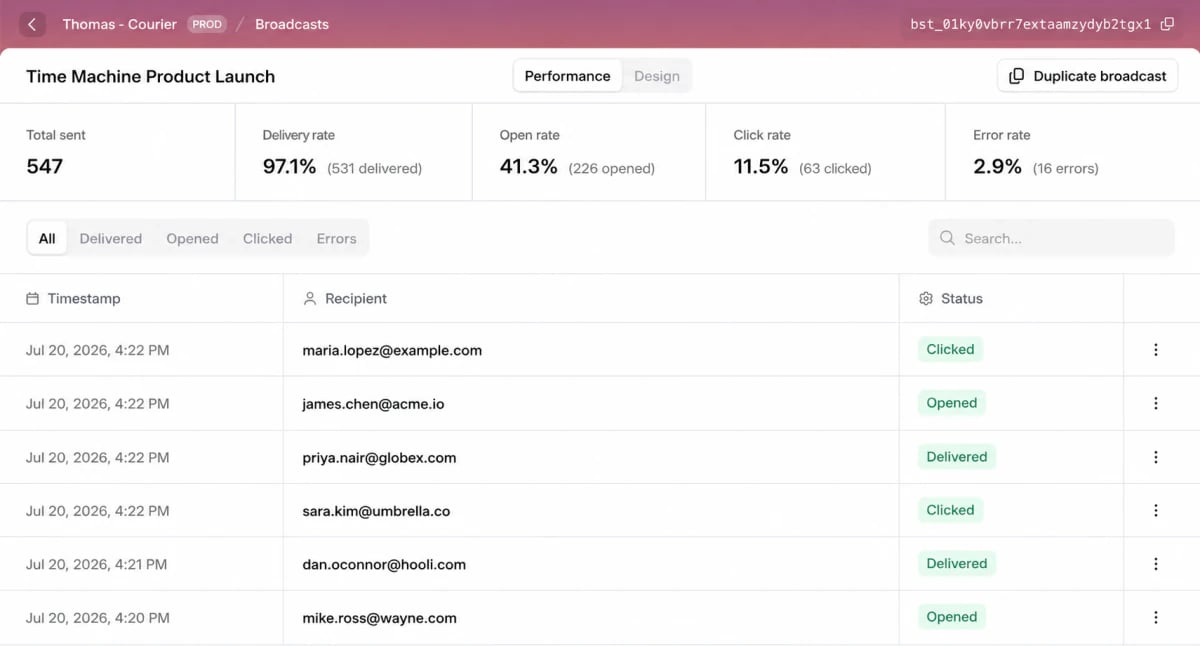
The top of the view summarizes the whole send:Metrics depend on the channel. Open and click tracking applies only to channels that support it, like email.
Per-recipient log
Below the summary, the log lists every recipient with a timestamp and message status. Filter by status (All, Delivered, Opened, Clicked, or Errors), or search for one recipient. When something looks wrong for one person, find them here. The row’s View in logs action opens the full delivery detail in .Duplicating a broadcast
To send something similar again, open a past broadcast and select Duplicate broadcast. Courier copies the content and setup into a new draft you can edit and send.Limits & behavior
- Open and click rates depend on the channel. An SMS broadcast shows delivery and error rates but no opens.
- Open rates undercount. Image blocking and privacy proxies suppress the tracking pixel, so read opens as a trend, not an exact count. See .
- Metrics appear once the broadcast sends. A draft or scheduled broadcast has no Performance data.
FAQ
Why is my open rate lower than expected?
Why is my open rate lower than expected?
Open tracking relies on a pixel that many clients block or pre-fetch. Read the number as a trend across sends, not an exact count. covers the caveats.
How do I debug one recipient who did not get the message?
How do I debug one recipient who did not get the message?
Find them in the per-recipient log, then use View in logs for the full delivery detail, including provider responses and errors.