How to Internationalize Your App’s Product Notifications
 Tejas KumthekarFebruary 10, 2022
Internationalization in software development, known as “i18n” for its number of letters, is as vital as ever for modern companies. Web-based products and services are no longer tied to geographical and cultural boundaries and not every potential customer speaks English. You might have designed your app with your native region in mind, but you’ll eventually need to expand your supported languages and regions to cater to a global audience.
In this article, you’ll learn about the scope of internationalization and the tools that are available to build software with internationalization logic. You’ll also see how our app's own internationalization workflow is designed and our suggestions for how to do it yourself.
What is internationalization?
The purpose of internationalization is to prepare your product for expansion into other markets and countries. With i18n-ready software, you can competitively grow your customer base. Increasing supported languages can also provide sustained future growth. Effective internationalization involves abstracting much of the software by removing all culture- and locale-specific elements. These elements include languages, regions, dates, units, currency, and even cultural symbols and colors. An i18n-ready software should be free of all hard-coded region-specific elements.
Localization, or “L10N,” would then be the process of creating these specific elements for every different locale. This is a recurring process that needs to be completed for every additional locale, while internationalization is done only once to prepare the software to be localized. Localization is more than just translation as it involves updating all cultural markers, such as icons, symbols, colors, etc. Effective localization is dependent upon carefully crafted i18n logic in the software.
In my current role, we serve clients who increasingly look to reach customers across the world. Read on below to learn how we’ve crafted an internationalization workflow.
How does our app work with i18n flow?
We recently introduced a checks system that is similar to GitHub’s checks. We implemented the notifications flow around these checks to allow for maximum flexibility and automation. The diagram below illustrates how the checks system establishes a flow between our app and you.
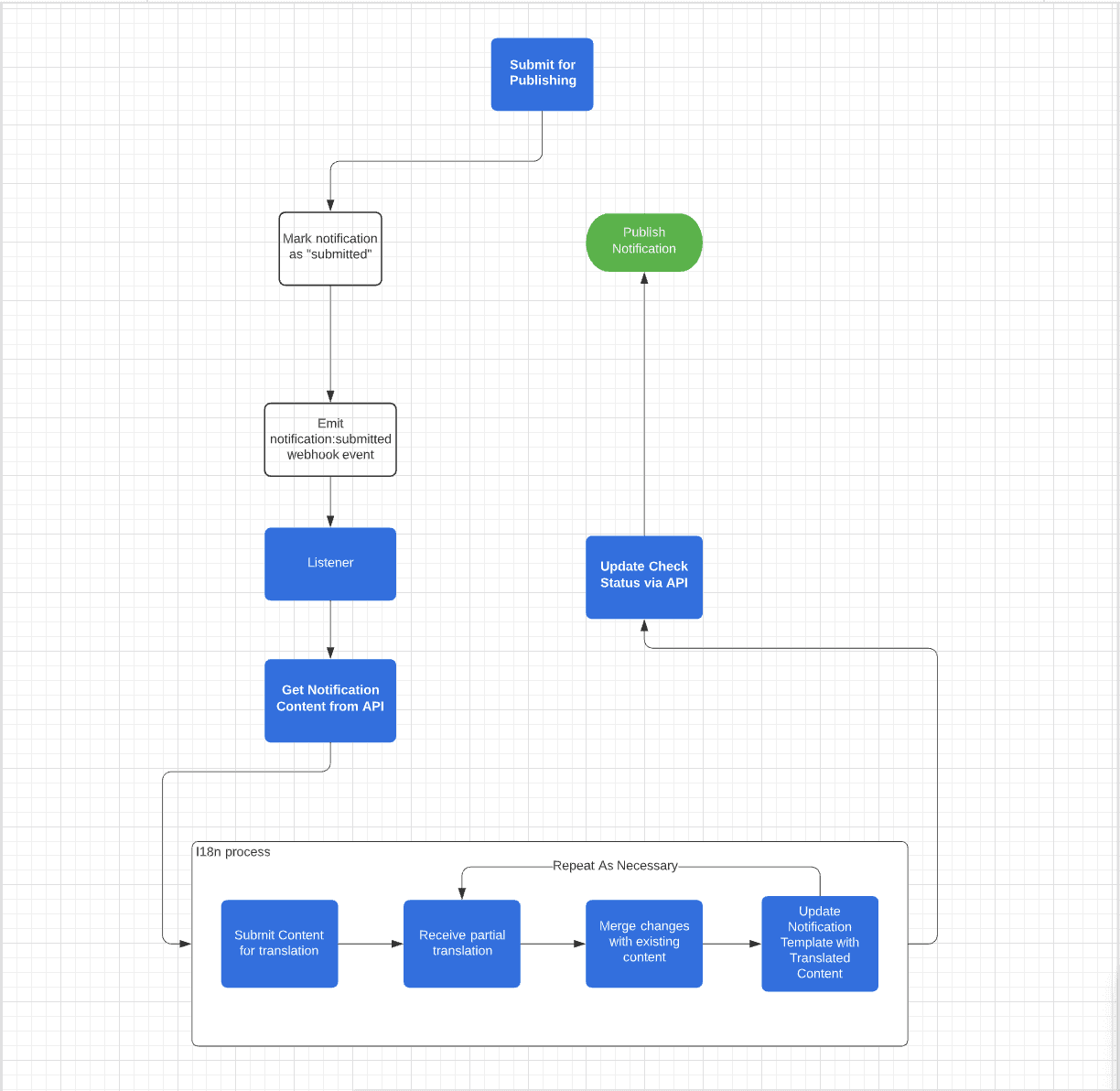
First, you create the notification in the workspace and then submit it for review. The HTTP webhook listens for this submission event and notification content is received via the API call. You can then initiate translations in your own space.
The i18n process is emphasized at the bottom of this diagram. As you submit your own content for translation/localization, you can work piecemeal with your translators until the notification template is translated and localized for each desired locale. You can update as you go along, instead of waiting until all language translations have been completed for each notification block.
As the localization process is completed for each locale, you can notify our app by updating the check-status via API and the app will know the notification is ready for publishing. For example, if all German translations are complete but the French ones are not, you can still upload all the German translations and push those through with the checks system while waiting for the French translations. This process allows for a smoother workflow as you can prepare notifications and translations and our app takes care of the rest.
Who handles the translation?
All translation and localization work is done outside of our app. It’s up to you to find the right localization service for your product. There are many machine translation services available these days but they are not suitable for most cases as localization is much more than translation. Many developers don’t realize how many locale assumptions their system is making. For example, China perceives good or lucky colors differently than many western nations. There, red is actually lucky and associated with positivity while green is unlucky and is even used to denote financial losses.
Another cultural marker that might easily be missed by a developer is the direction of reading, such as between English which reads from left to right, and Arabic or Hebrew which reads from right to left. A proper localization service would consider gender, word order, abbreviations, and many more such cultural marks for each specific locale.
So, while it’s up to you to translate and localize your notification content, we set up our app to handle the communication pathways, the storage of locale-specific translations, and user profiles, and the data logging for your notifications. Basically, we designed a workflow that abstracts all the logic so that you only have to provide your own translations and at your own pace.
What would your i18n flow look like without a managed service?
If your current software is not already designed with internationalization logic, retrofitting it is usually costly due to the labor and time involved. Every hard-coded locale-specific element will have to be re-coded as a variable that grabs the correct locale for each stored user profile from a library.
If you want to implement your own i18n flow, here are some recommendations. First, you’ll want to decide on your process and document it. You will need to set up a project management system and ensure a way for the development team to communicate with the localization team. One possibility might be to hire a project manager into the flow. It will be up to the development team to hand off notifications for translation and localization, and upon receipt of the translations from the localization team, add them into the system. For each new notification, this process will need to be cycled through, where a translation is requested and run through the process and then uploaded into the system.
Depending on the content and complexity of the notification, there might be some other difficulties. Our app uses various drag-and-drop content blocks as the basic components of a notification. If you’re building your system in a similar fashion, you’ll need to ascertain how you will abstract each block so that they are not hard-coded with locale-specific elements. Simple blocks, like text, can be replaced with custom variables. That seems intuitive. However, when you scale your company, this will become more difficult to implement as the different invocations will have to be written per locale. In addition, if your notification composition is complex and includes a variety of content blocks, each block would need to be handled as a custom variable as well. This can quickly become unmanageable if not accounted for from the outset.
Are there available resources for implementing i18n yourself?
There are several open-source libraries and frameworks available to develop i18n-ready software.
- i18next, a comprehensive open-source framework that has been around since 2011 with a dedicated community of developers. It provides you with plugins that can detect language and load translations, with support for multiple files.
- FormatJS and GlobalizeJS, which are collections of javascript libraries for i18n formatting and other tools. However, unlike i18next, developers using FormatJS will need to write their own code to detect language.
- Ruby on Rails has its own i18n library to abstract locale-specific information, replace it with another locale, and store these dictionaries.
- Polyglot.js, which is an interpolation and pluralization helper created by Airbnb.
Despite the number of tools available, you will still need to ascertain which ones are right for you. As you measure your options, keep in mind how long it might take to develop your i18n flow. Your team will need to write the code that will tie these libraries together. You will also need to configure how to store and manage locales in profiles. And of course, unless you provide the translators access to your codebase, you will still need to devise a method for continuous bi-directional communication between the developers and translators for the duration of the process.
Build or Buy your i18n notification workflow
You can always build your own notification system with i18n flow, but you’ll also spend valuable time and resources in the process. There is massive upside in focusing on your product and expanding your customer base as smoothly and efficiently as possible. Ultimately, the decision rests on available resources: do you have time to write i18n logic and re-design your product, or are expediency and user engagement your priorities for the moment in time?
Similar resources

React Native solved a problem nobody had. Use Flutter.
Shopify moved back to Swift and Kotlin because coding agents made two codebases affordable. That kills React Native's reason to exist. It does not touch Flutter's, and the canvas is why.

How to send Slack notifications from your app
Slack is where your customers already work, which makes it a product surface rather than only an internal alerting channel. Posting an approval request or a status change into a customer's own Slack means working in workspaces you don't own, addressing people by email rather than Slack ID, and holding a separate credential for every customer.

Your notification analytics are now available by API
If it's in the Courier dashboard, it's on the API. Analytics was one of the last screens where that wasn't true. GET /notifications/{id}/metrics returns sends, deliveries, opens, clicks, errors, and undeliverable counts per template as a time series, broken out by provider and channel, so the numbers can live in your own product or go straight to an agent.