

Prerequisites
- A MailerSend account
- A verified sending domain in MailerSend
Setup
1
Verify your domain
In MailerSend, open Domains, add your domain, and complete DNS verification.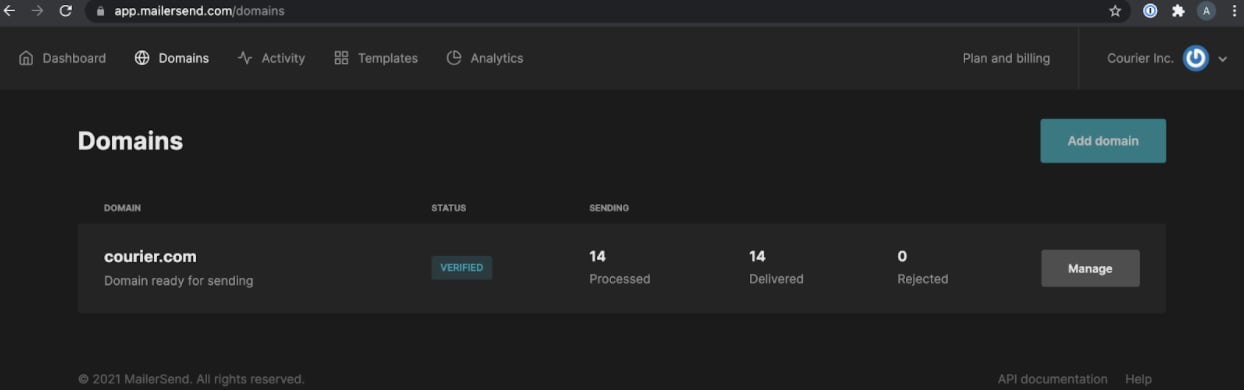
2
Generate an API token
Click “Manage” on your domain and generate an API token.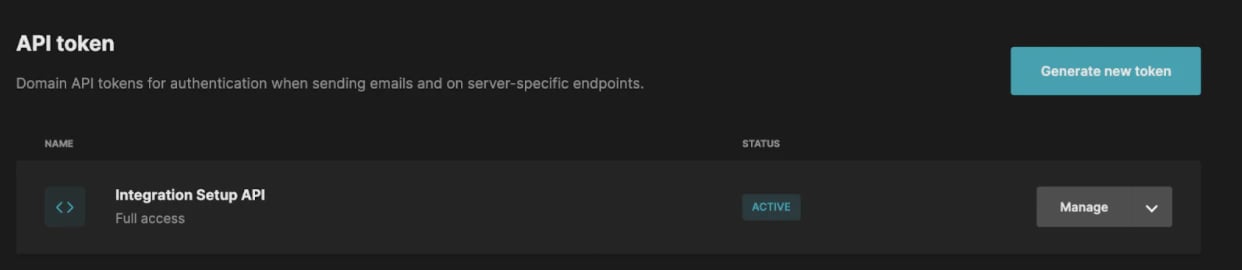
3
Configure in Courier
In Courier, open the page. Enter your API token and From Address, then click “Save.”
Overrides
covers the two levels and which one wins. lists the fields every email provider takes. You can override any field MailerSend’s /v1/email endpoint supports. Use an override when Courier doesn’t support a field yet, or to replace a value Courier generates. This example swaps the API key and the sender inconfig:
const { requestId } = await courier.send.message({
  message: {
    template: "nt_01kx4h2jdafq8bk9aftxak4b40",
    to: {
      email: "sarah@acme-corp.com",
    },
    providers: {
      mailersend: {
        override: {
          config: {
            apiKey: "<your override API key>",
            fromAddress: "alternate-sender@yourdomain.com",
          },
        },
      },
    },
  },
});
response = client.send.message(
    message={
        "template": "nt_01kx4h2jdafq8bk9aftxak4b40",
        "to": {
            "email": "sarah@acme-corp.com",
        },
        "providers": {
            "mailersend": {
                "override": {
                    "config": {
                        "apiKey": "<your override API key>",
                        "fromAddress": "alternate-sender@yourdomain.com",
                    },
                },
            },
        },
    },
)
curl -X POST https://api.courier.com/send \
  -H "Authorization: Bearer $COURIER_API_KEY" \
  -H "Content-Type: application/json" \
  -d '{
    "message": {
      "template": "nt_01kx4h2jdafq8bk9aftxak4b40",
      "to": {
        "email": "sarah@acme-corp.com"
      },
      "providers": {
        "mailersend": {
          "override": {
            "config": {
              "apiKey": "<your override API key>",
              "fromAddress": "alternate-sender@yourdomain.com"
            }
          }
        }
      }
    }
  }'
response = courier.send_.message(
  message: {
    template: "nt_01kx4h2jdafq8bk9aftxak4b40",
    to: {
      email: "sarah@acme-corp.com"
    },
    providers: {
      mailersend: {
        override: {
          config: {
            apiKey: "<your override API key>",
            fromAddress: "alternate-sender@yourdomain.com"
          }
        }
      }
    }
  }
)
response, err := client.Send.Message(context.TODO(), courier.SendMessageParams{
	Message: courier.SendMessageParamsMessage{
		To: courier.SendMessageParamsMessageToUnion{
			OfUserRecipient: &shared.UserRecipientParam{
				Email: courier.String("sarah@acme-corp.com"),
			},
		},
		Template: courier.String("nt_01kx4h2jdafq8bk9aftxak4b40"),
		Providers: shared.MessageProvidersParam{
			"mailersend": shared.MessageProvidersTypeParam{
				Override: map[string]any{
					"config": map[string]any{
						"apiKey": "<your override API key>",
						"fromAddress": "alternate-sender@yourdomain.com",
					},
				},
			},
		},
	},
})
SendMessageParams params = SendMessageParams.builder()
    .message(SendMessageParams.Message.builder()
        .to(UserRecipient.builder().email("sarah@acme-corp.com").build())
        .template("nt_01kx4h2jdafq8bk9aftxak4b40")
        .providers(MessageProviders.builder()
            .putAdditionalProperty("mailersend", JsonValue.from(java.util.Map.of("override", java.util.Map.of(
                    "config", java.util.Map.of(
                        "apiKey", "<your override API key>",
                        "fromAddress", "alternate-sender@yourdomain.com"
                    )
                ))))
            .build())
        .build())
    .build();
SendMessageResponse response = client.send().message(params);
$response = $client->send->message(
  message: [
    'template' => 'nt_01kx4h2jdafq8bk9aftxak4b40',
    'to' => [
      'email' => 'sarah@acme-corp.com',
    ],
    'providers' => [
      'mailersend' => [
        'override' => [
          'config' => [
            'apiKey' => '<your override API key>',
            'fromAddress' => 'alternate-sender@yourdomain.com',
          ],
        ],
      ],
    ],
  ],
);
SendMessageParams parameters = new()
{
    Message = new()
    {
        To = new UserRecipient { Email = "sarah@acme-corp.com" },
        Template = "nt_01kx4h2jdafq8bk9aftxak4b40",
        Providers = new Dictionary<string, MessageProvidersType>()
        {
            {
                "mailersend",
                new()
                {
                    Override = JsonSerializer.Deserialize<Dictionary<string, JsonElement>>(
                        """
                        {
                          "config": {
                            "apiKey": "<your override API key>",
                            "fromAddress": "alternate-sender@yourdomain.com"
                          }
                        }
                        """
                    ),
                }
            },
        },
    },
};

var response = await client.Send.Message(parameters);
courier send message \
  --api-key "$COURIER_API_KEY" \
  --message.to '{"email": "sarah@acme-corp.com"}' \
  --message.template nt_01kx4h2jdafq8bk9aftxak4b40 \
  --message.providers '{"mailersend": {"override": {"config": {"apiKey": "<your override API key>", "fromAddress": "alternate-sender@yourdomain.com"}}}}'
With Courier MCP, send my template to sarah@acme-corp.com and set a MailerSend field Courier does not expose.
Attachments
Add anattachments array in the override. File content must be base64-encoded.
const { requestId } = await courier.send.message({
  message: {
    template: "nt_01kx4h2jdafq8bk9aftxak4b40",
    to: {
      email: "sarah@acme-corp.com",
    },
    providers: {
      mailersend: {
        override: {
          attachments: [
            {
              filename: "billing.pdf",
              contentType: "application/pdf",
              data: "Q29uZ3JhdHVsYXRpb25zLCB5b3UgY2FuIGJhc2U2NCBkZWNvZGUh",
            },
          ],
        },
      },
    },
  },
});
response = client.send.message(
    message={
        "template": "nt_01kx4h2jdafq8bk9aftxak4b40",
        "to": {
            "email": "sarah@acme-corp.com",
        },
        "providers": {
            "mailersend": {
                "override": {
                    "attachments": [
                        {
                            "filename": "billing.pdf",
                            "contentType": "application/pdf",
                            "data": "Q29uZ3JhdHVsYXRpb25zLCB5b3UgY2FuIGJhc2U2NCBkZWNvZGUh",
                        },
                    ],
                },
            },
        },
    },
)
curl -X POST https://api.courier.com/send \
  -H "Authorization: Bearer $COURIER_API_KEY" \
  -H "Content-Type: application/json" \
  -d '{
    "message": {
      "template": "nt_01kx4h2jdafq8bk9aftxak4b40",
      "to": {
        "email": "sarah@acme-corp.com"
      },
      "providers": {
        "mailersend": {
          "override": {
            "attachments": [
              {
                "filename": "billing.pdf",
                "contentType": "application/pdf",
                "data": "Q29uZ3JhdHVsYXRpb25zLCB5b3UgY2FuIGJhc2U2NCBkZWNvZGUh"
              }
            ]
          }
        }
      }
    }
  }'
response = courier.send_.message(
  message: {
    template: "nt_01kx4h2jdafq8bk9aftxak4b40",
    to: {
      email: "sarah@acme-corp.com"
    },
    providers: {
      mailersend: {
        override: {
          attachments: [
            {
              filename: "billing.pdf",
              contentType: "application/pdf",
              data: "Q29uZ3JhdHVsYXRpb25zLCB5b3UgY2FuIGJhc2U2NCBkZWNvZGUh"
            }
          ]
        }
      }
    }
  }
)
response, err := client.Send.Message(context.TODO(), courier.SendMessageParams{
	Message: courier.SendMessageParamsMessage{
		To: courier.SendMessageParamsMessageToUnion{
			OfUserRecipient: &shared.UserRecipientParam{
				Email: courier.String("sarah@acme-corp.com"),
			},
		},
		Template: courier.String("nt_01kx4h2jdafq8bk9aftxak4b40"),
		Providers: shared.MessageProvidersParam{
			"mailersend": shared.MessageProvidersTypeParam{
				Override: map[string]any{
					"attachments": []any{
						map[string]any{
							"filename": "billing.pdf",
							"contentType": "application/pdf",
							"data": "Q29uZ3JhdHVsYXRpb25zLCB5b3UgY2FuIGJhc2U2NCBkZWNvZGUh",
						},
					},
				},
			},
		},
	},
})
SendMessageParams params = SendMessageParams.builder()
    .message(SendMessageParams.Message.builder()
        .to(UserRecipient.builder().email("sarah@acme-corp.com").build())
        .template("nt_01kx4h2jdafq8bk9aftxak4b40")
        .providers(MessageProviders.builder()
            .putAdditionalProperty("mailersend", JsonValue.from(java.util.Map.of("override", java.util.Map.of(
                    "attachments", java.util.List.of(
                        java.util.Map.of(
                            "filename", "billing.pdf",
                            "contentType", "application/pdf",
                            "data", "Q29uZ3JhdHVsYXRpb25zLCB5b3UgY2FuIGJhc2U2NCBkZWNvZGUh"
                        )
                    )
                ))))
            .build())
        .build())
    .build();
SendMessageResponse response = client.send().message(params);
$response = $client->send->message(
  message: [
    'template' => 'nt_01kx4h2jdafq8bk9aftxak4b40',
    'to' => [
      'email' => 'sarah@acme-corp.com',
    ],
    'providers' => [
      'mailersend' => [
        'override' => [
          'attachments' => [
            [
              'filename' => 'billing.pdf',
              'contentType' => 'application/pdf',
              'data' => 'Q29uZ3JhdHVsYXRpb25zLCB5b3UgY2FuIGJhc2U2NCBkZWNvZGUh',
            ],
          ],
        ],
      ],
    ],
  ],
);
SendMessageParams parameters = new()
{
    Message = new()
    {
        To = new UserRecipient { Email = "sarah@acme-corp.com" },
        Template = "nt_01kx4h2jdafq8bk9aftxak4b40",
        Providers = new Dictionary<string, MessageProvidersType>()
        {
            {
                "mailersend",
                new()
                {
                    Override = JsonSerializer.Deserialize<Dictionary<string, JsonElement>>(
                        """
                        {
                          "attachments": [
                            {
                              "filename": "billing.pdf",
                              "contentType": "application/pdf",
                              "data": "Q29uZ3JhdHVsYXRpb25zLCB5b3UgY2FuIGJhc2U2NCBkZWNvZGUh"
                            }
                          ]
                        }
                        """
                    ),
                }
            },
        },
    },
};

var response = await client.Send.Message(parameters);
courier send message \
  --api-key "$COURIER_API_KEY" \
  --message.to '{"email": "sarah@acme-corp.com"}' \
  --message.template nt_01kx4h2jdafq8bk9aftxak4b40 \
  --message.providers '{"mailersend": {"override": {"attachments": [{"filename": "billing.pdf", "contentType": "application/pdf", "data": "Q29uZ3JhdHVsYXRpb25zLCB5b3UgY2FuIGJhc2U2NCBkZWNvZGUh"}]}}}'
With Courier MCP, send my template to sarah@acme-corp.com with an attachment through MailerSend.
Troubleshooting
MailerSend 422 response code
MailerSend 422 response code
A 422 error from MailerSend has several possible causes:
The most common cause is an unverified sending domain. Verify your domain with MailerSend before using it with Courier.
| Error | Cause |
|---|---|
| From email must be verified | The domain of the from email address must match the domain that the API token is from. |
| Must provide HTML/text or template ID | The API request is missing content; provide either an HTML/text body or a template ID. |
| File type not supported | The attachment isn’t a supported file type. |
| Reply-to must be a valid email | The reply_to parameter isn’t a valid email address. |
| Email quota reached | The account’s quota has been reached. Ensure your account is approved for production sending. |
Provider details
mailersend
routing.channels instead is supported, and sends through just this provider.
Send to a specific provider
When that is worth doing, and what you give up: failover, channel priority, and providers you add later.