The path to “power user” isn’t linear. Courier helps you guide customers through each stage with notifications that reach them at the right time, on the right channel.

The path to “power user” isn’t linear. Courier helps you guide customers through each stage with notifications that reach them at the right time, on the right channel.

  • Photoroom

Meet users where they are

Meet users where they are

Power multi-channel lifecycle notifications across email, SMS, push, Slack, Teams, and in-app with routing that responds to user behavior and engagement signals.

Power multi-channel lifecycle notifications across email, SMS, push, Slack, Teams, and in-app with routing that responds to user behavior and engagement signals.

Email: Build lasting engagement with onboarding, education, and milestone messages users actually revisit.

In-app: Guide users inside your product with tutorials, upgrade prompts, and progress tracking.

Push: Re-engage dormant users with real-time mobile alerts and milestones that bring them back.

SMS: Break through in high-value moments like trial expirations, renewals, and urgent win-backs.

Slack / MS Teams:  Engage users with product updates, milestones, and renewals where they already work.
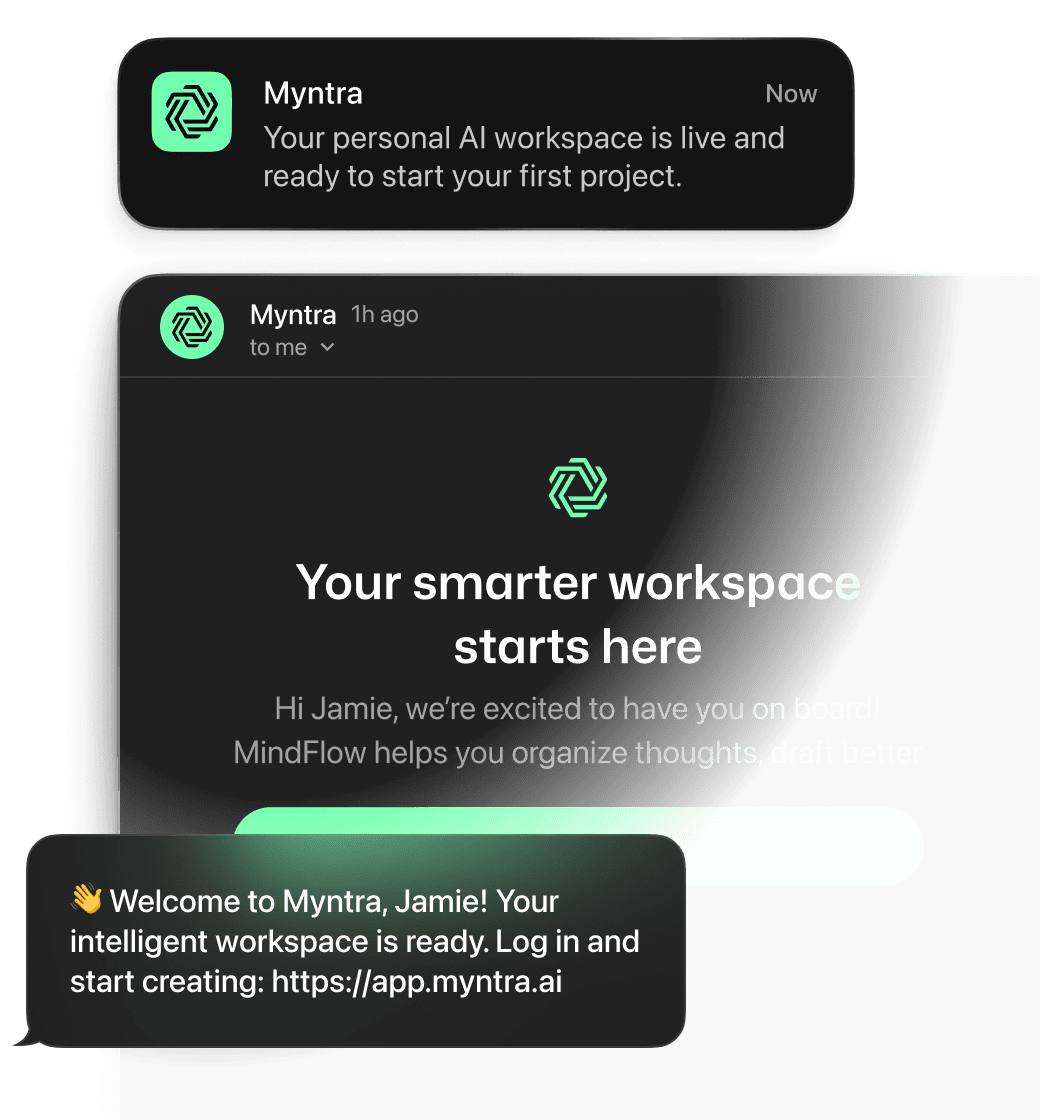
Myntra welcome email and SMS notification for a new AI workspace

Make journeys personal

Make journeys personal

Automate customer journeys that adapt to user behavior. Personalize every notification with signals from product usage, profile data, and milestones.

Workflows that work for you

Workflows that work for you

Courier Journeys take the busywork out of notifications, running behavior-based flows so your team can focus on shipping product.
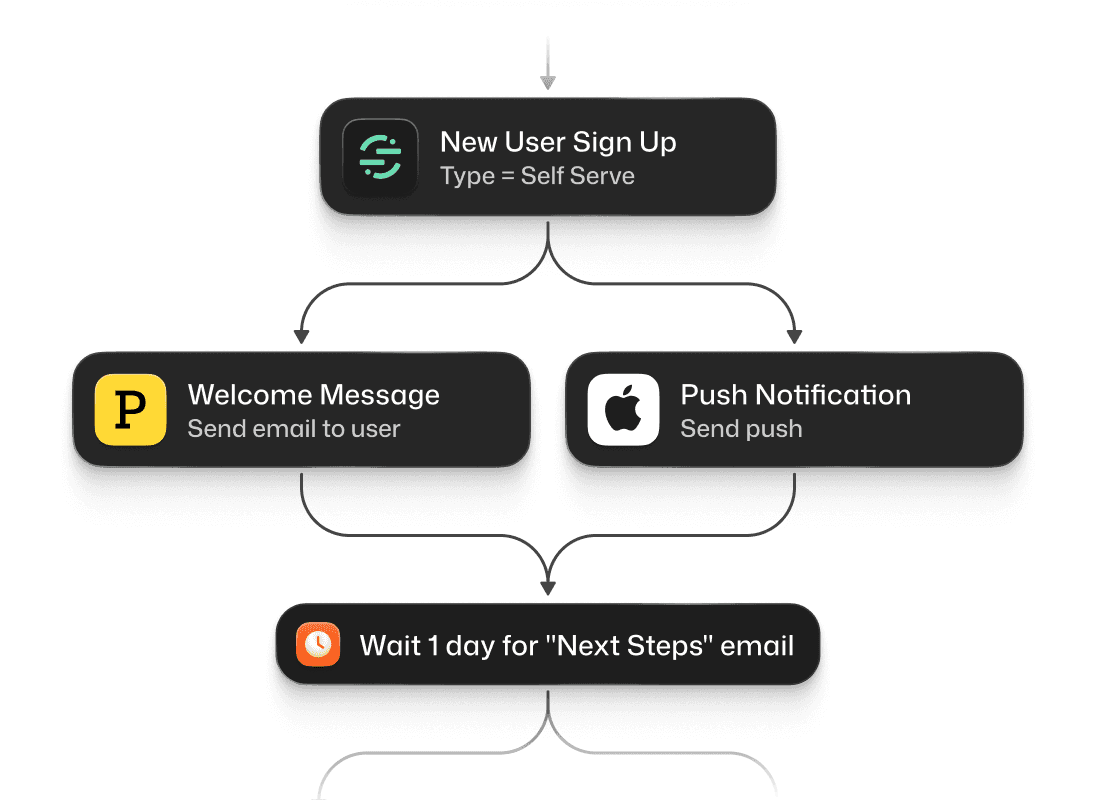
Journey flow: New User Sign Up branches to a welcome email and a push notification, then waits 1 day

Make every message matter

Make every message matter

Send notifications users actually want. Personalize messages with product and customer data so they always feel timely and relevant.
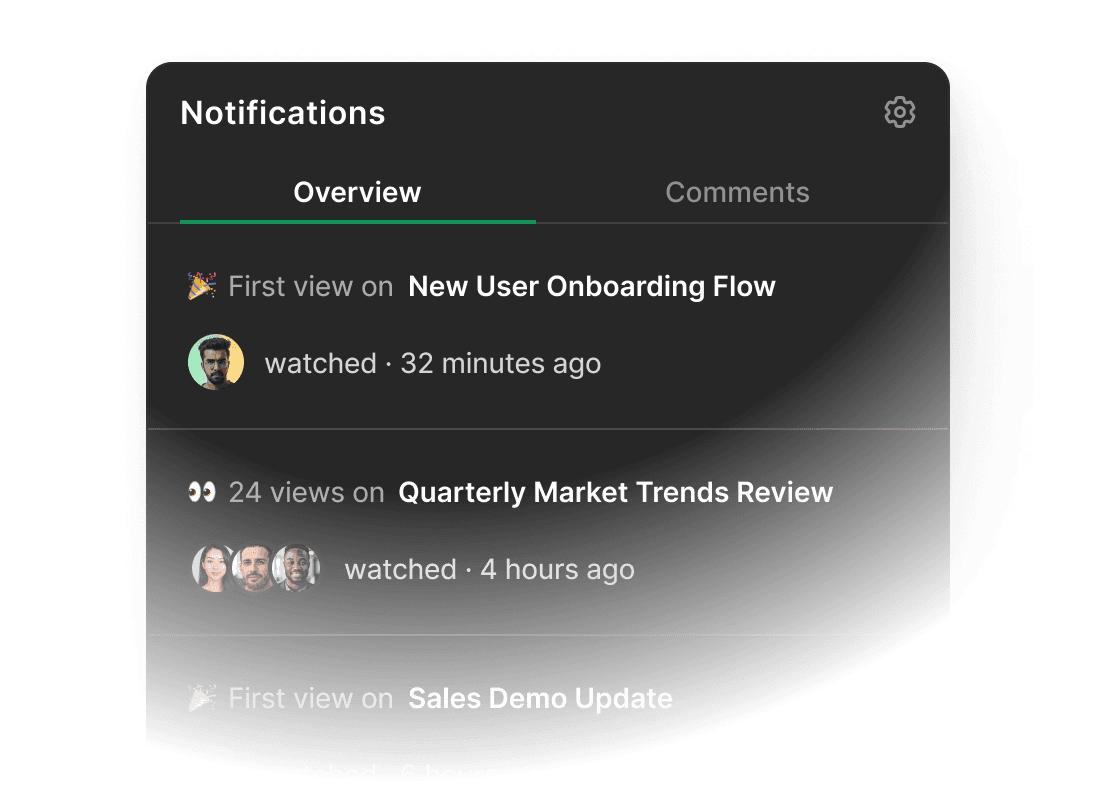
Notifications panel with Overview and Comments tabs, showing first-view and view-count activity

Turn-key growth program

Turn-key growth program

Unify lifecycle and transactional notifications in one platform. Courier simplifies user journeys, centralizes observability, and gives users one place to manage their notification preferences.

Unify lifecycle and transactional notifications in one platform. Courier simplifies user journeys, centralizes observability, and gives users one place to manage their notification preferences.

No-code designer
No-code designer

Design Studio builds branded notifications across email, SMS, push, and in-app without touching code.

Segment message types

Manage promotional and transactional streams independently on shared infrastructure. Easily route through multiple providers for reliability and scale.

Dynamic Audiences
Dynamic Audiences

Build dynamic audiences that target power users for expansion campaigns or win back churned customers with compelling offers.

Drop-in notification center

Courier Inbox lives inside your product with web/mobile SDKs. Users get control over message management.
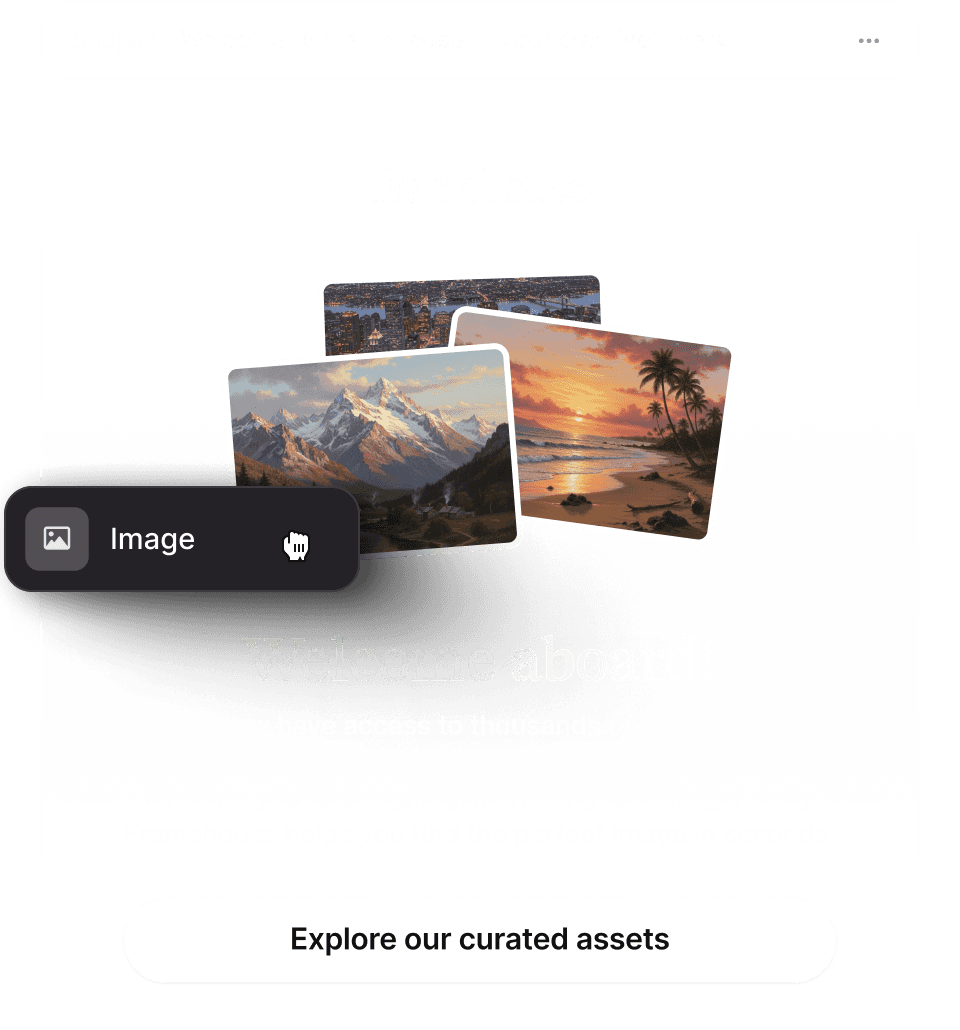
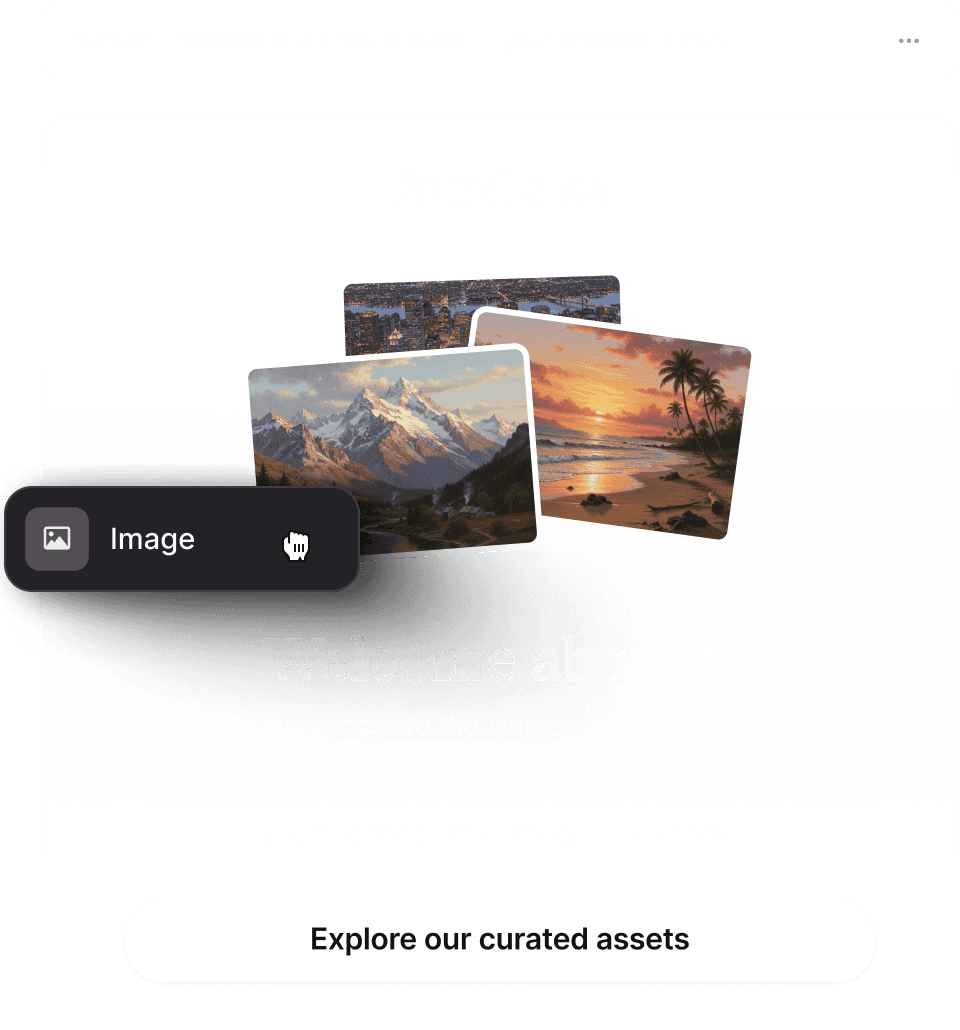
Email template, Welcome aboard, with an Image block being added above the text
Framehouse welcome email in the editor, with an image block and an Explore our curated assets button

Trusted by teams shipping notifications at scale

Side

"Courier was the most mature platform we saw, and the only one that empowered our product managers to own messaging and make improvements without engineering."

Nathan Lee, Senior Director of Engineering at Side on how Courier empowered their team to move faster and more accurately.

Side

"Courier was the most mature platform we saw, and the only one that empowered our product managers to own messaging and make improvements without engineering."

Nathan Lee, Senior Director of Engineering at Side on how Courier empowered their team to move faster and more accurately.

Side

"Courier was the most mature platform we saw, and the only one that empowered our product managers to own messaging and make improvements without engineering."

Nathan Lee, Senior Director of Engineering at Side on how Courier empowered their team to move faster and more accurately.

"Courier was the most mature platform we saw, and the only one that empowered our product managers to own messaging and make improvements without engineering."

Nathan Lee, Senior Director of Engineering at Side on how Courier empowered their team to move faster and more accurately.

Side
Side

Lifecycle moments that drive measurable growth

Onboarding Sequences

Onboarding Sequences

Progressive email and in-app campaigns guide new users to activation milestones, reducing time-to-value from weeks to days.

Feature Announcements

Feature Announcements

Multi-channel campaigns drive adoption of new capabilities while re-engaging dormant users interested in fresh functionality.

Re-engagement Campaigns

Re-engagement Campaigns

Escalating touch sequences bring back inactive users with personalized messaging before they fully churn from your product.

Trial Conversions

Trial Conversions

Time-based campaigns create urgency as free trials near expiration while highlighting value achieved during trial periods.

Upgrade Prompts

Upgrade Prompts

Behavioral triggers catch users at moments of demonstrated need, presenting premium features exactly when readiness signals appear.

Milestone Celebrations

Milestone Celebrations

Usage achievements and anniversaries build emotional connections, transforming utilitarian product relationships into personal bonds.

Win-Back Campaigns

Win-Back Campaigns

Incentive sequences recover churned customers with escalating offers, costing 5-25x less than acquiring net-new replacements.

Dormant Reactivation

Early intervention sequences guide never-activated signups through setup completion before accounts go permanently cold.

Educational Drips

Knowledge-building campaigns deliver progressive value through tips, tutorials, and best practices that increase product adoption.

Common questions about lifecycle notifications

How do I get started with lifecycle notifications?

Build your first journey on Courier’s canvas: pick a trigger, then add sends, delays, and branches for onboarding, trial, or win-back flows. You can also hand it to your AI coding agent: connect Claude Code, Cursor, or Codex to Courier’s MCP server, and it can create the journey, write and publish its templates, and run a test.

Can I trigger notifications based on user behavior?

Yes. A journey can start from four triggers: a direct API call, a Twilio Segment event, an inbound webhook that carries the user’s Courier ID, or a user joining an audience. Signups, feature usage, a trial nearing its end, or any custom event can start a flow, and trigger conditions decide which events count.

How do I prevent overwhelming users with too many notifications?

Let users choose what they get, by topic and channel, in a hosted or embedded preference center, and Courier checks those choices on every send to a topic. Inside a journey, a throttle node caps how often a user passes a step, and a Send to Digest node rolls updates into one summary on a schedule the user picks.

What's the difference between lifecycle and transactional notifications?

Lifecycle notifications move a user forward over time, like onboarding tips, trial reminders, and win-back offers. Transactional notifications confirm an action the user took, like a receipt or a password reset. Courier sends both from one platform, so they share your branding, user profiles, and delivery logs.

How do I personalize notifications for different user segments?

Build audiences from profile fields like plan, role, or signup date, including traits synced from Segment or RudderStack, and Courier keeps membership current as profiles change. Start a journey when someone joins an audience, branch on profile or event fields, and fill templates with variables from the same data.

How do I separate promotional lifecycle messages from critical transactional notifications?

In Courier, put lifecycle notifications on their own subscription topics, which users can opt out of, and mark must-send topics like password resets and receipts Required so they always deliver. Then, on Business and Enterprise, set send limits on your lifecycle topics only, so a busy campaign week never blocks a receipt. Learn how topics work in preferences.

How do I measure lifecycle notification impact on retention?

Courier’s analytics show sent, delivered, opened, and clicked for every journey and template. Experiments let you A/B test 2 to 10 versions of a message at one step and compare results for each version. To tie notifications to retention, stream message events into Segment or your own systems, and join them with your product data.

What happens if a user qualifies for multiple lifecycle campaigns?

On Business and Enterprise, Courier’s send limits cap how many notifications a user gets across every journey and broadcast in an hour, day, week, or month, so overlapping campaigns can’t pile up. When a user starts a new campaign, your code can call the cancel API to stop their run in the old one.