Create a Discord Bot that Automates Secret Messages with Node.js
 Shreya GuptaSeptember 27, 2022
Before Starting
GitHub Repository: https://github.com/shreythecray/infiltration
The hackathon ends soon, and we are giving away over $1K in prizes! Join us in building a cool project and winning any of the following prizes. 🏆
- Courier Hacks 1st Place: Top submission for use for notifications and demonstration of proper app-to-user notifications with the Courier API will receive $1000 via Zelle or PayPal.
- Courier Hacks 2nd Place: 2nd Place submission for use for notifications and demonstration of proper app-to-user notifications with the Courier API will receive the Apple AirPods Pro.
- Public Favorite: Public favorite winner will receive a Keychron Keyboard.
- Runners-Up: Runners-up submissions will receive a Hydro Flask.
Additionally, everyone who submits a project successfully integrating the Courier API will receive a $20 Amazon gift card! Submissions close on September 28th. Register now to submit this project for a chance to win some cool prizes.
Register for the Hackathon: https://courier-hacks.devpost.com/
Not sure where to start? In this tutorial, we will create a Discord bot that sends daily automated messages encrypted in Morse code with Node.js and the Courier API.
What is Going On?
Recap
We are secret agents, and we previously built an application to send secret messages encrypted in Morse code to communicate with our spy network. Learn more >
Last time, headquarters told us that one of our spies had leaked sensitive, top-secret information to our enemies, so we built a lie detector that alerted our spy network when we identified the mole. We used Azure's Cognitive Services to perform facial recognition on everyone on our team and Courier to broadcast the identity of the mole to our spy network. Learn more >
What’s Next:
We have successfully identified the mule and have alerted our spy network! In an unfortunate turn of events, the mule happens to be our partner, Agent X, and now we are being suspected as a traitor as well. Since we are highly skilled, Headquarters knows that the Lie Detector won’t work on us, but we have been placed off-duty until we can prove that we are innocent.
Before we were removed from duty, we were able to use the Lie Detector to find out that the enemy had thousands of civilians under control in a secret Discord server. The civilians are being brainwashed with enemy propaganda every day. To prove our innocence, we decide to go undercover and infiltrate the enemy’s Discord server. With the help of Agent X, we have been added to the server as an administrator. Our plan is to create and install a Discord bot that automates encrypted messages to the civilians and alerts them about the situation so that they can escape.
Let’s Build
Pre-reqs:
- Admin access to a Discord server
- A cool undercover Agent name for our Discord bot
- Optional: a cool undercover Agent profile picture for our Discord bot
Part 1: Set Up Node.js Project
Today, we will be building this with Node.js. If you’re curious about how to build this project using Ruby, cURL, Powershell, Go, PHP, Python, or Java, let us know: https://discord.com/invite/courier. You can also access code for these within our API reference. Let’s get started:
- Create a new project folder.
- Create three new files: “index.js”, “.env”, and “.gitignore”.
Install dotenv npm package to store variables:
npm install dotenv --saveImport and configure dotenv by adding to top of index.js:
require("dotenv").config();Similarly, install node-fetch npm package to make API calls:
npm install node-fetch@2Import and configure node-fetch by adding to top of index.js:
const fetch = require("node-fetch");
Part 2: Create a Discord Bot
- Sign up for (or log into) Courier >
- Open Discord provider in Channels. Here we will need our Discord bot token to continue.
- In order to access a Discord bot token, we’ll create a Discord application and add a Discord bot.
- Click on “New Application” within the Discord Developer Dashboard.
- Type the app’s name and click “Create”.
- In the left menu, open the “Bot” page and click “Add Bot”. We can update the icon and username (bot icon file can be found in the GitHub linked above).
- Once the bot has been created, copy the bot token provided and paste it in Courier (make sure to keep this token private).
- We will need to give this application permission to post as the bot within our server. Check out the Bot permissions documentation.
- Within the application, head over to OAuth2 and click on URL generator
- Select the
botscope - Select the following permissions:
View Channels,Send Messages, andRead Message History - Go to the generated URL below. This URL will invite the bot to the server and authorize it with the permissions chosen.
- On Discord, click on User Settings (next to username on the bottom left). Access the Advanced settings page and enable Developer Mode ✅.
Back in the Discord server, right click on the channel and copy the channel ID (bottom of list). Add this as the value of
channelIDin the .env file within the project and save it as a variable within the index.js file:const channelID = process.env.channelID
Now, Courier has access to sending messages to this server as the bot.
Part 3: Send Messages
- Create a new notification within the Notification Designer
- Add the Chat notification channel with Discord as the provider
- Select on the Chat channel on the right to edit the message
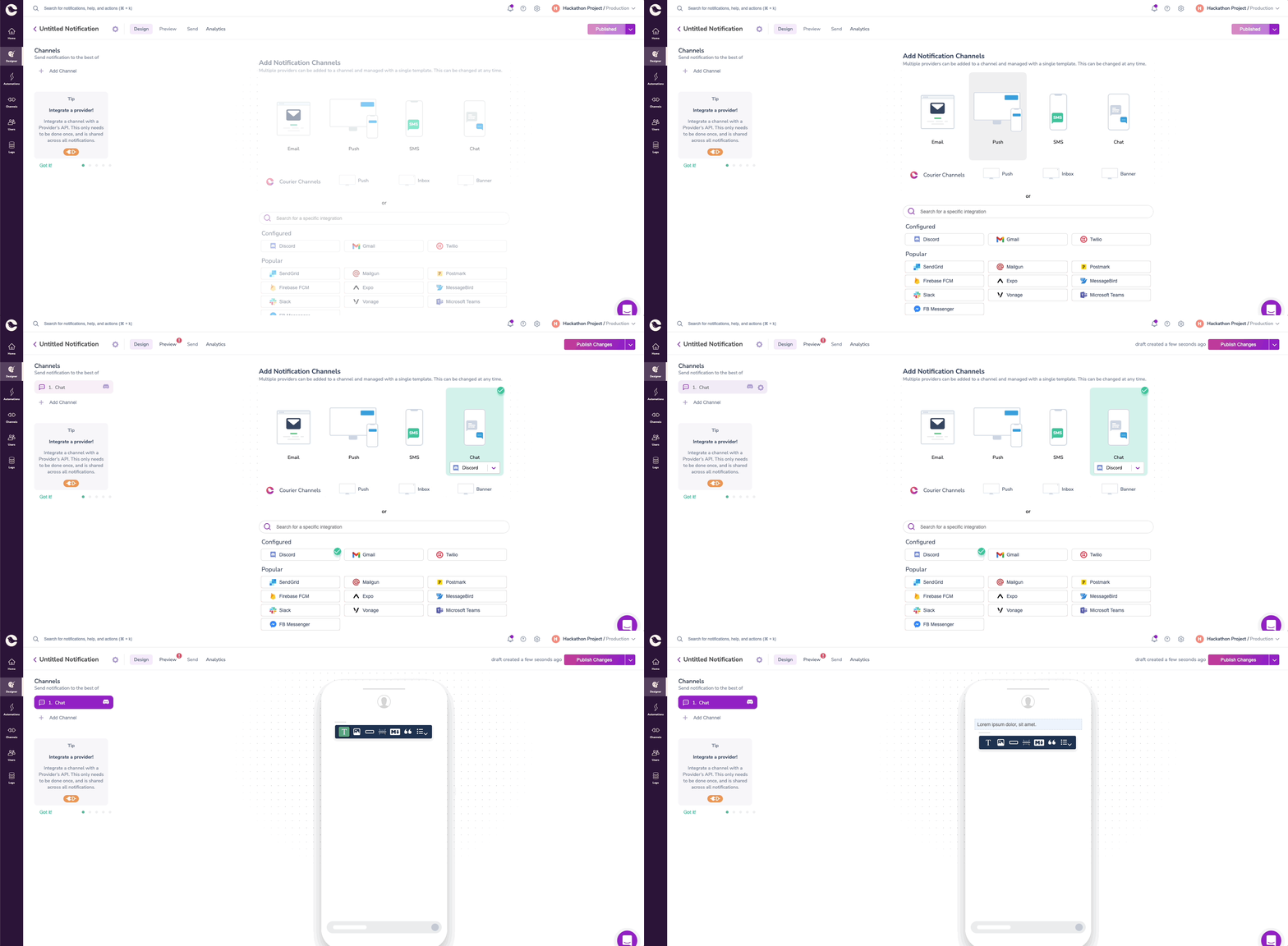
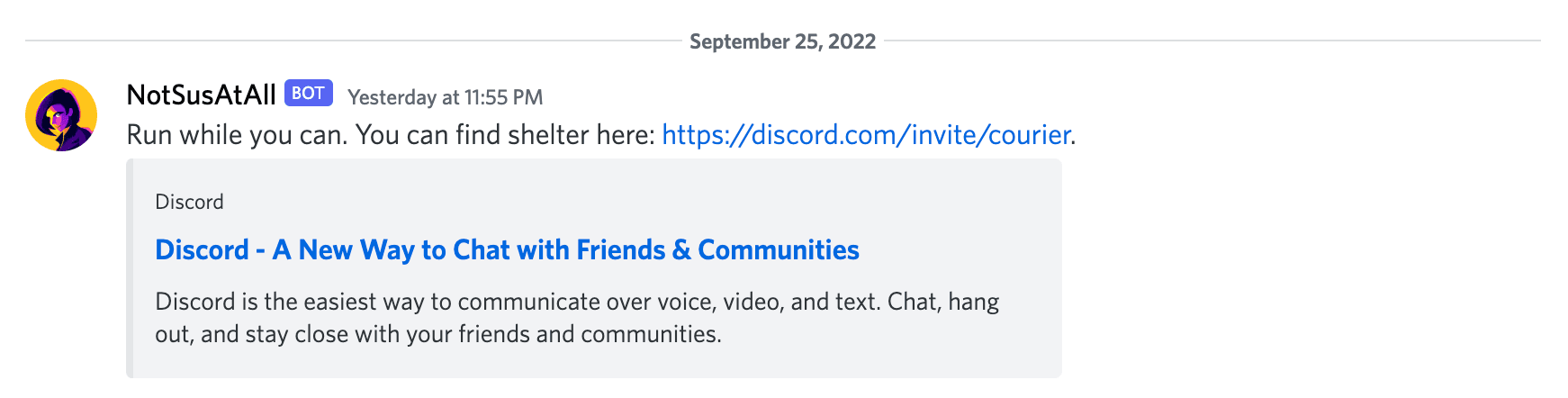
- Write and publish the message. We need to create a clear message that will indicate to our civilians how to escape. Our message will be:
Run while you can. You can find shelter here: https://discord.com/invite/courier. Copy the notification template ID from the notification’s settings and add it as the value of
templateIDin the .env file within the project and save it as a variable within the index.js file:const templateID = process.env.templateID
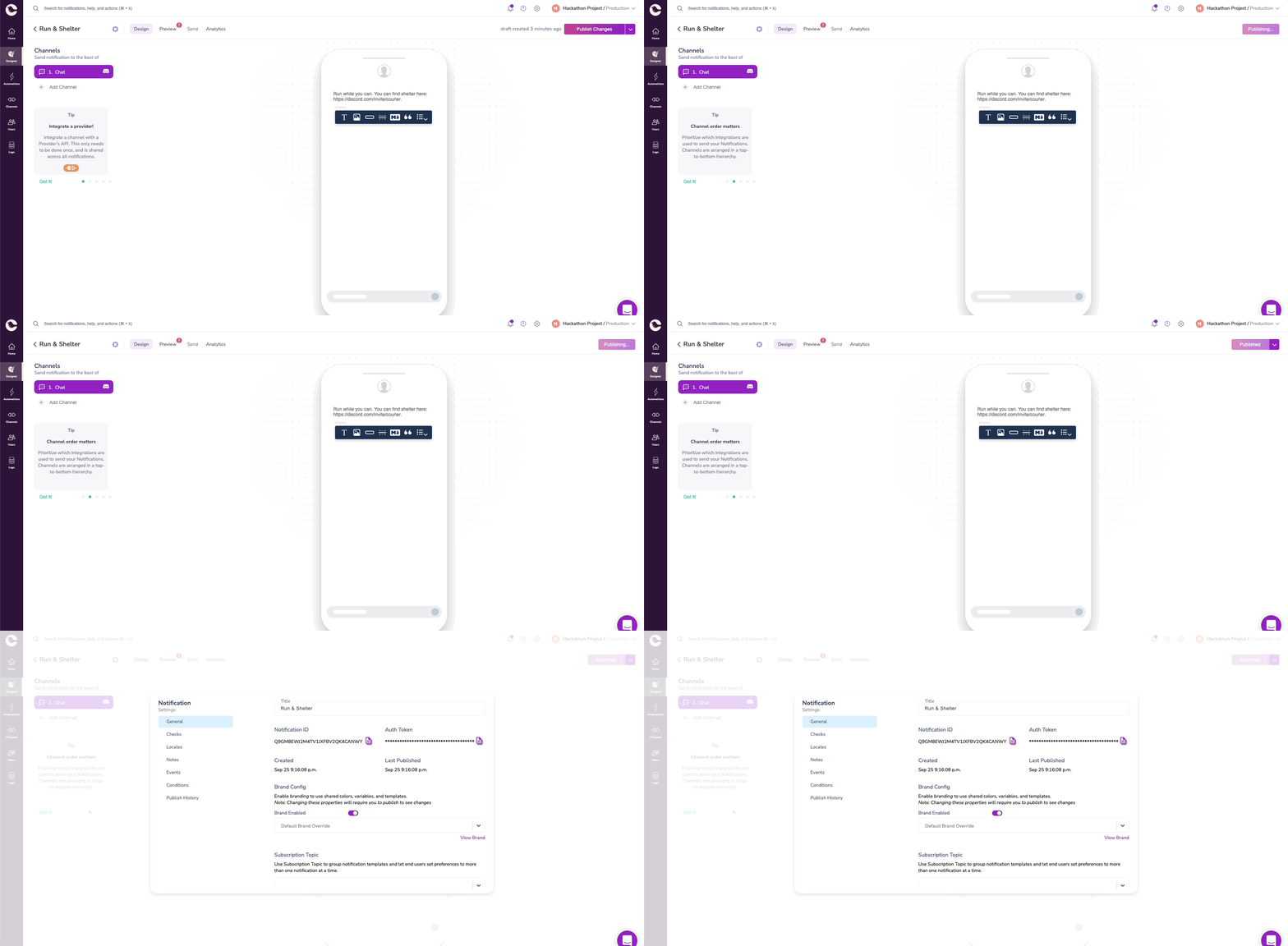
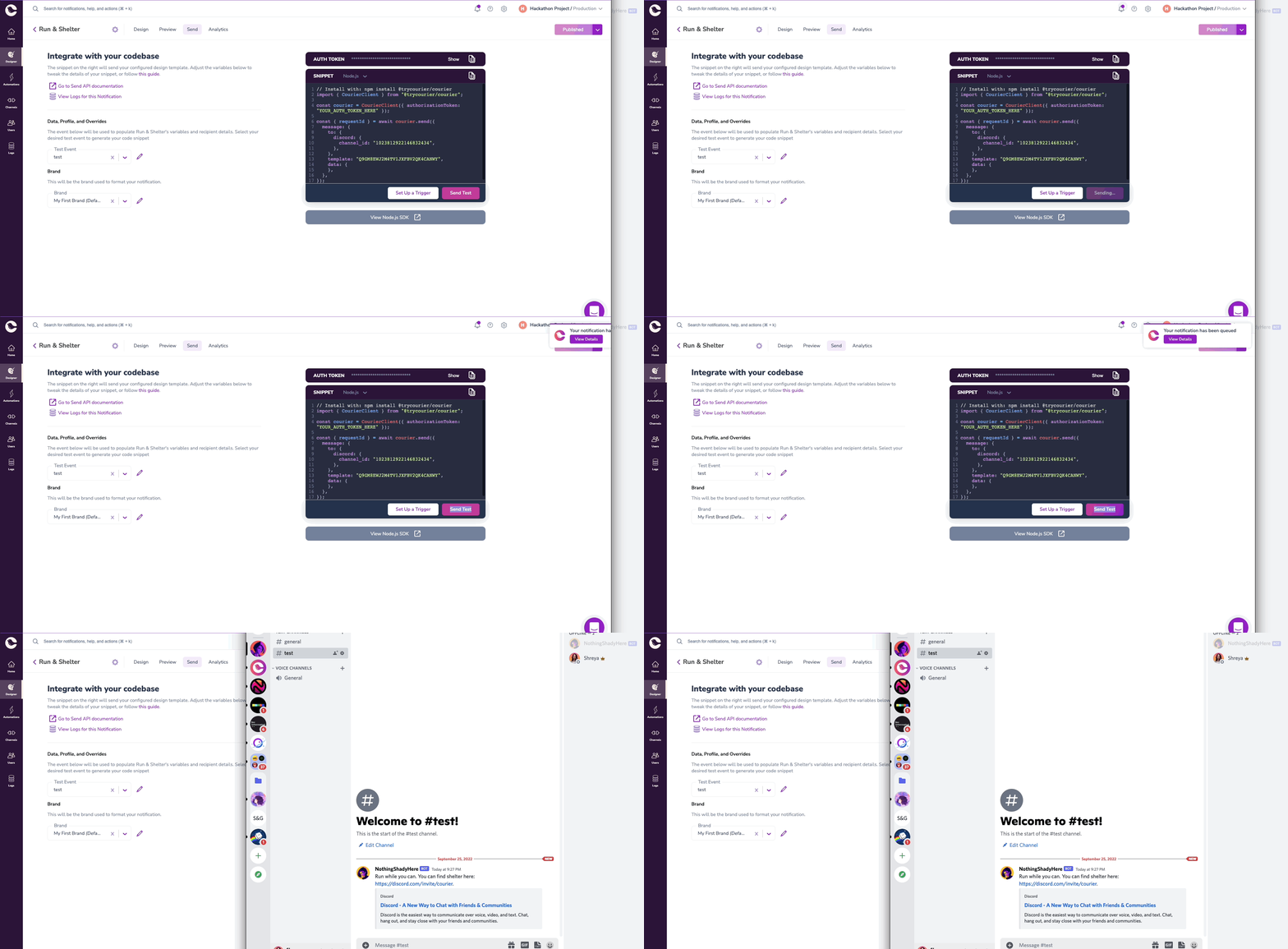
Create a test event and replace the
channel_idin the JSON with thechannel_idwe received from Discord earlier.{"courier": {},"data": {},"profile": {"discord": {"channel_id": "768866348853383208"}},"override": {}}Test a message to ensure that the Discord provider integration is working correctly.
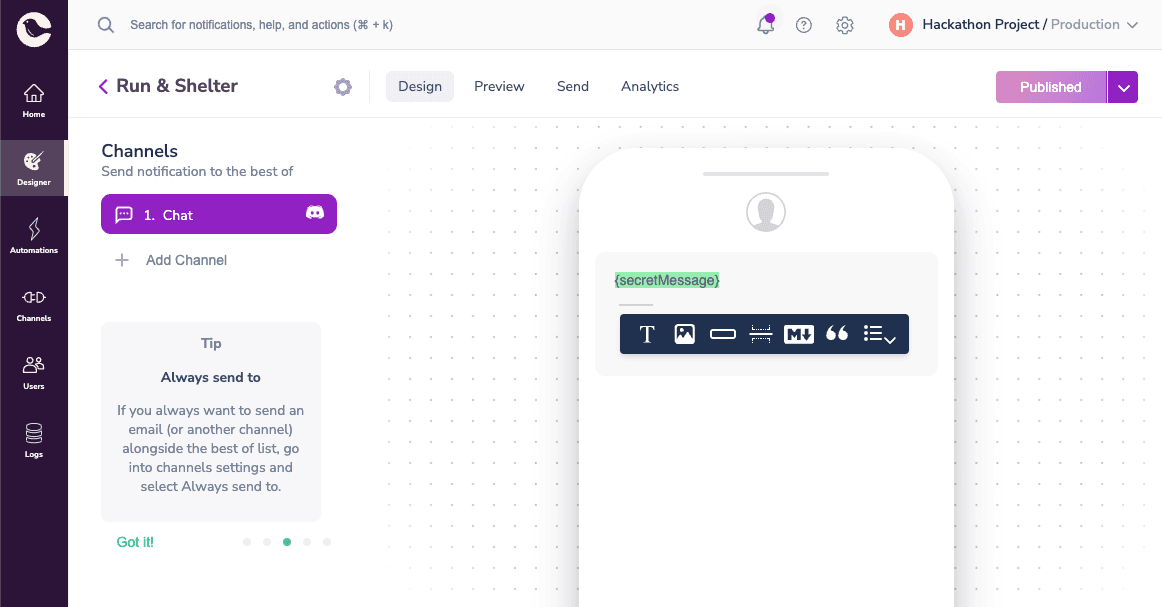
- Replace the message with a variable
{secretMessage}so that, later, we can edit the message from our code directly.
Part 4: Encrypt Message with the Morse API
Create an asynchronous function called
encryptMessage(), which takesoriginalMessageas a parameter. This function will call the Morse API, which will allow us to translate any message from English to Morse code. The enemy will have to spend more time and resources into decrypting our messages, which will give our civilians time to escape from the server.async function encryptMessage(originalMessage) {}Let’s define the GET API call options:
const morseOptions = {method: 'GET',headers: {Accept: 'application/json','Content-Type': 'application/json'}};We need to attach the
originalMessagefunction parameter to the Morse API endpoint:const morseEndpoint = "https://api.funtranslations.com/translate/morse.json?text="+originalMessageWe need to be able to access the translation from this API call in the body of the Courier API call. To call the API, we can use node-fetch as we did before.
- Create a variable called
morseResponse, which will hold the entire response from this call. - Convert the JSON object into a JavaScript object
morseResponseJSONso that we can read it within our code. - Get the translated message out of that object and save it in a new variable called
encryptedMessage. Return
encryptedMessageso that we can call this function to access it elsewhere.const morseResponse = await fetch(morseEndpoint, morseOptions);const morseResponseJSON = await morseResponse.json();const encryptedMessage = morseResponseJSON.contents.translated;console.log(encryptedMessage);return encryptedMessage;
- Create a variable called
NOTE: The Morse API has a rate limit, which may give you an error if you run it too many times within the hour. In this case, you will have to wait for some time before continuing.
Part 5: Automate Messages
Check out the Automations API reference >
Create a new asynchronous function called
runDiscordAutomation(), which will call theencryptMessage()function to translate a message and use the Courier API to automatically send messages to the enemy Discord server everyday.async function runDiscordAutomation() {}Before we can run our message through the Morse translation API, we need to ensure that it is in the correct format, with all spaces converted into their URL encoding,
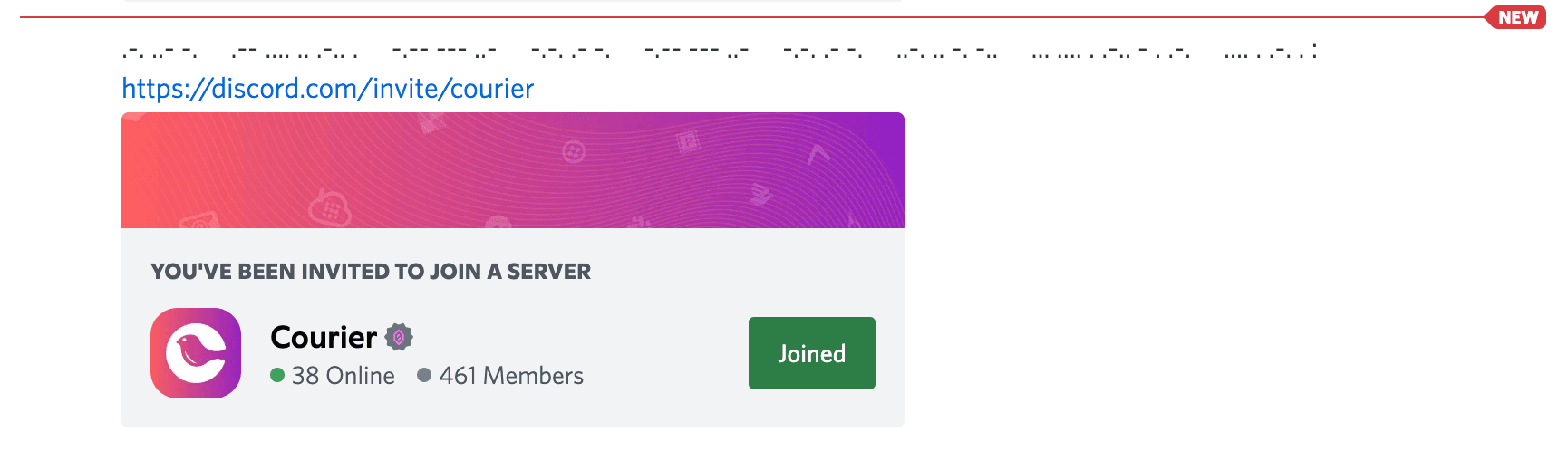
%20as shown below. We can callencryptMessage()withoriginalMessageas a parameter to translate it.encryptedMessagewill evaluate as the translated message.const originalMessage = "run%20while%20you%20can%20you%20can%20find%20shelter%20here";const encryptedMessage = await encryptMessage(originalMessage);Add the link to the safe server in the notification template within the designer: “https://discord.com/invite/courier”
Let’s define the Courier Automation endpoint and options. Here we will need access to our Courier API Key, which can be found within the Courier Settings page. Save the first value in the .env file as apiKey and access it in this file as process.env.apiKey.
const automationsEndpoint = "https://api.courier.com/automations/invoke"const courierOptions = {method: "POST",headers: {Accept: "application/json","Content-Type": "application/json",Authorization: 'Bearer ' + process.env.apiKey},body: JSON.stringify({//next steps}),};The body object within the options will encompass two objects:
automationanddatabody: JSON.stringify({"automation": {},"data": {}}),The
automationobject will include astepsarray, which will consist of all steps required for the automation. Our automation consists of reminders that are sent once a day - in this case we will be adding three steps: a send step, a delay, and another send step (so on)."automation": {"steps": [],},- Each step will need to be defined with two objects: the type of
action(send, delay, cancel, etc.) andmessage. Themessageconsists of the notification template ID (we saved this in the .env file earlier) and information about where this message is being sent. A Discord message requires either auser_idor achannel_id. In order to reach as many innocent civilians as possible, as quickly as possible, we will directly send messages in a channel. This is what the send and delay steps would look like:
{"action": "send","message": {"template": templateID,"to": {"discord": {"channel_id": process.env.channelID}}}},{"action": "send","duration":"1 day"},The data object would need to contain the
encryptedMessage:"data": {"secretMessage": encryptedMessage}
- For testing purposes, it’s easier to either remove 1 delay step or keep it at a short period like
1 minute Finally, we can use node-fetch again to call the Automations API and trigger this automation
fetch(automationsEndpoint, courierOptions).then((response) => response.json()).then((response) => console.log(response)).catch((err) => console.error(err));
Conclusion
Our Discord bot is ready to save some civilians. Try building a Discord bot of your own and tweet a screenshot of your Courier automated messages in action, and we will send a gift to the first three Secret Agents to complete this task! Head to courier.com/hack-now to get started. Don’t forget to submit your project to our Hackathon for a chance to win over $1000 in cash and prizes!
Quick Links
🔗 GitHub Repository: https://github.com/shreythecray/infiltration
🔗 Courier: app.courier.com
🔗 Register for the Hackathon: https://courier-hacks.devpost.com/
🔗 Discord Application and Bot Guide: https://discord.com/developers/docs/getting-started
🔗 Courier Discord Provider Docs: https://www.courier.com/docs/external-integrations/direct-message/discord
🔗 Courier Automations Docs: https://www.courier.com/docs/platform/automations/automations-overview
🔗 Courier Automations API Reference: https://www.courier.com/docs/reference/get-started
Similar resources

Build with AI: let your agent handle notifications end to end
Courier's Build with AI toolkit gives coding agents direct access to your notification infrastructure. Four integration points, one goal: let your agent send messages, debug deliveries, manage users, and follow notification best practices without context-switching. Works with Claude Code, Cursor, and any agent that can run shell commands or call MCP tools.

How to Use Claude Code on Mobile to Design, Test, and Ship Multichannel Notifications
A walkthrough of using Claude Code's mobile app with Courier's MCP server and CLI to design, test, and ship a multichannel product announcement from a phone. Covers the full workflow: drafting the content outline, creating notification templates using Courier's elemental format, building channel-specific variants for email, Slack, push, and SMS, customizing brand styling through the API, iterating on design with test sends, getting team approval, and publishing with custom routing rules. The whole thing took a couple hours, mostly cold start and design iterations.
Transactional, Product, and Marketing Notifications: What Are the Differences?
Understanding the difference between transactional, product, and marketing notifications is essential for developers building notification infrastructure. Transactional notifications confirm user actions and require no opt-in. Product notifications drive feature adoption through education. Marketing notifications promote sales and require explicit consent. This guide explains the legal requirements, best practices, and when to use each notification type to build compliant systems users trust.Retry