Better Observability and Faster Debugging with the New Logs Visualization
 Thomas SchiavoneFebruary 25, 2025
Easily spot issues and debug in seconds
Good observability helps you understand what’s happening, but our previous logs made it hard to see the full picture. Debugging often meant searching, filtering, and manually piecing together trends. Spotting a spike in failures or a drop in message volume shouldn’t take that much effort.
The new logs histogram makes this easier. Instead of scanning rows of data, you get a real-time visual overview of message activity. Spikes, dips, and failures stand out instantly, so you can quickly diagnose issues and get back to work.
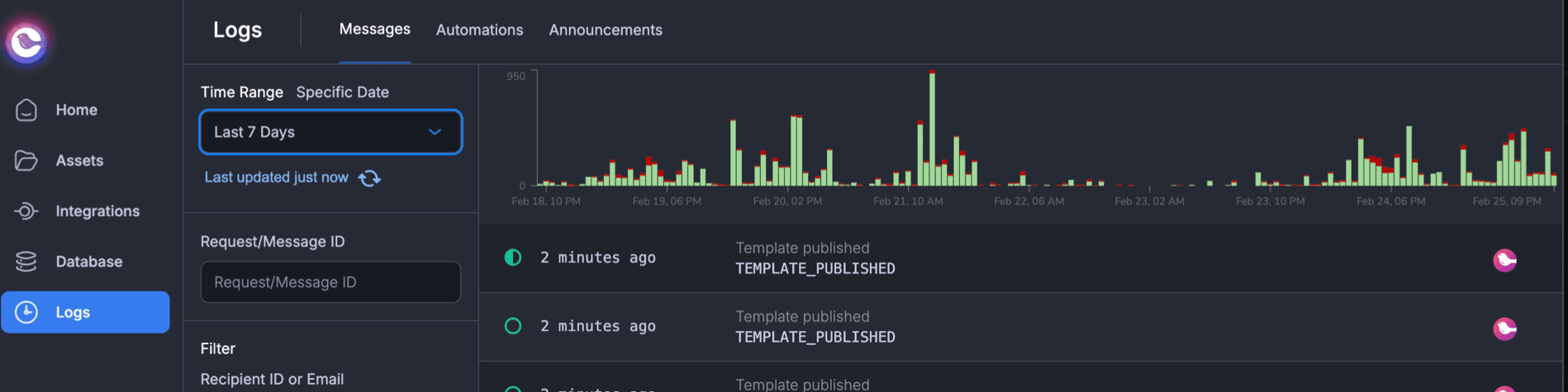
Now, trends are instantly visible. You can:
- Spot spikes and dips at a glance instead of manually searching for patterns
- Jump to a specific time range to investigate issues without adjusting multiple filters
- Quickly diagnose failure patterns without scrolling through hundreds of log entries
For example, if you notice a failure spike at 3:14 PM yesterday, you can zoom into that period, immediately see what happened.
How It Works
The histogram provides an overview of message activity over time, making it easy to track volume, identify trends, and spot failures.
- Clear visual indicators
- Green bars represent successful messages
- Red bars highlight failures
- Updates dynamically – The histogram reflects your selected filters, ensuring you always see relevant data.
- Adjustable time ranges – Quickly zoom in or out to analyze short-term issues or long-term trends.
- Drag a custom time range – Investigate historical issues without manually adjusting filters. Just drag your mouse over the range you want.
Whether you're debugging a real-time incident or reviewing historical trends, the histogram helps you find what you need faster—without searching through raw logs.
Try It Now
The histogram is live now in the Courier dashboard. If you’re already using Courier, head to Logs to explore your message activity with an instant visual overview.
We’d love to hear your feedback—let us know how the histogram improves your workflow or what you'd like to see next.
Similar resources

Introducing Cross-Device Email Preview: see your email on real devices before you send
Cross-Device Email Preview renders your template on the real clients you pick, from Outlook on Windows to dark mode on iPhone, and returns a screenshot of each one. Pick from 96 clients across 21 apps without leaving Design Studio.

New settings page, easier to use, with new background colors
Courier settings has been redesigned. Workspace pages and developer pages are grouped separately, every page says what it's for, and the app now comes in light or dark with nine background colors.

Broadcasts: send one-time messages to your users, right from Courier
Broadcasts lets you send a one-time message to a group of your users, now or on a schedule, without leaving Courier.