How to Build Approval Workflows with Slack and Node.js
 Nathalia SandovalMarch 17, 2022
Utilized by countless organizations, approval workflows arrange the hierarchy of teams and the sequence of tasks for the ultimate goal of improving collaboration and efficiency. In my experience as a software engineer, approval workflows are vital for peer code reviews, but that’s not the only use case. In this article, we’ll explore the difference between manual and automated approval workflows and what you’ll need to know if you decide to automate your workflow.
What is an approval workflow?
An approval workflow is a formalized process to ensure that project tasks are completed on time, are free of mistakes, and adhere to business and product standards. It generally consists of several phases of approval through different stages of project development. In software development, for example, approval workflows are often used to manage peer code reviews. Other use cases for approval workflows include:
- granting temporary access to particular projects or accounts within an organization
- handling document requests such as vacation and time off requests
- reviewing invoice, budget, or expense reports
Companies can structure their approval workflow manually, where it is up to each person to understand the hierarchy of approvals and initiate requests. However, manual workflows have limitations: they are harder to audit and can slow the company down.
In this article, we explain in more detail why manual workflows can be limiting and when companies should prefer the automated option. If you are ready to automate, we will show you how you can do it by using Courier.
When a manual approval workflow might not fit your needs
Suppose you’re a developer who needs their code peer reviewed and your company works with a manual approval workflow. You ask a team member to review your code. But in a fast-paced environment, there are so many moving pieces that your request for a peer review gets ignored or forgotten and you yourself forget to escalate the request. Not only might you and your team be frustrated with tasks falling through the cracks, but the software feature you had been working on gets delayed for a week and project schedules get shifted.
This is exactly the situation I experienced in my software engineering role some time ago. Code reviews became bottlenecks in the process. In a manual approval workflow, it is up to the code author to follow up on the request for a code review and escalate the request if necessary, on top of their other tasks.
In addition to the efficiency aspect, it’s difficult to ensure consistency with a manual workflow. A high degree of consistency allows all team members to know where they stand in the process, and removes the need for “reinventing the wheel” every time a new workflow begins. While checklists can be helpful in ensuring a consistent workflow, companies rarely use or follow them. Lack of consistency in tasks can become a serious limitation when applying for process certifications or security certifications.
Finally, manual workflows often lack transparency. They are hard to analyze and troubleshoot, as the statistics on the steps are not very “readable” to a business analyst or even to an interested observer.
To address the inefficiency, inconsistency and lack of transparency of manual approvals, companies often choose to automate parts of the approval process—especially the parts that are tedious or distracting.
What does an automated approval workflow look like?
Don’t spin up that shiny new Kubernetes cluster just yet! Automating an approval workflow doesn’t have to mean writing custom software. Tools like Slack are already available in many businesses and are well suited for simple automations. Let’s see what a Slack-based workflow could look like.
Automated approval workflow with Slack
A useful place to start an approval workflow automation is setting up a Slack bot. Using a dedicated bot account for approvals will lower the risk of security issues and allow you to customize your flow more easily, without requiring you to build a full-fledged Slack app.
Next, you will need to create different message templates for the specific tasks in your workflow. Then you can set up the automations—for example, posting one of the templated messages when a new pull request is ready for review. You’ll also need to specify the actions a user can perform on such notifications. We recommend including approvals, denials, reminders, and options to escalate a request.
As you develop your workflow, you’ll notice that the creation of these templates and automations presents further details to consider.
What to watch out for if you build your own automations
There are a few important factors to keep in mind if you’re creating your own automated approval workflow. The first is handling actions from users. Once the approval request is sent, what do you want to happen if it is accepted or denied? You will need to create different notification templates to alert the user making the request. The automation here also needs to stop the flow if the request is approved or denied. The next main factor is getting the timing right: if there is no response, you’ll have to decide how long until you escalate the request. What would be the right timing for your needs? For example, if a pull request isn’t approved within 30 minutes and it’s marked as P1/Urgent, you might want to escalate it right away, while other pull requests can likely wait a bit longer. If a request is ignored, to whom will the escalated request be sent? Additionally, you could add an option to manually escalate a request, interrupting the configured wait time.
You will also have to manage the database for these procedures and the status of each request any time something changes. If any database complications arise, that’s more time you have to spend on sorting out what went wrong. Your current available resources may allow you to dedicate a developer to these tasks, but consider whether, in the future, you’ll want to expand your automations to other channels like email or SMS, which will also use development resources.
How Courier makes automated workflows easier
At Courier, we have already implemented automations that best address customer needs, and it's all based on experience. The approval and escalation workflow is a straightforward use of our product’s automations. For example, you would just make an API call from Courier to start the automation. You could then add actions to this automated notification that would trigger other automations depending on whether the request is approved, is denied, or needs to be escalated. Instead of configuring the details of the automations, you’ll just need to create the API calls.
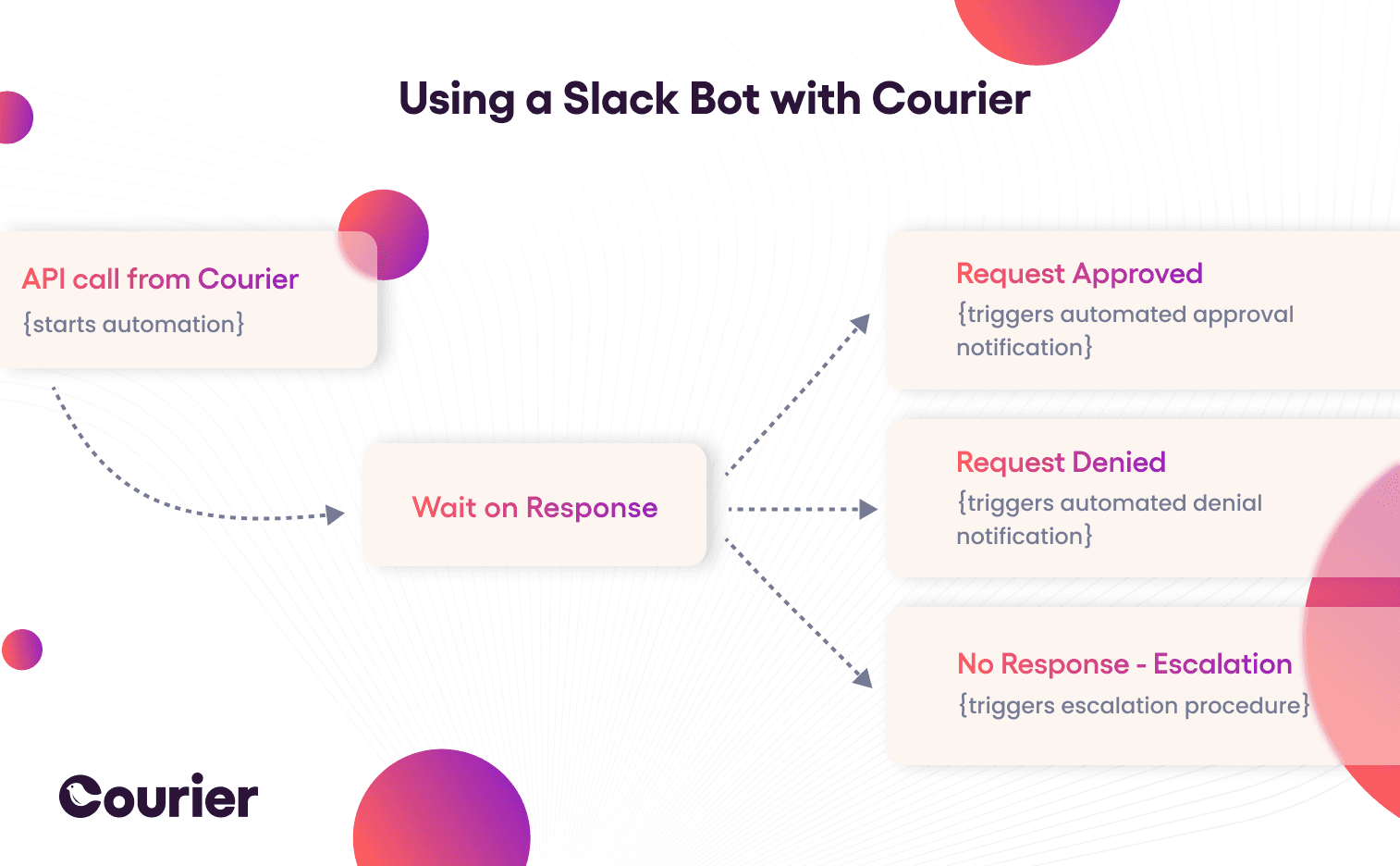
With Courier, you can create or configure dynamic templates easily. Courier also makes it simple to add more communication channels, whether you need email or SMS notifications. The benefit here is that your team does not have to spend any extra time on code outside of building your product. Your approval workflow can expand, adding users or communication channels, as you develop your product.
Example of an automated workflow with Courier and Slack
An automated approval workflow with Courier and Slack requires two components: a Slack bot, as mentioned above, and a Courier workflow that’s set up in the Courier user interface.
The relevant part of the Slack bot gets attached to the /request_access Slack slash command and handles the sending of a message to Courier for the next steps. Here’s how the Node.js code that accomplishes this task can look:
// Handle the command to start slack bot access requestapp.command("/request_access", async ({command, ack, say}) => {try {await ack();// Message to send to Courierconst message = `<@${command.user_id}> is requesting access ${command.text.length > 0 ? 'to ' + command.text : ""}`// The person requesting access who ran the commandconst requestor = command.user_id// First automation from template is called for initial access request.// Sends to first user, then waits 30 minutes before initiating the escalation requestconst { runId } = await courier.automations.invokeAutomationTemplate({templateId: "initial_access_request",profile: {slack: {access_token: process.env.SLACK_BOT_TOKEN,}},data: {message,requestor,requestId,}});} catch(error) {console.log("ERROR " + error)say("There was an error sending your request")}});
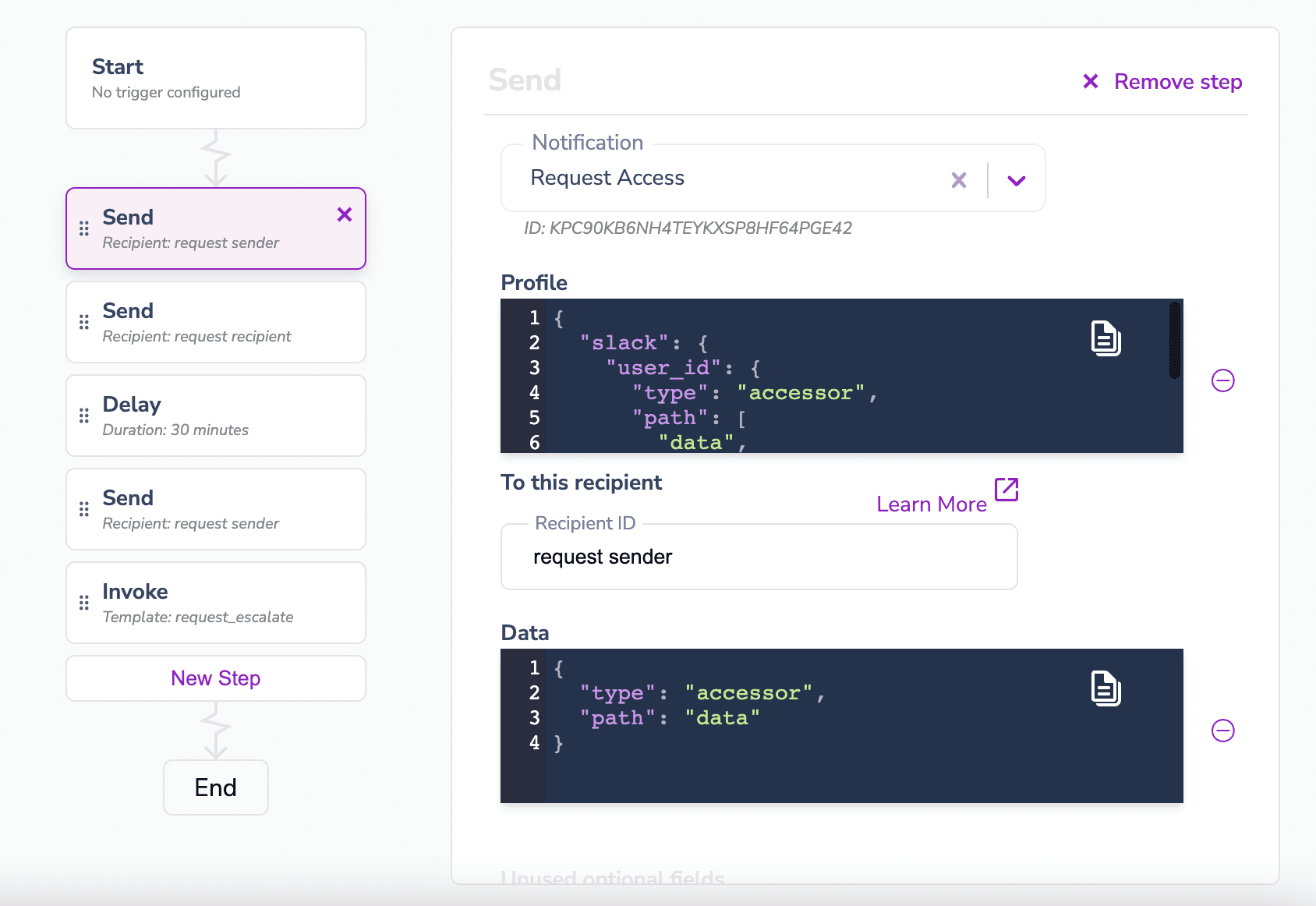
The corresponding Courier workflow that gets activated when the Slack bot sends the message to Courier can consist of the following steps:
- Send a confirmation of the request to the user who requested access.
- Send a message to the person who should handle the approval request.
- Wait for 30 minutes, and if the request hasn’t been approved by that time, send another message to the sender to tell them the request is getting escalated.
- Start the next automation that handles the escalation.
Here’s how such a workflow would look in the Courier user interface.
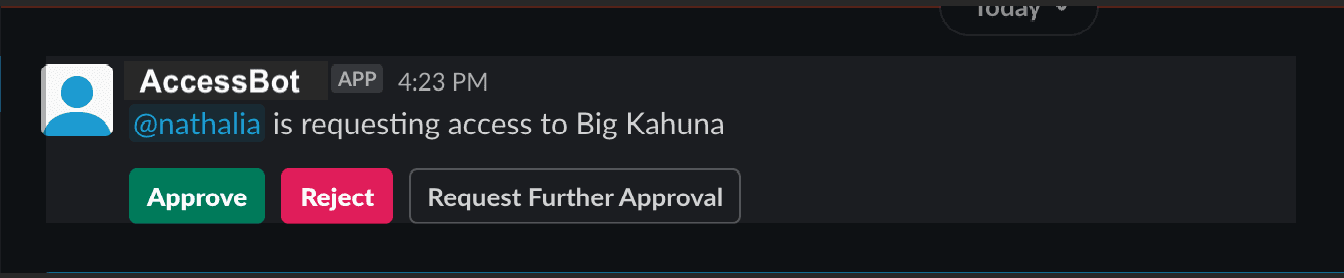
The approval request that Courier sends with this workflow looks like a Slack message from the Slack bot—AccessBot in this case. It offers three actions on the request: Approve, Reject, and Request Further Approval.
Ready to automate your approval workflow?
While manual workflows might be suitable for your needs, they also have their limitations. Automations help with these limitations, as well as ensuring efficiency, consistency, and visibility. Creating your own automated workflow will, however, cost you time and resources that could instead be spent on further developing your product. Also, keep in mind that automated approval workflows have many use cases besides peer code reviews, such as for various internal tasks or in your actual product. They can be used within any organization that needs to automate company document requests or control access to project or customer accounts, such as for support issues.
This article has explored what you need to consider in designing an approval workflow. At Courier, we’ve worked hard to create automations tailored to our customers' needs and we continue trying to find new problems that we can solve. If you’re interested in helping us out, send us a message or follow us on Twitter at @trycourier today!
Similar resources

React Native solved a problem nobody had. Use Flutter.
Shopify moved back to Swift and Kotlin because coding agents made two codebases affordable. That kills React Native's reason to exist. It does not touch Flutter's, and the canvas is why.

How to send Slack notifications from your app
Slack is where your customers already work, which makes it a product surface rather than only an internal alerting channel. Posting an approval request or a status change into a customer's own Slack means working in workspaces you don't own, addressing people by email rather than Slack ID, and holding a separate credential for every customer.

Your notification analytics are now available by API
If it's in the Courier dashboard, it's on the API. Analytics was one of the last screens where that wasn't true. GET /notifications/{id}/metrics returns sends, deliveries, opens, clicks, errors, and undeliverable counts per template as a time series, broken out by provider and channel, so the numbers can live in your own product or go straight to an agent.