Flutter Notifications: Add In-App Inbox and Push in 10 Lines of Code
 Kyle SeylerJanuary 07, 2026
Flutter developers ship fast. That's the whole point. Single codebase, consistent UI across iOS and Android, hot reload that actually works. You picked Flutter because you wanted to stop rewriting the same screens twice.
So why are you still hand-rolling notification infrastructure?
Building an in-app inbox from scratch takes weeks. Maintaining it takes forever. Or you can add one in 10 lines of code and get back to building what actually differentiates your app.
TL;DR
Add courier_flutter to your project, call Courier.shared.signIn() at login, drop in the CourierInbox widget. You get a real-time notification inbox, push support for iOS and Android, user preference controls, and cross-channel state sync (open an email, the inbox message marks as read). Works with FCM and APNs out of the box. Handles token management, digest batching, GDPR compliance, and all the edge cases that make building notifications yourself take a quarter instead of a week. Same infrastructure Twilio uses for 10+ million developers.
The Code
Install the package:
flutter pub add courier_flutter
Sign in your user (typically at login):
import 'package:courier_flutter/courier_flutter.dart';_signIn() async {await Courier.shared.signIn(accessToken: 'your_users_jwt', // Generate this on your backenduserId: 'your_user_id',);}
Add the inbox widget:
import 'package:courier_flutter/ui/inbox/courier_inbox.dart';@overrideWidget build(BuildContext context) {return CourierInbox(onMessageClick: (message, index) {message.isRead ? message.markAsUnread() : message.markAsRead();},);}
Add user preferences if you want them:
import 'package:courier_flutter/ui/preferences/courier_preferences.dart';@overrideWidget build(BuildContext context) {return CourierPreferences(mode: TopicMode(),);}
That's the whole integration. The SDK handles real-time sync, read/unread state, push token management for both FCM and APNs, and WebSocket reconnection when your app moves between foreground and background.
Making It Match Your App
The inbox widget ships with theming that adapts to your app's Material or Cupertino design system automatically. If you're using Material3 or custom themes, the inbox picks up those defaults without configuration. But when you need deeper customization, everything's exposed through the theme parameter.
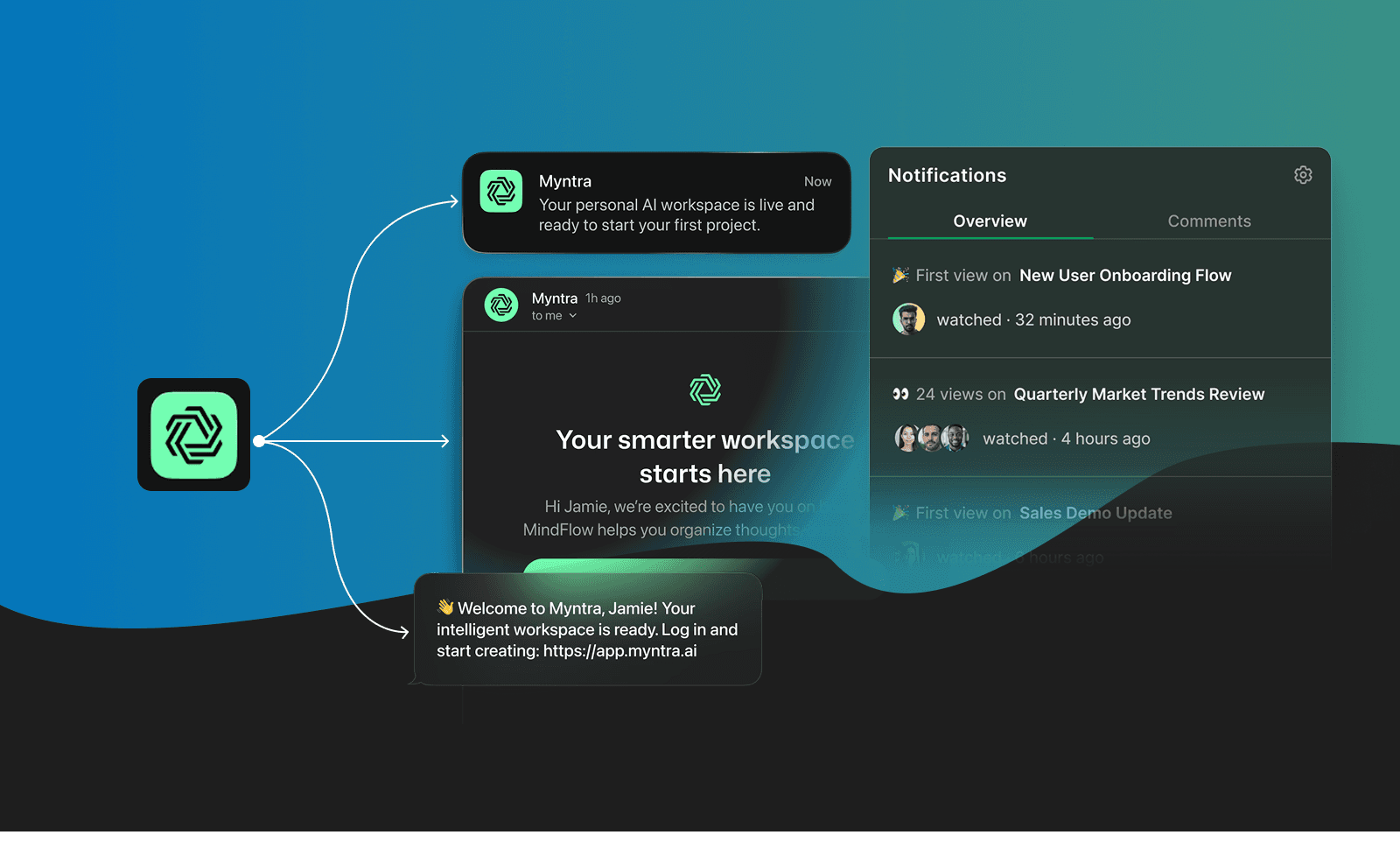
CourierInbox(theme: CourierInboxTheme(brandColor: Color(0xFF6C5CE7),unreadIndicatorStyle: CourierInboxUnreadIndicatorStyle.dot,titleStyle: TextStyle(fontSize: 16, fontWeight: FontWeight.w600),bodyStyle: TextStyle(fontSize: 14, color: Colors.grey[700]),),onMessageClick: (message, index) {message.isRead ? message.markAsUnread() : message.markAsRead();},)
You can override:
- 🎨 Brand colors for unread indicators and CTAs
- ✏️ Typography for titles and timestamps
- 🔵 Unread indicator styles (dot, line, or badge)
- ⏳ Loading states and empty state UI
- 👆 Swipe actions and long-press behavior
The widget uses Flutter's standard theming system throughout, so customization follows patterns you already know.
Why Not Just Firebase?
If you're building on Flutter, you're probably already using Firebase Cloud Messaging for push. So why add another SDK?
FCM handles delivery. It gets a notification from your server to the device. But that's where it stops. You still need to build the inbox UI where users see past notifications, read/unread state that persists across app launches, a preferences screen where users control what they receive, cross-channel orchestration for email and SMS and push and in-app messages, and read state sync so when a user opens an email, the related inbox message marks as read.
That last one is harder than it sounds. When someone opens a marketing email at their desk, your app needs to know that message is read before they even unlock their phone. Courier syncs read state across channels automatically. Open an email, the inbox message gets marked as read. Tap an inbox message, the associated push notification clears. This cross-channel state management is what takes teams weeks to build correctly, and it's running in production the moment you integrate the SDK.
FCM and Courier aren't competing. FCM is your delivery pipe. Courier is the orchestration layer sitting on top, handling inbox UI, preferences, routing logic, and the state management that ties everything together. Most teams use both. Courier registers your FCM tokens automatically and handles token refresh when users reinstall your app or revoke notification permissions.
Flutter's Production Era
Flutter 3.38 dropped in November 2025, and Google officially declared this the "Production Era." The experimental phases are over. Impeller is stable. The framework handles 16KB page sizes for Android 15 compliance out of the box. The 3.38 release fully supports iOS 26, Xcode 26, and macOS 26, all released in September. Flutter now supports Apple's mandated UIScene lifecycle, which means proper multi-window support on iPadOS through Stage Manager, improved state restoration, and correct background/foreground transitions. If you're shipping to iOS, your Flutter apps are ready for the latest Apple requirements without extra work.
Flutter 4.0 is expected in early 2026, bringing the Impeller 2.0 rendering engine and deeper AI/ML integration. Google is already using Flutter to build the interactive UI components in Gemini and NotebookLM. When Google needs a fast, cross-platform way to render AI-generated interfaces, they reach for Flutter. According to Apptopia, Flutter now accounts for nearly 30% of all new free iOS apps. JetBrains developer surveys show it's been the most-used cross-platform framework since 2021.
The framework's maturity means teams are building production apps faster than ever. But speed-to-market only matters if you're not wasting cycles on solved problems.
What You're Actually Building When You Build Notifications
Here's what teams underestimate when they start building notification infrastructure in-house:
- 📱 FCM setup for Android and APNs certificates/entitlements for iOS
- 🔑 Token management that survives installs, updates, and permission changes
- ⚡ Foreground, background, and terminated state handlers (each behaves differently)
- 🔌 WebSocket or polling for real-time inbox sync
- ✅ Read/unread state that persists correctly across app restarts
- 📄 Pagination, empty states, pull-to-refresh that doesn't feel janky
- ⚙️ Preferences UI that syncs with your backend sending logic
That's not a sprint. That's a quarter. And then someone has to maintain it while your app evolves.
When Twilio needed to unify notifications for their own platform serving 10+ million developers, they chose Courier. As their Technical Lead put it: "We chose Courier because the depth of the inbox and multi-channel integrations allowed us to choose one notification platform for all products and teams at Twilio."
What the SDK Actually Does
📬 Inbox:
Real-time updates via WebSocket, read/unread state management, long press gestures with haptic feedback, pull-to-refresh with proper empty states, brand color integration for unread indicators, pagination, and cross-channel state sync so marking a message as read in email updates it in-app immediately.
⚙️ Preferences:
Topic-based and channel-based modes, syncs to Courier's backend automatically, and themes to match your app. When a user toggles a preference, it propagates instantly and your send logic respects it without extra code on your end.
🔔 Push:
Automatic token management for both FCM and APNs, foreground/background/terminated state handlers, and token refresh logic when users reinstall or revoke permissions. You don't write any of this.
📊 Digests:
Schedule notifications on daily, weekly, or custom intervals. Batch multiple events into single notifications, configure per-user (some want real-time, others want daily summaries), and works across all channels so you can combine 20 activity events into one email or push. The digest logic runs on Courier's backend, which means you don't need to track pending notifications or build batch-send infrastructure.
The SDK supports iOS 13+ and Android API 21+. Beyond the Flutter SDK, Courier connects to 50+ providers including SendGrid, Twilio SMS, Slack, and Teams. If you're building a SaaS product, the same notification infrastructure handles onboarding flows, payment reminders, and multi-channel orchestration.
Preferences and Compliance
GDPR and CCPA don't just require user consent. They require giving users ongoing control over what messages they receive. Building a preference center that actually works means:
- 🎛️ UI for toggling notification categories and channels
- 🔒 Backend logic to respect those preferences when sending
- 🔄 Keeping frontend and backend in sync
- 📋 Audit logs proving you honored user choices
Courier's preference widget handles the UI. When a user toggles a preference, it syncs to Courier's backend immediately. Your send logic automatically respects those preferences without extra checks on your end. You send a "product_updates" notification, Courier checks if that user opted in, and only delivers if they did. The preference data lives in Courier's user profiles, which means it persists across devices and works the same whether you're sending push, email, or SMS.
This isn't just compliance theater. When users feel in control, they leave notifications enabled instead of revoking permissions at the OS level. That's worth the integration cost alone.
Getting Started 🚀
flutter pub add courier_flutter
Generate a JWT on your backend for user authentication, call Courier.shared.signIn() when your user logs in, and add CourierInbox and CourierPreferences widgets where they fit your UX.
Full documentation: github.com/trycourier/courier-flutter
Similar resources

React Native solved a problem nobody had. Use Flutter.
Shopify moved back to Swift and Kotlin because coding agents made two codebases affordable. That kills React Native's reason to exist. It does not touch Flutter's, and the canvas is why.

How to send Slack notifications from your app
Slack is where your customers already work, which makes it a product surface rather than only an internal alerting channel. Posting an approval request or a status change into a customer's own Slack means working in workspaces you don't own, addressing people by email rather than Slack ID, and holding a separate credential for every customer.

Your notification analytics are now available by API
If it's in the Courier dashboard, it's on the API. Analytics was one of the last screens where that wasn't true. GET /notifications/{id}/metrics returns sends, deliveries, opens, clicks, errors, and undeliverable counts per template as a time series, broken out by provider and channel, so the numbers can live in your own product or go straight to an agent.