How We Investigate Support Tickets at Courier
 Thomas SchiavoneDecember 18, 2025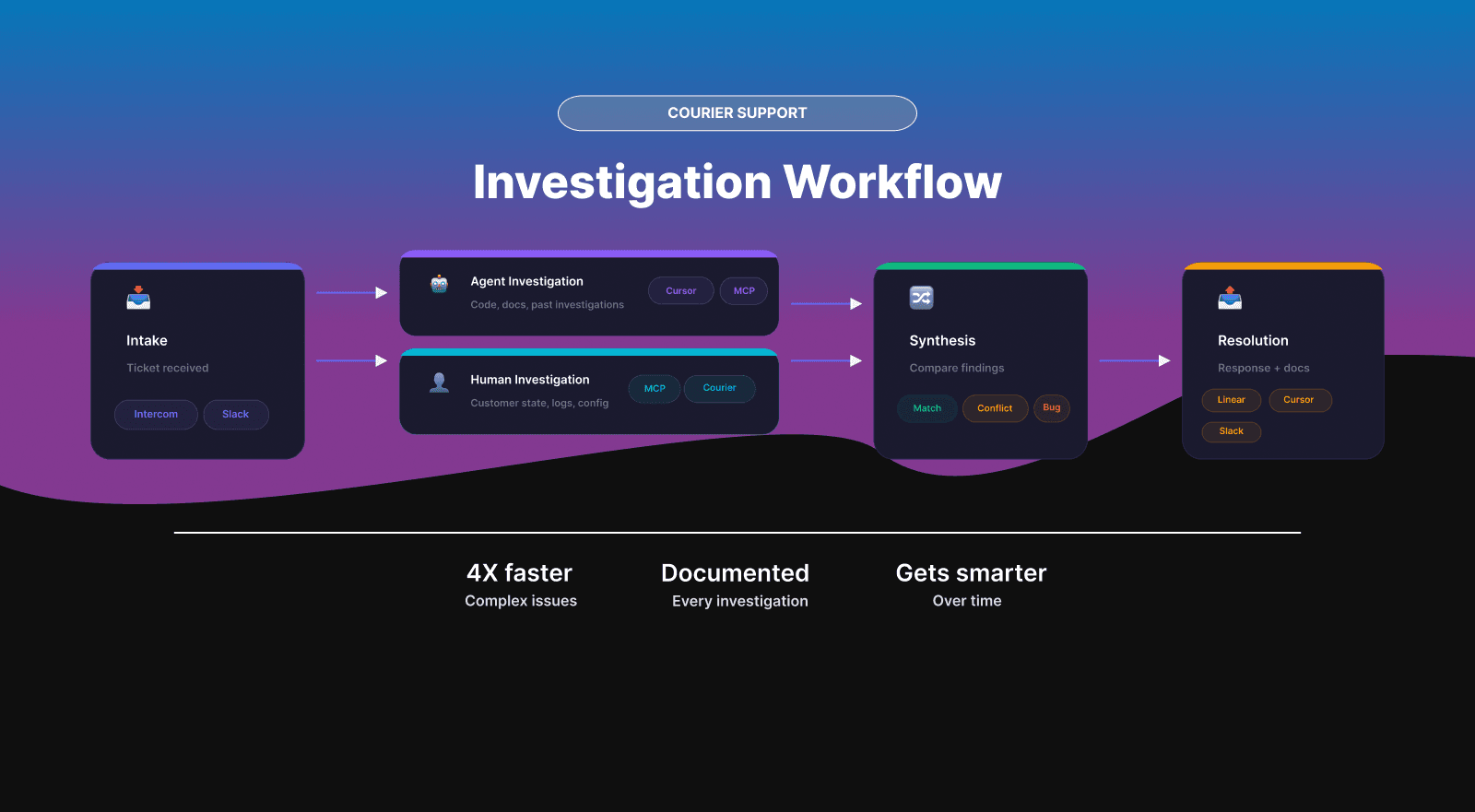
How We Investigate Support Tickets at Courier
Most support teams operate in one of two modes: either the engineer knows the answer immediately, or they spend an hour grepping through code and Slack history trying to piece together what went wrong. We got tired of that second mode. So we built a system that runs AI code exploration and human investigation in parallel, then synthesizes the results.
The result: 4X faster resolution times for complex issues. For a small team, that's the difference between keeping up and drowning in backlog.
Here's the actual workflow, the tools, and why we structured it this way.
What does AI-assisted support investigation look like in practice?
A support engineer receives a ticket, runs a single command, and an AI agent starts exploring the codebase while the engineer pulls up the customer's actual data. Both investigations happen simultaneously. When they converge, the engineer has code-level context and real-world state in one place.
The system catches mismatches fast. The agent investigates what the customer described; the engineer sees what actually happened. Sometimes those are two different things. Running both surfaces the gap before anyone wastes time on the wrong problem.
The Tools
Cursor with a custom investigation agent. We built an agent with access to our backend repos, API docs, and a structured prompt that defines each investigation step. The agent lives in a dedicated project containing all current documentation, past investigation write-ups, and troubleshooting guides. This gives it searchable context without rebuilding knowledge each time.
Courier sample apps for reproduction. When we need to verify behavior, we use our own sample applications. No touching customer data to test hypotheses.
Courier MCP for triggering notifications from the IDE. The MCP server lets us send test messages, check routing logic, and verify provider behavior without leaving Cursor. This is the fastest path from "I think I know what's happening" to "I confirmed what's happening."
Intercom and Slack for intake. Most tickets come through Intercom. Enterprise accounts have dedicated Slack channels where they can post issues directly. These channels also feed into impact analysis when we need to see how widespread a problem is.
Internal workspace tools for customer data. Message logs, event histories, configuration states. The stuff you actually need to see to understand what happened.
Linear for engineering escalations. When an investigation surfaces a real bug, it goes to Linear with a standardized format that includes everything engineering needs to start working.
The Investigation Workflow
Step 1: Intake
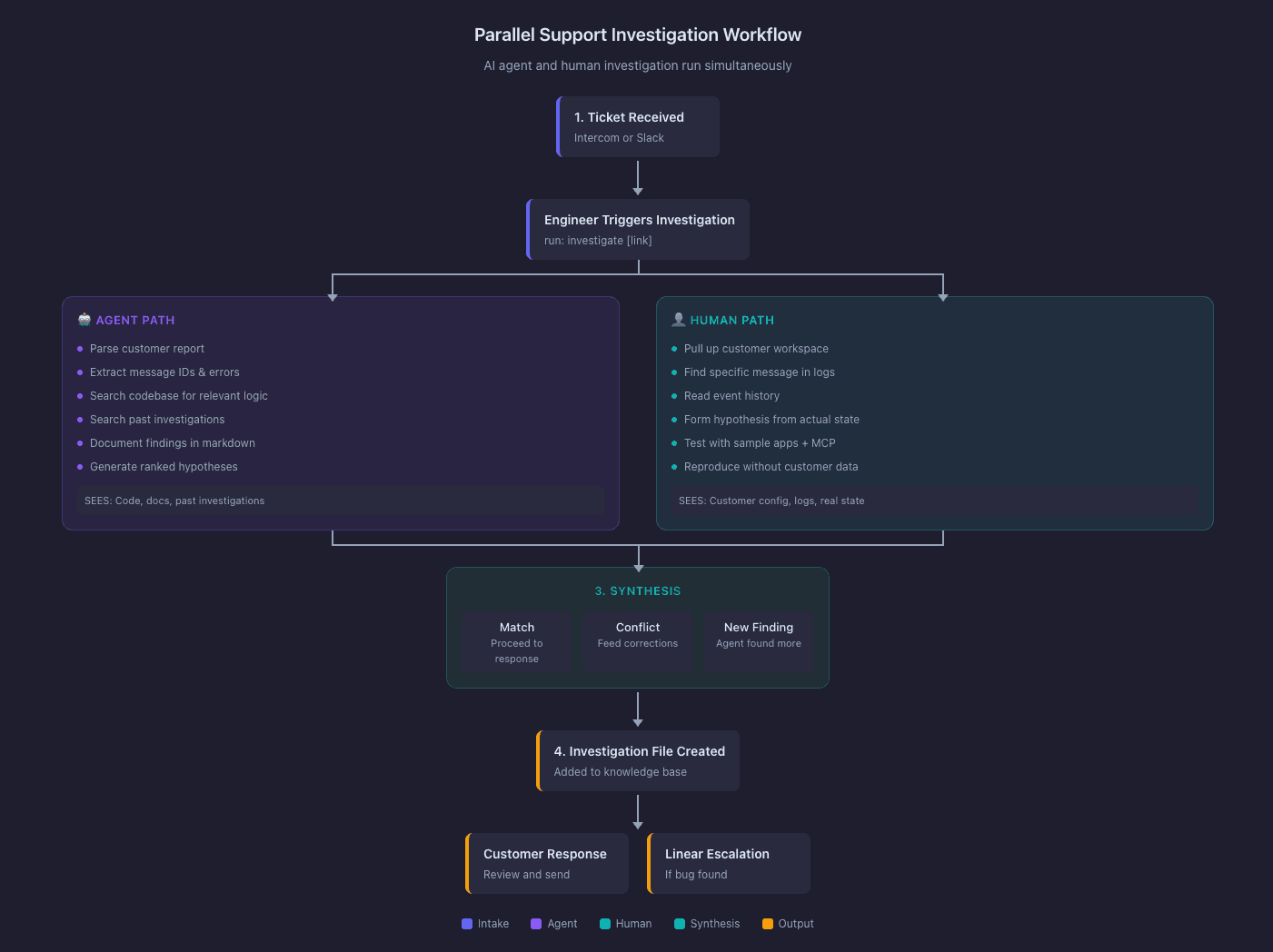
Support engineer gets a ticket via Intercom or Slack. They run investigate [link] in the support investigations repo. This kicks off the agent.
Step 2: Parallel Investigation
Two things happen at once.
The agent parses the customer report, extracts message IDs and error descriptions, then starts searching the codebase. It looks for relevant routing logic, status handlers, event processors, and API definitions. It also searches past investigations for similar issues. It documents findings in a structured markdown file as it goes.
The support engineer pulls up the customer's workspace and looks at the actual data. They find the specific message, read through the event log, and form their own hypothesis. If they need to test behavior, they use sample apps and the MCP to reproduce conditions.
This parallel approach exists because agents and humans are good at different things. The agent is fast at code exploration but takes customer descriptions literally. The human is slower at code exploration but can see actual state and interpret what the customer meant versus what they wrote.
Step 3: Synthesis
The engineer compares findings. Three possible outcomes:
They match. Investigation proceeds to response drafting.
They conflict. The engineer feeds corrections into the agent. Common causes:
- The customer described a symptom, but the root cause is elsewhere. The agent traced the symptom; the engineer found the actual culprit in their configuration or a provider issue.
- The customer's setup has custom routing rules or tenant-specific settings the agent didn't account for.
- The issue is timing-dependent or only happens under certain conditions the agent can't simulate.
- Terminology mismatch: "Undeliverable" to a customer might mean "didn't arrive." In our system, UNDELIVERABLE is a specific status with a specific cause.
The agent found something the engineer missed. Tracing code paths sometimes surfaces unexpected behavior. Occasionally this reveals bugs unrelated to the original report.
Step 4: Documentation
Every investigation produces a markdown file with these sections:
| Section | Purpose |
|---|---|
| Executive Summary | One paragraph on what happened and what we found |
| Customer Report | Verbatim text with message IDs and timestamps |
| Investigation Findings | Code locations, event traces, system behavior |
| Root Cause Analysis | What's actually going on, with confidence level |
| Assessment | Bug, expected behavior, or misunderstanding? |
| Customer Response Draft | Ready to review and send |
| Engineering Escalation Draft | Linear ticket with title, TLDR, repro steps, code locations, customer impact, workaround (if needed) |
| Investigation Journal | Working notes showing how the hypothesis evolved |
These files get added to the Cursor project. Future investigations can reference them.
Step 5: Response
Support engineer reviews the drafted response, adjusts tone and specifics, sends to customer. Engineering escalations go into the weekly review queue unless they're urgent.
Why Parallel Investigation Works
The agent and the human see different things. The agent sees code, documentation, and past investigations. The human sees actual customer state: their specific configuration, their message logs, their provider responses. When a customer says "it's not working," the agent explores what could cause that in the codebase. The human looks at what actually happened to that specific message. These are complementary views, and running them together catches gaps that either would miss alone.
Six months of investigations become a searchable knowledge base. The structured files create institutional memory. When a similar issue comes in, we search past investigations for context. The investigation journal is especially useful because it records wrong hypotheses, not just final answers. Knowing what didn't work helps the next person avoid the same dead ends.
We never touch customer data to test theories. Sample apps and the MCP let us reproduce issues in isolation. We confirm behavior before responding, and we test fixes before shipping them.
Engineering gets everything they need upfront. The Linear ticket template includes code locations, repro steps, and customer impact. Engineers can assess priority and start working without asking clarifying questions. This alone probably saves hours per week in back-and-forth.
The Agent Prompt Structure
The investigation prompt defines a specific sequence:
Parse the customer report. Extract message IDs, error messages, timestamps, and the customer's description of expected versus actual behavior.
Search the codebase for relevant logic based on the error type or status mentioned.
Search past investigations for similar issues or patterns.
Document findings with specific file paths and line numbers.
Generate hypotheses ranked by likelihood.
Draft a customer response explaining what we found.
If a bug is identified, draft a Linear ticket with standard sections.
Record hypothesis evolution in the investigation journal.
The prompt also includes context about common terminology mismatches and pointers to key areas of the codebase for different issue types: routing, delivery, status updates, provider errors, retries.
What Makes Investigations Faster
"When support volume is high, I don't always have time to prioritize a new ticket immediately. But I can open an investigation and get a summary plus an initial hypothesis within minutes. That alone changes how I triage." —Eric, Courier Support Engineer
Eric's been running this workflow for several months. The results: 4X faster resolution times on complex issues and the ability to chip away at a backlog that would otherwise require a much larger team. The biggest wins come from tracing codepaths and changelogs that would take too long to do manually, and from tackling older tickets for free-tier customers who we can't always respond to quickly. The workflow made that backlog tractable.
Code exploration takes seconds instead of minutes. The agent traces status transition logic, finds event handlers, and maps code paths across files faster than any human doing grep-and-read.
Investigations are more thorough. The structured workflow means we check the same things every time. We don't skip steps when we're rushed. The agent explores systematically instead of jumping to conclusions.
Documentation happens during the process, not after. The investigation file gets written as we go. This means we actually have records of what we found and why.
Pattern recognition improves over time. The knowledge base of past investigations helps identify recurring issues. If we've seen this exact pattern before, we know immediately. If it's a variation, past investigations provide starting points.
Reproduction is fast. Triggering test notifications from the IDE means we verify behavior in seconds instead of context-switching to a separate testing environment.
What Helps Us Help You Faster
When you file a ticket:
Include message IDs. First thing we do is pull up the specific message.
Include timestamps. Many issues are time-dependent.
Describe observed versus expected behavior. "Status shows ROUTED but I expected DELIVERED" is more useful than "it's broken."
Avoid conclusions in the description. "Message shows status ROUTED" is better than "message failed to route" because the second bakes in an interpretation that might not match our terminology. We'd rather see the raw facts and draw our own conclusions.
Limitations
The agent can't access customer data. It works from code, documentation, and past investigations only. The human side of the parallel investigation is required for seeing actual state.
The agent takes descriptions literally. It needs human correction when customers use terms colloquially.
Complex bugs still take time. The workflow speeds up the mechanical parts, but debugging novel issues requires human judgment throughout. We haven't automated thinking. We've automated the boring parts that slow thinking down.
The Bigger Picture
Support investigation is one of those processes that looks simple from the outside. Customer reports problem, engineer fixes problem. But the actual work is mostly translation and archaeology. Translating customer language into system language. Digging through event logs and code paths to find what actually happened.
The parallel investigation model treats translation and archaeology as separate skills that can run concurrently. The agent does archaeology fast. The human does translation well. Combining them produces better results than either alone.
We're still iterating on this. The prompt gets refined as we find new failure modes. The documentation format evolves as we learn what information future investigations actually need. But the core insight holds: AI agents are good at code exploration, humans are good at interpretation, and running them in parallel catches errors faster than running them in sequence.
If you're building something similar, start with the documentation structure. Knowing what output you need makes it easier to design the process that produces it.
Similar resources

Clinical alert and notification systems: how escalation works
A clinical alert is easy to send and hard to close. This is how alerting works inside a hospital: where alerts come from, how routing by role and shift works, and how the acknowledge, timeout, escalate loop is actually built, including what happens when nobody answers.

How to send Slack notifications from your app
Slack is where your customers already work, which makes it a product surface rather than only an internal alerting channel. Posting an approval request or a status change into a customer's own Slack means working in workspaces you don't own, addressing people by email rather than Slack ID, and holding a separate credential for every customer.
How Product Teams Build, Test and Ship Multichannel Notifications in Design Studio
Product teams need to build, test, and ship notifications across multiple channels without filing an engineering ticket every time. Courier's Design Studio is the workspace for that: a template builder, visual channel routing, omnichannel testing, and publishing in one place. This post walks through the traditional template designer paradigm, how it splits effort across too many tools, and outlines a path for product and growth teams to ship transactional, product, and marketing notifications from a single workspace.