

Overview
This page provides comprehensive technical details for implementing complex tenant architectures. For basic tenant concepts, see the Tenants Overview.Tenant Object Structure
Tenants store defaults (preferences, profile) that take effect when users don’t have specific configurations, plus custom properties for template usage:For complete tenant structure details and all available fields, see the Tenants API Reference.
Hierarchical Inheritance
Four-Layer Hierarchy Limit
Courier supports up to four layers of tenant hierarchy. Here’s how the system handles deeper hierarchies:Courier supports four layers of tenant hierarchy. For example if you have a hierarchy like the following.Loading a tenant context of tenantR2 will load in tenant0, tenantQ, tenantP, tenantR2.However, loading a tenant context of tenantR2D2 will start at tenantQ, and also load tenantP, tenantR2, then finally tenantR2D2
Metadata Merging Behavior
When data is loaded through a hierarchy, the topmost parent is loaded first, then the next, and next, overwriting keys within the metadata properties as it goes. Parent Tenant:User Profile Merging
Tenant user profile data merges with user data following a specific precedence order:- Tenant hierarchy merge (parent → child)
- User profile data from Courier
- Send API call to/profile context (highest priority)
Provider Credentials Storage
Tenant user profiles commonly store per-tenant provider credentials:Default Preferences Management
Setting Tenant Defaults
Configure tenant-specific default preferences for subscription topics: Via Courier Studio:Custom Routing Defaults
Set default channel routing per tenant:USER PREFERENCE PRECEDENCEDefault Tenant Preferences will change the default behavior for any user/tenant combination who has not updated their preferences for the subscription_topic_id yet. Users who have already made a selection for this tenant will keep their current preference.
Branding Integration
Specify a brand as the default for a tenant. This allows inbox, inbox messages, and email messages to be applied based on tenant context instead of global level. Providing the brand in the Notification Send can still override this setting. To learn more about creating and managing brands, see Brands in Email Notifications.Customer Data Platform Integrations
For both RudderStack and Segment integrations, we support thegroup event, which will create a user tenant membership between the userId in the group call and the groupId.
Auto-Infer Tenant Context
By default, if a user has a single User Tenant Membership and a Send request does not specify the tenant in the context, Courier will load the tenant information into the context by default. Auto-infer is excellent for studio, list, or audience messages because required provider information may be stored at the tenant level. You can control this setting under your general workspace settings.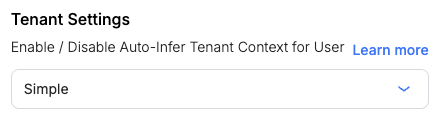
Workspace Settings - Auto-Infer Tenant Context