Build Custom In-App Notifications in 15 Minutes with Courier and ChatGPT
 Thomas SchiavoneMarch 26, 2025
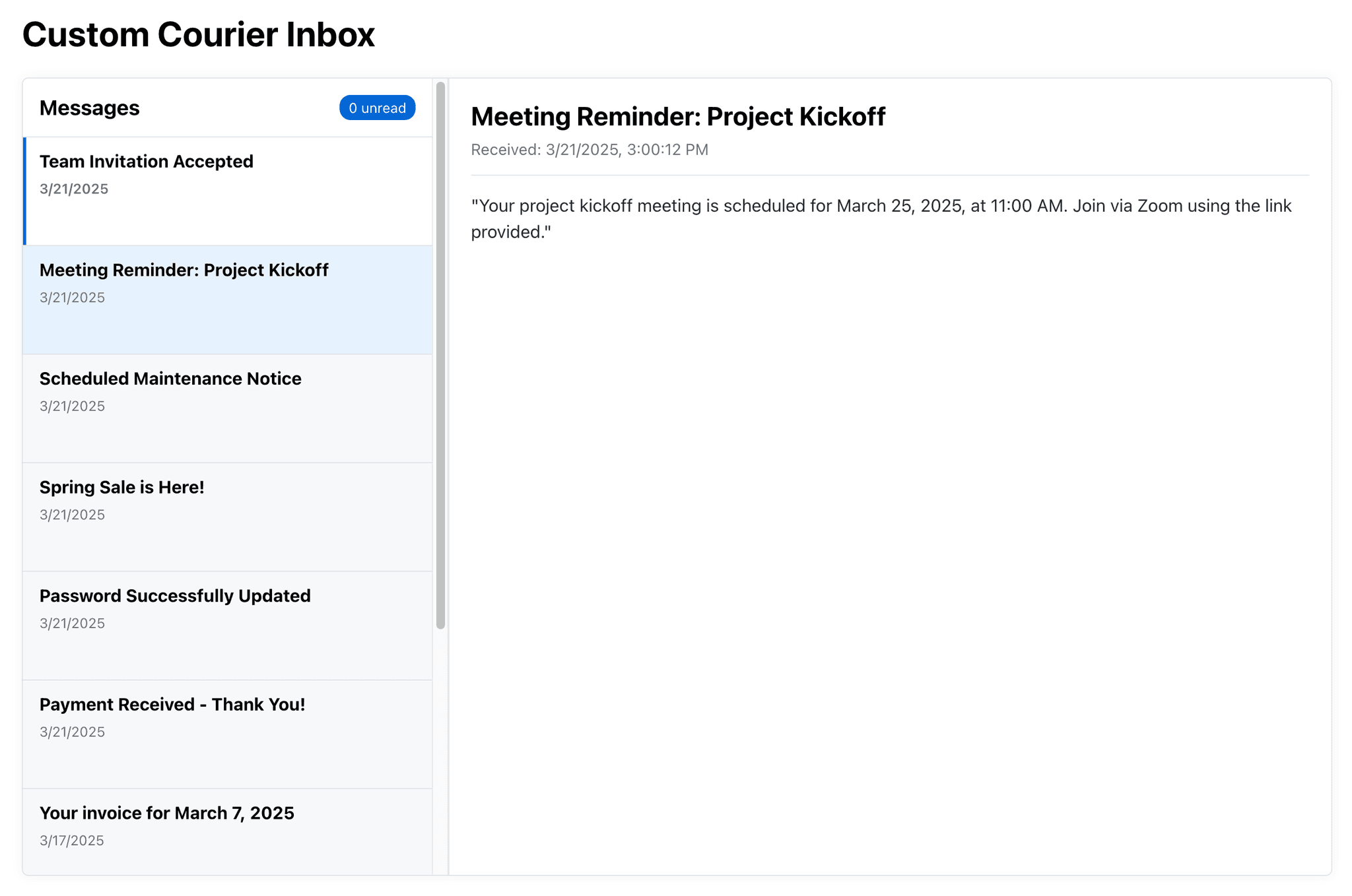
Jon, one of our sales engineers, got a request during a customer implementation: could we customize Inbox, Courier's in-app messaging product, to look and feel like an email client? A two-pane layout—message list on the left, selected content on the right.
That’s a little different from Courier’s default Inbox UI, which is more of a pop-over notification center. But that’s not a problem. Courier was built to be customized. With our React Hooks SDK, teams can take full control—layout, styling, behavior—without rebuilding core logic from scratch.
Jon could’ve spent a few hours wiring things up. Instead, he tried something faster. He dropped our SDK docs and a short prompt into ChatGPT, and 15 minutes later, had a fully working prototype.
This post is about how AI helped solve a real-world implementation challenge—fast—and how Courier makes it easy to build custom in-app messaging experiences.
Courier Inbox: Flexible by Design
Out of the box, Courier Inbox gives teams a clean, brandable notification center they can drop into their app with just a few lines of code. It supports all the essentials—mark as read, archive, unread counts, real-time updates—and looks great with minimal setup.
But not every product wants the same thing. Some teams want a slide-out drawer. Others want a modal. And in this case, the request was for a full two-pane layout that matched the customer’s existing design system.
That’s exactly what our React Hooks SDK was made for. It gives developers access to the full inbox state and methods—without forcing them to use our UI. You get the power of Courier, and complete control over how it's presented.
Customizing Courier to Meet Your Needs
The request was clear: build an in-app notification inbox that looked and worked like email. Message list on the left, content pane on the right. Something that felt native to their app—not tacked on.
Jon knew Courier’s default UI wouldn’t be the right fit here. But with the Hooks SDK, he had everything he needed: access to messages, preferences, state management, and all the methods—mark as read, unread, archive, delete—already built and tested.
The only thing missing was the UI itself. That’s where AI came in.
Instead of manually piecing together a React app from scratch, Jon tried something new. He gave ChatGPT a prompt describing the layout, pasted in the Hooks SDK README, and hit enter.
Using ChatGPT to Build a Custom Inbox Fast
The goal was to get a working prototype that he could hand over to the customer as a starting point. Jon wrote a short prompt:
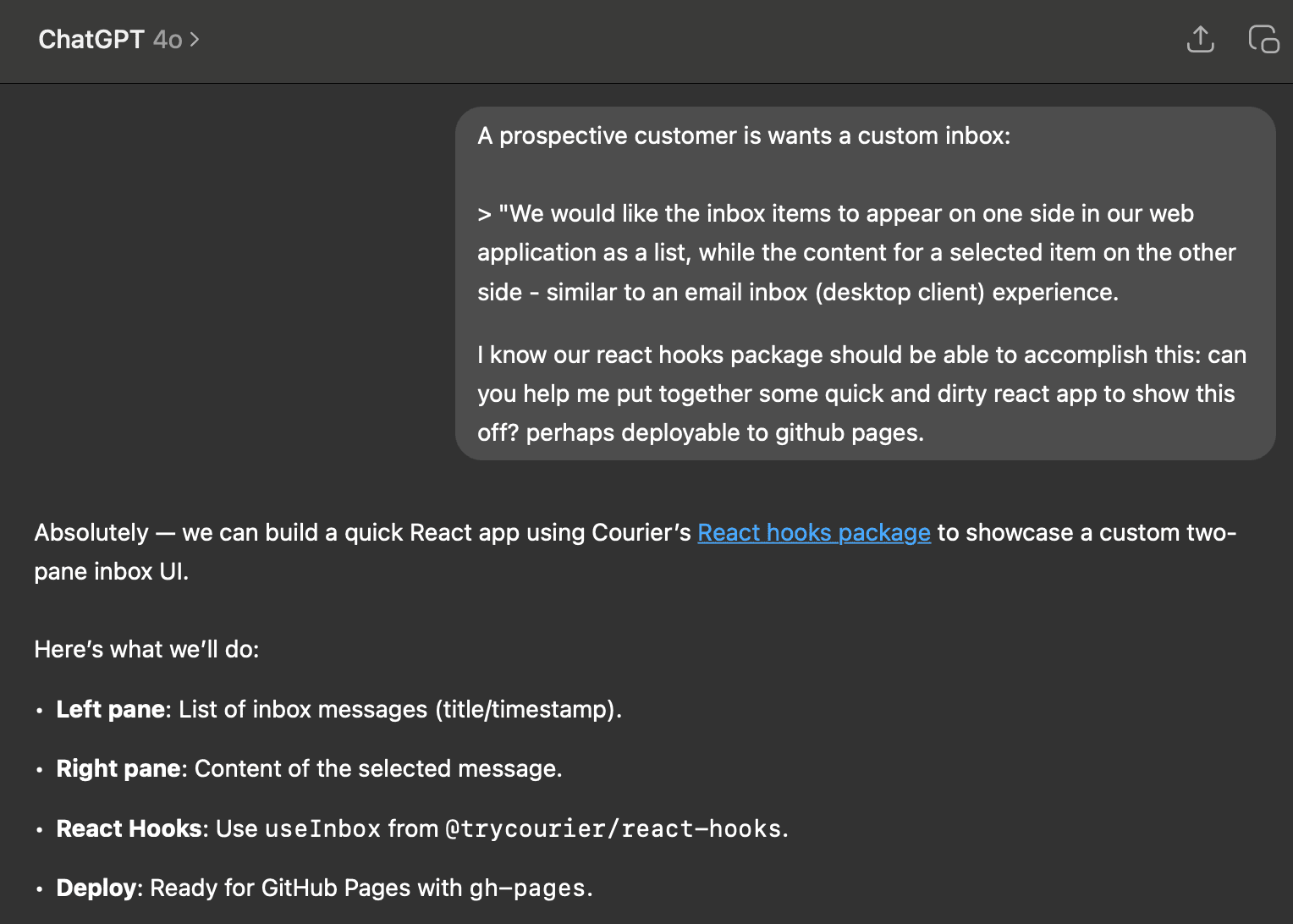
Along with that, he pasted in the README from the React Hooks SDK. That was it.
ChatGPT responded with step-by-step instructions:
- Set up a new React project
- Install the necessary Courier packages
- Use the inbox hooks to fetch messages and state
- Build a layout with a sidebar list and message content pane
- Add logic for selecting messages and marking them as read
- Deploy to GitHub Pages
The first version worked. In 15 minutes, Jon had a custom inbox UI that looked and behaved the way the customer wanted—backed by live data from Courier.
He made a few small tweaks to clean up the layout, but most of the work was already done. And the code was readable enough that any front-end engineer could pick it up and make it production-ready with minimal effort.
From Proof of Concept to Production-Ready
This wasn’t just a cool experiment with AI—it was a glimpse at how fast teams can move when the right tools are in place.
Courier’s Hooks SDK already exposes everything a developer needs—message state, preferences, real-time events, and inbox methods. With ChatGPT’s help, Jon turned that API surface into a functional UI in minutes.
That’s a big unlock for sales engineers. But it’s just as useful for product teams and platform engineers. If you want to:
- Match your app’s UX and brand
- Embed a notification system directly into your layout
- Build features like search, filters, swipe actions, or pinned messages
You don’t have to start from scratch. With Courier and AI, you can move fast, prototype faster, and still keep full control of the user experience.
Brainstorming with AI
After shipping the prototype, Jon asked ChatGPT a follow-up:
“What are some creative UI applications of these hooks that we might not be thinking of yet?”
It came back with a list of UI ideas for in-app messaging:
- Drag-and-drop notifications
- Swipable cards for mobile
- Persistent side drawers
- Timeline view
- Custom filtering and search
- Dark mode and dynamic theming
None of these ideas required modifying Courier’s backend. The SDK already exposes everything. All you need to do is bring your UI to life—something AI tools like ChatGPT are surprisingly good at helping with.
From Docs to Working UI in Minutes with AI
This was a real implementation request. And thanks to Courier and ChatGPT, it turned into a working solution in 15 minutes.
Courier gives you the foundation: powerful SDKs, real-time infrastructure, and control over every part of the notification experience. AI tools like ChatGPT help you move faster—turning docs into working code, bridging the gap between idea and implementation.
Jon didn’t write much code. He didn’t need to. Courier handled the backend. ChatGPT handled the boilerplate. All he had to do was tweak the layout and ship the link.
If you're building a custom notification experience—something that fits your app, your users, your brand—Courier makes it easy. And now, with AI in the loop, it’s faster than ever.
Resources
- Courier React SDK Documentation
- GitHub – Courier React Hooks
- Getting Started with Inbox
- How to Customize Inbox with React Hooks
FAQ: Building Custom In-App Notifications with Courier and ChatGPT
What is Courier and how does it help with in-app notifications?
Courier is a notification infrastructure platform that lets developers send messages across multiple channels—email, SMS, push, chat, and in-app. With Courier Inbox, you can add a notification center to your app in minutes. It works out of the box or can be fully customized using the React Hooks SDK.
Can I build a custom in-app notification UI with Courier?
Yes. Courier’s React Hooks SDK gives you full control over your notification UI. You can build any layout using your own components and styles, while still taking advantage of Courier’s backend logic—like message delivery, unread states, and user preferences.
How does ChatGPT help with building in-app notifications?
ChatGPT can accelerate development by converting documentation and prompts into working React code. In this case, a sales engineer used ChatGPT to build a two-pane inbox layout using Courier’s SDK. With just a short prompt and a copy of the SDK README, ChatGPT generated a fully functional prototype—including layout, logic, and live data handling.
Is it possible to create a Gmail-style inbox using Courier?
Yes. You can use Courier’s Hooks SDK to build a Gmail-style two-pane layout:
- Messages list on the left
- Selected message content on the right
- All backed by Courier’s real-time infrastructure
This layout was built in under 15 minutes using React and ChatGPT.
Do I need a backend to use Courier Inbox?
No. Courier provides the backend infrastructure for notification delivery and state management. The React SDK lets you build fully custom frontends without needing to build or maintain your own backend notification system.
What are the benefits of using Courier and ChatGPT together?
Combining Courier’s developer-friendly SDKs with generative AI tools like ChatGPT allows teams to:
- Rapidly prototype custom notification centers
- Generate React components using natural language
- Speed up implementation and reduce boilerplate
- Deliver working UIs backed by live data in minutes
Can ChatGPT generate production-ready code using Courier?
ChatGPT can generate well-structured, readable React code using Courier’s SDKs—especially when given a good prompt and documentation. While the output is great for prototyping, it should be reviewed and tested before using in production.
What kinds of custom notification UIs can I build with Courier?
Courier supports nearly any notification UI pattern you can think of, including:
- Two-pane layouts (like Gmail or Outlook)
- Slide-in drawers and side panels
- Full-screen inboxes with filtering and search
- Mobile-first designs with swipe actions
- Timelines, pinning, and priority inboxes
- Theme-aware dark mode UIs
How long does it take to build a custom notification center?
With Courier and ChatGPT, a working in-app notification center can be built in under 15 minutes. In the blog example, a sales engineer created a fully functional UI with live data using a single prompt and the React Hooks SDK.
Similar resources
Build with AI: let your agent handle notifications end to end
Courier's Build with AI toolkit gives coding agents direct access to your notification infrastructure. Four integration points, one goal: let your agent send messages, debug deliveries, manage users, and follow notification best practices without context-switching. Works with Claude Code, Cursor, and any agent that can run shell commands or call MCP tools.

How to Use Claude Code on Mobile to Design, Test, and Ship Multichannel Notifications
A walkthrough of using Claude Code's mobile app with Courier's MCP server and CLI to design, test, and ship a multichannel product announcement from a phone. Covers the full workflow: drafting the content outline, creating notification templates using Courier's elemental format, building channel-specific variants for email, Slack, push, and SMS, customizing brand styling through the API, iterating on design with test sends, getting team approval, and publishing with custom routing rules. The whole thing took a couple hours, mostly cold start and design iterations.
Transactional, Product, and Marketing Notifications: What Are the Differences?
Understanding the difference between transactional, product, and marketing notifications is essential for developers building notification infrastructure. Transactional notifications confirm user actions and require no opt-in. Product notifications drive feature adoption through education. Marketing notifications promote sales and require explicit consent. This guide explains the legal requirements, best practices, and when to use each notification type to build compliant systems users trust.Retry