DynamoDB Partition Key Strategies for SaaS
 Chris GradwohlMarch 15, 2022
Amazon DynamoDB is a fully managed NoSQL database service built for scalability and high performance. It’s one of the most popular databases used at SaaS companies, including Courier. We selected DynamoDB for the same reasons as everyone else: autoscaling, low cost, zero down time. However, at scale, DynamoDB can present serious performance issues.
SaaS applications commonly follow a multi-tenant architecture, which means every customer receives a single instance of the software. At scale, this can often lead to hotkey problems due to an uneven partitioning of data in Amazon DynamoDB, which can be resolved with two solutions that will allow the system to scale. When using Amazon DynamoDB for a multi tenant solution, you need to know how to effectively partition the tenant data in order to prevent performance bottlenecks as the application scales over time. This article discusses a potential problem that early stage SaaS companies face when they reach hyper growth and two solutions that can be used to tackle the subsequent challenges with Amazon DynamoDB.
A Naive Partition Key and the Noisy Neighbor Problem
During heavy traffic spikes, it is possible to experience several read-and-write throttling exceptions being thrown from DynamoDB. After further investigation, it should be clear that the throttled DynamoDB errors are correlated to large spike’s in request traffic. To understand why, we need to take a look at how a DynamoDB item is stored and what hard limits the service enforces. First it is important to remember that DynamoDB stores your data across multiple partitions. Every item in your DynamoDB table will contain a primary key that will include a partition key. This partition key determines the partition on which that item will live. Finally, we must note that each partition can support a maximum of 3,000 read capacity units (RCUs) or 1,000 write capacity units (WCUs). If a “hot” partition exceeds these hard service limits, then the overall performance of the table can degrade.
The first time developing with DynamoDB, it’s often tempting to implement a data model that uses the tenant id as its partition key, which introduced a “noisy neighbor problem”. When one tenant (or a collection of tenants) makes a high volume of requests, the system would fetch a high volume of records from their partition. In the case of rapid user growth, it is likely that you will see significant spikes in request volume from certain tenants. Therefore, this spike in requests would ultimately throttle the entire table, which would slow down the system and potentially impact all users.
If you’ve identified this issue within your DynamoDB instance, the next step is to look for solutions to overcome the performance bottlenecks or risk downtime on the application. While the tenant id is a natural, yet naive, partition key design, it simply cannot not scale due to the aforementioned service limits. Therefore, you need a new partition key design that can support much higher throughput. There are two ideal strategies for multi-tenant data modeling with DynamoDB. Both key design strategies support a strict set of access patterns and should be implemented based on your applications requirements.
The Random Partition Key Strategy
The first and most obvious strategy to increase throughput, is to use a random partition key. For tenant data that is not frequently updated, this strategy allows us to basically side step write throughput concerns all together. As an example consider an application that needs to store a tenant’s incoming requests into a Dynamo table. A partition key would have fairly high read and write throughput, assuming the request_id is random and of high cardinality. Each request essentially gets its own partition, and therefore we can achieve 3000 individual request item reads per second (assuming the item is 4KB or less). This is extremely high read throughput for an entity like an api request, and serves our use case well.
The major downside to this partition key design is that it is impossible to fetch all items for a given, which is a common access pattern for multi-tenant applications. Yet for use cases where items do not require many updates, a random partition key provides essentially unlimited write throughput and very acceptable read throughput.
The Sharded Partition Key Strategy
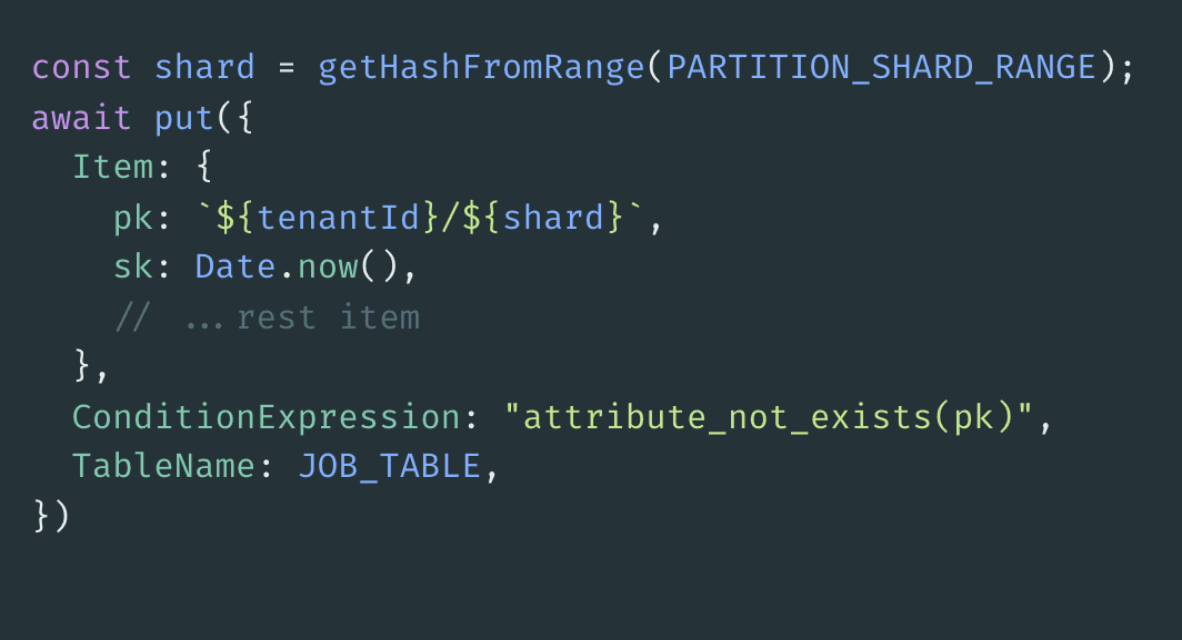
To be able to retrieve all items for a given tenant, you need to split a tenants partition into multiple smaller partitions or shards and distribute their data evenly across those shards. This partition sharding technique requires a few important characteristics. At item write time, you need to be able to compute a shard key time from a given range. The sharding function needs to have high cardinality and be well distributed. If it is not, then you will still end up with a few hot partitions. The shard range and item size will ultimately determine your final throughput. Finally at item read, you iterate across the determined shard range of a tenants partition, and retrieve all items for the given tenant.
For example, let’s say we want to be able to support 10,000 writes per second for a given tenant. If we can guarantee that each item is 4KB or less, and we assume a shard range of 10, then we can use a simple random number generator, given our chosen range, to
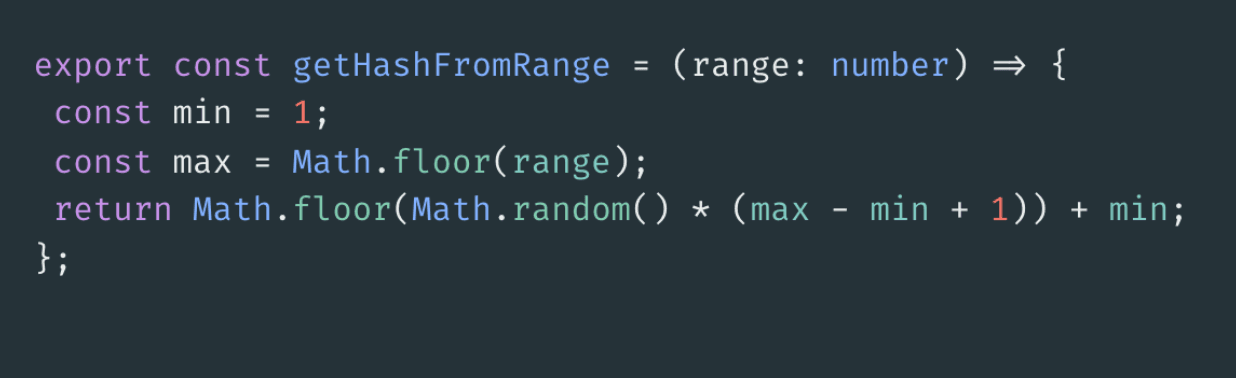
Then at item write time, we simply compute the shard for the tenant and append it to the partition key.
Additional Considerations
- Consider access patterns and application requirements first
- Keep item size under 4KB, and off load payload to S3
- Beware of GSI’s and their ability to throttle the table
Similar resources

Test Courier emails end to end with your AI agent
Give your coding agent an AgentMail inbox, and it can test your Courier emails the way a user would: send the change, check what arrives, review how it renders, and fix what it finds before the change reaches Production.

Let your agent check every email before it ships
Courier Device Preview gives your coding agent real screenshots from Outlook, Gmail, and Apple Mail. Here's the prompt and workflow to have it check every email, fix the draft, and check again before you publish.

React Native solved a problem nobody had. Use Flutter.
Shopify moved back to Swift and Kotlin because coding agents made two codebases affordable. That kills React Native's reason to exist. It does not touch Flutter's, and the canvas is why.