Introducing Courier Elemental
 Troy GoodeFebruary 23, 2022
Marking up notification emails with HTML out of the 1990s has always been an annoyance, but now notifications need to span across additional channels such as SMS, Slack, Microsoft Teams, mobile push, web push, etc. They also need to accommodate more dynamic use cases like magic login links, multi-language notifications, and location based alerts that have caused the content formatting challenge to become far more complicated and cumbersome.
For example, if you need to trigger a notification that includes a call-to-action for email, SMS, and Slack, the CTA needs to be an HTML button in email, a plain text link in SMS, and a Slack Block element. This task typically is approached by either creating three separate templates or coding up some if/then statements, both of which get very cumbersome very quickly.
That is why we built Courier Elemental, an omni-channel markup language for notifications. Elemental provides a powerful JSON-based syntax to describe the content of your notification for email, push, chat, or any channel you use to notify users (check out the docs). With Courier Elemental, you can customize the look, language, and structure of your notification based on locale, channel, and other more advanced custom logic. Elemental not only makes the tedious parts of notification development simple, but it also enables more dynamic, engaging notification experiences that feel like a natural exetension of the core product experience. Let’s take a look at some of the notifications that Courier Elemental enables for the Bat Signal app.
Examples
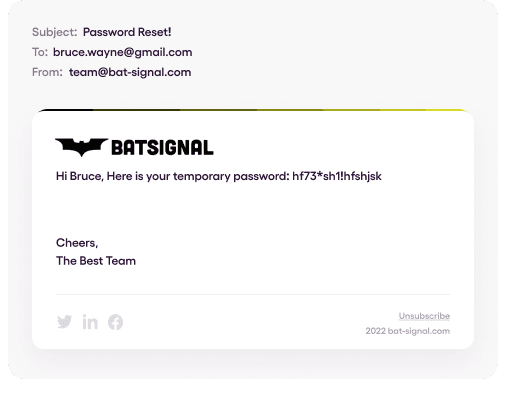
A simple email notification
{"message":{"to":{"email":"bruce.wayne@gmail.com"},"content":{"title":"Password Reset!","body":"Hi Bruce, here is your temporary password: {{new_password}}"},"data":{"new_password":"hf73*sh1!hfshjsk"},"routing":{"method":"single","channels":["email"]}}}
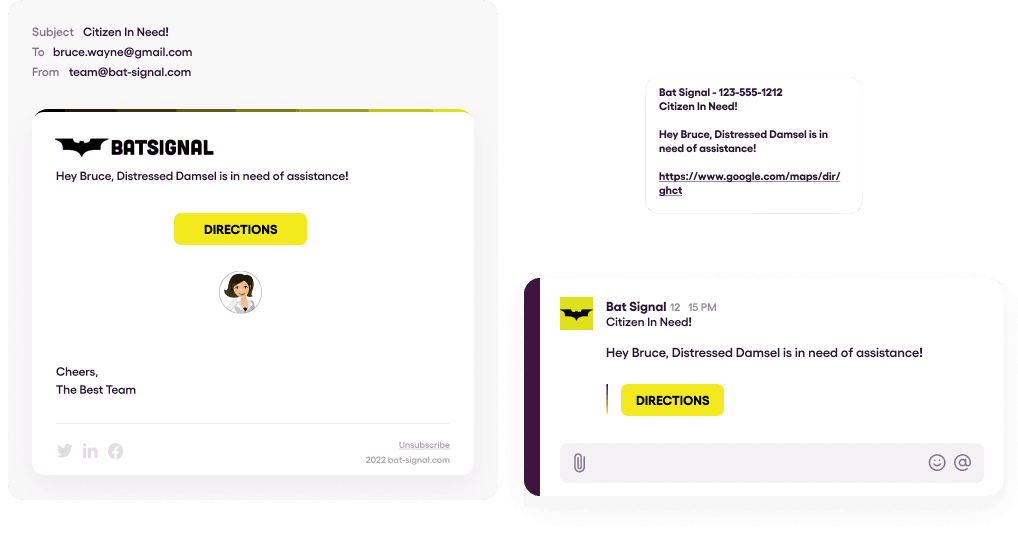
A multi-channel notification with image and action
{"message": {"to": {"email": "bruce.wayne@gmail.com"},"content": {"title": "Citizen In Need","body": "Hi Bruce, {{citizen_name}} needs help!","elements": [{"type": "action","style": "button","content": "Directions","href": "{{directions_to_incident}}"},{"type": "image","src": "{{citizen_image}}","href": "{{citizen_profile}}","align": "center","altText": "{{citizen_name}} Image"}]},"data": {"citizen_name": "Distressed Damsel","citizen_profile": "www.bat-signal.com/profile/distressed-damsel","citizen_image": "www.bat-signal.com/profile/distressed-damsel/profile.png","directions_to_incident": "https://www.google.com/maps/dir/ghct"},"routing": {"method": "all","channels": ["email","sms","slack","push"]}}}
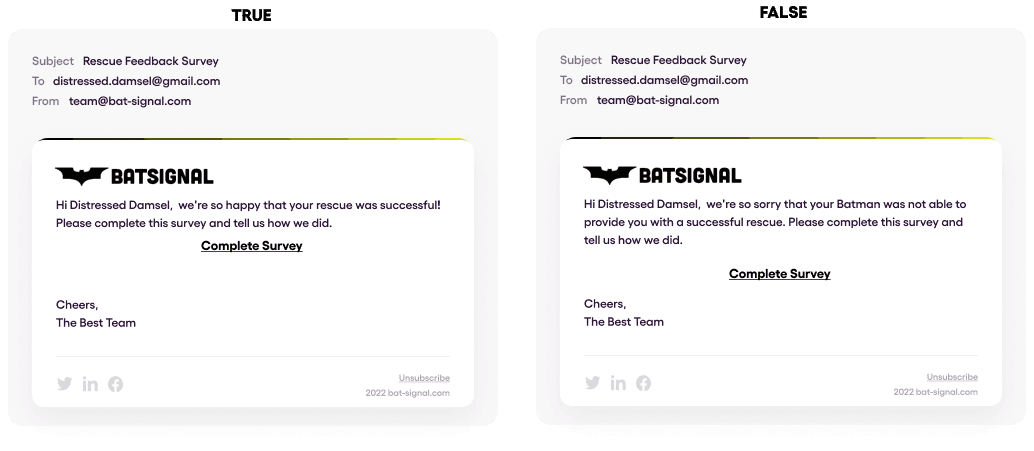
An email notification with conditional content
{"message":{"to":{"email":"{{citizen_email}}"},"content":{"title":"Rescue Feedback Survey","elements":[{"type":"text","content":"Hi {{citizen_name}}, we're so happy that your rescue was successful!Please complete this survey and tell us how we did.","if":"data.rescue_success === true"},{"type":"text","content":"Hi {{citizen_name}}, we're so sorry that your Batman was not able to provide youwith a successful rescue. Please complete this survey and tell us how we did.","if":"data.rescue_success === false"},{"type":"action","style":"link","content":"Complete Survey","href":"{{survey_link}}"}]},"data":{"citizen_name":"Distressed Damsel","citizen_email":"distressed.damsel@gmail.com","rescue_success": true,"survey_link":"https://bit.ly/3BFUief"},"routing":{"method":"single","channels":["email"]}}}
We've also put together an example app on GitHub called the Courier Alert Center to show what notification built with Elemental look like in a real code base.
What’s next?
This is just the beginning for Courier Elemental. In the coming months, we will be releasing new elements as well as new API functionality to open up even more developer use cases. One exciting use case that Courier Elemental will be enabling soon is the ability for our customers to embed a custom notification designer in their product for their end users. Imagine a teaching platform where teachers want to create notifications for students or a CRM for small businesses that wants to enable business owners to notify their customers. This is just one of many new notification use cases that will be coming to Courier in 2022.
If you want to get started building with Courier Elemental today, you only need to do two things.
You need a Courier API key which you can get for free by signing up here (every developer gets 10,000 free sends per month)
Once you have an account you need to configure one of the many notification providers we integrate with.
If you’d like to attend a more in-depth technical demo and ask any questions, please register for Developing With Elemental and join us next week!
Similar resources

Clinical alert and notification systems: how escalation works
A clinical alert is easy to send and hard to close. This is how alerting works inside a hospital: where alerts come from, how routing by role and shift works, and how the acknowledge, timeout, escalate loop is actually built, including what happens when nobody answers.

How to send Slack notifications from your app
Slack is where your customers already work, which makes it a product surface rather than only an internal alerting channel. Posting an approval request or a status change into a customer's own Slack means working in workspaces you don't own, addressing people by email rather than Slack ID, and holding a separate credential for every customer.
How Product Teams Build, Test and Ship Multichannel Notifications in Design Studio
Product teams need to build, test, and ship notifications across multiple channels without filing an engineering ticket every time. Courier's Design Studio is the workspace for that: a template builder, visual channel routing, omnichannel testing, and publishing in one place. This post walks through the traditional template designer paradigm, how it splits effort across too many tools, and outlines a path for product and growth teams to ship transactional, product, and marketing notifications from a single workspace.