Introducing Design Studio: a new way to craft customer messages
 Thomas SchiavoneMarch 11, 2026
Introducing Design Studio: a new way to craft customer messages
Courier's multi-channel notification designer is now in public beta.
We've been rethinking how teams build messages in Courier, and today we're ready to show you what we've been working on. Design Studio is a new multi-channel designer built around one idea: it should be easy to create great notifications across every channel, and powerful enough when you need to go deeper.
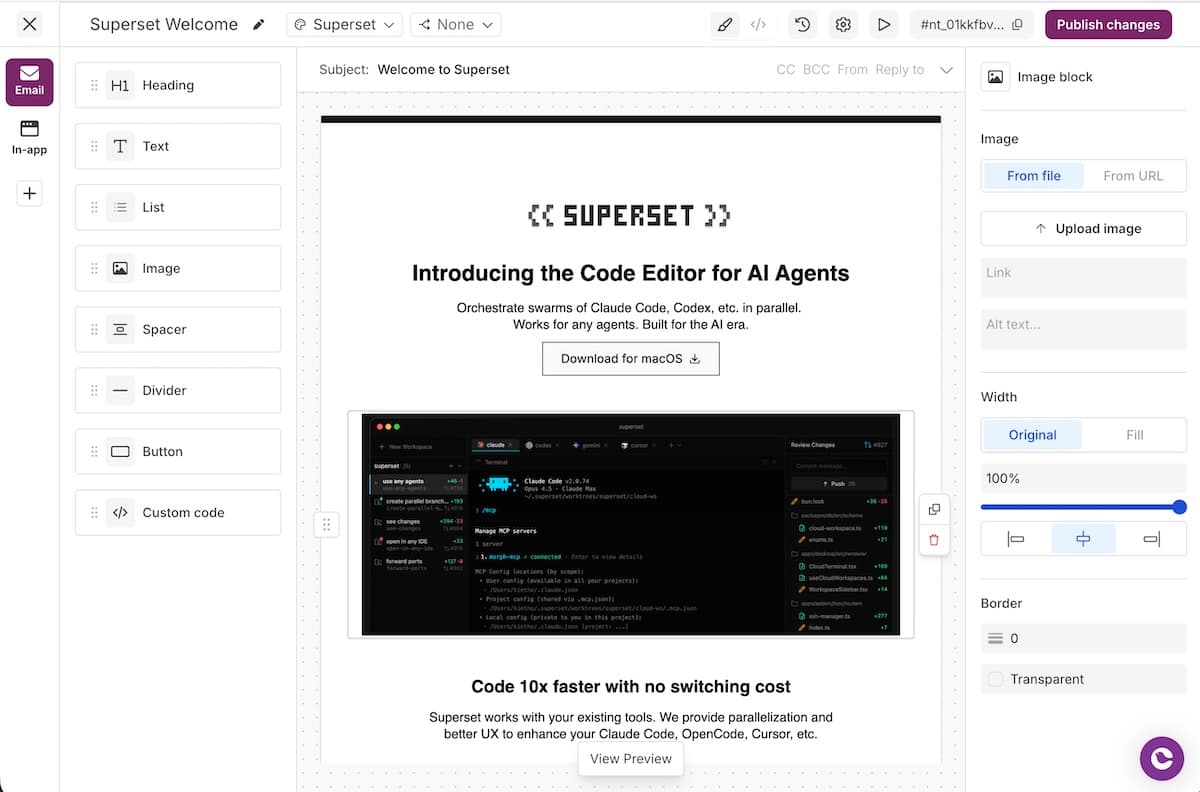
Design Studio supports email, SMS, push, inbox, Slack, and Microsoft Teams — all from the same editor. Pick a channel, drag in your content blocks, and you've got a message ready to send. No juggling separate tools or starting from scratch each time.
What you can do with Design Studio
Build with drag-and-drop
The editing experience is built around drag-and-drop content blocks. Grab a block from the sidebar — headings, text, images, buttons, dividers, HTML — and drop it onto your canvas. Each block has its own settings panel where you can adjust styling, alignment, colors, and spacing without touching code. Reorder blocks by dragging them up and down. It's a fast way to go from blank template to finished message.
Each channel gets its own editor, so you can tailor content per channel without workarounds. Switching between them is a single click in the channel tabs.
Go deeper with email
Email gets the deepest treatment, because it's the most complex channel to get right. The visual editor gives you full formatting control — bold, italic, links, images, buttons — with fine-grained styling on every block. When you need more control, switch the entire canvas to HTML mode and work directly in markup, with a live preview updating as you type. For teams using AI-assisted design-to-code workflows, that means you can drop generated HTML straight into your template and see it rendered instantly. You can also connect to the Courier MCP server to save templates directly from your development environment and review them in the Courier console.

Test and track changes
Preview your templates with real variable data by creating saved test events — reusable JSON payloads that simulate production data. When the preview looks right, send a test message to yourself or your team to catch rendering issues, broken links, or provider-specific quirks before you publish.
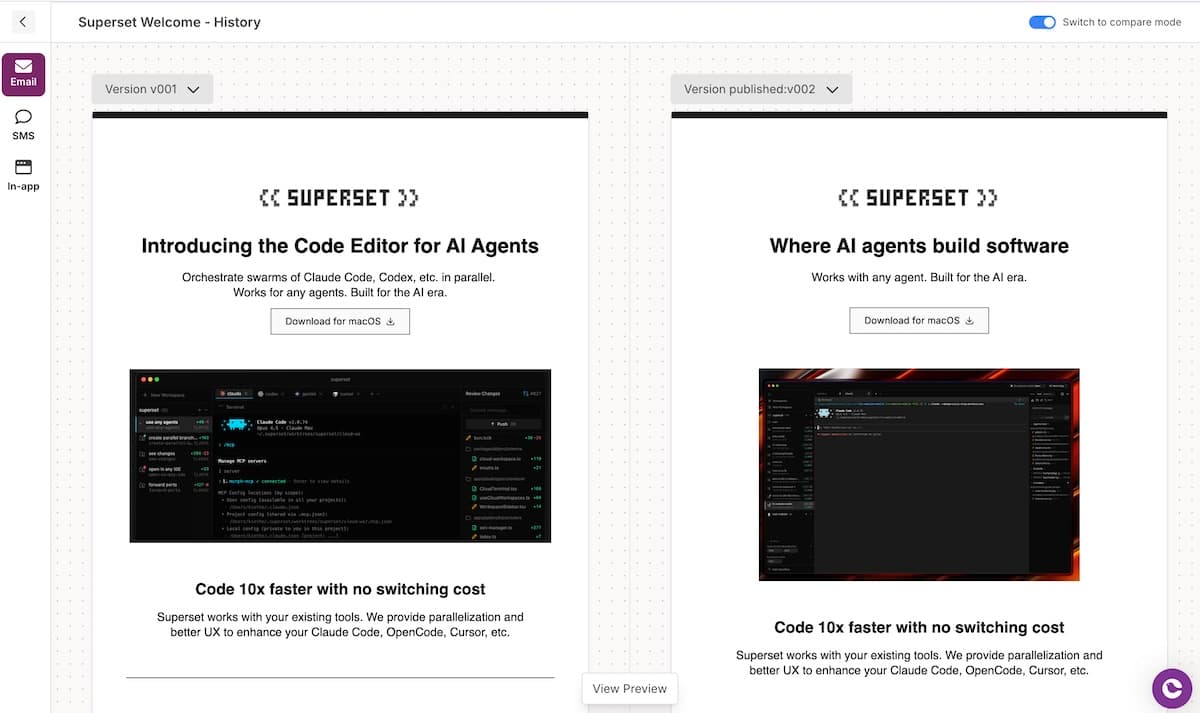
Every version of your template is tracked automatically with full change history — who changed what, when, and on which channels. When you need to review changes, comparison mode renders both versions side by side so you can visually diff the actual notification content, not just a list of edits. Spot a problem after publishing? Roll back to any previous version with a single click.
Available now in public beta
Design Studio is in public beta and available to everyone. You can start building with it today.
If you're already using the Classic Designer, your existing templates aren't going anywhere. You can move to Design Studio when you're ready.
Ready to try it? Read the docs or build your first template in Design Studio.
Similar resources

Introducing Cross-Device Email Preview: see your email on real devices before you send
Cross-Device Email Preview renders your template on the real clients you pick, from Outlook on Windows to dark mode on iPhone, and returns a screenshot of each one. Pick from 96 clients across 21 apps without leaving Design Studio.

New settings page, easier to use, with new background colors
Courier settings has been redesigned. Workspace pages and developer pages are grouped separately, every page says what it's for, and the app now comes in light or dark with nine background colors.

Broadcasts: send one-time messages to your users, right from Courier
Broadcasts lets you send a one-time message to a group of your users, now or on a schedule, without leaving Courier.