The Modern Embedded Editor: Why SaaS Needs More Than Email
 Thomas SchiavoneMay 02, 2025
Why Embedded Editors Exist (And Why You Need More Than Email)
SaaS platforms are in the business of delivering experiences — and communication is a big part of that. From onboarding emails and system alerts to in-app messages and SMS reminders, SaaS products and platforms rely on notifications to keep users engaged and informed.
Giving customers control over these notifications is now table stakes. They expect to design and manage messages that reflect their brand and speak directly to their users.
That’s why embedded editors — especially embedded email editors and notification editors — have grown in popularity. They bring notification customization into your product — no more copy-paste handoffs or support tickets to change text or colors. But most embedded editors solve only a small part of the problem.
Where Traditional Embedded Editors Stop
Most embedded notification editors today share the same story:
- They focus only on email, leaving push, SMS, and in-app notifications disconnected.
- They stop at design — you still have to build and maintain delivery logic.
- They aren’t built for multi-tenant SaaS. Scoped access, per-customer branding, and localization are either manual or nonexistent.
That’s a big gap — and one that often falls on engineering and product teams, especially for SaaS platforms, to fill with internal tools, scripts, and workarounds.
At best, traditional editors solve half the problem. The harder half — delivery, scale, and customer isolation — is still on you.
Courier Create — Embedded, Multi-Channel, and Connected
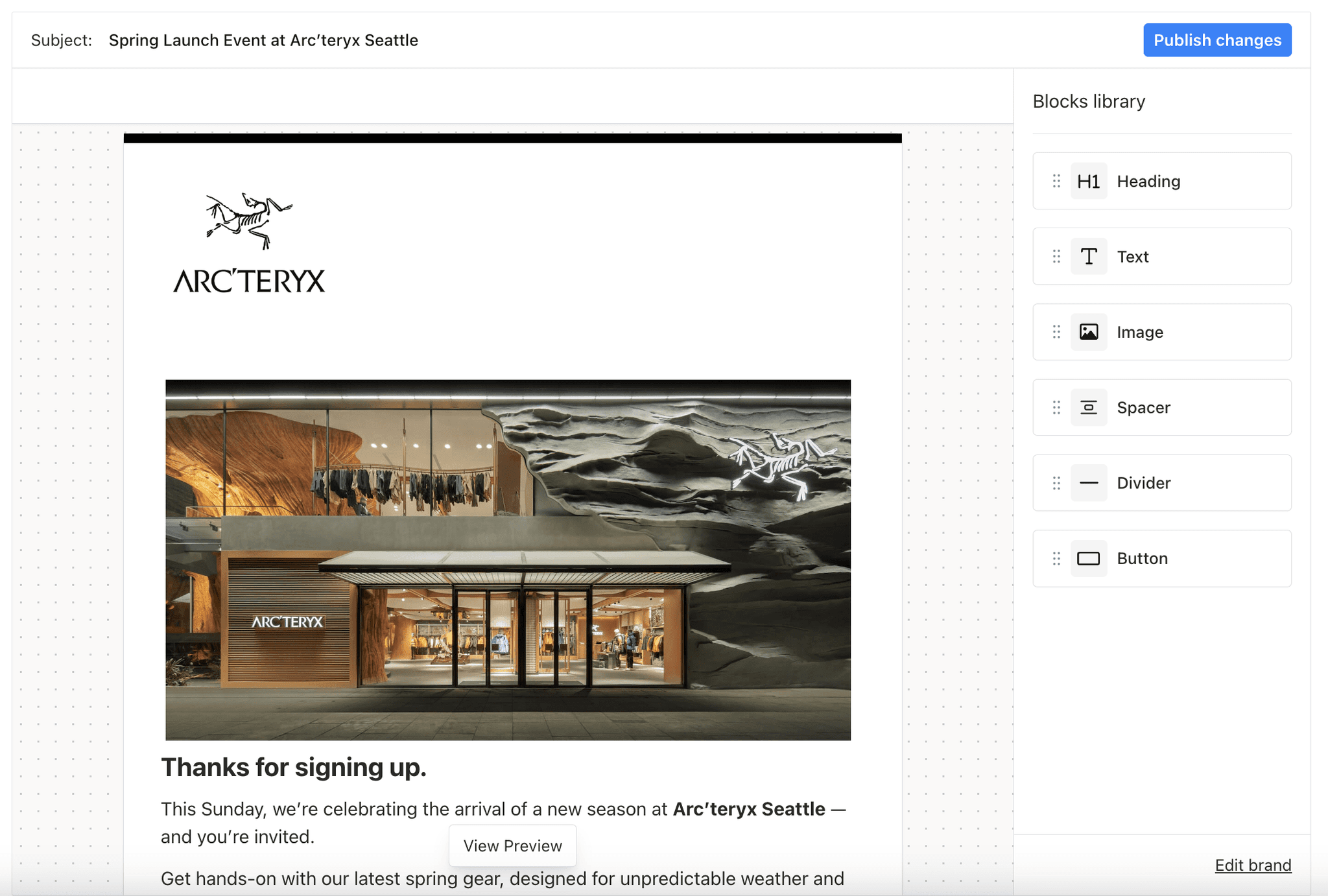
Courier Create was built to solve the entire problem — from design to delivery. It is a React-based embedded notification editor purpose-built for SaaS platforms.
Like others, it’s a drop-in notification designer. But unlike traditional editors, Courier Create was designed to support more than email — and to connect directly to delivery out of the box.
Here’s how it’s different:
- Multi-channel support → email, push, SMS, and in-app notifications, all managed from a single multi-channel notification editor.
- Integrated delivery → no syncing or handoffs, messages go directly from editor to user.
- Scoped access → perfect for SaaS platforms, with per-tenant templates and brand control.
- Localization and flexibility → built-in internationalization, test sends, and advanced design blocks.
Courier Create gives your customers the freedom to create and manage notifications — without adding complexity for your team.
Multi-Channel Messaging — Why It Matters
Most embedded editors were built for email marketers. Courier Create was built for platforms.
In today’s world, notifications aren’t limited to email. Product updates, transactional alerts, and user messages are sent across:
- Email → Traditional transactional and marketing messages.
- Push → Mobile-first updates and user engagement.
- SMS → Urgent, direct alerts.
- In-app → Seamless product experiences.
An embedded notification editor should support all of them — and Courier Create does. It lets your customers design and manage messages for every channel, all from one simple, branded interface.
Integrated Delivery — No More Handoffs
Most embedded email editors stop at design. Once the message looks right, your product team is still responsible for getting it delivered. That means building APIs, writing syncing scripts, and managing delivery across every channel.
Courier Create eliminates all of it. It combines notification design and delivery into a single streamlined platform.
When your customers hit save, the message is instantly connected to Courier’s multi-channel delivery system — ready to send via email, push, SMS, or in-app. Design, save, and deliver — no extra steps or handoffs.
Explore the Courier Create docs to see how easy it is to embed →
Scoped for SaaS and Multi-Tenant Platforms
SaaS platforms have unique challenges when it comes to notifications. Your customers expect control over their messages, but you can’t compromise on security, isolation, or branding.
Courier Create was built for exactly this — a multi-tenant notification editor designed for SaaS applications.
Every customer gets their own scoped environment — isolated templates, branding, and content that only they can access. There’s no risk of cross-tenant data leaks, no complicated permission systems to build, and no manual work to manage notification ownership.
Whether you support dozens of customers or tens of thousands, Courier Create ensures each one can design and manage notifications safely, securely, and on-brand. Multi-tenancy, done right — and built in from day one.
Designed for Ease — Simple for Customers, Flexible for You
Courier Create makes notification design effortless for users.
At its core is a simple, intuitive drag-and-drop email editor and notification designer that lets your customers create and customize messages without writing a line of code. They can add text, images, and layouts in seconds — and see exactly what their notifications will look like before sending.
For lighter use cases, the Brand Designer makes it even easier. You can offer customers the ability to set logos, colors, and footers — giving them brand control without needing to manage full templates.
Or, combine both. The Notification Designer and Brand Designer work together, so you can choose how much control to give each customer. Offer full template customization or limit to brand styling — it’s up to you and your product.
Whatever the use case, Courier Create keeps notification design simple and seamless — right inside your SaaS app.
The Next Generation of Embedded Editors
Embedded editors shouldn’t stop at email. A modern notification editor should do more — and be built for today’s SaaS products.
It should:
- Support every channel your platform relies on.
- Connect directly to delivery, not leave it up to you.
- Offer scoped, branded, and localized experiences.
- Live seamlessly inside your product — not feel bolted on.
Courier Create does all of this. It replaces internal tools, sync scripts, and manual workflows — so your team can stay focused on building your product, not maintaining messaging infrastructure.
If you're ready to give your customers real ownership of their notifications — without sacrificing control or adding engineering overhead — it's time to see Courier Create in action.
Similar resources

WhatsApp pricing changes on October 1, 2026
On October 1, 2026, two things become billable on the WhatsApp Business Platform: free-form replies inside the 24-hour customer service window, and utility templates sent in response to a customer. If your WhatsApp volume is conversations rather than campaigns, this is not a rate tweak. It adds a line to your invoice where there used to be a zero. Here is what changes, a worked example of the cost, and what to check.

Clinical alert and notification systems: how escalation works
A clinical alert is easy to send and hard to close. This is how alerting works inside a hospital: where alerts come from, how routing by role and shift works, and how the acknowledge, timeout, escalate loop is actually built, including what happens when nobody answers.

Courier vs Customer.io: 2026 messaging platform comparison
Courier and Customer.io both send across email, push, SMS, and in-app, but they are not priced or built the same way. Courier bills by the send, puts journeys, experiments, broadcasts, an in-app inbox, preferences, and 50+ delivery providers on one platform, and exposes all of it through an API, a CLI, and an MCP server. Customer.io bills by the number of profiles in your database and fits a marketing team that needs deep behavioral segmentation. This comparison covers pricing, journeys, channels, in-app messaging, localization, and preferences, with every competitor figure linked to Customer.io's own pages.