Who Knew Email Subjects Are So Complicated?
 Riley NapierJune 10, 2021
Did you know that email subjects, by default, only support 127 characters?! I didn’t, and I ran into a “fun” puzzle of a problem earlier this year when a client of ours noticed a problem with Courier-built emails in Microsoft Outlook. Small rendering issues and bugs like this can give the wrong impression to a recipient of an email. It can make the end user feel the product they are using is poorly planned or not tested. Not even just that, but not having support for certain characters can prevent you from reaching customers in other languages and countries.
This is the screenshot we received (note the Black Diamonds):

Any guesses why this happened? Or what the email subject should be? Well, the email subject is French and should be “Vèrifiez votre email” (Verify your email). Let’s dive in, debug, and solve this problem together.
How we solved the problem
As any engineer in 2021, the first step was to Google the problem like: black diamond question mark email subject. This didn’t give us great answers, unfortunately. Some of the first results were from a Microsoft forum and the solution was asking people to update their local Outlook configuration thinking the problem was only a local one. The problem with this is that in order for us to be able to help, we would have needed to ask our customers (and all of their customers) to make this update. The lack of ability to reach all these people and clearly explain to them why they needed to do this meant that the solution was a no-go for Courier.
After digging deeper and making a few keyword changes, I found that this specific character, �, is actually the sign of using a non UTF-8 character when the client expects all characters to be UTF-8.
What is UTF-8?
Very basically, UTF-8 characters are the first 128 unicode characters representing a-z, A-Z, and 0-9 characters and keyboard codes (including punctuation, tabs, shift, etc.). This does NOT include accented characters like the ones we had seen used above. These characters are outside of the first 128 char codes.
Encoding to the rescue!
First some background. Emails (and http requests in general) consist of headers and a body. The email body (HTML) is relatively straightforward. The other parts of an email include fields like “From:, “To”, “Subject”, etc. are headers. Headers are where things start to get tricky. When an email server starts to decode headers, it expects the headers to be UTF-8. This means you cannot include any characters outside of the first 128 unicode characters as mentioned above.
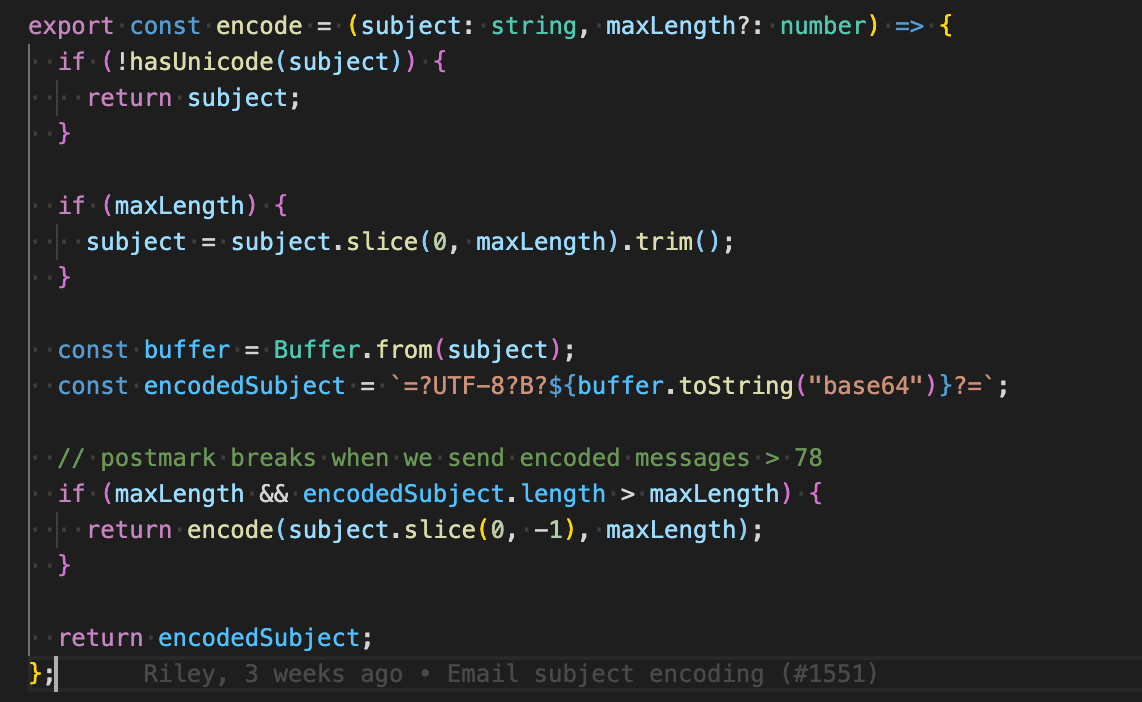
To get around this limitation, we can encode our email subjects in base64. Base64 encoding schemes are commonly used when there is a need to encode binary data, especially when that data needs to be stored and transferred over media that are designed to deal with text. In layman's terms it takes unicode characters and converts them to UTF-8 readable text. This does mean the text will be longer, but it allows us to send over all the data we need in a header.
We can encode base64 like this in Node.js.

This doesn’t, however, tell the email server that the email subject is base64. To inform the server the email subject is encoded in base64, we can use this specific format (RFC 1342).

Sending an email subject like this should “just work,” since this way, the server will decode the string and render it correctly! 🎉
But wait, there’s more!
Limitations! :(
We did run into problems with some email providers and the length of the base64 encoded string. Keep in mind, if I encode the string in base64, check the length, and determine that the length is too high, I cannot just trim the encoded string because it will break the encoding. I won’t be able to decode the string.
To solve this, I had to recursively encode the subject and check the string if it was too long. If it is too long we take the original string, trim it and then re-encode and check the length. We repeat this process until we get an encoded string at the right length for said email provider.
This was our journey into email subjects when we found out that Microsoft Outlook didn’t like certain characters in our email subjects. The process took us from confusion to understanding, and finally building a solution that works for multiple providers.
It blows my mind that email in 2021 can (still) cause such a headache. Well, in reality, it is just Microsoft Outlook. This email client is notorious for causing headaches like this. Two of the other most popular clients, Gmail and Superhuman, both handled these email subjects just fine. I wish this was as easy as saying “we don’t support Internet Explorer,” but so many people still use these old versions of Microsoft Outlook. So to anyone reading this and building an email application. If anything funky happens, always check and see if it's Microsoft Outlook...and don’t get too frustrated when the solution obtuse and lengthy to implement.
I’d like to call out these websites which were great and helped us understand and test our solution:
Are rendering issues and bugs are making your end-user feel like your product isn't up to standard? Sign up for Courier's free demo to find out how we can help your subject lines land right!
Illustration by Rebekka Dunlap
Similar resources

Test Courier emails end to end with your AI agent
Give your coding agent an AgentMail inbox, and it can test your Courier emails the way a user would: send the change, check what arrives, review how it renders, and fix what it finds before the change reaches Production.

Let your agent check every email before it ships
Courier Device Preview gives your coding agent real screenshots from Outlook, Gmail, and Apple Mail. Here's the prompt and workflow to have it check every email, fix the draft, and check again before you publish.

React Native solved a problem nobody had. Use Flutter.
Shopify moved back to Swift and Kotlin because coding agents made two codebases affordable. That kills React Native's reason to exist. It does not touch Flutter's, and the canvas is why.