

Types of Control Flow
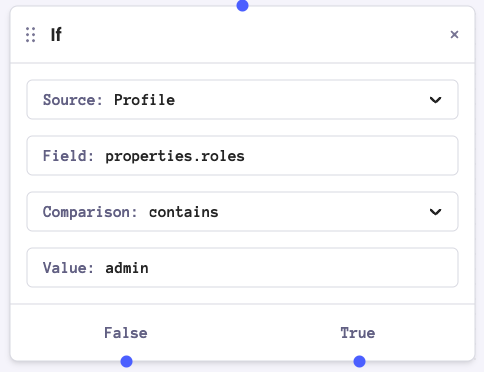
If
TheIf node routes workflow execution based on a single condition. When the condition evaluates to true, the workflow follows the True branch; otherwise, it follows the False branch.
Switch
TheSwitch node allows routing based on multiple conditions.
It evaluates conditions in order and routes to the first matching branch.
If no conditions match, the workflow follows the default branch.
Comparison Operators
The following operators are available for Data, Profile, and Step Ref conditions:Condition Sources
TheIf and Switch nodes can evaluate boolean expressions from four different sources:
Data
Compare a field within thedata key of the automation context with a value.
Profile
Compare a field within theprofile key of the automation context with a value.
Profile conditions require profile data to be present in the automation context. Automations started by an audience trigger or a schedule do not automatically load stored profile fields. Add a GET Profile step before your If or Switch node so the user’s profile is available for comparison.
Step Ref
Check the current status of an upstream Send node, using it’s reference ID (Ref). The Ref value is defined in the Send node’s configuration.
Possible status values are:
CLICKED, DELIVERED, ENQUEUED, FILTERED, OPENED, SENT, UNDELIVERABLE, UNMAPPED, UNROUTABLE
JS Condition
Use JavaScript expressions when standard comparisons aren’t sufficient.JS Condition examples
Javascript Expressions in Value Fields
Javascript expressions can also be used in theValue field of Data, Profile, and Step Ref sources.
Examples