

- Manual approaches: Create language-specific channels or templates in the designer
- Variable-based: Pass translated content in your send request
- API-driven: Use the localization API directly or integrate with a translation management system (TMS)
Setting a User’s Locale
Include alocale property in the user’s profile or in the send request:
en, en_US, fr, fr_FR, de_DE).
Previewing Localized Content
Include a locale in your test event’s profile to preview the localized version: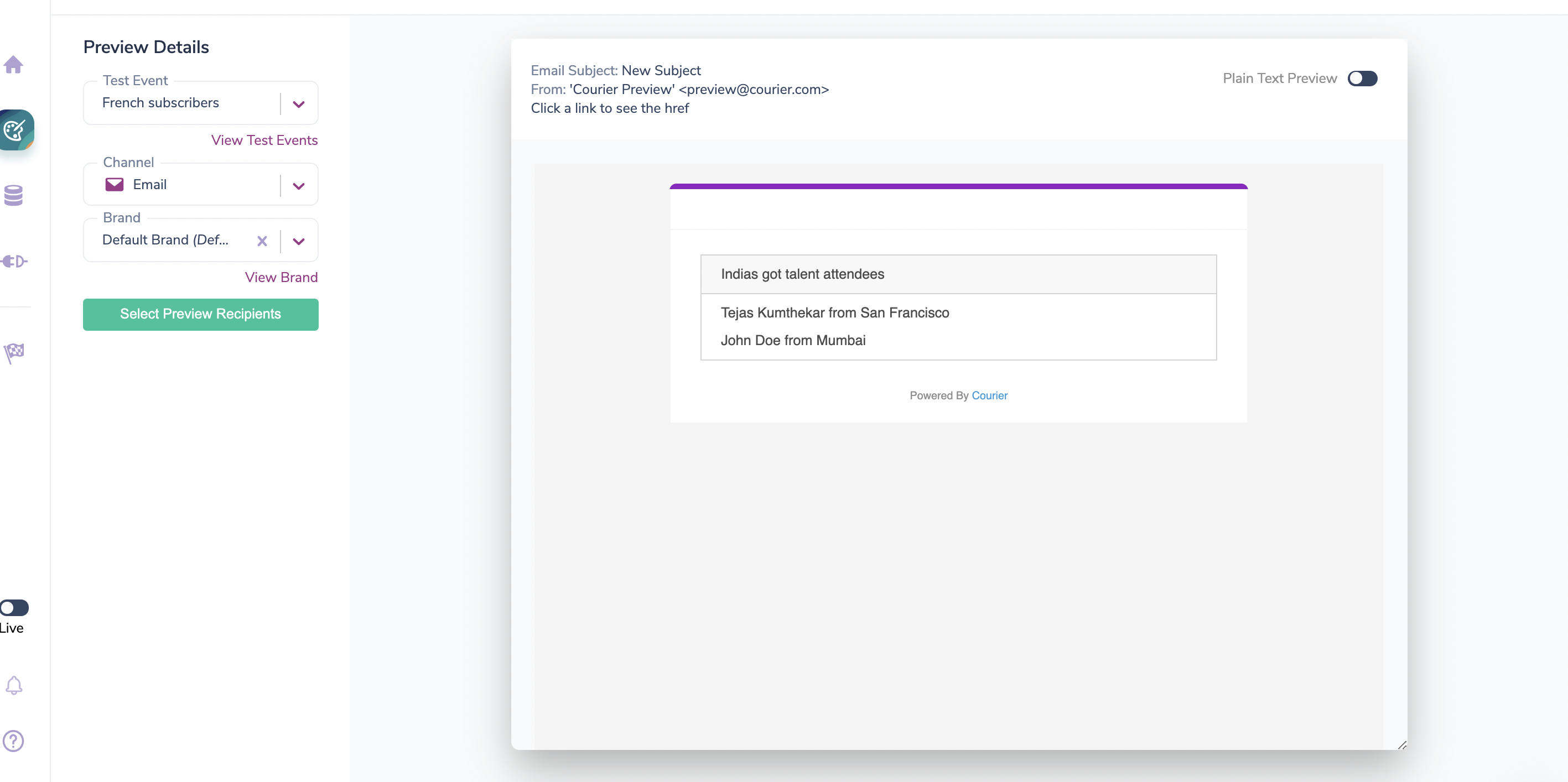
Localized preview with fr_FR locale
API-Driven Localization
Courier provides APIs to programmatically manage translations, either for direct scripting or integration with a translation management system (TMS). These endpoints address content by element ID. IfGET /notifications/{id}/content comes back with blocks and channels rather than elements, that template predates the element model and these endpoints will not accept it. GET /notifications lists both kinds together, so check the shape before assuming it’s uniform.
Key Concepts
Locale Codes
ThelocaleId you write to is stored verbatim. Courier does not validate or normalize it, and at send time it is matched against the recipient’s profile locale as an exact string.
Pick whichever form your profile data already uses and stay consistent. This page uses fr_FR throughout, matching the profile examples above.
Localizable Properties
Which properties an override may set depends on the element type. This is not a flat list that applies everywhere.divider, jsonnet, partial, and comment elements reject any locale override.
Sending a property that the element type does not support returns a 400 naming the offending field, for example element t1 is type 'text', 'href' is not a valid locale field for this type.
For the resolution rules, including what happens when an element uses content and elements together, see Elemental locales.
Localizing raw
raw on a channel element is the provider-native escape hatch: a free-form map that bypasses Elemental rendering and is passed to the provider as channel overrides. Recognized keys:
Anything else passes through to the provider untouched.
Localizing
raw means localizing that payload, so you can ship a translated subject line or an entire translated HTML body:
raw does take effect.
How Merging Works
The merge is exactly one level deep. Fields insidelocales[localeId] merge with whatever is already there, and each field’s value is then replaced wholesale.
What that means in practice:
- Sending only
contentfor a locale that also has anhreftranslation leaves thehrefintact, and other locales are untouched. Partial overrides are safe at the field level. - Sending
elementsreplaces that locale’s entire subtree. A one-element array against a two-element translated subtree leaves one element and silently drops the other. Sibling fields in the same locale, such asraw, do survive.
elements means restating every child you want to keep. For a list element, that is the full set of list items:
Draft vs Published
Writes carry astate field in the request body rather than using a separate path:
Note that
PUBLISHED publishes the whole draft, not just your change, so any other unpublished edits on that template go live with it. Use the DRAFT default when you cannot account for what else is pending.
Reads work the other way around, with a version query parameter: GET /notifications/{id}/content returns the published content, and ?version=draft returns the draft.
API Endpoints
All endpoints require an
Authorization: Bearer {api_key} header.
For translation work, reach for PUT /locales/{localeId} rather than the element endpoint. It merges and it validates, where the element endpoint replaces and does not, which gives you two ways to lose translations silently. See Updating a Single Element.
Step 1: Fetch Translatable Content
Start by fetching your template’s content to get the element IDs you’ll need for the update endpoints. This works for any existing template, including anything built in Design Studio.channel and group elements carry their children in their own elements array, so walk the tree rather than expecting a flat list. Save the id of every element you intend to translate, at whatever depth it sits.
The locales map returns a checksum per existing locale, not the translated text. Compare an element’s checksum against the one you stored at translation time to find translations that have gone stale because the default content changed.
Keep variable expressions such as {{data.name}} byte-identical to the default content when you translate. Courier substitutes them at send time, and an altered expression will not resolve.
Step 2: Set Locale Overrides
Send one request per locale. Each entry inelements names the element it overrides by id and sets the properties you want translated.
200 with the updated element checksums and the state the write landed on:
id fails the whole request with a 400 and the valid overrides in the same array do not apply. The error names every bad id at once, so a single round trip is enough to fix them all.
Repeat the request per locale. fr_FR and de_DE are independent writes, and setting one does not affect the other.
Updating a Single Element
Reach for this when the default content changed and the translations behind it need re-syncing in the same breath. It replaces the element outright, so pass every locale you want to keep:Journey-Scoped Templates
Templates that live inside a journey use the same body, addressed through the journey:Defining Locales at Creation
If you author templates through the API, you can skip the locale endpoints entirely on the first pass. Nestlocales on each element as you create the template:
notification requires all six of name, tags, brand, subscription, routing, and content. Pass null for the ones you aren’t using, as above.
state: "PUBLISHED" creates and publishes in one call, and it’s case-insensitive here. Omit it to leave the template as a draft.
Setting your own id on each element is worth doing here. Courier only generates an id when you don’t supply one, so readable ids like order_confirmation survive and make later translation updates far easier to follow than generated ones like elem_01kytdc4bhfzsb2qyg3b0659yp.
Publishing Draft Changes
A write withstate omitted or set to DRAFT saves to the draft version and needs to be published before it takes effect. Two options:
Option 1: Direct publish (simplest)
"state": "PUBLISHED" with the write and skip this section entirely.
TMS Integration Workflow
For teams using a translation management system, Courier supports a webhook-driven workflow:- Submit for translation: When a template is submitted in Studio, Courier sends a
notification:submittedwebhook - Fetch content: Your TMS fetches translatable content via
GET /notifications/{id}/content?version=draft - Update translations: Push translated content back via
PUT /notifications/{id}/locales/{localeId}, leavingstateat itsDRAFTdefault - Complete the process: Resolve checks via
PUT /notifications/{id}/{submissionId}/checksto auto-publish
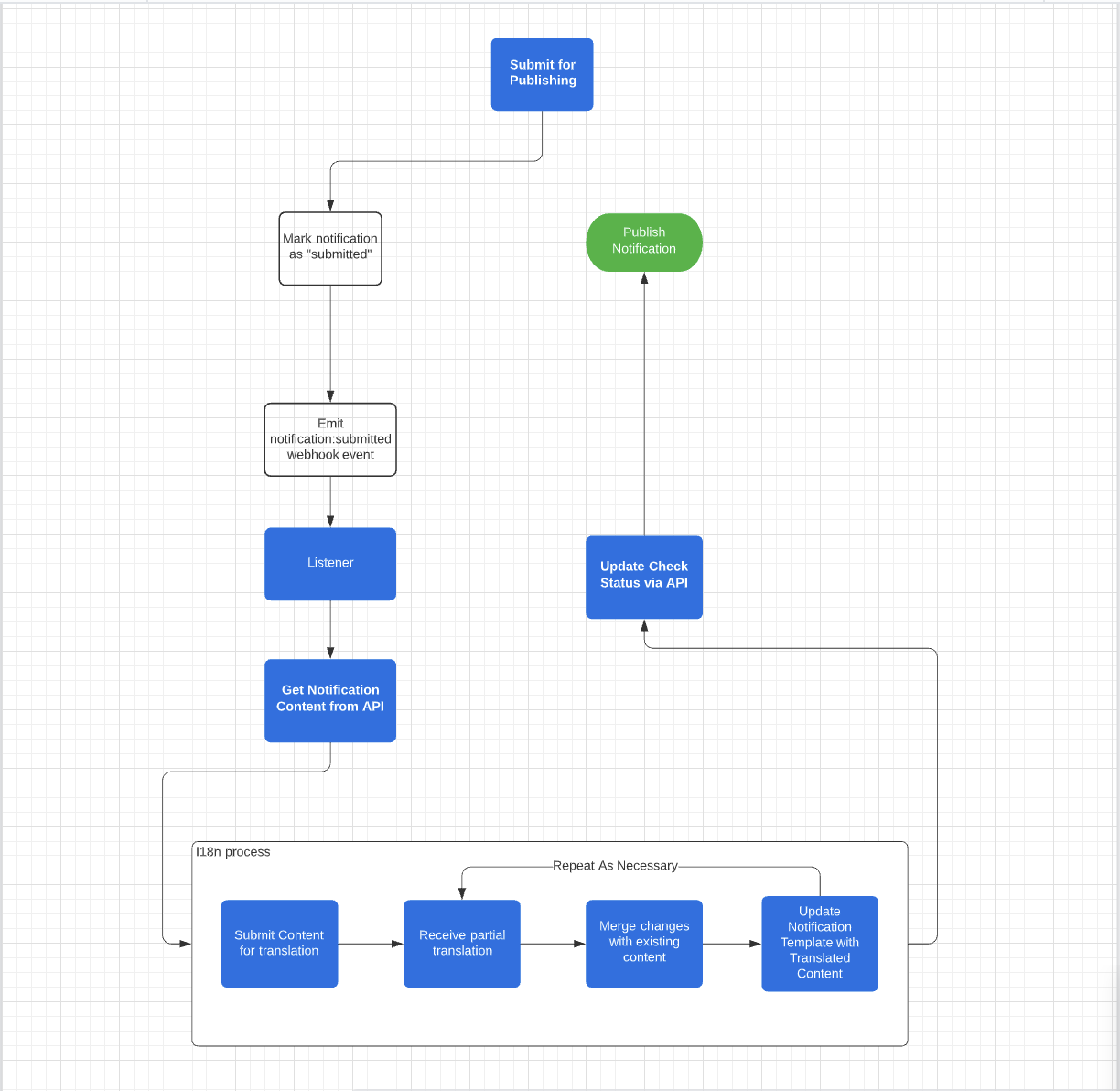
TMS translation workflow
Webhooks
Configure webhooks in Settings → Webhooks to receive events for the TMS workflow:notification:submitted: Template submitted for translationnotification:published: Template publishednotification:canceled: Submission canceled
Right-to-Left (RTL) Language Support
Courier automatically detects RTL content in email templates and appliesdirection: rtl CSS styling at the block level. When a text block contains content in an RTL language like Arabic or Hebrew, Courier switches alignment from left to right and sets the text direction. This is content-driven; you don’t need to set a dir attribute or add custom CSS.
RTL detection applies to text, quote, markdown, and list blocks. Text blocks get full treatment (direction and alignment), while other block types receive the direction: rtl style. Action buttons do not include RTL detection.
If you use a custom brand template override, you may need to add
.text-rtl { direction: rtl; } to your brand’s custom head styles. The built-in email templates (line, none, inbox) include this by default.