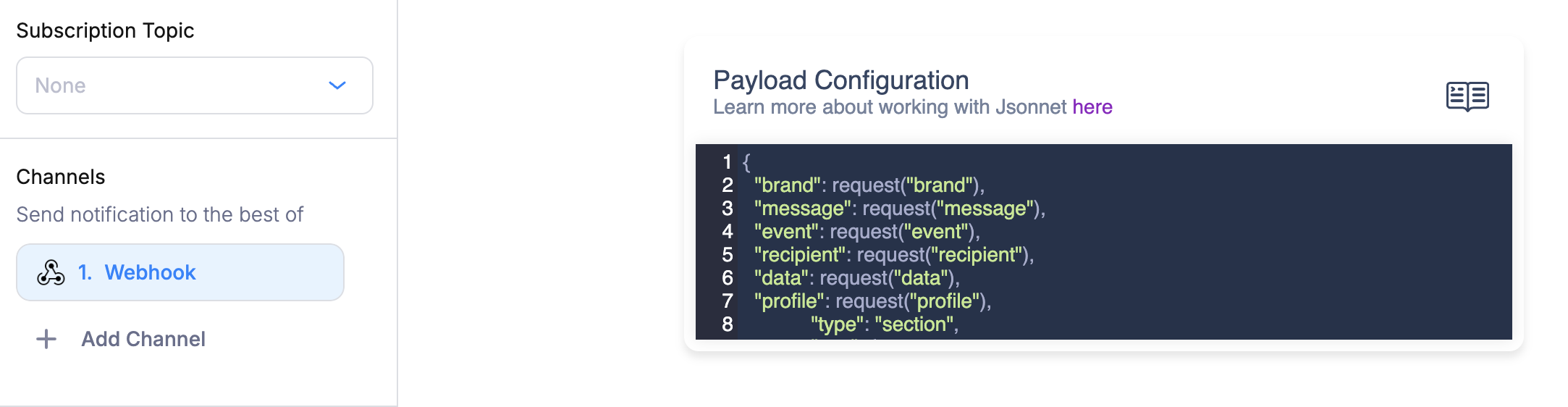
The Webhook Designer lets you define the JSON payload Courier sends to your Webhook integration using a Jsonnet code editor. You can build dynamic payloads that pull from your send data, recipient profile, and request metadata.
Jsonnet Webhook Designer

Setting Up Your Webhook Destination

Courier needs a destination URL to deliver webhook requests. You have two options:
  • Static destination: Go to Settings, scroll to Outbound Webhooks, and add a webhook with the URL and auth type.
  • Dynamic destination: Pass the URL per recipient via the webhook profile property. See the Webhook integration docs for details.

Default Payload

If you don’t define a custom Jsonnet template, Courier sends this default payload:
{
  "brand": request("brand"),
  "message": request("message"),
  "event": request("event"),
  "recipient": request("recipient"),
  "data": request("data"),
  "profile": request("profile"),
}
This includes the full data and profile objects from your send request, plus metadata like message ID and template name.

Available Functions and Variables

The Jsonnet editor provides these built-in functions for accessing your notification context:
FunctionDescriptionExample
data("path")Access a value from the send request’s data objectdata("order.total")
profile("path")Access a value from the recipient’s profileprofile("email")
request("path")Access request metadata (brand, message, event, recipient, data, profile, template)request("message")
t("key", default, locale)Resolve a translation from the data objectt("greeting", "Hello")
chunk(str, size)Split a string into chunks of a given sizechunk(longText, 40)
These scalar variables are also available directly:
VariableDescription
brandThe brand ID
messageThe message ID
recipientThe recipient ID
eventThe event associated with the notification
templateThe template name
All standard Jsonnet std library functions are also available (e.g., std.length(), std.join(), std.format()).

Writing a Custom Payload

Your Jsonnet template must evaluate to a JSON object. Use data() and profile() to pull values from the send request. Here’s an example that builds a custom payload for an order confirmation webhook:
{
  "event_type": "order.confirmed",
  "customer": {
    "id": data("customer.id"),
    "email": profile("email"),
    "name": profile("name"),
  },
  "order": {
    "id": data("order.id"),
    "total": data("order.total"),
    "currency": data("order.currency"),
    "items": data("order.items"),
  },
  "metadata": {
    "courier_message_id": message,
    "template": template,
  },
}
Given this send request:
{
  "message": {
    "template": "ORDER_CONFIRMED",
    "to": { "user_id": "user_123" },
    "data": {
      "customer": { "id": "cust_456" },
      "order": {
        "id": "ord_789",
        "total": 99.99,
        "currency": "USD",
        "items": [{ "name": "Widget", "qty": 2 }]
      }
    }
  }
}
Courier would deliver this payload to your webhook URL:
{
  "event_type": "order.confirmed",
  "customer": {
    "id": "cust_456",
    "email": "jane@example.com",
    "name": "Jane Doe"
  },
  "order": {
    "id": "ord_789",
    "total": 99.99,
    "currency": "USD",
    "items": [{ "name": "Widget", "qty": 2 }]
  },
  "metadata": {
    "courier_message_id": "1-abc123...",
    "template": "ORDER_CONFIRMED"
  }
}

Conditional Logic

Jsonnet supports conditionals, which let you vary the payload based on your data:
{
  "event_type": "user.action",
  "priority": if data("is_urgent") then "high" else "normal",
  "channel": data("channel"),
} + if data("include_debug") then {
  "debug": {
    "message_id": message,
    "recipient": recipient,
  },
} else {}

Nested Path Access

The data() and profile() functions support dot-separated paths to access nested values:
{
  "city": profile("address.city"),
  "plan": data("customer.plan.name"),
  "first_item": data("order.items.0.name"),
}
If a path doesn’t exist, the function returns null by default. You can provide a fallback as the second argument:
{
  "name": profile("name", "Unknown User"),
  "locale": profile("locale", "en_US"),
}