Chapter 1
Why Use Slack and Microsoft Teams Notification Tools
Why workplace notifications reach users faster than email and enable action without context switching. Covers Block Kit vs Adaptive Cards and how Courier handles both, the dual-platform reality facing B2B teams, essential components for production systems including OAuth, threading, and webhooks, and how cross-channel coordination prevents duplicate sends.
Last updated: May 2026
Key takeaways
- Slack and Teams notifications reach users where they already work, so action-oriented messages like approvals and alerts get a response in minutes instead of the hours email takes.
- The two platforms use incompatible formats. Slack renders Block Kit JSON and Teams renders Adaptive Cards JSON, so building both natively means maintaining two separate codebases.
- Interactive messages turn notifications into workflows. Buttons, dropdowns, and forms let users approve, acknowledge, or resolve directly in the message through webhooks back to your app.
- Production systems need more than a send call: OAuth and token management, per-platform rendering, threading, rate-limit handling, retries, and webhook verification.
- Courier abstracts both platforms behind one API, rendering Block Kit and Adaptive Cards from a single template and coordinating delivery across email, in-app, push, and SMS.
What are Slack and Microsoft Teams notifications?
If you've ever clicked "Approve" on an expense report directly inside Slack, or seen a CI failure post to your team's #deploys channel before anyone had opened a dashboard, you've used workplace notifications done right. The message arrived where your team was already working, carried enough context to understand the situation, and let someone act without opening a second tool.
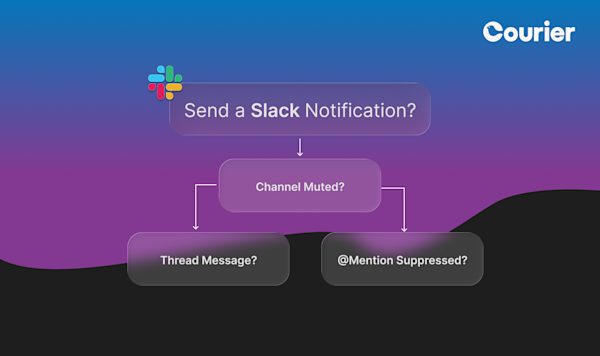
A Slack or Teams notification is a message your application sends into your users' existing collaboration workspace. It arrives as a direct message or in a shared channel, carries formatted text and images, and can include interactive buttons that let recipients approve, reject, acknowledge, or trigger actions, without leaving the tool they're already in. Unlike email or push, these messages land where your users actively coordinate all day.
How Slack and Teams notifications appear to users
Notifications reach users through two patterns. Direct messages go to an individual's personal inbox, best for user-specific alerts like "your export is ready" or "you have a pending approval." Channel messages post to a shared workspace, best for team-visible events like deployment completions, new customer signups, or system alerts the whole team needs to see.
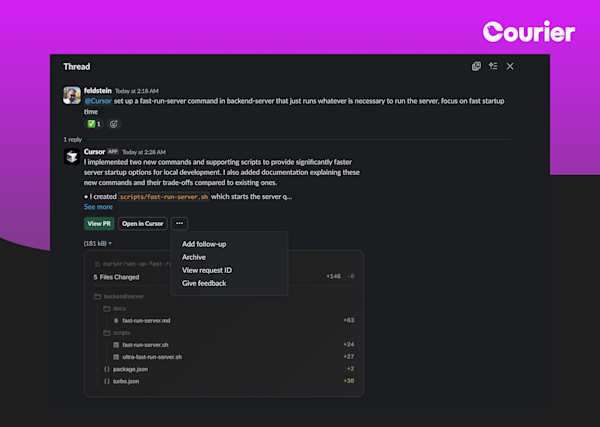
Both platforms support rich content far beyond plain text: structured sections, images, code blocks, user mentions, timestamps, and action buttons that trigger webhooks back to your application. Both support threaded replies, so follow-ups about a specific event appear under the original message rather than cluttering the channel. The experience looks native, messages from your product feel like messages from a teammate, not a mass notification system.
Slack and Teams notifications vs other channels
Every channel has a different relationship with users. The mistake most teams make is treating Slack and Teams as just another email endpoint.
| Slack / Teams | In-App Inbox | Push | SMS | ||
|---|---|---|---|---|---|
| Visibility | Open all day at work | Batch-checked, often delayed | Only when in your app | Lock screen, high interrupt | High interrupt, anywhere |
| Typical response time | Minutes | Hours to days | Seconds (if in app) | Seconds | Seconds |
| Best for | Approvals, alerts, team coordination | Detailed content, receipts | Session-based updates | Re-engagement, urgent | Time-critical, personal |
| Interactive actions | Yes, buttons, forms, dropdowns | Limited (click-through) | Yes, inline actions | Limited | No |
| Persistent history | Yes, searchable | Yes | Yes | No | No |
| Risk if overused | Channel noise, muting | Inbox overload | Notification fatigue | Uninstalls | Opt-outs |
The strongest notification strategies pair workplace channels with others. A critical alert posts to Slack for immediate visibility, logs to the in-app notification center for permanent reference, and falls back to email if no one engages within a set window, all coordinated by the same multi-channel routing logic.
What Block Kit and Adaptive Cards look like, and how Courier handles both
Slack and Teams use completely different message formats, and the gap between them is bigger than it first appears. Slack uses Block Kit, a JSON schema composing messages from typed blocks like section, image, actions, and context. Teams uses Adaptive Cards, a different JSON schema with Container, TextBlock, ColumnSet, and ActionSet elements. Neither format is compatible with the other, and both are verbose. A single approval message runs to dozens of lines of JSON in each format.
Here's the same approval message written for each platform:
Slack Block Kit:
json
{
  "blocks": [
    {
      "type": "section",
      "text": { "type": "mrkdwn", "text": "*Budget request: $24,500*\nFrom Sarah Chen, Q4 marketing" }
    },
    {
      "type": "actions",
      "elements": [
        { "type": "button", "text": { "type": "plain_text", "text": "Approve" }, "style": "primary", "value": "approve_1234" },
        { "type": "button", "text": { "type": "plain_text", "text": "Reject" }, "style": "danger", "value": "reject_1234" }
      ]
    }
  ]
}
Microsoft Teams Adaptive Card:
json
{
  "type": "AdaptiveCard",
  "body": [
    { "type": "TextBlock", "text": "Budget request: $24,500", "weight": "Bolder" },
    { "type": "TextBlock", "text": "From Sarah Chen, Q4 marketing", "wrap": true }
  ],
  "actions": [
    { "type": "Action.Submit", "title": "Approve", "data": { "action": "approve", "id": "1234" } },
    { "type": "Action.Submit", "title": "Reject", "data": { "action": "reject", "id": "1234" } }
  ]
}
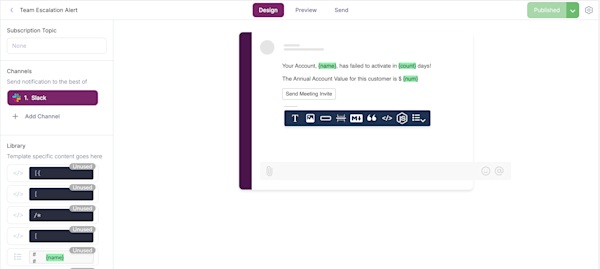
Without an abstraction layer, you maintain two codebases and update copy twice for every change. Courier's Design Studio handles this: design the message once visually, and Courier renders it as Block Kit for Slack recipients and Adaptive Cards for Teams recipients automatically. Template variables, conditional content, and per-platform previews all work from the same editor, and when either platform updates their schema, Courier updates the rendering engine, not your templates.
Why Slack and Teams notifications matter
The core reason is where users are when something important happens. Email gets batch-processed two or three times a day. Slack and Teams are open all day. When a notification lands in a DM or team channel, users see it within minutes, not hours. For workflows where response time matters, like approvals, incident response, deployment decisions, and access requests, this is the difference between resolving something today and waiting until tomorrow.
The second reason is what users can do with the message when it arrives. Email is read-only. A Slack message from your application can include an Approve button that resolves the request directly, a link that opens relevant context in your product, or a form that collects input without navigation elsewhere. The message becomes an interface: users complete the action in the tool they're already using instead of being routed to a second context.
From a business perspective, faster action means faster workflows. Approval cycles that previously ran 24–48 hours because they routed through email can close in minutes when they land in the tool teams actively use. Support escalations reach the right people before customers notice. Deployment failures surface to the right channel before users report them. For B2B products where the notification recipient is a professional whose time is the resource, reducing friction from task completion is a real product differentiator.
Common use cases
Slack and Teams notifications work anywhere teams need to be informed or take action without leaving their collaboration tool. The patterns repeat across product types whether you're building developer tooling, financial software, or a security platform.
DevOps and engineering alerts are the classic case. Deployment completions, CI/CD failures, error rate spikes, infrastructure alerts, and on-call escalations all route naturally to engineering channels. The message arrives where the response team is already coordinating, and action buttons can trigger remediation workflows directly from the message rather than requiring navigation to a dashboard.
Approval workflows are where interactive notifications pay off most clearly. Budget approvals, feature flag requests, access provisioning, content publishing, contract reviews: anything requiring human sign-off benefits when the approver can act directly in the message. The approval button posts a webhook back to your application, updates the record, and notifies the requester automatically. The entire workflow lives in Slack or Teams instead of spread across three tools.
Team coordination and customer activity alerts round out the common patterns. New account assigned to a rep. Support ticket escalated to engineering. On-call rotation completed. Enterprise domain signup detected. Usage limit reached. These events have a natural team-visible audience, and routing them to the right channel means the right people see them without a separate notification to each person individually.
Real examples
Twilio selected Courier for notification infrastructure across a platform processing nearly one trillion digital interactions annually. For a developer platform managing API events and status messages at that scale, reliable routing to collaboration tools alongside email and in-app channels is core operational infrastructure, not a nice-to-have.
LaunchDarkly routes feature flag approval requests through notification workflows that deliver to the appropriate engineering channels. When someone requests a new flag or needs to modify an existing one, approvers can act immediately, speeding up the workflow while maintaining a clear audit trail of who approved what and when.
"We were able to build the in-app notification experience that we wanted with excellent support and communication from the Courier staff."
Lucy Wonsower, Software Engineer, LaunchDarkly
DroneDeploy sends team notifications when processing jobs complete on their construction site drone mapping platform. Since these jobs run asynchronously and can take significant time, notifying the right people in their workspace rather than requiring dashboard monitoring fits how site teams already coordinate.
"With Courier, we added a beautiful inbox and in-app push notifications in a matter of weeks. Notifications are not our core competency, so it made complete sense to integrate rather than build out and support our own implementation."
James Pipe, VP of Product, DroneDeploy
Key components
If you're building Slack and Teams notifications or evaluating platforms, some capabilities are table stakes and others separate a functional integration from one that holds up in production.
Mandatory features
OAuth and token management is where most teams hit their first wall. Each customer workspace needs its own credentials. You need to handle the initial authorization flow for Slack and for Teams separately, store tokens securely, refresh them before they expire, and revoke them cleanly when customers disconnect. When tokens fail silently, notifications stop delivering with no error visible to end users, and users blame your product, not their workspace configuration.
Template design needs to work for both platforms without maintaining two separate codebases. Courier's Design Studio handles Block Kit and Adaptive Card rendering from a single visual editor, with variable support, conditional content, and previews for each platform. Your lifecycle team updates message copy without touching JSON schemas, and engineers wire up the data once.
Routing and delivery logic selects the right channel, workspace, and platform for each notification: DM versus team channel, which workspace when a user is in multiple, and Slack versus Teams when a user has both connected. Rate limits are a practical concern on both platforms, so production systems need queuing, retry logic, and fallback strategies for when limits are hit during high-volume spikes.
State management and threading keeps related notifications organized. Follow-up messages about a deployment, approval, or incident should appear as threaded replies under the original, not separate posts. Threading works differently on Slack and Teams, so production systems build abstraction that handles both without separate logic for each platform.
Advanced capabilities
Webhook handling is what turns one-way notifications into two-way product workflows. When a user clicks Approve in Teams, Teams sends a webhook to your application. You need endpoints to receive these, verify their authenticity, respond within the platform's tight timeout window, and maintain enough context to understand what action was taken on which notification. Getting webhook infrastructure right (retries, deduplication, logging) is more involved than the initial setup.
Cross-channel coordination prevents users from receiving the same notification through multiple channels after they've already acted. When someone clicks Approve in Slack, the corresponding email reminder shouldn't fire. When a Teams user resolves an alert, the SMS escalation should cancel. Courier tracks interaction state across all channels and applies it to routing logic automatically. User preferences let users control which notifications reach them in which channels: critical alerts in Slack, lower-priority updates in email, and the option to opt out of marketing entirely. Preference management at this level prevents overuse from causing users to mute your integration. Analytics and observability close the loop: delivery rates by platform, click-through on action buttons, latency from trigger to delivery, and enough logging to diagnose a missing notification when a customer reports one.
Adding Slack and Teams notifications to your app
Building this infrastructure yourself takes months and keeps accumulating: OAuth flows for two platforms, dual-format templates, queue and retry systems, webhook endpoints, multi-workspace token management, and ongoing API maintenance as both platforms ship updates. Courier handles all of it so you don't have to.
Here's what sending a Slack or Teams notification looks like with Courier's API:
import Courier from "@trycourier/courier";const courier = new Courier({ apiKey: "your-api-key" });await courier.send.message({message: {to: { user_id: "user-123" },template: "deployment-complete",data: {environment: "production",service: "payment-service",status: "success"}}});
Courier routes to Slack, Teams, or any other channel based on user preference and routing configuration, renders the correct message format for each platform, manages token refresh, and handles retries across 50+ providers. For a full walkthrough covering OAuth setup, template design in Design Studio, webhook handling, and multi-workspace routing, see Chapter 2: Technical Implementation.
Frequently asked questions
What's the difference between Slack notifications and Microsoft Teams notifications?
Both deliver messages to users inside their collaboration workspaces. The technical differences: Slack uses OAuth 2.0 with workspace-level tokens and formats messages in Block Kit JSON. Teams uses Azure Bot registration with multi-tenant architecture and formats messages in Adaptive Cards JSON. From a user's perspective, both show up as messages in their existing tool. Building both requires two separate technical implementations, which is why most teams use a platform that abstracts the difference automatically.
What are Block Kit and Adaptive Cards?
Block Kit is Slack's JSON-based message formatting framework. Adaptive Cards is Microsoft Teams' equivalent. Both compose rich, interactive messages from typed layout elements, but the schemas are completely different and incompatible with each other. Courier's Design Studio lets you design message templates visually once and renders them correctly in Block Kit for Slack and Adaptive Cards for Teams, eliminating dual-template maintenance.
When should I use Slack or Teams instead of email?
Use Slack or Teams when the notification requires a fast response, benefits from team visibility, or can be completed through an action in the message itself. Expense approvals, deployment alerts, incident responses, and access requests all fit this pattern. Use email when the message contains detailed content users may want to reference later, when they may not have a connected workspace, or for formal communications like receipts and invoices. The strongest strategies use both: workplace channels for immediacy and action, email for the permanent record.
What are interactive notifications?
Interactive notifications include buttons, dropdowns, or form inputs users can engage with directly in Slack or Teams. When a user clicks a button, the platform sends a webhook to your application, which processes the action and updates state. This lets users approve requests, acknowledge alerts, or respond to prompts without navigating to a separate tool. Courier's journey builder connects webhook events back to your notification workflows automatically.
What happens if a Slack or Teams token expires or gets revoked?
Notifications fail silently. Without error handling in place, your integration stops delivering and users have no indication why. Production systems need monitoring that detects delivery failures, user-facing flows for reconnecting expired authorizations, and fallback logic that routes to email or another channel when workspace delivery fails. Courier handles token lifecycle management and surfaces delivery failures in the analytics dashboard so you can act before users notice.
Ready to add Slack and Teams notifications to your product? Talk to a solutions expert to see how Courier can help, or get started for free with 10,000 notifications per month.