Building the Ultimate Notifications Stack with Twilio, Segment, and Courier
 Troy GoodeJanuary 12, 2021
Notifications are an essential part of every application. They’re how products communicate with users when key events take place, whether it’s confirming their account or alerting them to new activity. But, for developers and companies, delivering notifications that meet their users’ rising expectations can be a challenge. Today, users expect you to notify them on the channels where they already are, at exactly the right moment and with respect for their individual preferences.
That’s why we were so excited to see Twilio’s recent acquisition of Segment. It’s the first step in unifying the channels that customers already use with a single view of who they are. As one of Twilio’s portfolio companies and a recently minted Segment integration partner, we believe there’s an opportunity to unlock even more value for developers and companies – with Twilio, Segment, and Courier.
Together Courier, Segment, and Twilio make it possible to reach users across every channel without the monumental work of building your own notifications infrastructure. You can design and send notifications to users based on your rules and their behavior and preferences. Once you’ve integrated Segment, setting up and managing your notifications is entirely no-code. The result: an experience that empowers product teams to drive meaningful user engagement.
Twilio and Segment: Why they’re a powerful combination
For many, Twilio’s acquisition of Segment came as a surprise. After all, what does a developer platform offering communication APIs have to do with a customer data platform? But it actually makes a lot of sense: engaging with your users in a personalized, relevant way requires access to clean, unified data about who they are and how they’re using your product.
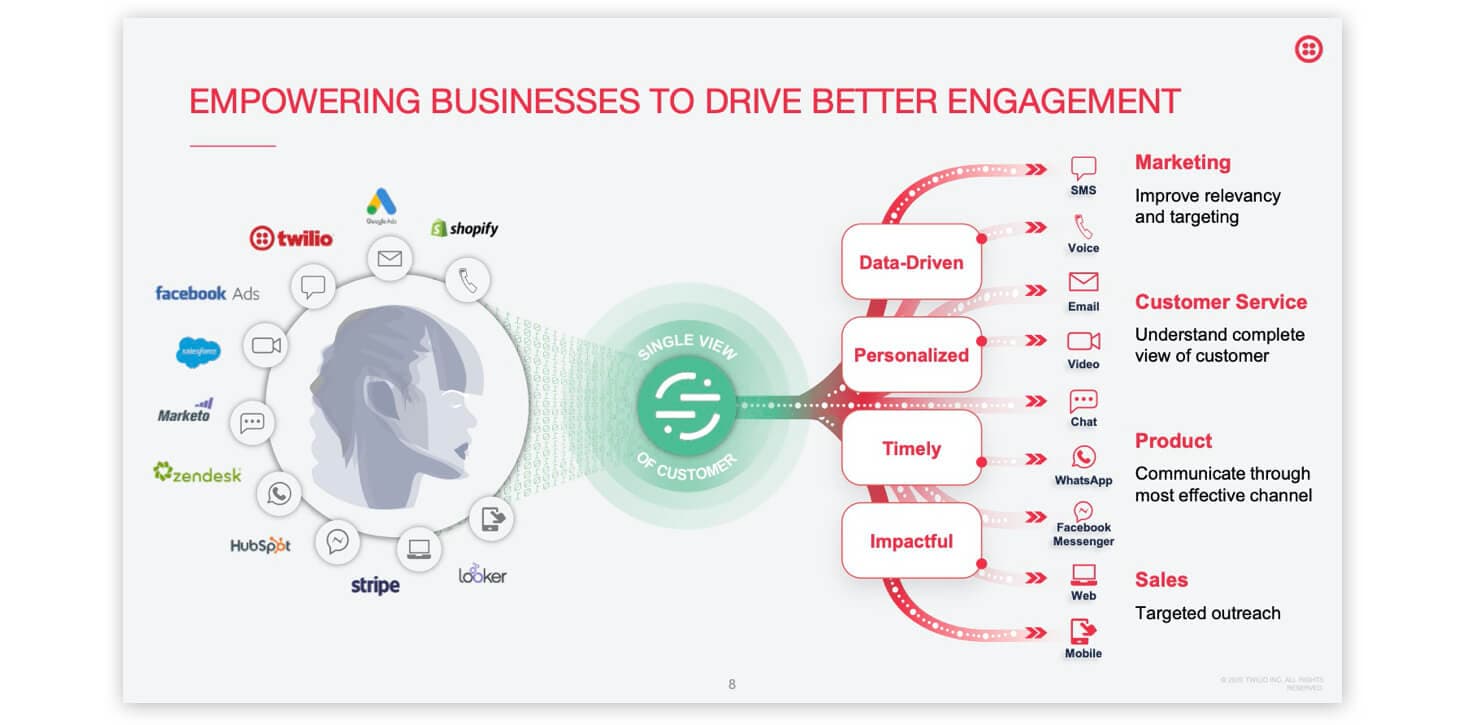
Over the years, Twilio has made it easy for developers to solve the first half of the equation with APIs for voice and SMS and, more recently, programmable video, WhatsApp, and, through the acquisition of SendGrid, email. Until now, however, Twilio has left it up to companies to decide what to send and when over these channels. One question we hear frequently from our own customers is: how can I ensure I’m reaching my customers at exactly the right moment?
Let’s imagine you have a project management app. You’ll likely want to notify your users when their teammates do things like update their project status, complete a task, or change the due date. While integrating your communication channels might be easy enough, accessing your customer data and taking action on it has often meant navigating frustrating data silos.
This is where Segment enters the picture. As a customer data platform, Segment enables you to collect, clean, and control your customer data across all the tools you use. You can see all your customer touch points in one place – for a single view of every user. At Courier, we use Segment to track how users get to our website, what they do once they’re in our app, and when they take key actions. We also use Segment to send all this data downstream to our warehouse and to marketing and support tools like Intercom, which powers the messenger on our site.
It should be clear by now that Twilio and Segment form a powerful duo: implement Segment to track your users’ behavior and use Twilio to reach them. But there’s something critical missing here. How do you actually connect your customer data to your communication channels?
The missing middle: Your orchestration layer
Segment and Twilio form two key layers of your notifications stack, but, in order for them to work seamlessly together, you need a third: your orchestration layer. The orchestration layer is where you decide what notifications to send, to whom, at what frequency, and over which channels.
At Courier, we call this your notifications infrastructure. Over the last year, we’ve spoken to hundreds of engineering and product teams – from seed-stage startups to public companies – and they all told us the same thing: this is a universal problem that only gets more difficult as you scale. (LinkedIn has ~50 engineers focused on their notifications infrastructure).
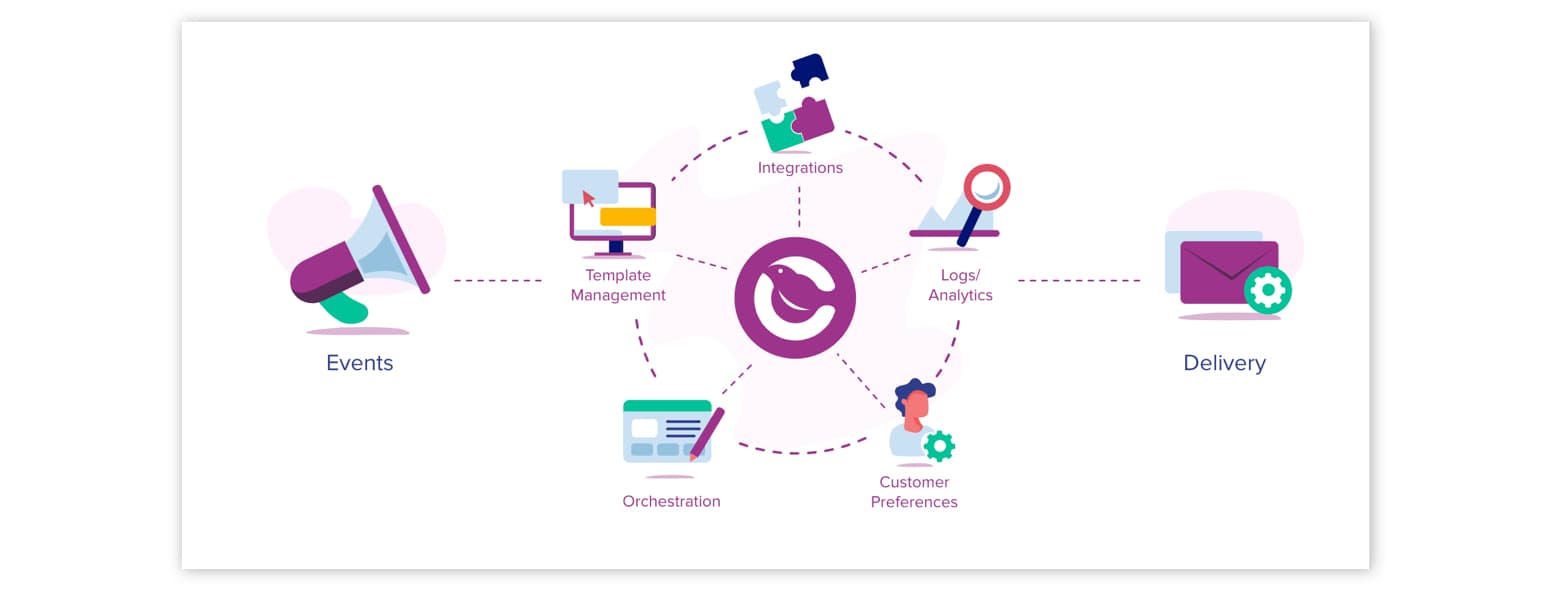
Your notifications infrastructure sits in between your customer data and your communication channels. On one end, it ingests events like “forgot password” or “usage limit hit” and, on the other, it manages the delivery of your notifications across all your channels. There are five key capabilities that make up a robust notifications infrastructure:
- Channel integrations – a unified API and platform to deliver notifications across every channel, whether it’s email, SMS, push, or messaging apps like Slack and WhatsApp. Every channel and every provider has their own formatting, features, and limitations, all of which should be abstracted away for your developers and product team.
- Template management – a centralized place to create and optimize the content of your notifications outside of source code, ideally using a visual editor. As your application and user base scales, having a single view of all your notifications becomes critical.
- Workflow orchestration – the ability to map which notifications are triggered by which events and, for each notification, to set delivery rules, including the notification channels and any send conditions like an account’s status or plan type.
- User preferences management – a way for users to control which notifications they’ll receive and via which channels and for your developers to respect those preferences programmatically. Nobody appreciates an app that spams them across every channel.
- Logs and analytics – a single view of your logs to track delivery across every channel and cross-channel analytics to measure user engagement, such as open rate and clicks.
This is exactly where Courier fits into your notification stack. Couriers powers your notifications infrastructure, enabling you to seamlessly connect your customer data in Segment to your communication channels through Twilio, including SMS and email. Our direct integrations with both Segment and Twilio mean your product teams can start triggering notifications from your user events – without ever shipping a single line of code.
We built Courier to make it easy and quick to integrate multi-channel notifications into your app. With our platform, you can focus on notifying your users at exactly the right moment and driving deeper engagement, not rolling your own bespoke infrastructure. You can also extend Courier beyond the channels that Twilio offers to include new ones like Slack, Microsoft Teams, and more as well as use our best-in-class API to trigger notifications from events outside Segment.
Courier, Segment, and Twilio: Putting it all together
All three of our platforms – Courier, Segment, and Twilio – are key pieces in building your notifications stack and, while each is powerful on its own, they fit seamlessly together to enable developers and companies to reach their users in a personalized and impactful way. We’re excited to see how you use Courier, Segment, and Twilio to drive meaningful user engagement.
Curious to learn more about building your notifications stack? Or want to get started with Courier, Segment, and Twilio? Chat with us using the button below – we’re here to help!
Similar resources

Clinical alert and notification systems: how escalation works
A clinical alert is easy to send and hard to close. This is how alerting works inside a hospital: where alerts come from, how routing by role and shift works, and how the acknowledge, timeout, escalate loop is actually built, including what happens when nobody answers.

How to send Slack notifications from your app
Slack is where your customers already work, which makes it a product surface rather than only an internal alerting channel. Posting an approval request or a status change into a customer's own Slack means working in workspaces you don't own, addressing people by email rather than Slack ID, and holding a separate credential for every customer.
How Product Teams Build, Test and Ship Multichannel Notifications in Design Studio
Product teams need to build, test, and ship notifications across multiple channels without filing an engineering ticket every time. Courier's Design Studio is the workspace for that: a template builder, visual channel routing, omnichannel testing, and publishing in one place. This post walks through the traditional template designer paradigm, how it splits effort across too many tools, and outlines a path for product and growth teams to ship transactional, product, and marketing notifications from a single workspace.