Why We Built Courier
 Troy GoodeJuly 29, 2020
In the beginning, there was email.
In 2012 I was part of the amazing team that took Eloqua public on the NASDAQ – four months after IPO we were acquired by Oracle where Eloqua is now the centerpiece of the Oracle Marketing Cloud. Eloqua and its contemporaries had set out to make it easy for marketing teams to build and send emails to a list of recipients, to identify who to include in that list using segmentation tools, and to automate programmatic “campaigns” that would result in multiple messages being delivered to the recipient over time. We had led the charge into public markets, but there were many other startups also building the first generation of cloud-hosted marketing automation tools that made it easy for a marketing team to send promotional emails: Marketo, HubSpot, ExactTarget, and many others.
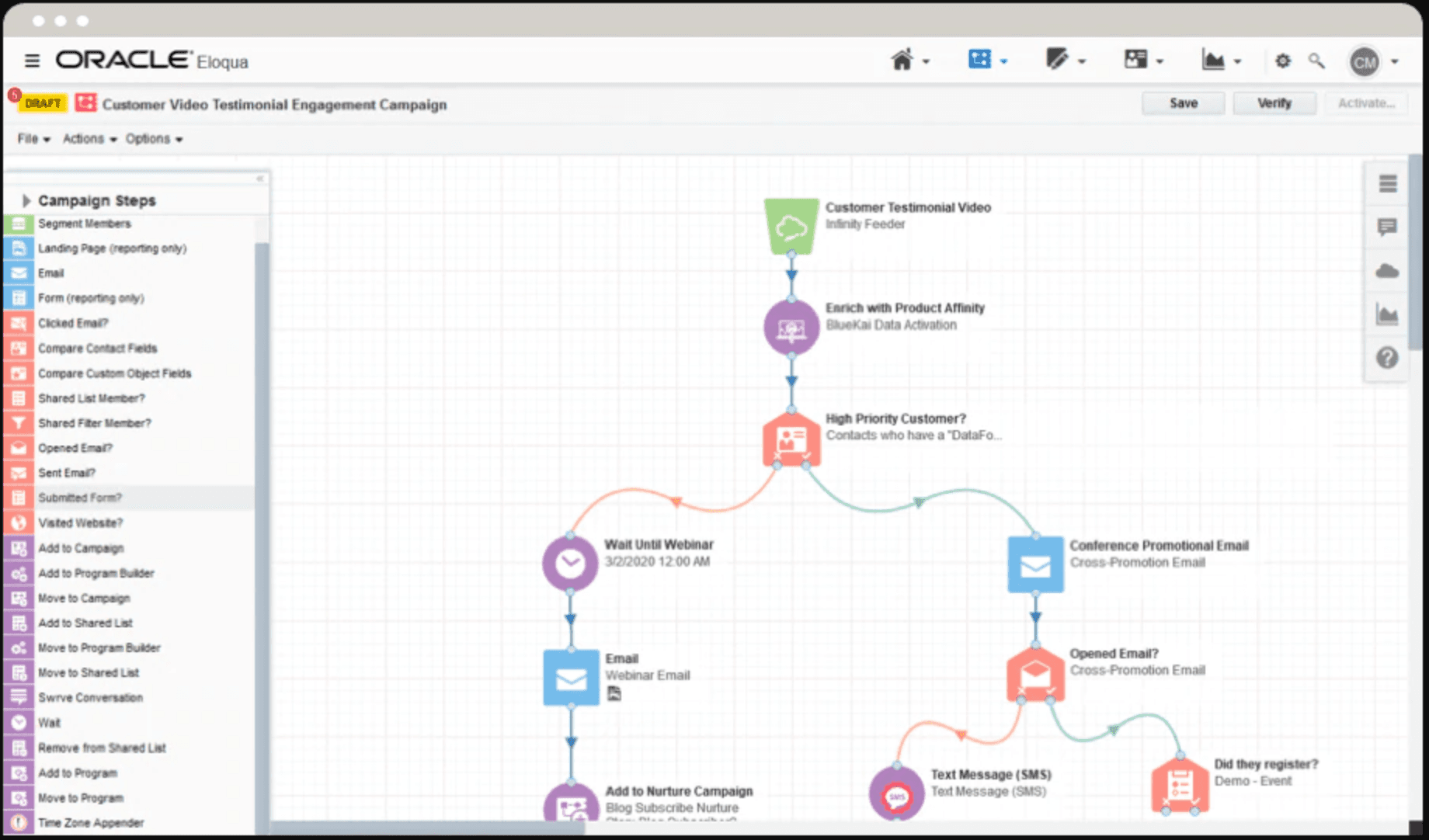
Designing an automated email campaign using Eloqua
At the same time that late-stage email marketing automation platforms like Eloqua were going public or being acquired, a new generation of cloud-hosted email Message Transfer Agents like SendGrid, Mailgun, and SparkPost were just starting to hit their stride. Unlike products like Eloqua, these cloud-based MTAs targeted developers, not marketers, and sought to make it easy to programmatically send an email to a recipient with a REST API call. SendGrid was recently acquired by Twilio for over $2 billion in 2019.
curl --request POST \--url https://api.sendgrid.com/v3/mail/send \--header 'Authorization: Bearer YOUR_API_KEY' \--header 'Content-Type: application/json' \--data '{"personalizations": [{"to": [{"email": "recipient@example.com"}]}],"from": {"email": "sender@example.com"},"subject": "Hello, World!","content": [{"type": "text/plain", "value": "Oh hai!"}]}'
But email still sucks.
Following Eloqua, I was VP Engineering and then CTO of two startups that relied heavily on email (and other channels…) to communicate with our customers, as well as recipients our customers wanted to reach themselves. Despite the great advances we’d seen from companies like Eloqua and SendGrid, I was frustrated to see the amount of effort my engineering teams continuously put into our email infrastructure. Were they reinventing the wheel? Were they not taking advantage of capabilities in existing platforms?
As I dug into these questions I began to understand the root of the problem: marketing automation solutions were purpose-built for marketing teams, not product teams, and the cloud-hosted MTAs like SendGrid were designed to solve for low-level infrastructure use cases. Common use cases that nearly all software development teams are faced with fell somewhere into an unsupported gap between the two; a void that required you to build, not buy.
- How do I template my messages in a way that lets designers, product managers, and marketers easily change the templates?
- How do I white-label my templates for multiple brands?
- How do I track and respect each recipient’s preferences, and comply with GDPR & CCPA?
- How do I queue up a number of notifications, but deliver them together as one email – a digest – instead of flooding the recipient’s inbox?
- How do I schedule a message to only be delivered during business hours in the recipient’s timezone?
And it isn’t just email anymore!
While my frustrations with email technology continued to grow, they were rapidly exacerbated by the need to also add support for additional communication channels, like mobile push, SMS, Slack, and more. As I talked to my peers leading engineering at late stage companies, I began to see entire teams form who were dedicated to internal infrastructure built to handle queuing, scheduling, routing, rendering, and ensuring delivery of messages across multiple channels. Companies were now spending millions to build infrastructure like LinkedIn’s Air Traffic Controller and Slack’s (in)famous notification flowchart.
Think about Slack notifications for a moment: if I were to @mention you, how would Slack tell you? If you’re already in the app – but not currently chatting with me – they’ll send you an in-app notification, like a badge; if you aren’t online, they'll send a mobile push if you've download their app; finally, they’ll send you an email if they have no other way of reaching you. You’re now implementing 3 or more separate communication APIs, queues to handle different throughputs, failover for when a channel is down, separate templates for each channel, and you haven’t even gotten started on user preferences:
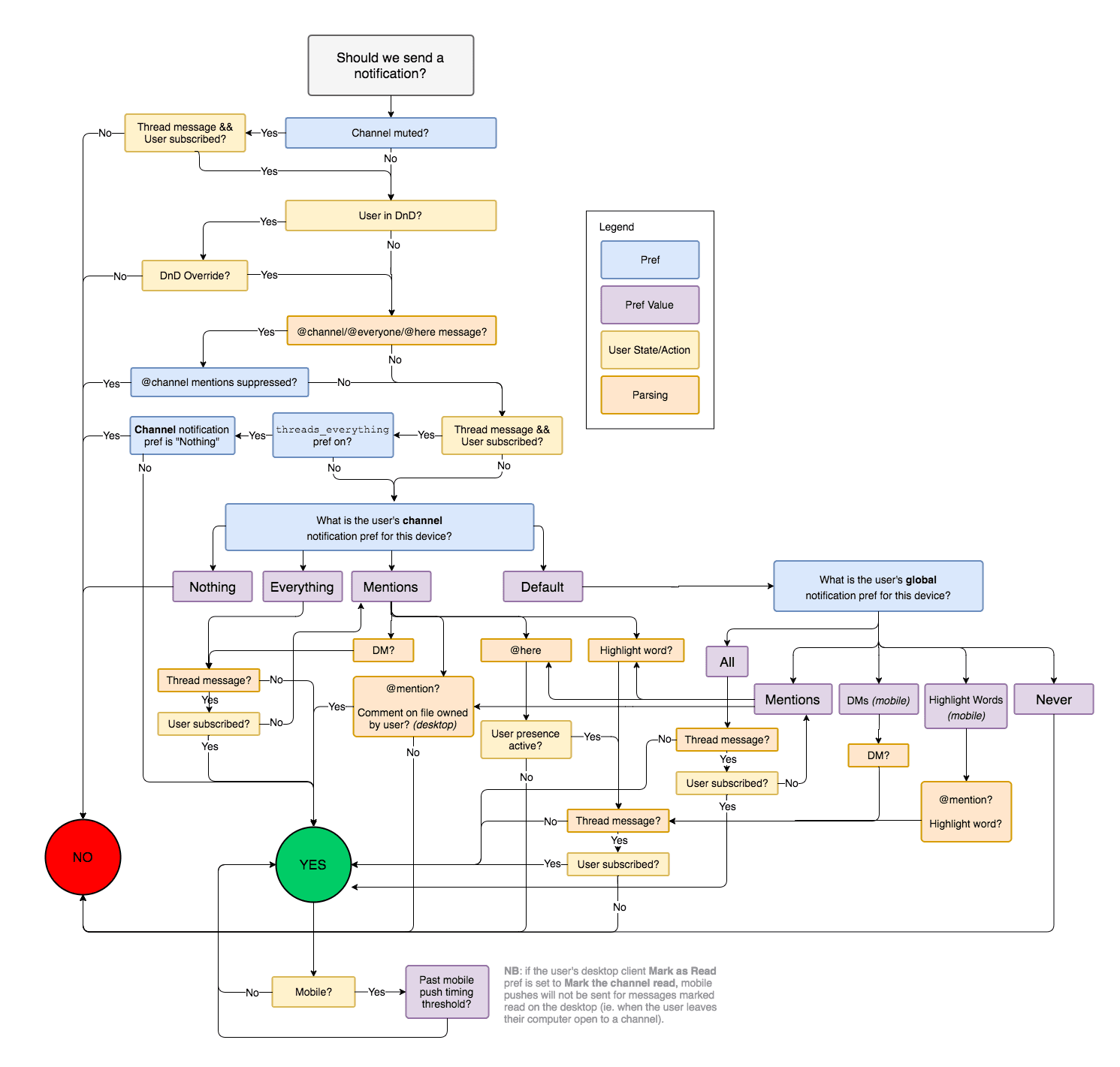
A flowchart describing how Slack decides whether, when, and where to notify you.
Thus, Courier!
Email shouldn’t have to be hard, and it should also be easy to support reaching your customers on their preferred channel – not just on the one you could afford the time to integrate. We built Courier to make sure nobody else ever has to spend millions on custom communication infrastructure, that our inboxes are never again flooded by a well-meaning developer who just didn’t have the time to implement user preferences or digests, and that simple tickets to tweak the text and branding of a template stop getting stuck just outside the scope of the next sprint.

Has your company had to build custom communication infrastructure? Have you had to cut corners with your product’s outbound messaging? We’d love to hear from you. Join the conversation in the Courier Community!
Similar resources

Clinical alert and notification systems: how escalation works
A clinical alert is easy to send and hard to close. This is how alerting works inside a hospital: where alerts come from, how routing by role and shift works, and how the acknowledge, timeout, escalate loop is actually built, including what happens when nobody answers.

How to send Slack notifications from your app
Slack is where your customers already work, which makes it a product surface rather than only an internal alerting channel. Posting an approval request or a status change into a customer's own Slack means working in workspaces you don't own, addressing people by email rather than Slack ID, and holding a separate credential for every customer.
How Product Teams Build, Test and Ship Multichannel Notifications in Design Studio
Product teams need to build, test, and ship notifications across multiple channels without filing an engineering ticket every time. Courier's Design Studio is the workspace for that: a template builder, visual channel routing, omnichannel testing, and publishing in one place. This post walks through the traditional template designer paradigm, how it splits effort across too many tools, and outlines a path for product and growth teams to ship transactional, product, and marketing notifications from a single workspace.