Journeys: AI-powered orchestration for customer messaging
 Thomas SchiavoneMarch 17, 2026
Journeys: AI-powered orchestration for customer messaging
Courier's next step: from sending notifications to orchestrating the customer experience.
Today we're launching Journeys, a visual workflow builder for designing multi-step, cross-channel notification workflows, with built-in AI agents that add intelligence directly into the workflow. It represents a new direction for Courier: moving beyond individual notifications into full lifecycle orchestration, where your team designs the flow, and Courier handles the execution.
Customer messaging, done well, is a competitive differentiator for your product. But the orchestration behind it (branching, sequencing, timing, personalization) has always required custom engineering. Journeys handles all of it, so you just design the flow in Courier and we run it.
What Journeys gives you
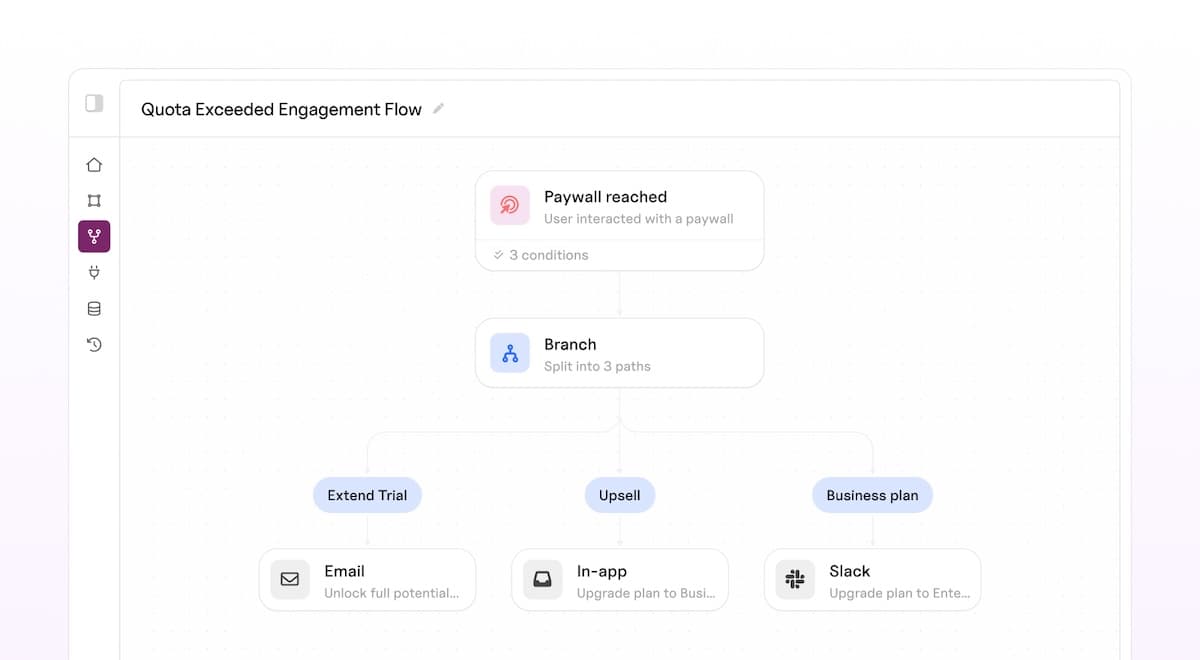
You design notification workflows on a visual canvas by connecting nodes: sends, branches, delays, data fetches, and throttles. Courier handles the execution, timing, and delivery across every channel.
Visual workflow editor, not code
The entire flow lives on a single canvas: every branch, every delay, every message. You see the full picture, not fragments scattered across services. Templates are created inline with access to the full data context, so content and logic live side by side. Changes don't require a deploy.
Powered by the data you already have
Your product data drives everything in a journey. Trigger a flow from a Segment event or an API call with a typed payload, and that data is available to every node downstream. Branch on a user's plan tier. Personalize a message with their latest activity. Fetch live details from your backend mid-journey and use the response to shape the next step. You define a data contract upfront, and Courier surfaces those fields throughout the editor with autofill and variable hints, so every decision in the flow is grounded in real customer context.
Triggered from your application or your event stream
An API call or a Segment event starts a journey. Everything downstream (which messages go out, in what order, under what conditions, on which channels) is managed in the journey editor.
Debuggable end to end
Every journey invocation creates a run: a complete execution trace for that user. Step through it node by node, see which branch was taken and why, inspect the data at each step, and trace exactly what happened when something goes wrong.
What you can build
Here's what this looks like in practice:
- Onboarding that responds to what users actually do. A new signup gets a welcome email. If they haven't activated after two days, they get a nudge. If they have, they get tips for going deeper. The flow adapts without anyone writing conditional logic in application code.
- Reminder sequences that know when to stop. A payment reminder goes out, waits three days, follows up, and cancels the rest of the sequence the moment the invoice is paid.
- Transactional flows that get smarter mid-execution. An order confirmation triggers a journey that fetches the latest shipping estimate from your API and uses it to personalize the follow-up, all within the same flow.
- Throttled notifications for noisy events. A collaboration tool fires an event every time someone comments, but the user only gets one notification per hour instead of twenty.
Each of these would normally require custom application logic, background jobs, and state management. In Journeys, they're a handful of nodes on a canvas.
AI agents, built into every journey
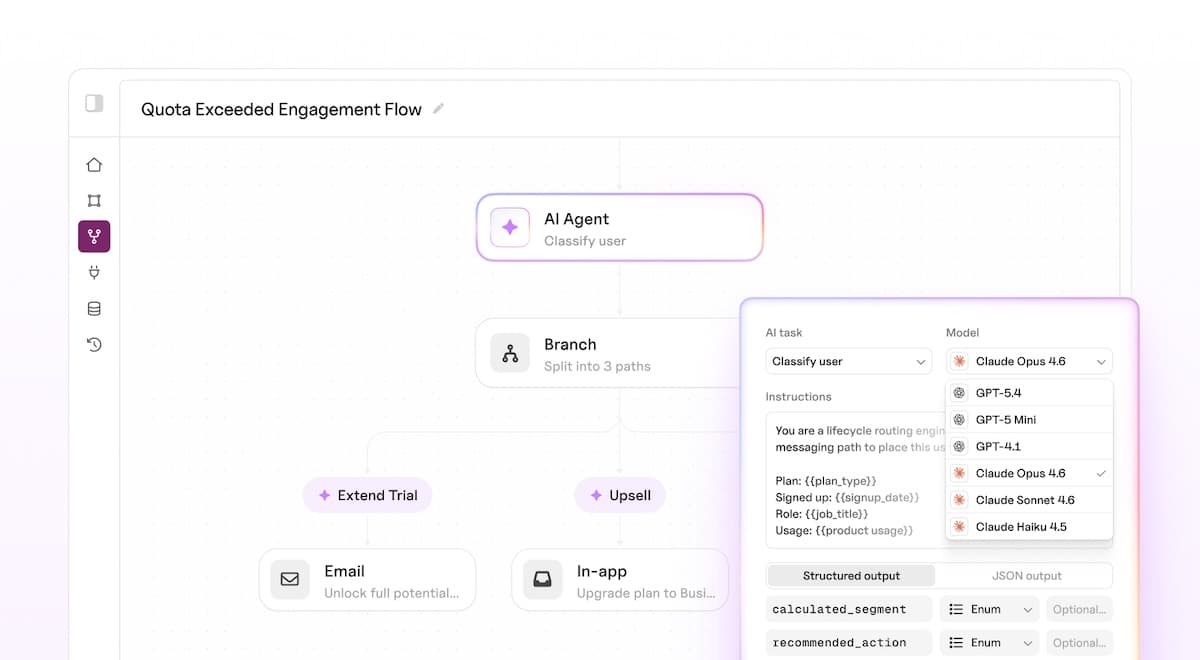
Journeys also introduces an AI node that runs frontier models (GPT-5.4, Claude Opus, and others) as a step in any workflow. Your journeys already have rich context about each user. The AI node lets you act on it in ways that would otherwise require a dedicated service or an ML pipeline.
- Score and classify users. Feed product usage, behavior, and profile data into the LLM. Route the journey based on risk level, intent, engagement, or any structured category the model returns.
- Generate personalized notifications. Give the model your journey context and get back tailored subject lines, body copy, and recommended actions. Personalized content for every recipient without dozens of template variants.
- Enrich user profiles automatically. Classify users into personas, derive lifecycle stage, or generate account summaries. Persist outputs to the profile so every future journey starts with richer context.
- Structured output, not free-form text. Define an output schema with field names, types, and enums. The LLM returns structured JSON that branch conditions, send nodes, and downstream integrations act on directly.
Pick your model, define your prompt and output schema, test in the editor, and go live. No AI infrastructure to manage.
The AI node is currently rolling out to enterprise customers first, with broader availability to follow.
Available now
Journeys is available today. You can start building your first workflow right now.
- Head to Journeys in the Courier app
- Create a new journey and pick a trigger type
- Design your flow, publish, and invoke
Or start with the Journeys docs to see what's possible.
A note for teams using Automations: Automations isn't going anywhere for now. Journeys is a ground-up rebuild that will eventually do everything Automations does and more. We'll share a migration path as Journeys matures, but there's no rush to move. Use whichever fits your current needs.
Get started: Read the Journeys docs or build your first journey.
Similar resources

Introducing Cross-Device Email Preview: see your email on real devices before you send
Cross-Device Email Preview renders your template on the real clients you pick, from Outlook on Windows to dark mode on iPhone, and returns a screenshot of each one. Pick from 96 clients across 21 apps without leaving Design Studio.

New settings page, easier to use, with new background colors
Courier settings has been redesigned. Workspace pages and developer pages are grouped separately, every page says what it's for, and the app now comes in light or dark with nine background colors.

Broadcasts: send one-time messages to your users, right from Courier
Broadcasts lets you send a one-time message to a group of your users, now or on a schedule, without leaving Courier.