Announcing the Courier Destination for Segment – Send Multi-Channel Notifications With No Code
 Danny DouglassNovember 10, 2020
Today we’re excited to announce the Courier and Segment integration is publicly available. Product teams can now send targeted notifications to users on any channel – *without *shipping any code.
With the Courier destination in Segment, you can automatically create user profiles in Courier and trigger notifications based on events you track in Segment. For example, you might notify users when they buy a product, use a feature, or take an action like resetting their password.
Our new integration gives you access to your most important customer data, so you can deliver the right notification to the right user at exactly the right moment. Best of all, the integration takes just minutes to set up and is entirely no-code.
First, what is Segment?
Segment is a single platform that makes it easy to collect, unify, and connect your customer data. With Segment, you can build a unified view of your customer – who they are, what actions they take, and where they take them in your product. You can then fan out that 360-degree view across hundreds of tools, including Courier, with just a few clicks.
If you’re new to Segment, you can learn more about the platform here.
What you can do with Segment and Courier
Using Courier and Segment together makes it easy to send notifications that are highly targeted and personalized to your users. Combined with 20+ channel integrations in Courier, you can reach users across email, SMS, push, and messaging apps like Slack and Microsoft Teams.
Here’s how the Courier destination for Segment works:
Create and enrich user profiles
Automatically populate user profiles in Courier with customer data from Segment. Along with basic properties like email address and phone number, which are necessary to send notifications, you can also enrich user profiles in Courier with any custom traits you record in Segment.
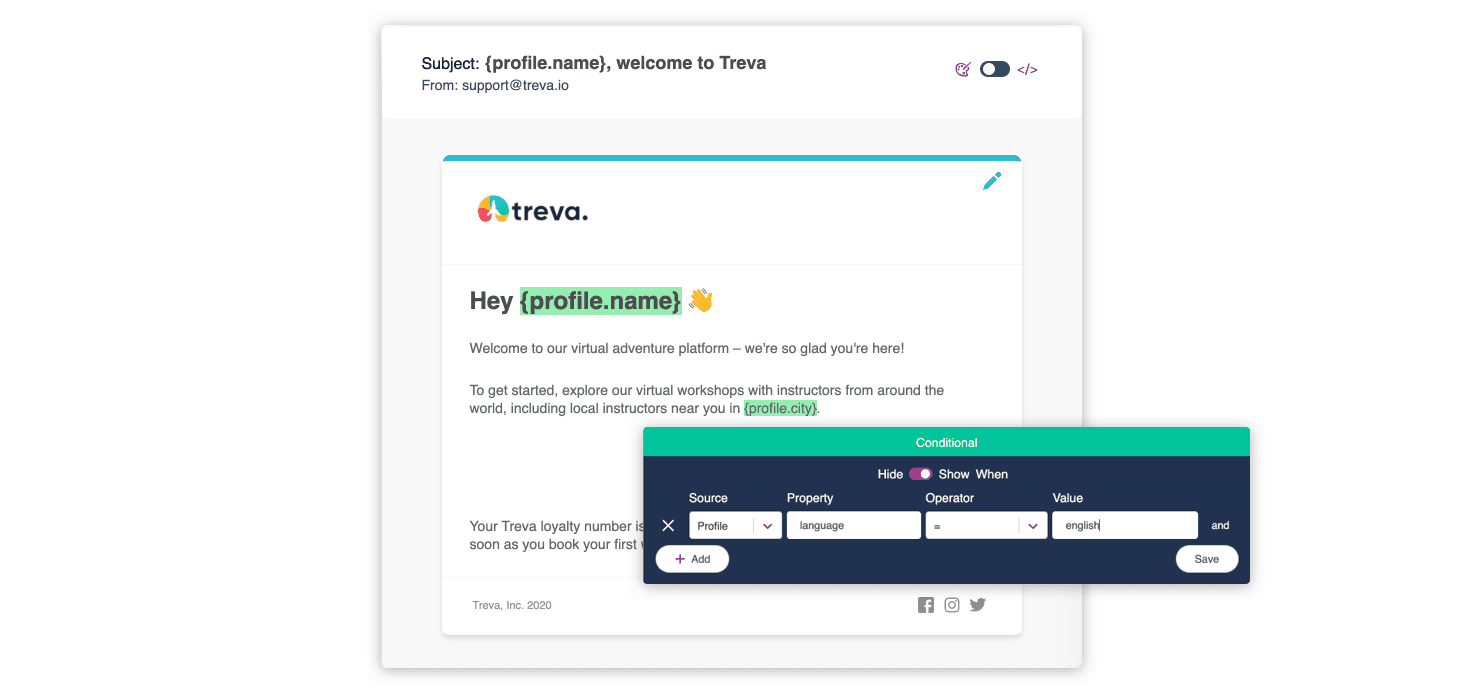
With user profile data, you can deliver notifications that are truly personalized to every user. Say, for example, that you’re a global business. If you record your users’ preferred language, you can use conditional logic to deliver the notification in that language. You can also include traits like first name and location as variables in the message itself.
Notify users based on their actions
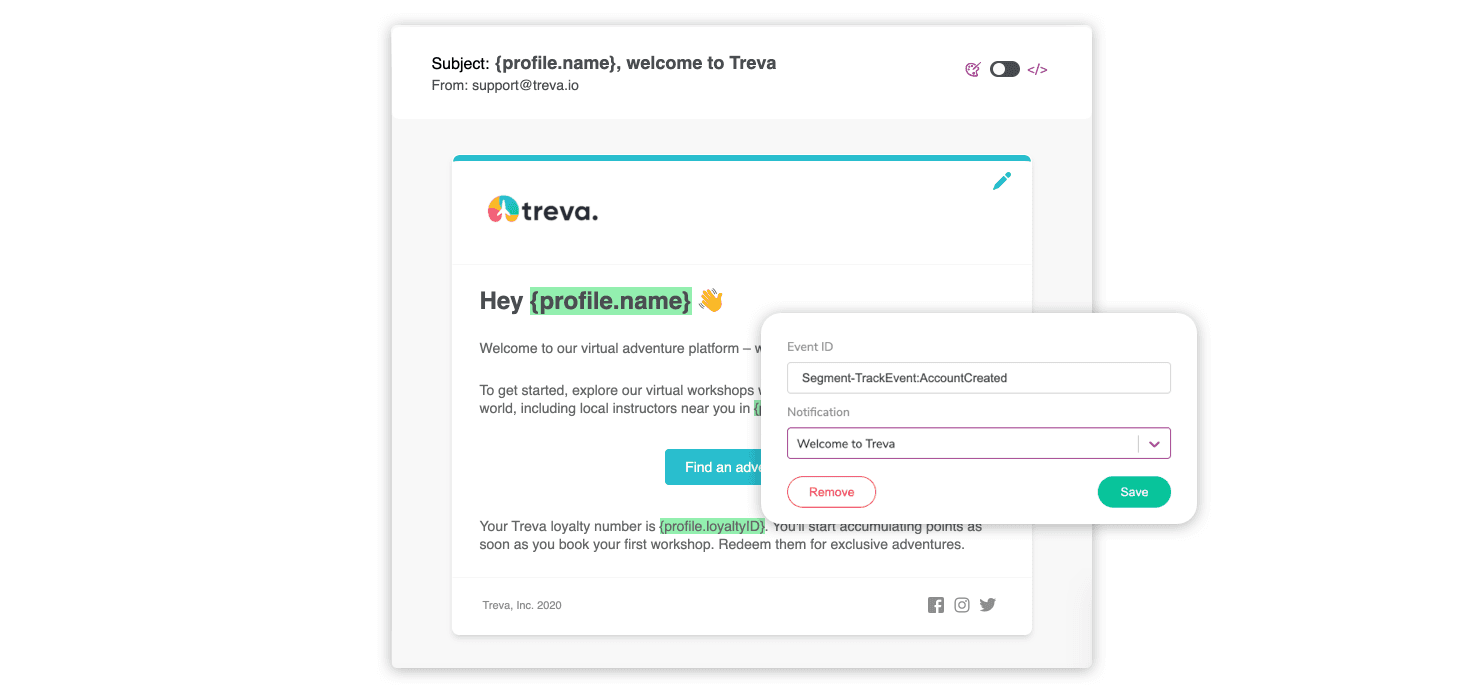
Send timely, contextual messages to your users based on what they do as soon as they do it. Once the Courier destination is installed, user events that you track in Segment will automatically start flowing into Courier. All you need to do is map the right user events to the right notifications in Courier, and your notifications will start triggering immediately.
If you’re a SaaS company, you might choose to notify users for events like creating an account, hitting a usage limit, or having their payment method declined. For ecommerce businesses, you might focus on user events like clicking an ad, viewing a product, or abandoning their cart.
How Bluecrew sends no-code notifications at scale
Our beta customers are already seeing the value of the Courier and Segment integration. Staffing platform Bluecrew takes a Segment-first approach to collecting their customer data. Thanks to our new integration, it took just 30 minutes for them to set up their first notification in Courier.
Today Bluecrew sends hundreds of thousands of notifications every month through Courier, across email, text, in-app and Slack. Here’s what their CPO Coop had to say:
“We were looking at building our notifications infrastructure ourselves. Nothing had all the connections we needed. We wanted something that could hook into Segment, send multi-channel notifications, and keep all our templates in one place. Now with Courier, anyone can pick an event in Segment, map it to a notification, and start sending a new message on any of our channels – without a single line of code.”
Get started with the Segment and Courier integration
With the Segment and Courier integration, you can combine two powerful platforms to send targeted notifications to your users over any channel – *without *any code at all.
The integration is available on our Starter, Business, and Enterprise plans. To get started, install the Courier destination for Segment. You can also learn more about how our integration works.
Interested in upgrading your plan? Chat with us below or get in touch at sales@courier.com.
Similar resources

Let your agent check every email before it ships
Courier Device Preview gives your coding agent real screenshots from Outlook, Gmail, and Apple Mail. Here's the prompt and workflow to have it check every email, fix the draft, and check again before you publish.

React Native solved a problem nobody had. Use Flutter.
Shopify moved back to Swift and Kotlin because coding agents made two codebases affordable. That kills React Native's reason to exist. It does not touch Flutter's, and the canvas is why.

How to send Slack notifications from your app
Slack is where your customers already work, which makes it a product surface rather than only an internal alerting channel. Posting an approval request or a status change into a customer's own Slack means working in workspaces you don't own, addressing people by email rather than Slack ID, and holding a separate credential for every customer.