The Notification Platform Developers Choose
 Kyle SeylerJanuary 26, 2026
The Notification Platform Developers Choose When It Actually Matters
TLDR
Courier is notification infrastructure built around developer primitives, not bolted-on afterthoughts.
What matters:
- One API, every channel: Single
/sendendpoint for email, push, SMS, Slack, in-app - API primitives that scale:
/users,/lists,/audiences,/bulk,/automations - 7 typed server SDKs: Node, Python, Ruby, Go, Java, PHP, C#
- CLI and MCP for testing: Humans, CI/CD, and coding agents use the same tools
- Batch, Throttle, Digest: Built-in, not enterprise add-ons
- SOC 2 Type 2: One-year audit, not a checkbox
- i18n in all plans: Not locked behind enterprise pricing
Who uses it: Twilio (10M+ developers), LaunchDarkly (feature release workflows), and teams that can't afford notification failures.
AI agents changed what "notifications" means
Clawdbot hit 30,000 GitHub stars in its first week. The feature everyone loves? It messages you first. Morning briefings. Stock alerts. Calendar prep. Weather warnings.
This isn't a chatbot waiting for input. It's an AI agent that takes actions and tells you what happened.
The same pattern is showing up everywhere. Claude Code runs tasks autonomously. GitHub Copilot has agent mode. Devin writes code while you sleep. These systems do things, and when they do things, they need to tell you about it.
That changes the infrastructure question. It's not "how do I send a password reset email" anymore. It's "how do I notify users across channels when an autonomous system completes a task, without spamming them into oblivion?"
The answer requires real developer tooling. Not a dashboard with an API tacked on.
The API: one endpoint, every channel
Most notification APIs make you think in channels. One endpoint for email. Another for push. Another for SMS. You write routing logic. You handle failover. You build the orchestration layer yourself.
Courier's API inverts this. One endpoint. Every channel.
POST /send{"message": {"to": { "user_id": "user-123" },"template": "welcome-notification","data": { "name": "Kyle" }}}
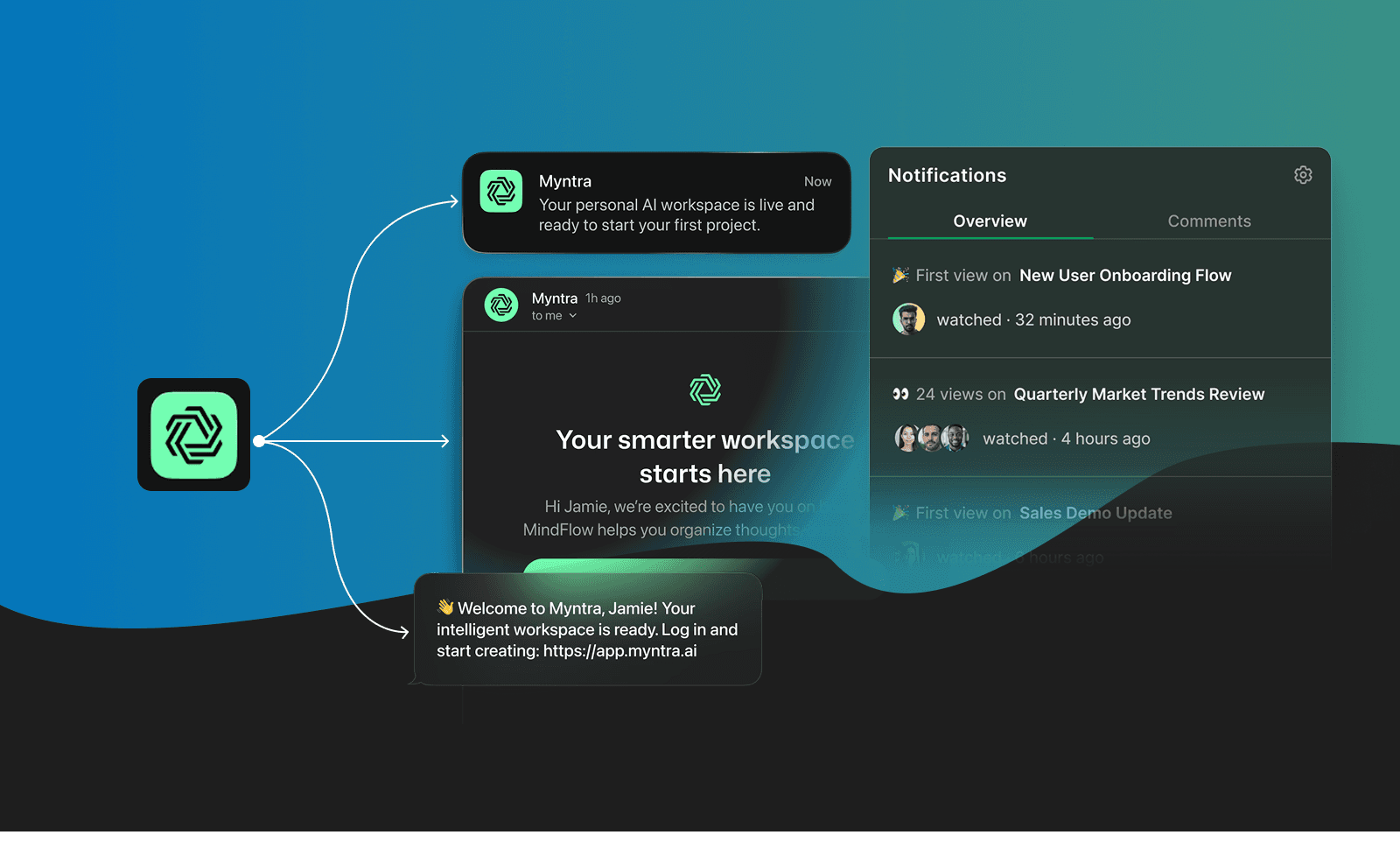
That request can deliver to email, push, SMS, Slack, MS Teams, or in-app inbox. Same payload. The routing, channel selection, user preferences, and provider failover happen on Courier's side.
API primitives
| Endpoint | What it does |
|---|---|
| /send | Single endpoint for all channels. Templates or inline content. Sync or async. |
| /users | Create, update, merge profiles. Store preferences, tokens, and custom attributes. |
| /lists | Subscriber lists for broadcasts. Add/remove users, send to entire lists. |
| /audiences | Dynamic segments. Define filters, Courier maintains membership automatically. |
| /messages | Query delivery status, logs, rendered content. Debug why something didn't arrive. |
| /bulk | High-volume sends with job tracking. Don't loop through /send 10,000 times. |
| /automations | Trigger workflows programmatically. Invoke batch, throttle, digest, delay logic. |
RESTful. JSON. Predictable URL patterns. No GraphQL complexity when you don't need it. No webhook-only flows that force async handling for simple operations.
7 typed SDKs
The SDKs wrap these primitives with language-native types. Not auto-generated stubs with interface{} everywhere. Real clients. Real types. Full SDK documentation.
Plus client SDKs for iOS, Android, React Native, and Flutter.
CLI and MCP: how you test at scale
Good APIs need good tooling. The Courier CLI and MCP server aren't wrappers around a dashboard. They're first-class interfaces to the API, built for developers and coding agents who test notifications programmatically.
CLI for humans and CI/CD
Install (requires Node.js v18+):
yarn global add @trycourier/clicourier config --apikey <your-api-key>
Then use it:
# Send and verify deliverycourier send --user user123 --template welcome-flow --name "Kyle"# Inspect what was sentcourier messages:get msg_abc123# Manage userscourier users:get user123courier users:set user123 --email kyle@example.com# Bulk operationscourier users:bulk ./users.csv --replace# Sync translationscourier translations:upload en-US ./translations/en-US.po
Every command maps to an API primitive. Every command works in CI/CD. Run courier send in your test suite. Verify delivery before merging. View source on GitHub.
MCP for coding agents
Courier's MCP server gives Claude Code, Cursor, VS Code, and Windsurf direct access to notification infrastructure.
claude mcp add courier
Now your coding agent can:
- Call
/sendto test a notification flow it just built - Query
/messagesto debug why a notification didn't render correctly - Update
/usersto set up test data - Invoke
/automationsto trigger batch or digest workflows
Why this matters: When Claude Code builds a notification workflow, it can immediately test it. Send a real message. Verify delivery. Check the payload. Debug rendering issues. All in the same conversation. No context-switching to Postman or a dashboard.
This is what testing looks like in 2026. Your coding agent doesn't just write notification code. It builds, tests, and validates the entire flow before you review the PR.
Mintlify docs
Developer docs should be searchable, consistent, and fast. Not a marketing site with code samples bolted on.
Courier's documentation runs on Mintlify. API playground that works. Code examples in every language. Changelog you can actually follow. The same documentation platform used by Cursor, Vercel, and Perplexity.
Batch, Throttle, Digest: built-in
Some platforms claim to be "the only notification platform with batching and throttling." That's not true.
Courier's Automations include all three, available on standard plans:
Batching: Group multiple events into a single notification. Configure by inactivity period, max event count, or max wait time. An agent completing 50 tasks overnight doesn't send 50 notifications.
Throttling: Limit notifications per user within a timeframe. Set by user, global, or dynamic scope. Prevent alert fatigue without manual rate limiting in your code.
Digests: Consolidate notifications of the same type into scheduled summaries. Daily activity digests, weekly reports, aggregated alerts.
These aren't enterprise add-ons. They're core automation primitives available through the Workflow Builder or API.
Compliance that doesn't slow you down
SOC 2 Type 2 means Courier proved its security controls work over a one-year audit period. Not just that we wrote a policy (Type 1), but that we followed it for 12 months under auditor review.
Current certifications:
- SOC 2 Type 2 (one-year audit period)
- Working toward HIPAA and ISO 27001
What this means in practice:
- All sub-processors must be SOC 2 compliant
- Continuous compliance monitoring through Drata and Vanta integrations
- Security controls aren't marketing checkboxes, they're audited processes
If you're building in healthcare, fintech, or enterprise, your security team will ask for this. Courier has the paperwork.
The companies that can't afford notification failures
Here's where it gets interesting.
Twilio chose Courier for their own platform.
Twilio built SMS. They know notifications. When they needed to unify in-app notifications with SendGrid email across their 10M+ developer platform, they evaluated options and chose Courier.
From Twilio's team: "We chose Courier because the depth of the inbox and multi-channel integrations allowed us to choose one notification platform for all products and teams at Twilio."
That's not a customer testimonial. That's a technical validation from the company that defined programmable messaging.
LaunchDarkly powers feature releases with Courier.
LaunchDarkly's Feature Workflows product lets engineering teams automate flag releases with approvals and scheduling. When the right person doesn't know their approval is needed, the whole system breaks down.
Courier handles LaunchDarkly's multi-channel notification delivery for these workflows. Slack integration reduced approval times internally. Webhooks enable customer notifications through any Slack instance with LaunchDarkly installed.
When developer infrastructure companies choose your notification platform, it says something about technical foundations.
Handoff without losing control
The hardest problem in notification infrastructure isn't sending messages. It's the organizational boundary between developers who build it and product/marketing teams who need to iterate on it.
Bad solutions make developers a bottleneck for copy changes. Worse solutions give non-technical users tools that bypass code review and break things in production.
Multi-channel template editor
Courier's Design Studio lets you build templates for email, push, SMS, and in-app in one place. Not email-only.
Drag-and-drop content blocks. Instant publishing without redeploys. Consistent branding across all channels. Product managers and marketers can update notification content without filing engineering tickets.
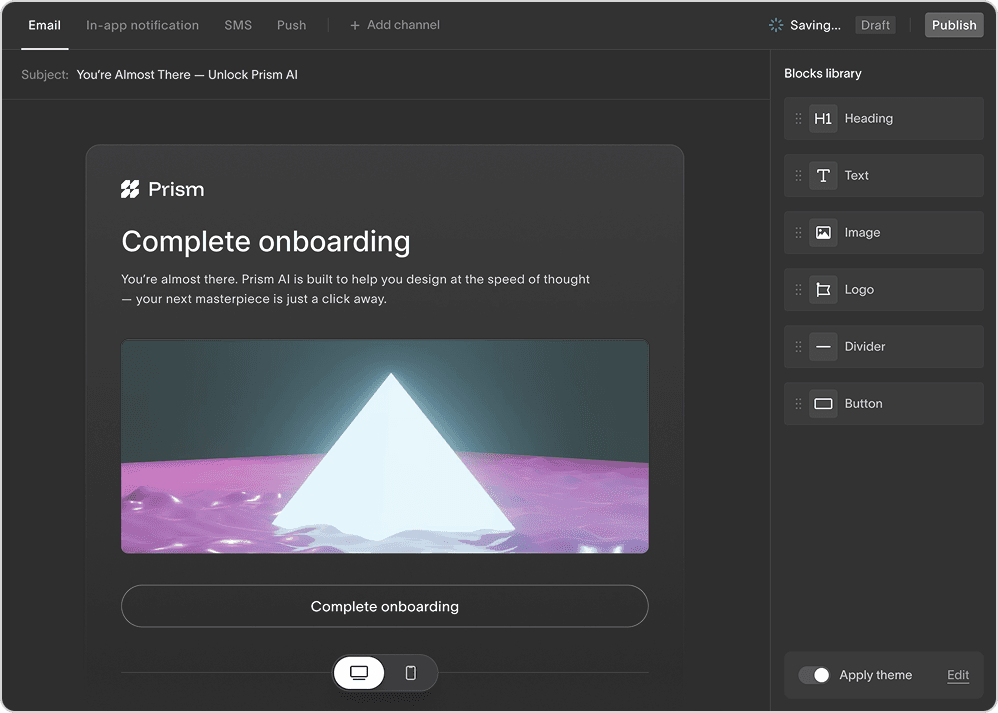
But here's the key: developers control the schema. You define what data variables exist. Design Studio users work within those constraints. No one ships a template referencing {{user.nmae}} because the variable doesn't exist.
i18n in all plans
Internationalization shouldn't cost enterprise pricing.
Courier's localization system handles translations per block and channel. Webhooks notify when translations are needed. Content gets fetched via API. Translations are managed through locale endpoints that integrate with your existing localization workflow.
This is available on all plans. Not locked behind a sales call.
Automation builder for product managers
Courier's Automations let product managers build and update notification workflows without writing code. Visual interface. Conditional logic. Timing controls.
Engineers set up the triggers and data schema. Product managers adjust the flows. No deploys required for "can we add a 24-hour delay before the follow-up?"
Observability that helps you debug
Dashboards are for demos. Logs are for debugging.
When a notification doesn't deliver, you need to know why. Not just that it failed, but which step failed, what the provider returned, and what the payload looked like.
Datadog and New Relic integrations
Import Courier metrics directly into your existing observability stack. Notification delivery lives alongside application performance, not in a separate dashboard you forget to check.
Filterable logs
Query logs by:
- User ID (what happened to this specific user?)
- Message ID (what happened to this specific send?)
- List ID (what happened to this broadcast?)
- Provider (are SendGrid failures spiking?)
- Status (show me all failures in the last hour)
Provider failover visibility
When your primary email provider goes down and Courier automatically routes to the backup, you see it in the logs. Not as an abstracted "delivered" status, but as "SendGrid failed, retried via Postmark, delivered."
What this looks like in practice
Setup (2 minutes)
# Install CLI (requires Node.js v18+)yarn global add @trycourier/cli# Authenticatecourier config --apikey $COURIER_API_KEY# Add MCP to Claude Codeclaude mcp add courier
Send your first notification (30 seconds)
from courier.client import Courierclient = Courier()response = client.send(message={"to": {"email": "kyle@example.com"},"template": "welcome-notification","data": {"name": "Kyle","action_url": "https://app.example.com/get-started"}})print(f"Message ID: {response.request_id}")
Query status via CLI
courier messages:get msg_abc123
Let your AI assistant build and test it
With MCP configured, your coding agent can do more than send messages. It can build entire notification workflows and verify they work:
"Create a welcome notification flow that sends an email immediately, then a push notification 24 hours later if the user hasn't logged in. Test it with kyle@example.com."
Claude Code creates the automation, sets up the conditional logic, sends the test, and confirms delivery. You review the implementation, not the process.
"The onboarding email isn't rendering the user's company name. Debug it."
Claude queries the message logs, finds the payload, identifies that company_name is null, and suggests the fix. Testing and debugging happen in the same conversation where you're writing code.
What you get with Courier that you don't get elsewhere
If you're comparing notification platforms, here's what Courier does differently:
| Feature | Courier | Other platforms |
|---|---|---|
| Template editor | Multi-channel (email, push, SMS, in-app) | Email-only editors, other channels require code |
| i18n | All plans | Enterprise-only or not available |
| Batch, Throttle, Digest | Built into Automations, standard plans | Often claimed as unique, sometimes enterprise-only |
| MCP server | Setup management, lean context footprint | 50+ tool warnings, context bloat |
| Go SDK | Strongly typed with param.Opt[T] | Untyped interface{}, rebuilt SDKs to fix issues |
| SOC 2 | Type 2 (one-year audit) | Type 1 or in progress |
| Provider failover | Automatic, visible in logs | Manual configuration or not available |
We're not going to pretend other platforms don't exist. If you're evaluating Knock, Novu, or building in-house, run your own comparison. Check their i18n pricing. Try their template editors. Look at their Go SDK types. Ask about SOC 2 Type 2.
When Courier might not be the right fit
Being honest about limitations builds trust.
If you only need one channel forever: Courier adds a layer between you and providers. If you genuinely only send email and will never add push, SMS, or in-app, a direct SendGrid integration might be simpler.
No social media integrations yet: Instagram DMs, Snapchat, TikTok. Not currently supported.
The bottom line
Notification infrastructure should work like the rest of your stack: CLI-first, type-safe, observable, compliant, and designed for teams where developers build and product managers iterate.
Twilio chose Courier. LaunchDarkly chose Courier. The companies that build developer tools chose a notification platform built for developers.
Get started with Courier or add the MCP server to your AI coding assistant.
claude mcp add courier
First notification in 5 minutes. Pricing is public. No sales call required.
Similar resources

How to send Slack notifications from your app
Slack is where your customers already work, which makes it a product surface rather than only an internal alerting channel. Posting an approval request or a status change into a customer's own Slack means working in workspaces you don't own, addressing people by email rather than Slack ID, and holding a separate credential for every customer.

Your notification analytics are now available by API
If it's in the Courier dashboard, it's on the API. Analytics was one of the last screens where that wasn't true. GET /notifications/{id}/metrics returns sends, deliveries, opens, clicks, errors, and undeliverable counts per template as a time series, broken out by provider and channel, so the numbers can live in your own product or go straight to an agent.

Dark mode email design: a primer for every major email client
Dark mode is three different behaviors, not one. Apple Mail needs an explicit opt-in before it reads your dark CSS, Gmail ignores it entirely and rewrites your colors on its own, and classic Outlook gives you no control at all. This guide covers what each client actually does, the CSS that reaches the ones you can influence, and the design rules that survive the ones you cannot.
© 2026 Courier. All rights reserved.