Best Notification Infrastructure Software: 5 Platforms Compared
 Kyle SeylerDecember 23, 2025
TL;DR
Notification infrastructure sends messages across email, SMS, push, in-app, Slack, and Teams and handles routing, preferences, failover, and delivery underneath. This guide compares developer-first notification infrastructure (Courier, Knock, Novu) against the marketing-led tools teams weigh alongside it (Customer.io, Klaviyo). Courier is the broadest pick: product- and engineering-forward, with marketing built in. See the evaluation criteria for how to choose.
Last updated: July 2026.
The notification infrastructure problem
Every product team hits the same wall. You start with password resets through SendGrid, then scope expands: an in-app inbox, SMS for re-engagement, Slack, Microsoft Teams, audit logs, GDPR preferences. Soon you're maintaining five provider integrations, each with its own auth, retries, and failure modes, preferences scattered across them, and no single view of what got delivered.
Big companies put a dedicated team on this. Everyone else buys a platform that sits between the app and the providers and handles routing, preferences, delivery, and observability through one API. Until recently that meant picking between two products: notification infrastructure for transactional messages, and a marketing tool for lifecycle. In 2026 those are merging.
Notification and customer messaging are converging
Teams no longer want two systems with split profiles, split preferences, and two delivery logs. They want one layer that handles a password reset and an onboarding sequence the same way. The vendors agree: Knock pitches "product, marketing, and transactional" in one platform, Novu calls itself infrastructure "for agents and products," and Courier has run both for years.
The other shift is who runs it. Agents write this code now and increasingly operate it, so build-vs-buy is three options: build, buy, or buy something opinionated and let an agent run it. As a16z's Martin Casado put it, "I don't think there's any inherent defensibility in AI." The plumbing isn't a moat, so it's the part to buy. That sets the bar: an agent-first platform is reachable in code, predictable, with docs and errors a model can read and results it can verify. Not just callable by a model, operable by one. That's the lens this comparison uses.
The platforms at a glance
Courier and Knock are customer messaging and notification platforms; Novu is open-source notification infrastructure. Customer.io and Klaviyo are marketing-led engagement platforms teams weigh against them, included here with that distinction clear.
| Platform | Type | Channels | Self-host | Best for |
|---|---|---|---|---|
| Courier | Customer messaging + notification platform | Email, SMS, push, in-app, Slack, Teams, WhatsApp, Discord | No | Product and marketing messages in one platform |
| Knock | Customer messaging + notification platform | Email, SMS, push, in-app, Slack, Teams, Discord | No | Developer-first messaging with a strong workflow engine |
| Novu | Notification infrastructure (open source) | Email, SMS, push, in-app, chat | Yes (MIT core) | Teams that need to self-host or own the code |
| Customer.io | Marketing / engagement | Email, SMS, push, in-app, RCS | No | Data-driven lifecycle and product messaging |
| Klaviyo | Marketing | Email, SMS, push, WhatsApp, RCS | No | E-commerce marketing and segmentation |
Notification and customer messaging platforms
Three developer-first platforms, with different philosophies. Courier and Knock are managed and API-first, built for engineers, reachable by coding agents through an MCP server and CLI, and both now span product and marketing messaging. Novu is the open-source, self-hosted option: strong if you want to run and own the code, heavier to operate if you don't. Courier goes furthest on breadth, pairing that developer surface with marketing, lifecycle journeys, and drop-in UI in one platform.
Courier
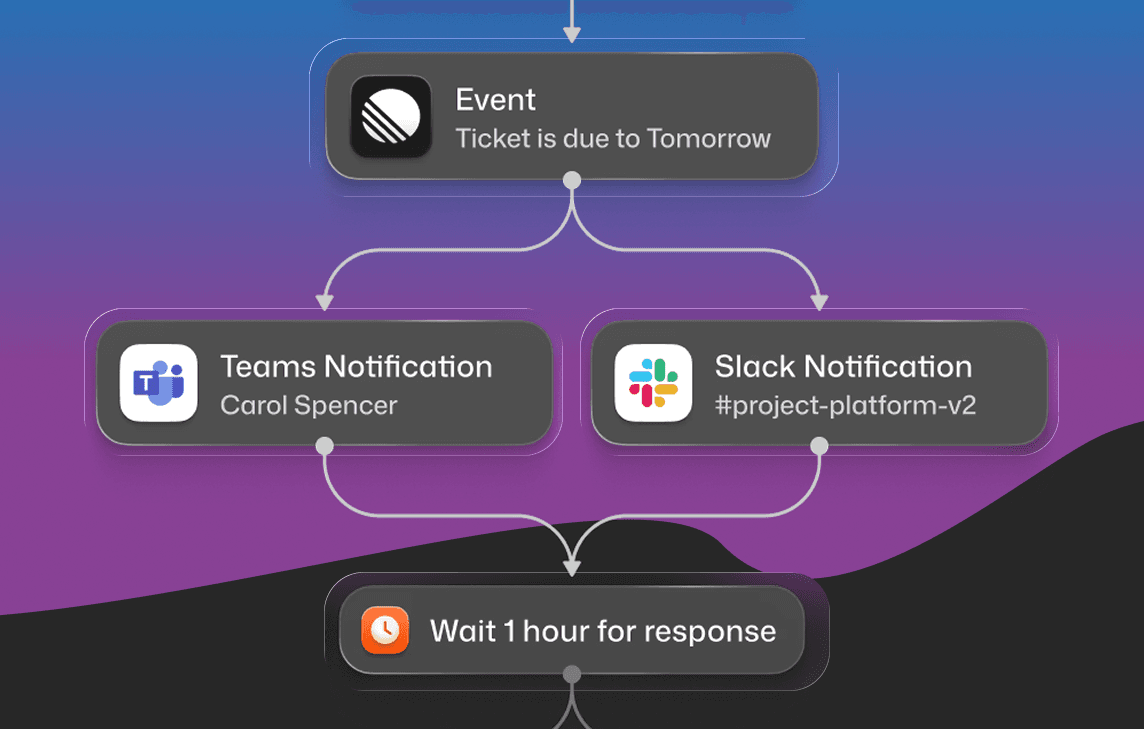
Courier is a customer messaging platform for engineers, product teams, and AI agents. One API sends across email, SMS, push, in-app, Slack, and Microsoft Teams, and the same platform runs the journeys, UI, and delivery logic on top, so you aren't wiring a marketing tool onto a transactional one to cover both.
Strengths
- Product and marketing in one platform. Journeys run lifecycle flows and transactional sends together, with an AI step that can score users, generate copy, or route on intent inside a journey.
- Drop-in UI. Inbox, Preferences, and Toasts, with SDKs for React, JavaScript, iOS, Android, React Native, and Flutter. Add a real-time inbox in a day.
- Your providers, with failover. Connect the 50+ providers you already use and swap them by config, not code, with automatic failover. No lock-in to Courier's own delivery.
- Native Slack and Microsoft Teams, plus an MCP server and CLI so Cursor and Claude Code build and test against your real templates.
- Enterprise-ready. Design Studio for non-engineers, SOC 2, BAA support, audit logs, multi-tenant support, and EU data residency.
Limitations
- Not open-source or self-hostable. If you have to run and own the code, Novu is the better fit.
- More than you need if you only ever send one channel through one provider.
Best for
Teams that want product and marketing messages in one place, with journey orchestration, drop-in UI, provider flexibility, and compliance controls (SOC 2, BAA, EU data residency) that regulated and B2B buyers ask for.
Pricing
Free tier with 10,000 notifications per month, usage-based from there. See pricing.
Knock
Knock is a developer-first messaging platform that started in product notifications and now spans transactional, product, and marketing messages. It pairs a clean API with a strong workflow engine and good documentation.
Strengths
- Workflow editor for cross-channel sequences, with batching and digests
- Slack and Teams support, including TeamsKit for building Teams integrations
- In-app feed component for notification centers
- Environments, version control, and CLI integration
Limitations
- You bring your own delivery providers rather than getting them bundled with failover
- Marketing and campaign features are newer than its core product-notification strengths
- No visual journey builder with the depth of Courier's Journeys
- Fewer drop-in UI components than Courier
Best for
Engineering teams that want a clean, developer-led workflow model across product and messaging and already have provider relationships.
Pricing
Free developer tier (10,000 messages/month). The entry paid plan is $250/month for 50,000 messages, usage-based beyond that.
Novu
Novu is the leading open-source option in the category, and the default pick when you need to self-host or want full control over the codebase.
Strengths
- Open-source core with an active community (39k+ GitHub stars)
- Self-hosting for data residency and full control
- Embeddable Inbox component that works with minimal setup
- Connects to dozens of delivery providers
Limitations
- The managed cloud is less mature than commercial alternatives
- Self-hosting carries real operational overhead
- Visual workflow tooling is less polished
- Enterprise support and SLAs vary
Best for
Teams with strict data residency requirements or a preference for running and modifying the source themselves.
Pricing
Free and open-source when self-hosted. Managed cloud has a free tier with usage-based paid plans.
Marketing and engagement platforms
These two are marketing-capable and genuinely strong at campaigns, segmentation, and revenue attribution, but they're built for marketers, not engineers or agents. They lack the developer surface that notification infrastructure provides: drop-in components, provider abstraction, and tooling an agent can operate. Teams compare them here because marketing often owns a large share of the messaging.
Customer.io
Customer.io is a data-driven customer engagement platform for product and marketing teams. It sends event-triggered messages across channels and leans heavily on customer data and segmentation.
Strengths
- Email, SMS, push, in-app messages, and RCS
- Visual workflow builder for behavioral, event-triggered journeys
- Frequency capping and channel prioritization to prevent fatigue
- Strong data tooling: APIs, webhooks, and reverse ETL from Snowflake and BigQuery
- A/B and cohort testing with conversion tracking
Limitations
- Built for lifecycle and marketing messaging, not developer notification infrastructure
- No native Slack or Microsoft Teams delivery channels
- No drop-in in-app notification center (Inbox) component for your app
- No provider abstraction with failover across your own providers
- Pricing scales by profile count and can climb quickly
Best for
Product and growth teams that want data-driven lifecycle messaging and already model their users as event streams.
Pricing
Essentials starts at $100/month for up to 5,000 profiles. Premium starts at $1,000/month. Enterprise is custom. SMS carries per-segment overage fees; push is unlimited under a fair-use policy.
Klaviyo
Klaviyo is a marketing platform built for e-commerce. It owns email and SMS campaigns with deep segmentation and revenue attribution, especially for Shopify stores.
Strengths
- Email, SMS, and mobile push, with RCS and WhatsApp added in 2026
- Audience segmentation and lifecycle flows (abandoned cart, post-purchase, winback)
- Revenue attribution and A/B testing
- Deep e-commerce integrations (Shopify, BigCommerce, WooCommerce)
- Drag-and-drop email editor and flow builder
Limitations
- A marketing platform, not notification infrastructure
- No in-app notification center, no Slack or Microsoft Teams
- No drop-in Inbox or Preferences components
- No provider abstraction; delivery runs on Klaviyo's own infrastructure
- Transactional notifications are secondary, and pricing scales by contact count
Best for
E-commerce and D2C brands where marketing email and SMS drive revenue and the marketing team owns messaging.
Pricing
Free tier with 250 contacts and 500 email sends per month. Paid email plans start at $20/month, with SMS adding about $15/month, scaling with contact count.
How Courier compares
Courier is product- and engineering-forward, with marketing built in, the opposite of the marketing platforms that shine on campaigns but weren't built for engineers or agents. Its edge is breadth: product and marketing messages in one platform, drop-in UI, provider failover, and compliance controls like EU data residency. Product and marketing teams can build and edit messaging in Courier without engineering, through Design Studio and visual Journeys, which keeps non-technical stakeholders unblocked. That breadth is also the honest case for picking something else in a narrower situation:
- Knock for a clean, developer-led workflow engine, especially if you bring your own providers.
- Novu if self-hosting or owning the source is a hard requirement.
- Customer.io if you're built around event data and want data-driven lifecycle marketing.
- Klaviyo if you're an e-commerce brand and marketing owns the messaging.
If you need product and marketing messages, orchestration, drop-in UI, and regional compliance from one system, Courier covers the most ground.
When to build vs buy
Building this yourself has never been easier, which is exactly the trap. Building is cheap now; owning is not. Every system you stand up is one more thing to secure, patch, and get paged for at 3am, a standing draw on the one resource AI doesn't make more of: your team's attention. Infrastructure like this should cost you nothing to think about, the way you notice electricity only when it's out.
So the honest test isn't "can we build it" (you can), it's whether you ever get to stop maintaining it. Build only if notification infrastructure is your product: real scale, dedicated infrastructure engineers, and the appetite to own it forever. If you're weighing that call, the product notifications API guide lays out the ten requirements a system has to cover and what each one costs to maintain. Otherwise buy it, and point your agents at operating it, not rebuilding it. The full argument is in why you shouldn't build your own infrastructure.
Evaluation criteria
If you're comparing platforms yourself, these are the dimensions that actually separate them. Weight them by what your product needs.
- Cross-channel orchestration. Send across email, push, SMS, in-app, Slack, and Teams from one API, with channel priorities and fallback set without code changes.
- Developer experience. Real SDKs, clear docs, live delivery logs, and local tooling like a CLI and an MCP server for AI IDEs. See what building a product notifications API actually involves.
- Drop-in components. Production-ready notification centers, preference UIs, and toasts you don't have to build. These take months to build well.
- Orchestration and journeys. Multi-step sequences with delays, branching, and conditions, editable by product and growth, not only engineers.
- Delivery optimization. Batching, digests, throttling, and timezone-aware sending.
- Provider flexibility. Use your own providers rather than being locked into the platform's delivery, with automatic failover.
- Deployment and compliance. Managed versus self-hosted, data residency, audit logs, and the SLAs your customers require.
Getting started
Notification infrastructure looks simple until you build it, and most teams find that out after committing to a homegrown approach. If you're evaluating platforms, start with these questions:
- Which channels do you need today, and which in 12 months?
- Do your B2B customers need Slack or Microsoft Teams?
- Do you need drop-in components, or only API-based delivery?
- Who modifies notification flows: only engineers, or product and growth too?
- What compliance requirements affect delivery (GDPR, HIPAA, data residency)?
- Do you have existing provider relationships to maintain?
See Courier's SDK documentation and API reference to try the developer experience firsthand.
Ready to see how Courier handles notification infrastructure? Start free with 10,000 notifications per month, or book a demo to see Journeys and drop-in components in action.
FAQ
What is notification infrastructure?
Notification infrastructure is the software layer that turns product events into messages and delivers them across channels like email, SMS, push, in-app, Slack, and Teams. It handles routing, user preferences, templating, retries, provider failover, and delivery tracking, so your application makes one API call instead of managing each provider itself.
What is the difference between notification infrastructure and a marketing platform?
Notification infrastructure (Courier, Knock, Novu) is developer-focused and built for product and transactional messages, with APIs, SDKs, and drop-in UI. Marketing platforms (Klaviyo, and to a degree Customer.io) are built for campaigns, segmentation, and lifecycle marketing. Courier spans both, which is why teams don't always need a separate marketing tool.
What is the best open-source notification infrastructure?
Novu is the most established open-source option, with an MIT-licensed core, 39k+ GitHub stars, and self-hosting for data residency and full control. It's the right pick when you need to run or modify the code yourself. If you'd rather not operate the infrastructure, a managed platform like Courier removes that overhead.
How do I send Slack and Microsoft Teams notifications from my app?
You'd normally integrate the Slack API and Microsoft Graph API, handle OAuth, manage workspace connections, and format messages for each. Courier and Knock both provide native Slack and Teams support through a single API, so one notification renders correctly in both without separate implementations.
Should I build or buy notification infrastructure?
Build if you send over 100 million notifications monthly, have dedicated infrastructure engineers, and can invest 6+ months up front. Buy if speed matters, you're under 20 million notifications monthly, or your team should focus on the core product. Most companies underestimate the ongoing maintenance of a homegrown system.
How do I manage user notification preferences at scale?
You need a preference center UI, a backend to store preferences, logic to enforce them across every send, and compliance with GDPR and CAN-SPAM. Most notification infrastructure platforms include this; Courier provides a drop-in Preferences component that enforces user choices across all channels without extra code.
Sources
- Notification Infrastructure Software Market 2025-2032, Intel Market Research
- Customer Case Studies, Courier
Similar resources

How to get your logo in Gmail and Apple Mail
BIMI puts your logo next to your emails in Gmail and Apple Mail, but there is no upload form. It is earned by locking your domain down. Here is the whole project: what it costs, how long it takes, and the five ways it fails silently.

HIPAA-compliant notifications: where PHI should live
A practical guide to HIPAA-compliant notifications across SMS, push, email, and an in-app inbox. One rule, applied to every channel and every place PHI gets stored, including the systems most teams forget are in scope.

Email preview tools compared: 6 that render on real devices
Most "email preview" features are simulations. These six open your email in the actual client and send back a screenshot. Here’s what each costs per preview, how much work sits between your template and the result, and which ones you can drive from code.